
ExplorerPatcher is a free and open-source utility designed to bridge the gap between Windows 10 and Windows 11, restoring many of the beloved features and functionalities of the older operating system to the newer one. For users who found the transition to Windows 11 jarring, or who simply prefer the familiar feel of Windows 10’s interface, ExplorerPatcher offers a powerful and customizable solution to reclaim a more comfortable desktop environment. This isn’t a simple skin or theme; ExplorerPatcher operates at a deeper level, leveraging DLL manipulation to effectively reinstate a range of Windows 10 elements within the Windows 11 framework.
Reviving Familiar Features: A Nostalgic Return
One of the primary draws of ExplorerPatcher is its ability to bring back the classic Windows 10 taskbar. Many users found the Windows 11 taskbar to be a significant departure, lacking the customization and functionality of its predecessor. ExplorerPatcher addresses this directly by allowing users to reinstate the familiar Windows 10 taskbar, complete with its array of options and intuitive layout. This includes the restoration of features like small icons and label support in the taskbar, enhancing both visual appeal and ease of navigation.
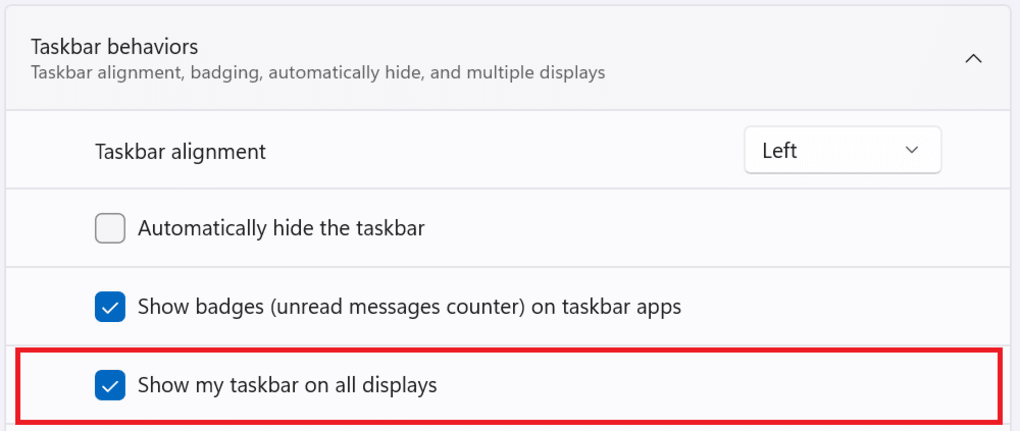
Beyond the taskbar, ExplorerPatcher offers a wide range of customizations to further personalize the user experience. This extensive customization extends to various aspects of the File Explorer and system menus. Users can opt to disable the Windows 11 context menu and command bar, returning to a cleaner, less cluttered interface. The ability to tailor the behavior of right-clicks on the network icon allows for streamlined network management. The program also provides options to revert the Windows 11 search box to the more traditional Windows 7 search box, and users have the power to deactivate Windows Search entirely, a feature that many found intrusive or resource-intensive. Further, immersive menus and certain mitigations can be selectively disabled, offering granular control over the operating system’s behavior.
It’s important to note that while ExplorerPatcher delivers a powerful suite of customizations, some limitations exist. Currently, the pinning of shortcuts to the taskbar is not supported. This is a notable omission for some users, but the extensive capabilities provided elsewhere in the utility largely offset this limitation for many.
Seamless Installation and User-Friendly Customization
The installation process for ExplorerPatcher is relatively straightforward. Before launching the installer, users should place the installer file in the root directory of their Windows 11 system. This ensures that the patched functionalities integrate seamlessly with the existing system components. An active internet connection is required during the installation process, and a system restart is necessary to fully apply the changes. Upon restarting, the modified Windows 11 environment, featuring the reintegrated Windows 10 features, will be immediately apparent.
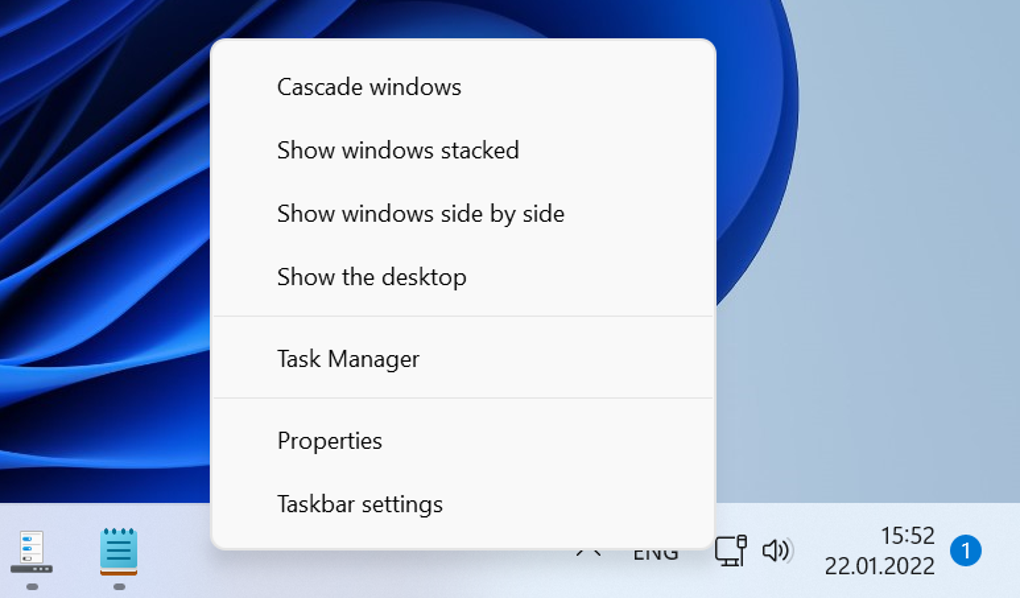
Customization is readily accessible through the familiar right-click context menu in the taskbar. Selecting ‘Properties’ opens a menu of options that allow users to meticulously tailor their desktop experience. The options are clearly presented and intuitively organized, allowing even novice users to easily navigate and select their preferred settings.
The ability to choose between the familiar elements of Windows 10 and the newer features of Windows 11 offers users unprecedented flexibility in customizing their work environment. They are not forced to completely abandon the functionality of Windows 11; instead, ExplorerPatcher empowers them to selectively integrate elements from both operating systems, creating a hybrid environment that optimally balances familiarity and modern functionality.
A Powerful Tool for Enhanced Productivity and Personalization
ExplorerPatcher’s appeal lies in its ability to balance nostalgia with practical enhancements. For users who value the efficiency and intuitive design of the Windows 10 interface, ExplorerPatcher effectively reclaims that familiar experience within the Windows 11 environment. The program’s extensive customization options further cater to individual preferences, allowing users to tailor their workspace to their exact specifications.
This isn’t just about restoring an aesthetic; it’s about enhancing productivity. By streamlining access to commonly used functions and minimizing distractions, ExplorerPatcher contributes to a more efficient and less cluttered workspace. The ability to disable specific features that some find intrusive or inefficient allows users to fine-tune their operating system for optimal performance and personal comfort.
The open-source nature of ExplorerPatcher provides a significant advantage, fostering transparency and community involvement. This openness allows users to examine the code, contributing to enhanced security and trust. The ongoing development and community support guarantee that the program remains updated and responsive to the evolving needs of its users.
Weighing the Pros and Cons: A Balanced Perspective
Pros:
- Restores Windows 10 features: This is the core functionality and primary advantage. The ability to bring back the familiar Windows 10 taskbar and other elements is a significant draw for many users.
- Easy installation: The installation process is straightforward and user-friendly, requiring minimal technical expertise.
- Highly customizable: The breadth of customization options allows users to tailor the environment to their exact needs and preferences.
- Free and open-source: The open-source nature ensures transparency, community support, and ongoing development.
- Compatibility: The program aims to maintain compatibility with updates to Windows 11, though occasional adjustments may be required.
- Lightweight: The program itself has a small footprint and minimal impact on system resources.
Cons:
- Taskbar shortcut pinning limitation: This is a notable limitation, affecting users who rely heavily on taskbar shortcut pinning for quick access to frequently used applications.
- Potential for conflicts: While generally stable, there is a potential for conflicts with other system modifications or third-party applications. Thorough testing and careful consideration of other installed software is recommended.
- Reliance on DLL manipulation: The underlying mechanism relies on modifying system DLLs, which carries a potential risk, though this risk is generally mitigated by the open-source nature and community oversight.
Overall, ExplorerPatcher presents a valuable tool for users seeking to bridge the gap between the familiar comfort of Windows 10 and the functionalities of Windows 11. While some limitations exist, the benefits of increased customization and the ability to reclaim a preferred user interface far outweigh the drawbacks for many. The free, open-source nature further contributes to its appeal, making it a compelling option for users seeking a personalized and efficient Windows 11 experience. Before installation, however, it is prudent to back up important data and thoroughly consider the potential risks associated with system-level modifications. As with any system utility, proceed with caution and exercise informed judgment.
File Information
- License: “Free”
- Version: “22000.469.41.16”
- Latest update: “February 24, 2022”
- Platform: “Windows”
- OS: “Windows 11”
- Language: “English”
- Downloads: “6.2K”
- Size: “919.55 KB”


