
In an era dominated by digital downloads and streaming, the humble optical disc might seem like a relic of the past. However, for backup, physical media distribution, or simply enjoying content on legacy players, disc burning remains an essential task for many users. Enter Express Burn DVD Burning Software, a robust and surprisingly versatile application designed to make the disc burning process as fast, straightforward, and efficient as possible. Developed by NCH Software, Express Burn distinguishes itself by offering a compact footprint, blazing speed, and comprehensive support for a vast array of media formats and disc types, ranging from traditional CDs and DVDs to advanced HDDVDs and Blu-ray discs.
At its core, Express Burn is built for efficiency. It cuts through the clutter often found in larger multimedia suites, focusing solely on the burning process without unnecessary bells and whistles. This dedication to a streamlined experience is immediately apparent, making it an ideal choice for both novices seeking a simple drag-and-drop solution and power users who appreciate its underlying capabilities for automation and advanced authoring. This article will delve into the features, benefits, and overall user experience of Express Burn, exploring why it has earned its reputation as an all-round winner in the disc burning landscape.
Unrivaled Speed and Simplicity: The Express Burn Advantage
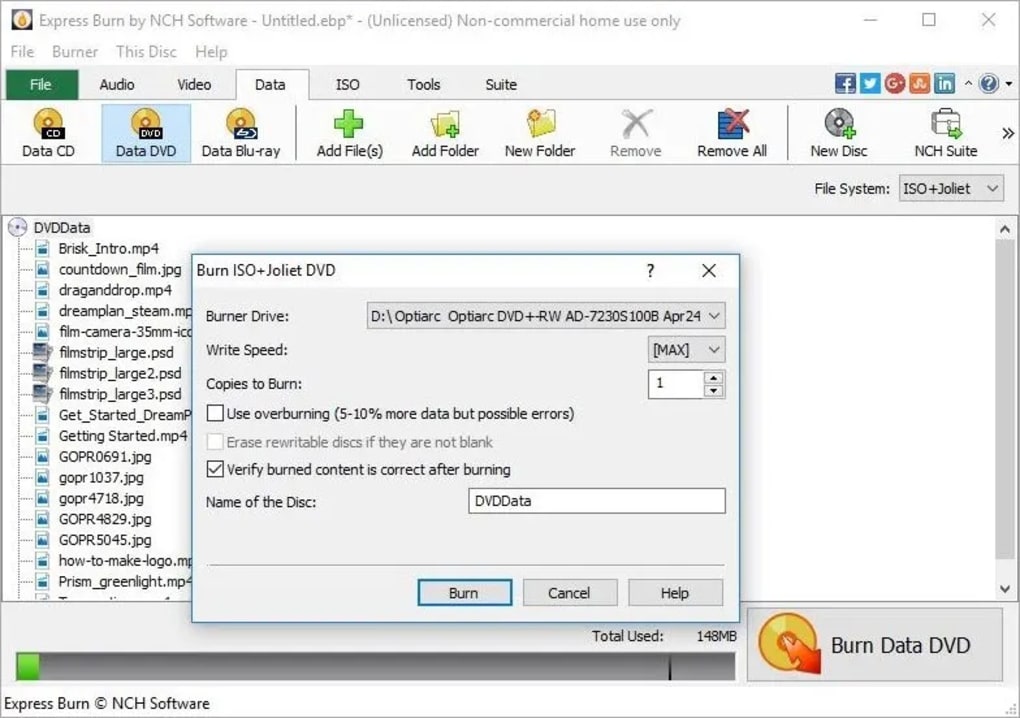
The primary appeal of Express Burn lies in its commitment to speed and an intuitive user interface. From the moment you launch the application, it’s clear that NCH Software prioritized making the burning process as quick and painless as possible. The interface adheres to a simple “drag and drop to click and burn” philosophy, which means users can typically prepare a disc for burning in a matter of seconds.
Unlike many bloated burning suites that can take ages to load and navigate, Express Burn is remarkably compact and lightweight. This ensures that the program launches quickly and operates smoothly, even on older or less powerful hardware, minimizing system resource consumption. The minimalist design isn’t just aesthetic; it’s functional, guiding the user through each step without overwhelming them with an excessive number of options. Whether you’re burning a simple data CD or authoring a complex video DVD, the process is streamlined and logical.
Speed isn’t just about how quickly you can prepare a disc; it also refers to the actual writing process. Express Burn is optimized to take full advantage of modern hardware, supporting high-speed drives to ensure your data or media is transferred to the disc at the fastest possible rates your burner allows. This is particularly crucial when dealing with large video files or extensive data backups, where minutes can easily turn into hours with less efficient software. The application’s core architecture is designed to handle these tasks with maximum throughput, translating directly into saved time for the user.
Moreover, Express Burn boasts an impressive capability that significantly enhances its utility: automatic file conversion. This feature is a major time-saver, especially for those working with diverse media collections. For instance, if you’re compiling an audio CD and some of your music files are not in the standard MP3 format, Express Burn can seamlessly convert them into a compatible format during the burning process. This eliminates the need for separate, often time-consuming, third-party conversion tools, simplifying your workflow and ensuring compatibility with your target disc format. For video projects, this means that even if your source files are in an unconventional format, Express Burn can re-encode them on the fly to fit the specifications of a standard DVD Movie disc or Blu-ray video disc, making playback effortless on any compatible player. This integration of conversion into the burning pipeline underscores Express Burn’s commitment to efficiency and user convenience, truly setting it apart in the crowded market of burning software.
Comprehensive Media Support: From CDs to Blu-rays
One of Express Burn’s most compelling attributes is its extraordinary versatility in handling virtually every type of optical media currently in use. Far from being a niche tool, it positions itself as a universal solution for all your disc burning needs, catering to an expansive range of formats and disc capacities. This comprehensive support ensures that whether you’re creating simple audio CDs or archiving vast amounts of data on a high-capacity Blu-ray, Express Burn has you covered.
Starting with the basics, Express Burn provides excellent support for CDs. Users can effortlessly create audio CDs for playback in traditional CD players, ensuring compatibility with the Redbook standard (44.1K 16-bit CD Quality). It also allows for the burning of data CDs, perfect for smaller backups or sharing files. The automatic conversion capabilities are particularly useful here, as mentioned, accommodating various audio file formats to ensure a seamless listening experience.
Moving up the capacity ladder, DVDs are where Express Burn truly shines with its flexibility. It supports both data and video DVD burning, encompassing a wide array of disc types including DVD-R, DVD-RW, DVD+R, and DVD+RW. For data DVDs, the software is an excellent choice for creating robust backups of documents, photos, and other critical files. Its ability to create ISO images is a standout feature, allowing users to archive entire disc contents into a single file that can be mounted as a virtual drive or burned to another disc later. This is invaluable for software distribution, operating system backups, or simply organizing large collections of data.
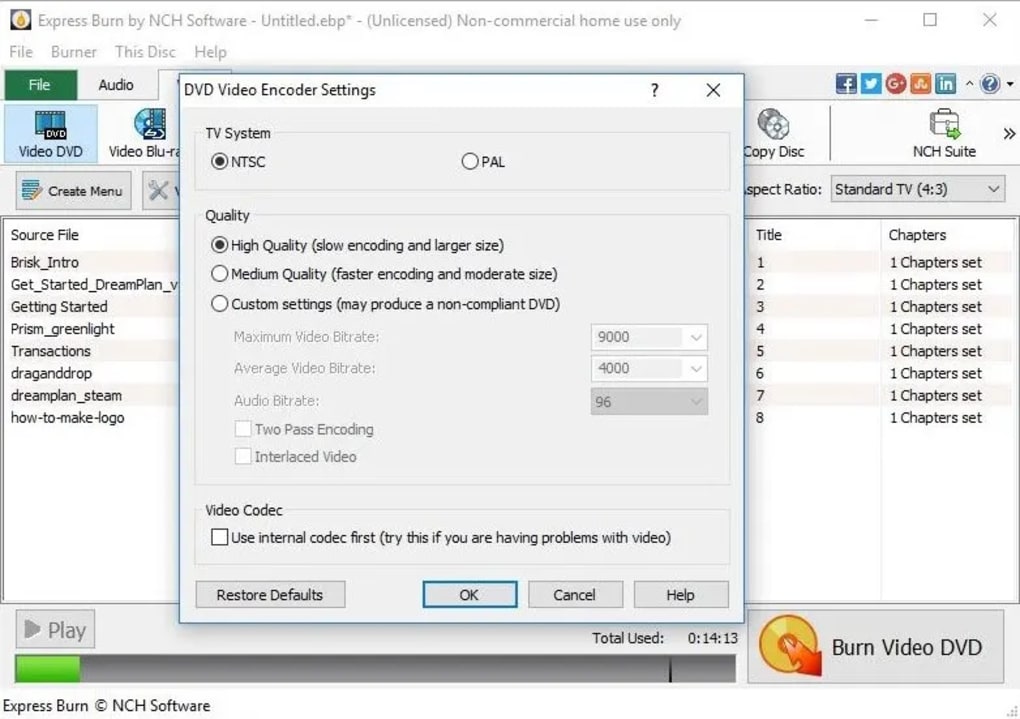
When it comes to video DVDs, Express Burn transforms into a powerful authoring tool. It enables users to burn video files for playback not just on computers, but more importantly, on standard DVD players. The software intelligently handles video re-encoding, ensuring that your source files, regardless of their original format, are converted into a standard DVD Movie disc structure. This includes support for both PAL and NTSC video standards, making it suitable for international use. Furthermore, users gain control over crucial aspects of video DVD authoring, such as the choice between widescreen or standard (4:3) formats, allowing for optimal viewing experiences tailored to different display setups. The integrated chapter management feature is another professional touch, enabling users to easily define and navigate through different sections of their video content, enhancing the overall presentation and usability of the finished DVD.
Beyond DVDs, Express Burn keeps pace with modern storage requirements by offering robust support for high-definition media. It can handle HDDVD discs (though this format is now largely obsolete, its inclusion highlights the software’s legacy support) and, more importantly, a full spectrum of Blu-ray discs. For Blu-ray, Express Burn supports burning both data and video discs, including BD-R (recordable), BD-RE (rewritable), and their dual-layer counterparts (BD-R DL, BD-RE DL) for even greater storage capacity. This makes it an invaluable tool for archiving large quantities of high-definition video, professional project files, or extensive photographic libraries, leveraging the massive storage capabilities of Blu-ray technology. The ability to burn ISO compliant data Blu-ray discs further extends its utility for serious data management and archival purposes.
In essence, Express Burn is a one-stop solution for anyone who needs to burn optical media. Its comprehensive support eliminates the need for multiple specialized burning applications, providing a unified and efficient platform for everything from a quick audio CD to a sophisticated, chapter-managed Blu-ray video disc. This broad compatibility, combined with its focus on speed and ease of use, solidifies its position as an incredibly flexible and powerful tool for media creators and archivists alike.
Advanced Features for Seamless Burning and Authoring
While Express Burn is celebrated for its simplicity and speed, a deeper dive reveals a suite of advanced features that empower users with greater control and flexibility over their disc burning projects. These capabilities extend beyond basic file transfers, offering tools for automation, enhanced video authoring, and sophisticated data management.
One of the most impactful advanced features is its automatic format conversion. As previously touched upon, this is a significant advantage, particularly for video and audio projects. When you drag and drop video files into Express Burn for a DVD or Blu-ray project, the software intelligently re-encodes them to fit the specific standards required for playable movie discs. This means you don’t need to manually convert your MP4, AVI, MOV, or other video files into a DVD-compatible MPEG-2 format or a Blu-ray compatible H.264/MPEG-4 AVC format beforehand. Express Burn handles this complex process behind the scenes, ensuring the output is perfectly compliant with standalone players. This extends to audio as well, accommodating various audio codecs to create standard audio CDs without pre-conversion. This seamless, integrated conversion process drastically reduces the user’s workload and the need for external tools, making the entire authoring workflow smoother and more efficient.
For those engaging in video DVD authoring, Express Burn offers more than just basic burning. It provides essential controls to create professional-looking and navigable discs. Key among these is chapter management. Users can easily define chapters within their video content, allowing viewers to jump directly to specific scenes or sections. This is crucial for longer videos, documentaries, or collections of short clips, significantly enhancing the viewer experience. Coupled with the choice of widescreen (16:9) or standard (4:3) formats, users can ensure their video content is displayed correctly on a variety of televisions and monitors, avoiding distortion or undesirable letterboxing/pillarboxing. These authoring features elevate Express Burn beyond a simple burner, providing a capable tool for creating polished, navigable video discs.
ISO image creation is another powerful feature tailored for data management and software distribution. An ISO image is a single file that contains an exact copy of an entire optical disc, including its file system and structure. Express Burn allows users to create these ISO images from existing discs or from a collection of files, which can then be saved, shared, or later burned to another disc. This is incredibly useful for archiving software installers, creating bootable discs, or distributing large data sets efficiently. Furthermore, Express Burn supports burning ISO compliant data DVDs and Blu-ray discs, meaning it can take an existing ISO file and accurately reproduce it onto an optical disc, ensuring data integrity and compatibility.
For power users and system administrators, the inclusion of command line operation is a particularly valuable asset. This feature allows Express Burn to be controlled and automated through scripts or other programs, making it an ideal choice for integrating disc burning into larger automated workflows or batch processing tasks. Instead of manually interacting with the GUI, users can write commands to trigger burns, specify files, and configure settings, opening up possibilities for unattended backups, automated media production, or custom application integration. This level of programmability speaks to the software’s robust underlying architecture and its suitability for more demanding, professional environments.
Finally, multisession recording provides immense flexibility for data disc creation. With multisession recording, users can add data to a disc incrementally over time, rather than having to burn all content in a single session. This is particularly useful for backup discs that are updated regularly, or for collecting files on a disc until its capacity is fully utilized. Express Burn supports this feature for both data CDs and DVDs, allowing users to make the most efficient use of their optical media, reducing waste and providing a convenient way to manage evolving data sets.
Taken together, these advanced features transform Express Burn from a merely fast and simple burner into a highly capable and versatile media management tool. They offer a level of control and automation that belies its straightforward interface, catering to a broad spectrum of user needs, from casual home use to more professional and automated applications.
User Experience, Performance, and Considerations
The overall user experience with Express Burn is largely positive, characterized by its intuitive design and efficient operation. Installation is typically quick and straightforward, and the program’s lean footprint means it doesn’t hog system resources. The “drag and drop” interface, combined with clear on-screen prompts, makes the burning process accessible even to those who are new to disc burning software. Many users commend its sleek design and the way it guides them through each step, making complex tasks like video DVD authoring feel manageable. The inclusion of a helpful “help” section further ensures that users can find answers to their questions without much trouble.
Performance-wise, Express Burn lives up to its name. While the ultimate burning speed will always depend on your optical drive’s capabilities and the quality of your blank media, the software itself is optimized to minimize overhead and maximize throughput. Its efficient file conversion and re-encoding processes, performed on-the-fly, mean that even resource-intensive tasks are handled with commendable speed, especially when compared to alternative applications that might require separate, time-consuming pre-conversion steps.
However, no software is without its nuances, and Express Burn has a few aspects worth considering. One recurring comment from users, as noted in various reviews, pertains to its business model. While Express Burn is often available as a trial version, NCH Software, the developer, is known for promoting its other products within its applications. This can sometimes lead to features that appear to be part of Express Burn but, upon clicking, prompt the user to download a separate piece of software. While this is a common practice for many developers offering trialware, some users might find this approach less transparent. It’s important for potential users to understand that some functionalities might require additional NCH Software installations, rather than being fully integrated into Express Burn itself.
User reviews offer a mixed but generally favorable perspective. Many highly praise its ability to convert a massive amount of audio compression formats quickly and efficiently, making it a go-to tool for music production and compilation. The ease of use and installation are consistently highlighted as strong pros. For many, it replaces more complex and expensive suites, becoming their sole burning software due to its reliability and simplicity.
On the other hand, some users have reported issues with certain files failing to burn or experiencing lengthy burn times only for the process to fail at the end, particularly on specific operating systems or with older hardware. While these instances seem to be exceptions rather than the norm, they underscore that disc burning can be a finicky process, often influenced by the interaction between the software, the operating system, the burner hardware, and the quality of the blank media. Some users also consider the full paid version pricey compared to completely free alternatives, especially if their burning needs are very basic. However, for those who require its extensive format support, advanced video authoring, and robust features like command-line operation, the value proposition typically holds strong. The overall sentiment, especially from those who have used a variety of burning tools, suggests that Express Burn offers a compelling balance of features, performance, and user-friendliness.
Conclusion
Express Burn DVD Burning Software stands out as a highly competent and efficient solution in the realm of optical media burning. Its core strength lies in its ability to combine exceptional speed and a user-friendly, drag-and-drop interface with remarkably comprehensive support for almost every conceivable disc type and media format – from legacy CDs to modern Blu-rays and HDDVDs. Whether you’re creating data backups, compiling audio collections, or authoring intricate video DVDs with chapter management and widescreen options, Express Burn streamlines the process with its integrated file conversion capabilities and intelligent re-encoding.
While the presence of prompts for other NCH Software products in the trial version might be a minor point of contention for some, the overall consensus points to a robust and reliable application. Its compact design ensures minimal system impact, and its command-line capabilities cater to advanced users looking for automation. For anyone in need of a dependable, fast, and versatile disc burning tool, Express Burn provides a powerful all-round solution that consistently delivers on its promise of efficiency and broad compatibility. It effectively eliminates the need for multiple specialized programs, offering a unified platform for all your burning endeavors. For those seeking to master their media with both speed and precision, Express Burn DVD Burning Software remains an outstanding choice, proving that optical media still holds a valuable place in the digital landscape. For further information or to download the trial, users can visit Phanmemfree.org.
File Information
- License: “Trial version”
- Latest update: “February 4, 2025”
- Platform: “Windows”
- OS: “Windows 10”
- Language: “English”
- Downloads: “603K”
- Size: “1.01 MB”


