
Express Zip Free Compression Software is a free, user-friendly file compression utility for Windows, developed by NCH Software. This review delves into its features, usability, and overall effectiveness as a tool for managing and sharing files efficiently. While offering a robust set of compression and archiving capabilities, Express Zip also presents certain limitations that should be considered.
Core Features and Functionality
Express Zip’s primary function is to compress and decompress files and folders, utilizing a wide array of popular archive formats. This capability extends beyond the basic ZIP format, encompassing support for over 30 archive file types, including RAR, 7Z, TAR, CAB, ISO, GZIP, MULTIDISK, ZIPX, LZH, ARJ, PKPASS, GZ, and many more. This broad compatibility makes it a versatile solution for handling diverse compressed files received from various sources.
Creating compressed archives is straightforward, utilizing a simple drag-and-drop interface. Users can select files and folders directly and add them to a default ZIP archive or choose from other supported formats. The software streamlines the process, allowing for seamless conversion between formats without needing additional applications. This eliminates the cumbersome workflow of converting files between different compression tools. The ability to directly burn compressed files to CDs and DVDs adds further convenience, consolidating the archiving and distribution process.
Security and File Management
Beyond basic compression, Express Zip offers essential security features. Users can encrypt their compressed archives with password protection, adding a layer of security for sensitive documents or data. This ensures that only authorized individuals with the correct password can access the contents of the archive. This is particularly beneficial when sharing files via email, cloud storage, or other less secure methods.
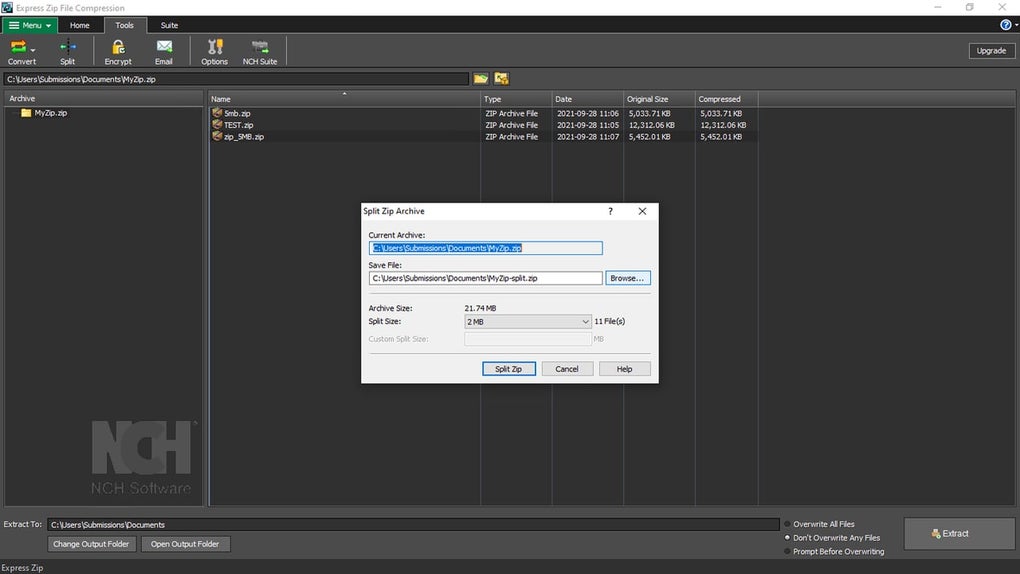
For managing larger files, Express Zip provides a multi-part split tool. This allows users to divide large archives into smaller, more manageable parts, facilitating easier sharing via email or other transmission methods with size limitations. The program also includes a PAR2 recovery file creation option, which is a crucial feature for data integrity. This recovery file helps restore corrupted archives, ensuring data loss is minimized in case of transmission errors or file damage. This function significantly enhances data reliability and provides a safety net for important compressed files. The right-click context menu integration further enhances usability, offering quick access to compression and decompression options directly from the file explorer.
User Interface and Usability
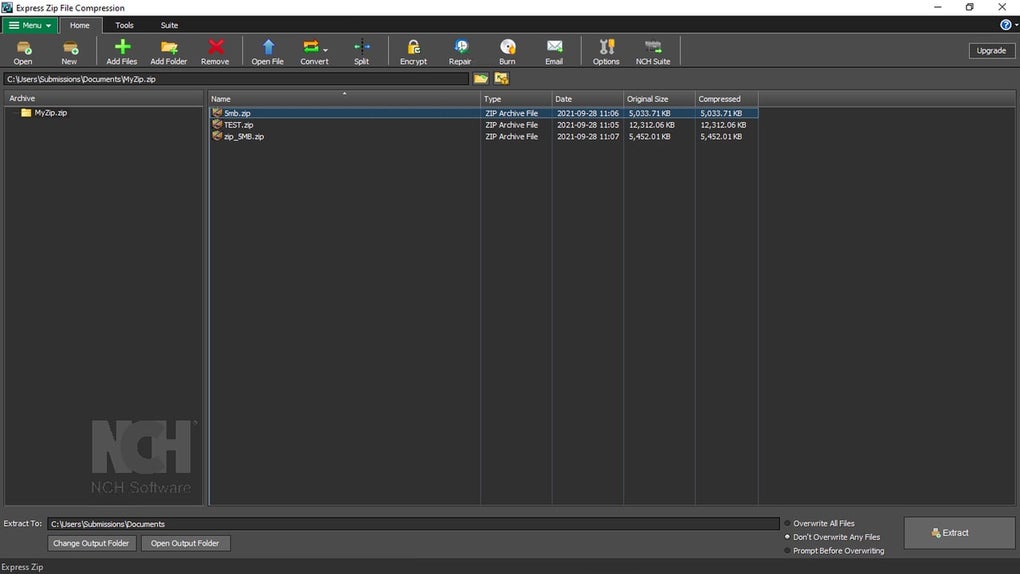
Express Zip boasts an intuitive interface, generally easy to navigate even for less tech-savvy users. The main window is logically organized, with clear labeling and placement of buttons and tabs. The four tabs—Menu, Home, Tools, and Suite—provide structured access to various functionalities. The “Home” tab offers quick access to the core features like creating and opening archives, adding files, format conversions, and encryption. The “Tools” tab provides access to more advanced features such as file splitting. The “Suite” tab acts as a convenient gateway to other NCH Software applications, allowing for seamless integration with their product ecosystem.
The main workspace is divided into two panels: an archive list on the left and a file list on the right. This arrangement aids in managing multiple archives and their contents efficiently. The bottom bar houses controls for extraction and output settings, including the crucial “Extract” button.
However, the absence of an integrated tutorial is a notable drawback. While the interface is mostly intuitive, a built-in guide could help users fully understand and utilize advanced features more efficiently. The redundancy of certain buttons across different tabs could also be improved upon by streamlining the interface. A more concise arrangement could further enhance the overall usability and user experience.
Comparison with Alternative Software
Express Zip competes with other popular compression tools such as 7-Zip, WinRAR, and WinZip. While these alternatives offer similar core functionality, Express Zip distinguishes itself with its user-friendly interface and broad format support. 7-Zip, renowned for its open-source nature and high compression ratios, may appeal to users prioritizing technical control and compression efficiency. WinRAR, a long-standing and established name, also offers strong compression and advanced features, but it comes with a cost after a trial period. WinZip, while popular, often presents a more complex interface, possibly making it less approachable for casual users.
Express Zip effectively bridges the gap between simple usability and extensive feature sets, targeting users who need a balance between ease of use and a wide range of functionalities.
Pros and Cons
Pros:
- Extensive format support: Handles a wide variety of archive formats, exceeding many competitors.
- User-friendly interface: Intuitive design makes it accessible for users of all technical levels.
- Strong security features: Offers password protection and encryption for secure file sharing.
- Convenient file management: Includes file splitting and PAR2 recovery for managing and safeguarding data.
- Integration with NCH Software suite: Provides seamless access to other NCH Software applications.
- Free to use: The basic version is available without any licensing costs.
Cons:
- Lack of integrated tutorial: Absence of a built-in tutorial could create a learning curve for some users.
- Redundant button placement: Some button functions are duplicated across tabs, leading to potential interface inefficiencies.
- No advanced compression settings: Users who require granular control over compression algorithms and levels might find the options limited compared to more technically advanced alternatives.
Conclusion
Express Zip Free Compression Software provides a compelling solution for users needing a versatile and user-friendly file compression tool. Its broad format compatibility, robust security features, and intuitive interface make it a strong choice for both casual users and those needing to manage numerous compressed files. While the lack of a tutorial and some interface redundancies could be improved, its overall ease of use and comprehensive feature set outweigh these minor drawbacks. For those prioritizing a balance between simplicity and functionality, Express Zip stands as a competitive and valuable addition to any Windows user’s toolkit. The free version is perfect for home use, and for commercial purposes, the paid Plus edition may be considered.
File Information
- License: “Free”
- Latest update: “June 26, 2025”
- Platform: “Windows”
- OS: “Windows 10”
- Language: “English”
- Downloads: “4.8K”
- Size: “3.47 MB”


