
Eye Candy, aptly named, is a powerful software application designed to create stunning and realistic visual effects that would be exceptionally difficult, if not impossible, to achieve using less sophisticated tools. This software empowers users to transform ordinary images into extraordinary works of art, offering a vast array of possibilities limited only by imagination. With over a thousand pre-set images and a comprehensive suite of 32 filters, Eye Candy provides a robust and user-friendly environment for both novice and experienced designers alike.
A Deep Dive into Eye Candy’s Features and Functionality
Eye Candy boasts a comprehensive collection of over 1,500 pre-set images, categorized for easy navigation. This extensive library provides a fantastic starting point for users, allowing them to quickly experiment with different effects and styles without needing to build everything from scratch. The organizational structure ensures a streamlined workflow; finding the right tool or effect is effortless, preventing users from wasting time searching through disorganized menus. This intuitive design is a significant advantage, especially for those new to visual effects software.
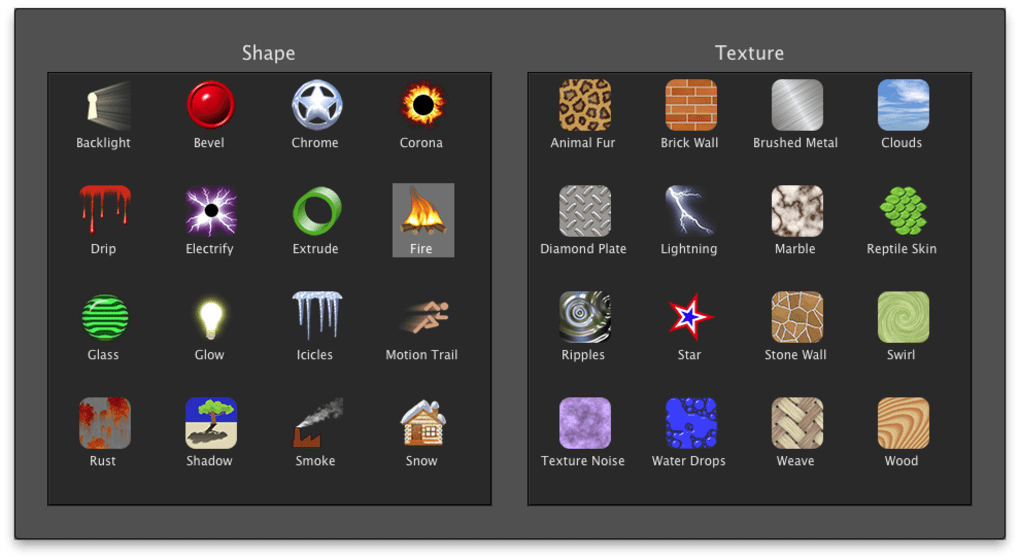
Beyond the pre-sets, the core strength of Eye Candy lies in its 32 distinct filters. These filters allow for a wide array of transformations, extending far beyond simple adjustments like brightness and contrast. The filters include sophisticated options such as simulating the texture of reptile skin, the aged appearance of rust, or the sleek look of brushed metal. This versatility allows for a remarkable range of creative expression, catering to a variety of design styles and projects. The application isn’t confined to simple texture additions; it enables intricate manipulation and realistic rendering that elevate images beyond the capabilities of typical photo editors.
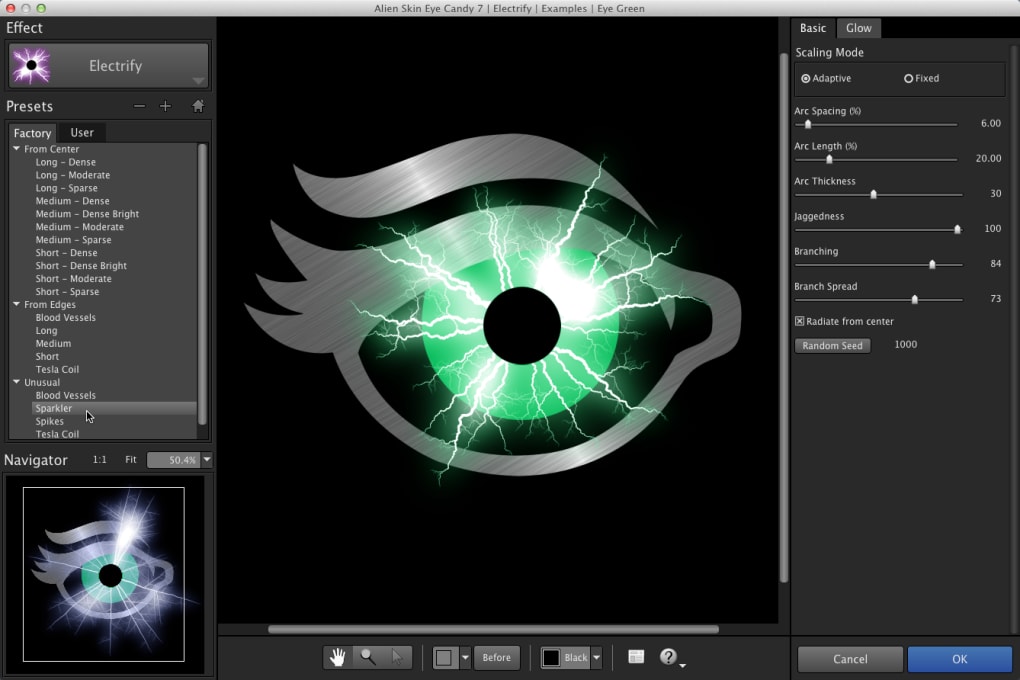
The software’s user interface is another key element contributing to its overall appeal. Designed with user-friendliness in mind, it offers a straightforward and intuitive experience, minimizing the learning curve. The interface is logically laid out, making it easy for users to find and utilize the various features. This accessibility is particularly beneficial for users who are less experienced with design software, enabling them to quickly grasp the fundamentals and begin creating impressive visual effects.
Strengths and Weaknesses: A Balanced Perspective
While Eye Candy offers many advantages, a balanced assessment must also consider its limitations. For those unfamiliar with design tools or visual effects software, the initial learning curve might present a challenge. The sheer number of options and sophisticated features could initially feel overwhelming to users lacking prior experience. While the user interface is designed for simplicity, understanding the nuances of each filter and its application might require some time and experimentation.
Furthermore, despite the wide array of options, some users might find that the functionality remains somewhat basic compared to professional-grade software suites. While Eye Candy delivers impressive results, seasoned designers accustomed to advanced features and precise control might find some limitations in the application’s capabilities. Its strength lies in its accessibility and ease of use, making it a powerful tool for a wider audience, but professionals might prefer software offering greater control and more nuanced effects.
The initial visual presentation of the application itself could also be considered a minor drawback. The black background, while functional, might appear uninspiring to some users, particularly those accustomed to brighter and more visually stimulating interfaces. This is a purely aesthetic consideration; it doesn’t impact the functionality or performance of the software, but it could slightly detract from the initial user experience.
Comparing Eye Candy to Alternatives
Eye Candy occupies a unique niche in the visual effects software market. Its strengths lie in its user-friendly interface, its extensive library of pre-sets, and its powerful yet accessible filters. However, it is crucial to compare Eye Candy with alternative applications to understand its positioning and potential limitations.
Several free alternatives exist, such as Harry’s Filters4Free, which provides basic design and photography tools. However, these free options often lack the breadth of filters and pre-sets offered by Eye Candy, along with the user-friendly interface that contributes significantly to its ease of use. Free alternatives might serve as adequate solutions for simple adjustments or basic effects, but they generally fall short of Eye Candy’s capabilities and comprehensive feature set.
For more demanding projects or professional-level work, commercial software like Adobe Photoshop remains a dominant force. Photoshop, while significantly more expensive and possessing a steeper learning curve, provides a far more extensive set of tools and capabilities. Its advanced features, precise control, and vast community support make it the industry standard for many designers. Eye Candy shouldn’t be viewed as a direct competitor to Photoshop but rather as a complementary tool suitable for users seeking a simpler, more accessible approach to creating compelling visual effects.
Other software, such as those focused on photo stitching (like AcroPano Photo Stitcher), offer specialized functions that don’t overlap directly with Eye Candy’s core functionality. These tools cater to specific needs, and their capabilities are not directly comparable to the broad range of visual effects offered by Eye Candy.
Eye Candy’s Target Audience and Use Cases
Eye Candy is best suited for users who desire a user-friendly and powerful tool for creating impressive visual effects without the complexities of professional-grade software. This includes hobbyist photographers, graphic designers who need to quickly enhance images, and content creators seeking visually compelling elements for their projects. The software is an excellent choice for anyone who wants to add a creative touch to their images without needing to invest significant time learning complex software or requiring the full power of industry-standard tools like Photoshop.
The pre-set filters and intuitive interface are particularly beneficial for beginners, making it a great entry point into the world of digital image manipulation. However, even experienced designers might find Eye Candy useful for quick enhancements or for projects where its range of effects and streamlined workflow are sufficient. It’s a versatile tool that caters to a broad range of skills and experience levels.
Specific use cases include:
- Enhancing product photography: Eye Candy can add a polished and professional look to product images, making them more visually appealing for online stores or marketing materials.
- Creating eye-catching social media posts: The software’s versatile filters can be used to create striking visual effects for social media content, helping to increase engagement and reach.
- Adding creative elements to graphic design projects: Eye Candy can provide unique textures and effects that can be incorporated into various design projects, adding a touch of originality and creativity.
- Improving personal photos: Casual users can use Eye Candy to enhance their personal photographs, applying artistic filters and effects to create visually stunning memories.
- Adding visual interest to presentations or websites: Eye Candy’s filters can dramatically enhance the visual appeal of presentations, websites, or any digital media by adding visually striking elements.
In conclusion, Eye Candy for Windows offers a compelling blend of user-friendliness and powerful visual effects. Its extensive library of presets, intuitive interface, and impressive range of filters make it an attractive option for a wide audience, ranging from beginners to experienced designers seeking an accessible and efficient way to create stunning visuals. While it might not replace professional-grade software for all tasks, its unique combination of accessibility and power makes it a valuable tool in the creative arsenal of many.
File Information
- License: “Trial version”
- Latest update: “May 23, 2023”
- Platform: “Windows”
- OS: “Windows 8”
- Language: “English”
- Downloads: “5.1K”
- Size: “50.82 MB”


