
Facebook for Chrome was a browser extension that aimed to provide quick access to core Facebook features without requiring users to navigate to the main Facebook website. While now discontinued, its functionality and limitations offer a valuable case study in the evolution of browser extensions and the integration of social media into everyday online experiences. This review examines its features, pros, cons, and ultimately, why it may have fallen out of favor.
Functionality and Interface
Facebook for Chrome presented users with a streamlined sidebar interface upon installation and login. This sidebar acted as a central hub, offering quick access to key Facebook functions. Users could readily check their news feed, update their status, view notifications, access their events calendar, browse photos, and review their messages. The extension’s design prioritized ease of access, aiming to provide a rapid glimpse into Facebook activity without the overhead of fully loading the website. The simplicity of the interface was a significant strength, appealing to users who wanted a quick and uncomplicated way to interact with their Facebook accounts. The icons for different features were intuitive and easily understandable, requiring minimal user learning curve.
Strengths and Limitations: A Balanced Perspective
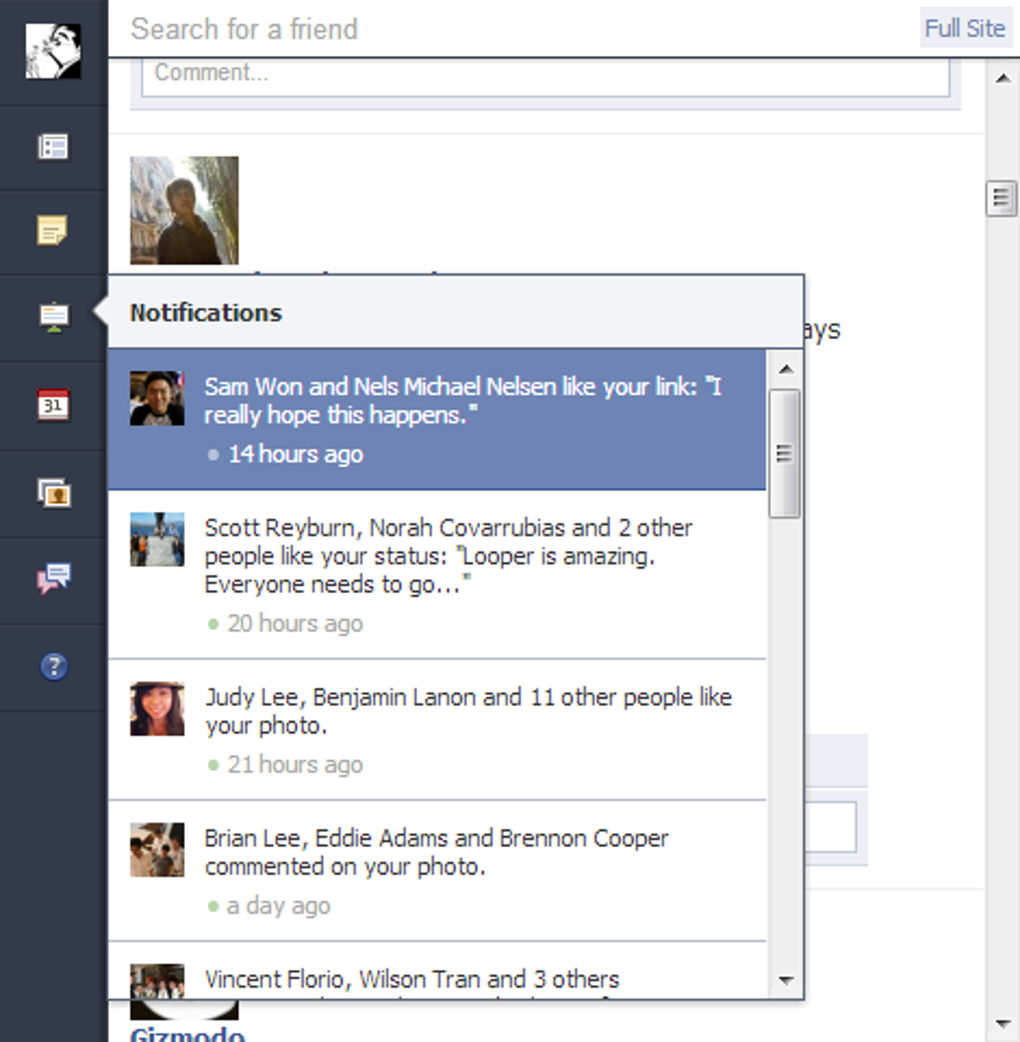
While Facebook for Chrome provided convenient access to many frequently used features, it lacked the depth of interaction offered by the full Facebook website. This discrepancy between accessibility and functionality created a mixed user experience.
Pros:
-
Rapid Access to Core Features: The extension’s primary benefit was its speed and efficiency in accessing essential Facebook elements. Users could quickly check their news feed, see updates from friends, and monitor notifications without the wait times associated with loading the full website. This was especially advantageous for users with slower internet connections or those who frequently needed quick updates.
-
Quick Status Updates: Updating one’s Facebook status was incredibly efficient. The direct access within the extension allowed users to share thoughts and updates without navigating away from their current webpage, maintaining workflow and focus. This functionality was a significant draw for users who valued seamless integration of their social media activity into their daily routine.
-
Convenient Birthday Calendar: The integration of a birthday calendar provided a helpful reminder system for users. This unobtrusive feature served as a useful organizational tool without cluttering the main interface.
-
Efficient Friend Search: Finding and interacting with friends was streamlined within the extension. The built-in search function allowed for quick identification of specific contacts.
-
News Feed Interaction: While interaction was limited compared to the full Facebook site, users could “like” posts and comments directly from within the extension, saving time and clicks. This partial interactivity was a compromise that aimed to balance speed with functionality.
-
Direct Facebook Sharing: The ability to right-click on a webpage and share it directly to Facebook was a useful feature, streamlining content sharing across platforms. This simplified the process of sharing interesting articles or content, fostering faster communication.
Cons:
-
Missing Messenger Integration: The absence of Facebook Messenger integration was a significant drawback. Users could view messages, but could not respond or engage in conversations directly through the extension. This forced users to switch to the main Facebook website for any form of interactive communication, negating some of the convenience the extension offered.
-
Inability to Reply to Messages: The lack of in-extension messaging significantly hindered its usability. It effectively limited the extension to a read-only function for messages, undermining its utility as a comprehensive communication tool.
-
Limited Sharing Capabilities: While sharing was possible, the lack of options for adding captions or comments during the sharing process was a considerable limitation. This resulted in reduced opportunities for contextualization and personalized messaging during content sharing.
-
Lack of Complete Facebook Portal: Facebook for Chrome never fully replicated the Facebook experience. While offering quick access to some features, it lacked many core elements, resulting in a fragmented user experience. Users often found themselves needing to switch to the main website to perform more complex actions.
-
Potential for Obsolescence: The fast-paced evolution of Facebook’s features and interface made the extension prone to becoming outdated. Keeping it updated and compatible with Facebook’s frequent changes would have been a continuous challenge for the developers.
User Reviews and Feedback: A Voice to the Past
User reviews of Facebook for Chrome reveal a common thread: a blend of appreciation for its speed and convenience alongside frustration over its limitations. Users praised its efficiency in checking news feeds and updating status, but frequently voiced criticism regarding the absence of messenger integration and the inability to fully interact with messages and events. The lack of a commenting feature for shared content also received negative feedback, highlighting the need for a more comprehensive approach to social media integration within a browser extension. One user aptly summarized the situation, praising its usefulness in the past but suggesting modern alternatives offer better functionality for managing Facebook interactions, especially for professional uses involving message automation. This points to the ever-evolving landscape of social media integration and the continuous demand for more refined and feature-rich extensions.
Why it was Discontinued: A Speculative Analysis
Several factors likely contributed to the discontinuation of Facebook for Chrome.
- Maintenance Overhead: Keeping a browser extension compatible with Facebook’s frequent updates and changes would have required significant ongoing maintenance, potentially outweighing the benefits for the developers. The effort required to continuously update the extension to match the evolving Facebook platform may have become unsustainable.
-
Limited Revenue Potential: Unless the extension incorporated in-app purchases or advertising, there may have been little financial incentive for continued development and support. The lack of a clear monetization strategy could have led to its eventual abandonment.
-
Shifting User Preferences: The rise of mobile devices and mobile-optimized social media applications may have diminished the demand for desktop-based extensions. User migration towards mobile interfaces could have reduced the overall user base for the extension, lessening its viability.
-
Security Concerns: Potential security vulnerabilities within the extension, although not explicitly mentioned, may have contributed to its removal. Any security issues, real or perceived, would have prompted removal from distribution platforms.
Conclusion: A Legacy of Convenience and Limitations
Facebook for Chrome represented an early attempt to bridge the gap between social media and browser-based productivity. While it succeeded in offering swift access to some key Facebook features, its limitations in interaction and integration ultimately constrained its long-term viability. Its discontinuation underscores the challenges of maintaining browser extensions in a constantly evolving digital landscape, highlighting the need for a balance between functionality, maintenance, and user demand. The extension serves as a valuable example of both the potential and the pitfalls of integrating social media platforms into everyday browser usage. While its functionality may seem outdated in the context of modern browser extensions and mobile-centric social media, it serves as a reminder of the iterative process of technology development and the continuous striving for improved user experiences.
File Information
- License: “Free”
- Version: “7”
- Latest update: “February 13, 2019”
- Platform: “Windows”
- OS: “Windows 7”
- Language: “English”
- Downloads: “842.9K”


