
Facetube Video Downloader is a free Windows application designed to simplify the process of downloading videos from popular platforms like YouTube, Facebook, and Dailymotion. It also offers the added functionality of converting downloaded videos into MP3 audio files. This review will delve into its features, performance, user experience, and compare it to alternative options available in the market.
Ease of Use and Interface
The Facetube Video Downloader boasts a remarkably simple and intuitive interface, making it accessible to users of all technical skill levels. The main window presents a clean layout, featuring only essential boxes and buttons for configuration. This minimalist approach avoids overwhelming beginners while remaining efficient for experienced users. The straightforward design ensures users can quickly grasp the software’s functionality without extensive tutorials or manuals. The clear display of available formats and quality settings further enhances usability, allowing for precise control over the download process. Download initiation is equally straightforward; a simple right-click on a selected item, followed by choosing the “Download” option from the context menu, initiates the download. This streamlined process significantly reduces the time and effort required to download videos, making it ideal for users seeking a quick and efficient solution.
Functionality and Features
Facetube Video Downloader’s primary function is downloading videos from YouTube, Facebook, and Dailymotion. This capability alone fulfills a common need for many internet users. However, the software’s versatility extends beyond basic downloading. Its key feature is the ability to convert downloaded videos into MP3 audio files. This added functionality caters to users who might only require the audio portion of a video, providing flexibility and saving storage space. The software also allows users to select their preferred video quality from a list of available options, providing control over the downloaded file size and quality. This feature is crucial, as users can tailor their downloads to fit their specific needs and bandwidth constraints. The selection of supported video qualities ranges from lower resolutions suitable for mobile devices to higher resolutions for larger screens and sharper viewing. The ability to customize the download parameters further enhances the user experience, making the software adaptable to various scenarios.
Performance and System Resource Usage
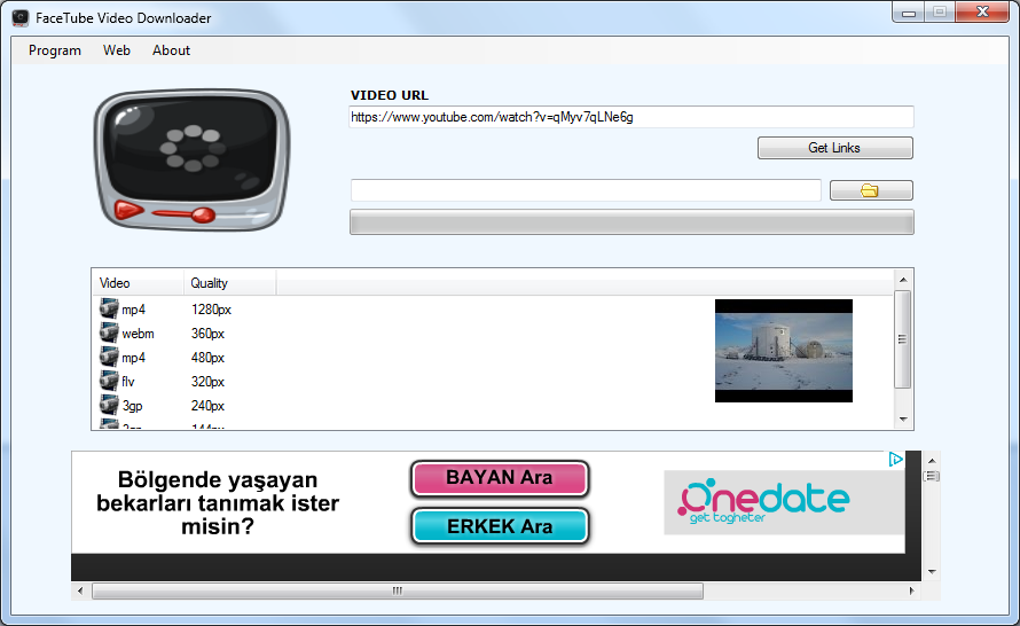
Facetube Video Downloader is designed for efficiency, ensuring minimal impact on system resources. It operates smoothly without slowing down other applications or consuming excessive memory. This lightweight nature makes it suitable for use on older or less powerful computers, a significant advantage over resource-intensive alternatives. The software’s quick response time further contributes to its overall positive performance. Downloads typically begin quickly and progress smoothly, without interruptions or delays. This responsiveness reduces the time spent waiting for downloads to complete, ensuring a seamless user experience. The lack of integrated help content doesn’t detract from the functionality as the simplicity of the interface makes it self-explanatory. The absence of unnecessary features contributes to the software’s efficiency and lean design. This focus on core functionality results in a program that is both powerful and lightweight.
Security and Safety
The software is rigorously scanned for malware and potential threats, and it has a clean security status as verified by Phanmemfree. This rigorous security checking process increases user confidence and reduces the risk of installing malicious software. Regular updates further enhance security and address any potential vulnerabilities that might emerge. The software’s straightforward design also mitigates security risks associated with complex or poorly coded software. The minimal features and simple interface reduce the chances of unintended actions or vulnerabilities that could compromise security. Furthermore, the transparent security status provided by the hosting platform provides reassurance to users concerning the software’s safety.
Comparison to Alternative Video Downloaders
Facetube Video Downloader competes with a wide range of video downloaders. Some popular alternatives include Wise Video Downloader, 4Videosoft Video Downloader, and Bigasoft Video Downloader Pro. While many offer similar core functionalities, Facetube Downloader distinguishes itself through its simplicity and user-friendly interface. Compared to others, the minimalist approach ensures a faster learning curve and less potential for user error. Others might boast more advanced features, but this often comes at the expense of a more complex and less intuitive user experience. The focus on ease of use, along with reliable performance and a secure platform, gives Facetube Video Downloader a strong competitive edge in the crowded market of video downloaders. While some alternatives might offer support for a broader range of video platforms, Facetube Downloader covers the most commonly used platforms effectively and efficiently. Its ability to convert videos to MP3 is a significant advantage over some competitors that only offer video download capabilities.
The choice between Facetube Video Downloader and its competitors ultimately depends on the user’s specific needs and preferences. For users prioritizing simplicity and ease of use, Facetube Downloader is an excellent choice. For users requiring more advanced features or support for less common video platforms, a more feature-rich alternative might be preferable. However, the balance of ease of use, functionality, and security that Facetube Video Downloader offers makes it a strong contender in the market.
Conclusion
Facetube Video Downloader provides a straightforward and efficient solution for downloading videos from popular platforms. Its clean interface, simple functionality, and minimal system resource usage make it an excellent choice for users of all technical proficiency levels. While not offering the extensive feature set of some competitors, its focus on simplicity and ease of use, coupled with its robust security and reliable performance, makes it a compelling option for those prioritizing a user-friendly experience. The added functionality of MP3 conversion further increases its value and versatility. For users seeking a reliable, secure, and easy-to-use video downloader, Facetube Video Downloader delivers a satisfying and efficient solution. The software’s emphasis on simplicity enhances its usability, making it readily accessible to novice users while maintaining efficiency for more experienced individuals. Its reliable performance and lightweight nature make it a suitable option for a wide range of users and systems. The overall user experience is streamlined and highly positive.
File Information
- License: “Free”
- Version: “7”
- Latest update: “December 20, 2024”
- Platform: “Windows”
- OS: “Windows Vista”
- Language: “English”
- Downloads: “5.4K”
- Size: “3.19 MB”


