
FakeFlashTest is a free, lightweight utility designed to verify the actual storage capacity of USB flash drives and SD cards. Developed by the creator of RMPrepUSB, this tool addresses a common problem: the proliferation of counterfeit storage media, often sold online or through unscrupulous vendors, that advertise significantly larger capacities than they actually possess. This comprehensive review delves into the functionality, usage, advantages, disadvantages, and alternatives to FakeFlashTest, helping you determine if it’s the right tool for verifying the authenticity of your storage devices.
Understanding the Problem of Counterfeit Storage Media
The digital marketplace is awash with inexpensive USB flash drives and SD cards boasting impressive storage capacities, often at prices that seem too good to be true. This allure often masks a darker reality: many of these devices are counterfeit, featuring significantly less storage space than advertised. A 64GB drive, for example, might only offer a fraction of that capacity, potentially leaving users with data loss or the frustration of purchasing substandard products. This deceptive practice is particularly prevalent in online auctions and marketplaces where verifying the authenticity of goods can be challenging.
FakeFlashTest provides a solution to this problem. It’s a simple yet effective tool that allows users to independently test the actual usable storage space on their flash drives and SD cards, preventing them from unknowingly purchasing fraudulent products or encountering unexpected data storage limitations.
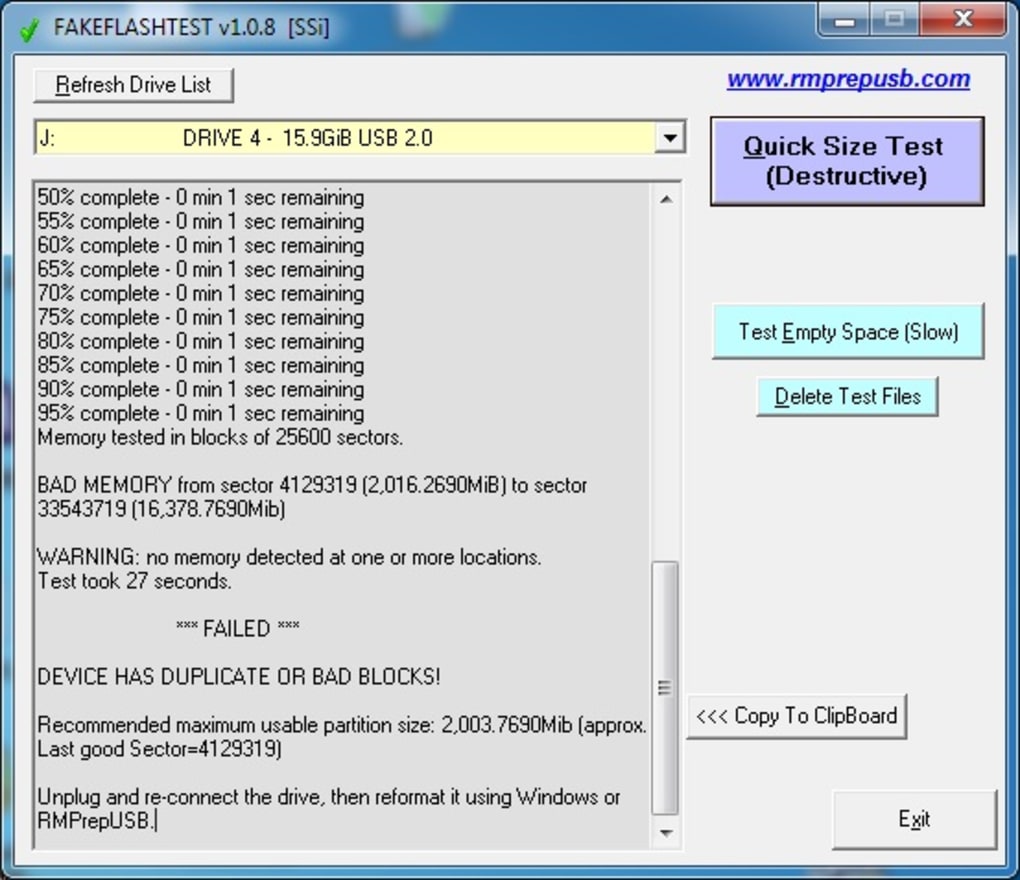
How FakeFlashTest Works: Two Testing Modes
FakeFlashTest offers two distinct testing modes, each designed to approach the verification process from a different angle:
1. Quick Size Test: This rapid test provides an immediate estimate of the drive’s true size. It quickly assesses the drive’s reported capacity and compares it to the actual usable space. This is a quick way to get a general idea of whether the drive might be counterfeit. However, it’s crucial to understand that this test may delete existing data on the drive. Therefore, it is strongly recommended to back up all important files before initiating a Quick Size Test. This precaution protects valuable data from accidental loss.
2. Test Empty Space: This more thorough test writes test files to the free space on the drive. This method allows for a precise measurement of the available storage space. Unlike the Quick Size Test, the Test Empty Space test will only delete data if the drive is definitively found to be counterfeit and exhibiting signs of fraudulent capacity representation. This targeted deletion helps prevent the spread of misleading storage devices. This mode is less destructive and offers a more in-depth analysis.
Both methods serve different purposes. The Quick Size Test provides a rapid, albeit potentially destructive, initial assessment. The Test Empty Space test offers a more detailed, safer evaluation, making it the preferred choice for users wanting to avoid accidental data loss.
Using FakeFlashTest: A Step-by-Step Guide
Using FakeFlashTest is straightforward:
- Connect the device: Insert the USB flash drive or SD card into your computer’s USB port or card reader.
- Run the software: Launch the FakeFlashTest application.
- Select the test: Choose either the “Quick Size Test” or “Test Empty Space” option, depending on your needs and risk tolerance. Remember to back up your data if you choose the Quick Size Test.
- Initiate the test: Click the appropriate button to begin the testing process. The duration of the test varies depending on the size of the storage device and the chosen test mode.
- Review the results: Once the test is complete, FakeFlashTest will display the results, indicating the drive’s true capacity. If the results significantly deviate from the advertised capacity, it strongly suggests the device is counterfeit.
Advantages and Disadvantages of FakeFlashTest
Like any software, FakeFlashTest presents both advantages and disadvantages:
Advantages:
- Ease of use: The program is simple and intuitive, making it accessible to users of all technical skill levels.
- Accuracy: FakeFlashTest provides a reliable assessment of a storage device’s actual capacity.
- Freeware: The software is available at no cost, making it a budget-friendly solution.
- Two testing modes: Offers flexibility in choosing between a quick but potentially destructive test and a more thorough, safer option.
- Effective identification of counterfeit media: Helps users avoid purchasing fraudulent storage devices.
Disadvantages:
- Potential data loss (Quick Size Test): The Quick Size Test carries the risk of deleting data on the tested drive. Always back up your files before using this option.
- Time-consuming (Test Empty Space): The Test Empty Space test can take a considerable amount of time, especially with larger storage devices.
- No technical support: While the software is generally reliable, users may find limited or no formal technical support available.
Alternatives to FakeFlashTest
While FakeFlashTest is an effective tool, several alternative applications offer similar functionality for verifying storage device capacity:
- H2Testw: This popular freeware utility is known for its thoroughness and accuracy in identifying counterfeit flash drives. It’s a powerful option that provides comprehensive test results.
-
Flash Drive/Card Tester: This tool provides a simpler interface compared to H2Testw, making it more user-friendly for those new to such utilities. It’s a good alternative for users seeking a straightforward approach.
-
Other specialized tools: Numerous other tools are available, focusing on specific aspects of storage device diagnostics or performance testing. These tools may offer additional features but might have a steeper learning curve.
Choosing the right alternative depends on user preference and technical proficiency. H2Testw is considered a strong contender due to its accuracy, while Flash Drive/Card Tester offers a more user-friendly experience.
Conclusion: A Valuable Tool for Protecting Yourself
FakeFlashTest serves as a valuable tool in the fight against counterfeit storage media. Its straightforward interface and accurate testing methods empower users to verify the authenticity of their USB flash drives and SD cards before encountering unexpected capacity limitations or data loss. While the potential for data loss with the Quick Size Test necessitates caution, the program’s overall benefits outweigh its risks, especially considering the potential financial and data-related consequences of using counterfeit storage devices. Remember to always back up your data before running any tests and carefully consider the trade-offs between speed and safety when selecting a test mode. If you have any concerns, explore the alternative solutions mentioned above. By using a tool like FakeFlashTest, you can protect yourself from purchasing fraudulent products and ensure that your digital data is secure.
File Information
- License: “Free”
- Latest update: “April 9, 2024”
- Platform: “Windows”
- OS: “Windows 10”
- Language: “English”
- Downloads: “28.5K”
- Size: “44.20 KB”


