
FanControl is a powerful, open-source utility for Windows that offers unparalleled control over your system’s cooling. Unlike many other fan control applications, FanControl distinguishes itself through its extensive customization capabilities, allowing users to fine-tune their cooling strategies to an exceptional degree. This in-depth review explores FanControl’s features, strengths, and weaknesses, providing a comprehensive understanding of its functionality and suitability for different users.
Unlocking Advanced Cooling Control
FanControl provides a user-friendly interface for managing CPU and GPU fan speeds, offering far more than simple speed adjustments. Its core strength lies in its ability to leverage various sensors, create custom fan curves, and meticulously adjust response parameters for optimal cooling performance. This level of control goes beyond simply setting a fixed fan speed, enabling users to create sophisticated cooling strategies tailored to their specific hardware and usage patterns. The program’s functionality stems from its reliance on three key libraries: LibreHardwareMonitor, MaterialDesignInXamlToolkit, and NvAPIWrapper, which collectively provide access to comprehensive hardware monitoring and control features.
Customizable Fan Curves: The Heart of FanControl
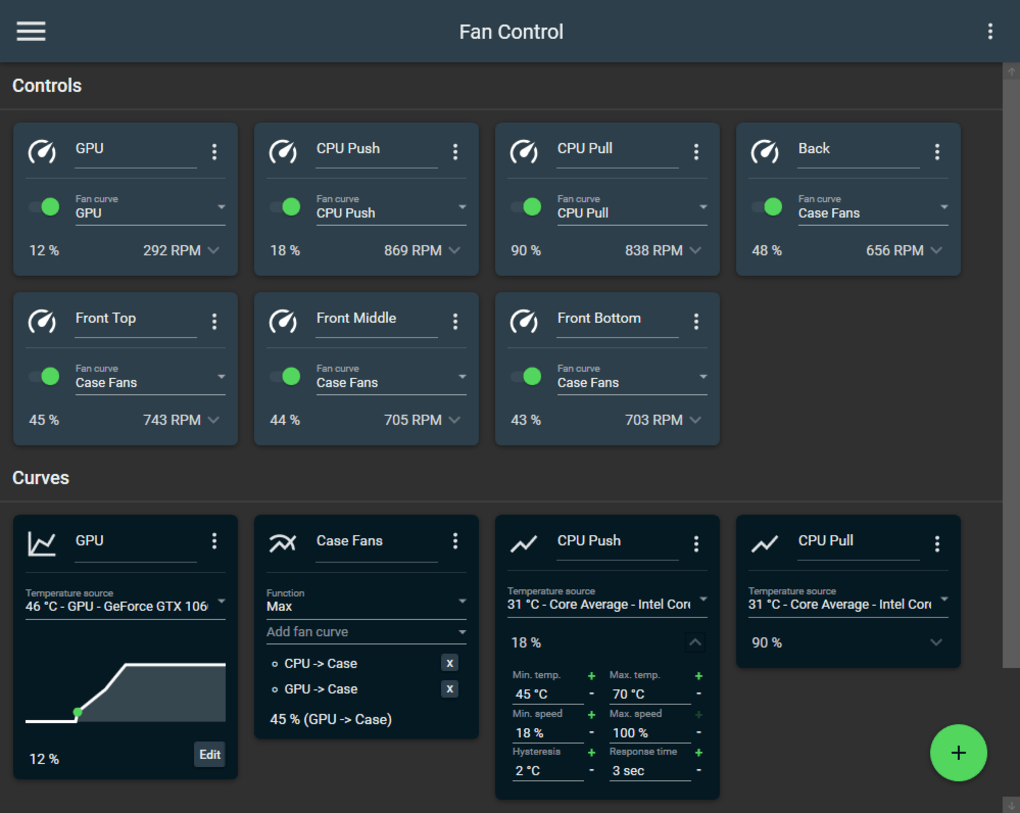
The heart of FanControl lies in its highly customizable fan curves. Unlike many competitors that offer only basic linear adjustments, FanControl offers six distinct curve types, providing users with a broad range of options to match their needs:
-
Linear: A straightforward approach, mapping fan speed linearly to temperature. Simple to understand and implement, this option is ideal for users who prefer a basic, predictable relationship between temperature and fan speed.
-
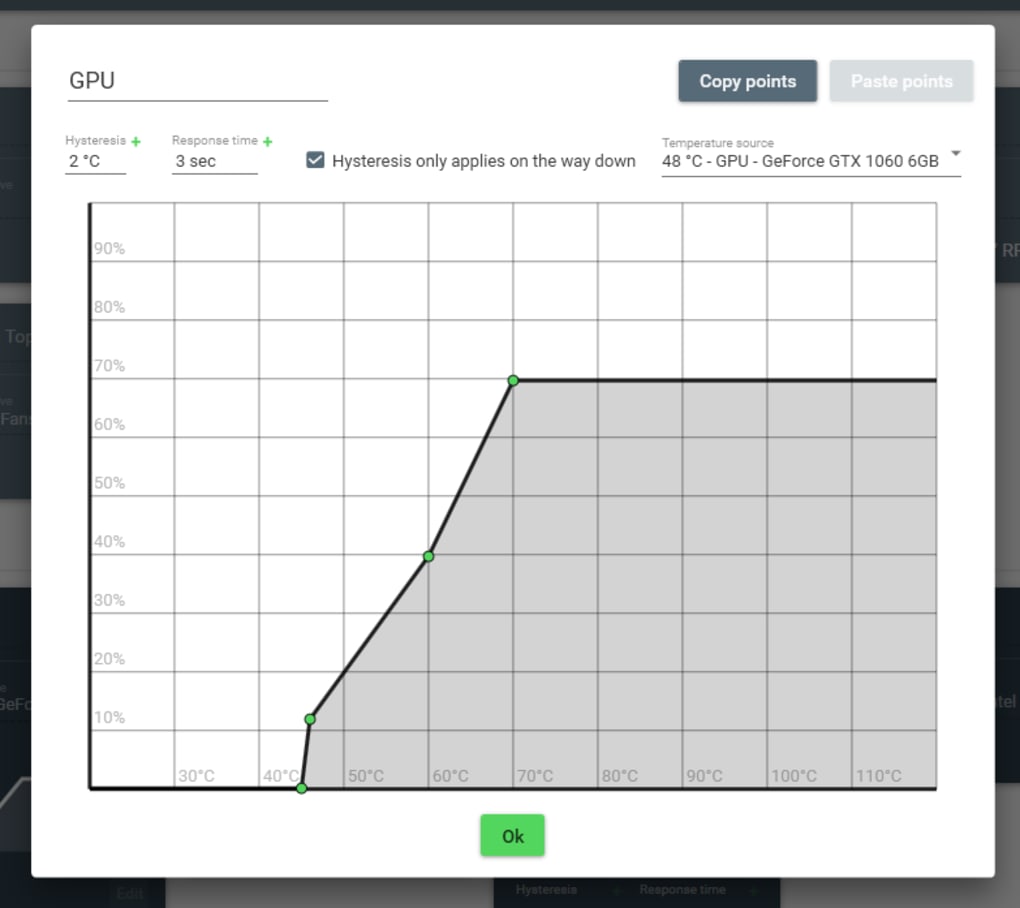
Graph: This allows for complete control, letting users define custom points on a graph to create a non-linear fan curve. This is exceptionally powerful for fine-tuning fan behavior based on specific temperature thresholds or desired noise levels. Users can add, remove, and adjust points, allowing for precise control over the fan speed at different temperatures.
-
Target: This keeps the fan speed at a minimum until a specified target temperature is reached. Once that threshold is crossed, the fan speed ramps up according to a defined curve. This is particularly beneficial for users who want quiet operation at lower temperatures but need responsive cooling when things heat up.
-
Mix: Combining the strengths of two different curves, this function allows users to apply either a “max” or “sum” function to two chosen curves. This provides flexibility in creating complex fan control strategies, potentially incorporating different behaviors at various temperature ranges.
-
Sync: This option synchronizes the fan speed with an existing control mechanism, such as a BIOS setting or another application’s fan control. This is useful for integrating FanControl with other system management tools.
-
Flat: This sets the fan to a fixed percentage of its maximum speed, regardless of temperature. This provides the simplest form of control and might be preferred for specific situations or for testing purposes.
This diversity in curve types ensures that FanControl can cater to a wide range of user preferences and hardware configurations, from basic linear adjustments to complex, multi-stage cooling strategies.
Beyond Fan Curves: Fine-Tuning the Control
FanControl extends its capabilities beyond just curve selection. Users can further refine the fan control using several crucial parameters:
-
Steps: This determines the granularity of fan speed adjustments. Smaller steps allow for finer control, but may increase the frequency of fan speed changes. Larger steps provide smoother operation but may sacrifice some precision.
-
Activation Percentage: This parameter defines the temperature threshold at which the fan begins to increase speed. Users can set this to ensure the fans remain off or at a low speed until a certain temperature is reached, promoting quieter operation at lower loads.
-
Hysteresis: This setting introduces a delay before the fan reacts to temperature changes. This prevents the fan from constantly cycling on and off, reducing wear and tear and promoting quieter operation.
-
Response Time: This dictates how quickly the fan responds to temperature fluctuations. A faster response time ensures immediate cooling when temperatures rise, but may also increase noise and wear. A slower response can provide a smoother, quieter experience.
These parameters, combined with the various fan curve types, allow for a level of customization rarely seen in other fan control applications. This empowers users to balance cooling performance with noise levels and fan longevity, creating an optimal cooling strategy for their specific needs.
Data Acquisition and Profile Management
FanControl’s functionality extends to comprehensive hardware monitoring. It supports reading temperature data from a wide array of sources, including:
- CPU: Monitors CPU temperature, enabling precise fan speed adjustments based on CPU thermal load.
-
GPU: Allows control over GPU fan speed, crucial for maintaining optimal GPU temperature and preventing throttling.
-
Motherboard: Monitors various motherboard temperatures, providing a holistic view of system thermal behavior.
-
Hard Drives: Monitors hard drive temperatures, allowing for adjustments based on storage device heat.
-
.sensor files: This option opens up the possibility of integrating data from other monitoring tools or custom sensors.
This robust sensor support enables FanControl to create accurate and responsive cooling strategies based on real-time hardware information. Furthermore, users can save, load, and edit multiple profiles, allowing for different cooling strategies for various workloads or system configurations. This flexibility is invaluable for users with varying usage patterns or those who wish to experiment with different cooling approaches.
User Interface and Usability
FanControl presents a modern, dashboard-style user interface that provides a clear and intuitive way to access and control all its features. The visual representation of fan curves and sensor data enhances usability, making it easy to understand system behavior and make adjustments accordingly. Although its functionality is advanced, the interface is well-designed, making it accessible to users with varying levels of technical expertise. The program can also run in the background, minimizing its impact on desktop space and allowing for continuous monitoring and control.
Strengths and Weaknesses
Strengths:
- Highly Customizable: FanControl’s greatest strength lies in its extensive customization options. The variety of fan curve types, combined with fine-tuning parameters, allow for incredibly precise control over cooling.
-
Comprehensive Sensor Support: Its ability to monitor a wide range of hardware temperature sensors provides a holistic view of system thermal behavior, leading to more informed cooling strategies.
-
Multiple Profile Support: Saving and loading multiple profiles is invaluable for users with varied usage patterns or those wishing to experiment with different cooling configurations.
-
User-Friendly Interface: Despite its advanced features, FanControl boasts a well-designed, intuitive interface that is easy to navigate.
-
Open Source: Being open-source promotes transparency, community involvement, and ongoing development.
Weaknesses:
-
Technical Knowledge Required: The extensive customization options require a certain level of technical understanding to use effectively. Beginners might find the sheer number of settings overwhelming.
-
Steeper Learning Curve: Mastering the full potential of FanControl requires time and effort to understand the various settings and their interactions.
Conclusion
FanControl is a powerful and versatile tool for managing CPU and GPU fan speeds. Its extensive customization capabilities and comprehensive sensor support set it apart from many competitors. While a certain level of technical knowledge is beneficial for maximizing its potential, the well-designed interface and clear documentation make it accessible to users with varying levels of expertise. For users seeking fine-grained control over their system’s cooling, FanControl is an excellent choice. Its open-source nature and active community further enhance its long-term viability and potential for future development. For those seeking simpler solutions, alternative applications might be more suitable, but for users who demand precise control and understand the implications of advanced settings, FanControl stands as a highly effective and customizable solution.
File Information
- License: “Free”
- Version: “85”
- Latest update: “July 15, 2022”
- Platform: “Windows”
- OS: “Windows 8”
- Language: “English”
- Downloads: “16.1K”
- Size: “4.26 MB”


