
Finding specific files on a computer can often feel like searching for a needle in a haystack. Traditional file explorer searches can be agonizingly slow, sometimes even freezing your system. This is where Fast File Finder steps in, offering a swift and user-friendly solution for locating your files in a fraction of the time. This free Windows utility eliminates the frustration of lengthy searches, providing a streamlined experience for quickly finding the documents, images, programs, or any other files you need.
Lightning-Fast File Searches
Fast File Finder’s primary advantage lies in its incredible speed. Unlike built-in operating system search functions that can take minutes or even longer to scour your entire hard drive, Fast File Finder typically locates files within seconds. The developer boasts search completion times often under 30 seconds, and frequently under 20, significantly reducing the time spent hunting for misplaced files. This dramatic speed improvement is achieved through highly optimized search algorithms designed for efficiency and resource management. The program avoids the common pitfalls of system-intensive searches, ensuring your computer remains responsive even during large-scale file hunts. This efficient approach is particularly beneficial for users with older machines or those working with extensive file libraries.
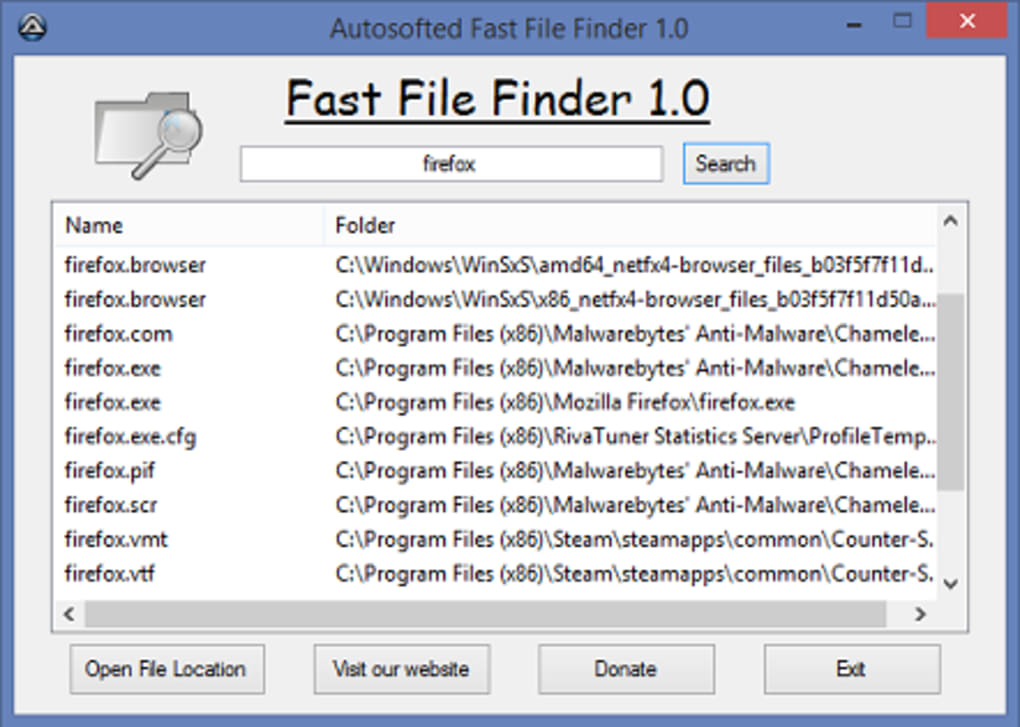
Intuitive and Minimalist User Interface
One of the most striking aspects of Fast File Finder is its remarkably simple interface. In contrast to many file-finding utilities that are cluttered with numerous buttons, options, and settings, Fast File Finder maintains a clean and intuitive design. The program eschews unnecessary complexity, presenting users with a straightforward search bar. To locate your desired file, simply type in your search term (the file name, a portion of the file name, or any relevant keywords) and click the “Search” button. The results will appear quickly and efficiently. This minimalist approach ensures that even users unfamiliar with complex software can quickly master the program. The lack of unnecessary features makes it incredibly easy to learn and use, focusing the user experience on the core functionality: fast and accurate file discovery.
The Advantages of a Simple Design: Efficiency and Accessibility
The simplicity of Fast File Finder’s design is not a compromise on functionality; it’s a strategic choice to maximize usability and efficiency. By stripping away extraneous features, the program prioritizes speed and accessibility. This makes it ideal for users who value quick results over advanced search customization. This is especially beneficial for less technical users or those who simply want a fast, effective way to find their files without having to navigate a confusing array of options and settings. The straightforward design ensures a low learning curve, allowing users to focus on their task rather than struggling with the software itself. This minimalist approach contributes directly to the program’s remarkable speed, as the system doesn’t need to process unnecessary commands or load extraneous features.
Free and Lightweight: A Powerful Tool Without the Cost
Perhaps the most attractive aspect of Fast File Finder is its accessibility. The software is completely free to download and use, eliminating any financial barriers to accessing its speed and efficiency benefits. This is a significant advantage over many file-finding utilities that offer limited functionality in free versions or require paid subscriptions. Fast File Finder is a genuinely free tool, offering its full capabilities without any restrictions. Furthermore, the program’s compact size ensures minimal impact on your system resources. This lightweight design reduces strain on your computer’s processing power and memory, making it a suitable option even for older machines or those with limited storage capacity. The combination of free access and minimal resource usage makes Fast File Finder an exceptionally accessible and practical tool for all users.
Limitations and Considerations
While Fast File Finder excels in speed and simplicity, it is essential to understand its limitations. The program lacks advanced search refinement options. Unlike some more sophisticated file search tools, it doesn’t offer options for filtering results by file type, date modified, size, or other metadata. This simplified approach enhances speed but may restrict the search capabilities for users requiring highly targeted searches. Furthermore, Fast File Finder’s core function is solely focused on file searching; it does not include any other features such as file management, organization, or duplicate file detection. Users who need a more comprehensive file management solution may find Fast File Finder insufficient for their needs. While its speed is exceptional for basic file searches, users with complex file organization requirements or those seeking additional utility features may prefer a more versatile tool.
Alternatives and Comparisons
Several alternative file-finding utilities exist, each with its own strengths and weaknesses. Some offer more advanced search features, including customizable filters, while others include additional file management tools such as organization, renaming, or deletion. Some are free, while others are commercial products offering more comprehensive functionality but at a cost. Choosing the right tool depends on individual needs and priorities. Users requiring only a fast and simple file search will find Fast File Finder perfectly suited to their purpose. Conversely, those seeking more advanced search capabilities or integrated file management tools might find other options more compelling. The best approach is to consider the specific requirements and choose the utility that aligns best with individual needs.
Conclusion: Fast File Finder – A Practical Choice for Speedy File Searches
Fast File Finder delivers on its core promise: incredibly fast file searching. Its minimalist design and straightforward functionality make it a user-friendly option for anyone needing to quickly locate files on their Windows PC. The free and lightweight nature of the software enhances its accessibility, making it an excellent choice for users with various technical skills and system configurations. However, users should acknowledge its limitations in advanced search options and lack of integrated file management tools. For users prioritizing speed and simplicity above all else, Fast File Finder presents a highly practical and effective solution. Its focus on efficient file location without extraneous features makes it a strong candidate for users who want a tool that is fast, reliable, and easy to use. Its speed alone may justify its use for those frequently searching for files across large data sets.
File Information
- License: “Free”
- Latest update: “May 24, 2023”
- Platform: “Windows”
- OS: “Windows 2003”
- Language: “English”
- Downloads: “14.2K”
- Size: “651.92 KB”


