
Fast Image Resizer is a lightweight Windows application designed for efficiently resizing multiple images simultaneously. Its streamlined interface and straightforward functionality make it an ideal tool for users needing to quickly prepare images for web use, email distribution, or other purposes requiring specific dimensions. This review delves into the software’s features, performance, and overall usability, exploring its strengths and limitations.
Streamlined Resizing for Efficiency
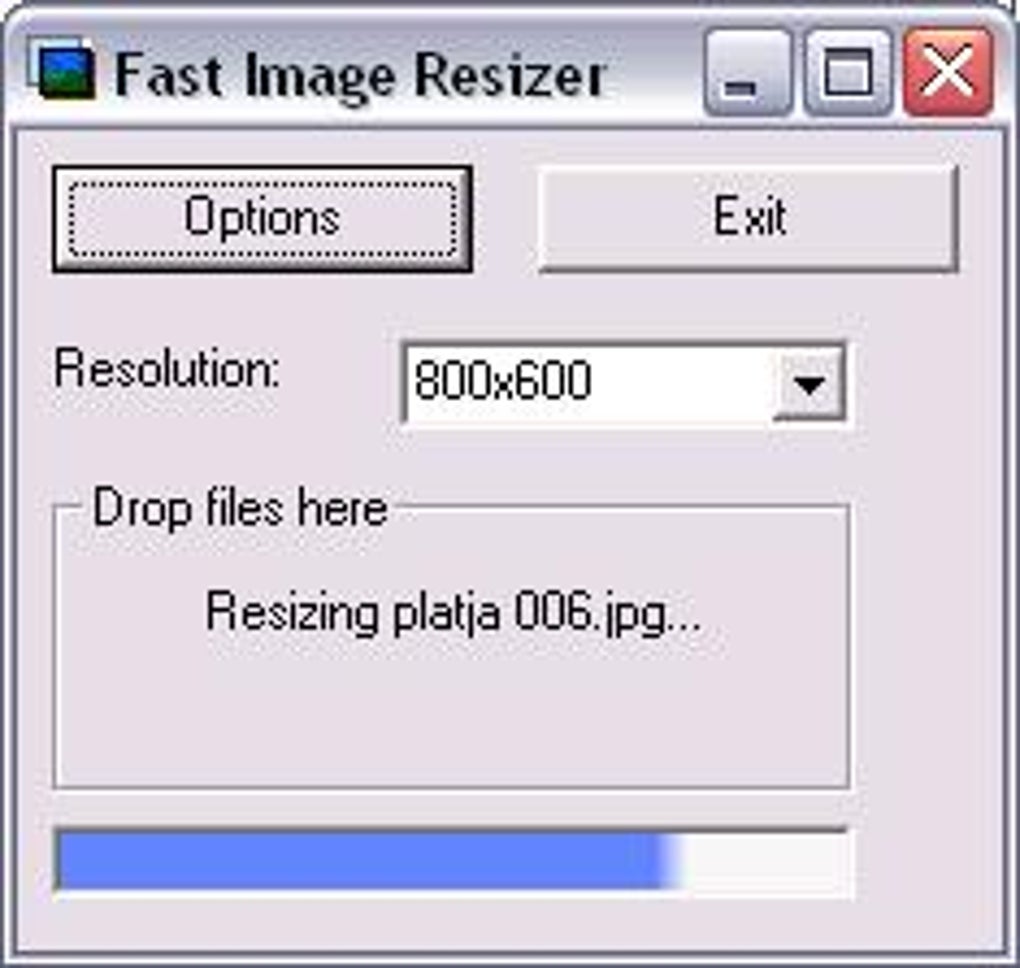
The core function of Fast Image Resizer is its ability to batch-resize images. Users can select multiple images and apply a chosen resolution from a dropdown menu, initiating the resizing process with a simple click. This drag-and-drop functionality eliminates the need for complex image editing software, saving valuable time and effort, especially when dealing with numerous images. The application excels in its speed and efficiency, processing images quickly without significant system resource consumption. User reports consistently highlight the software’s rapid processing, even when working with large batches of images. This speed, a key selling point, directly addresses the “fast” element in its name.
Customizable Output Settings for Flexibility
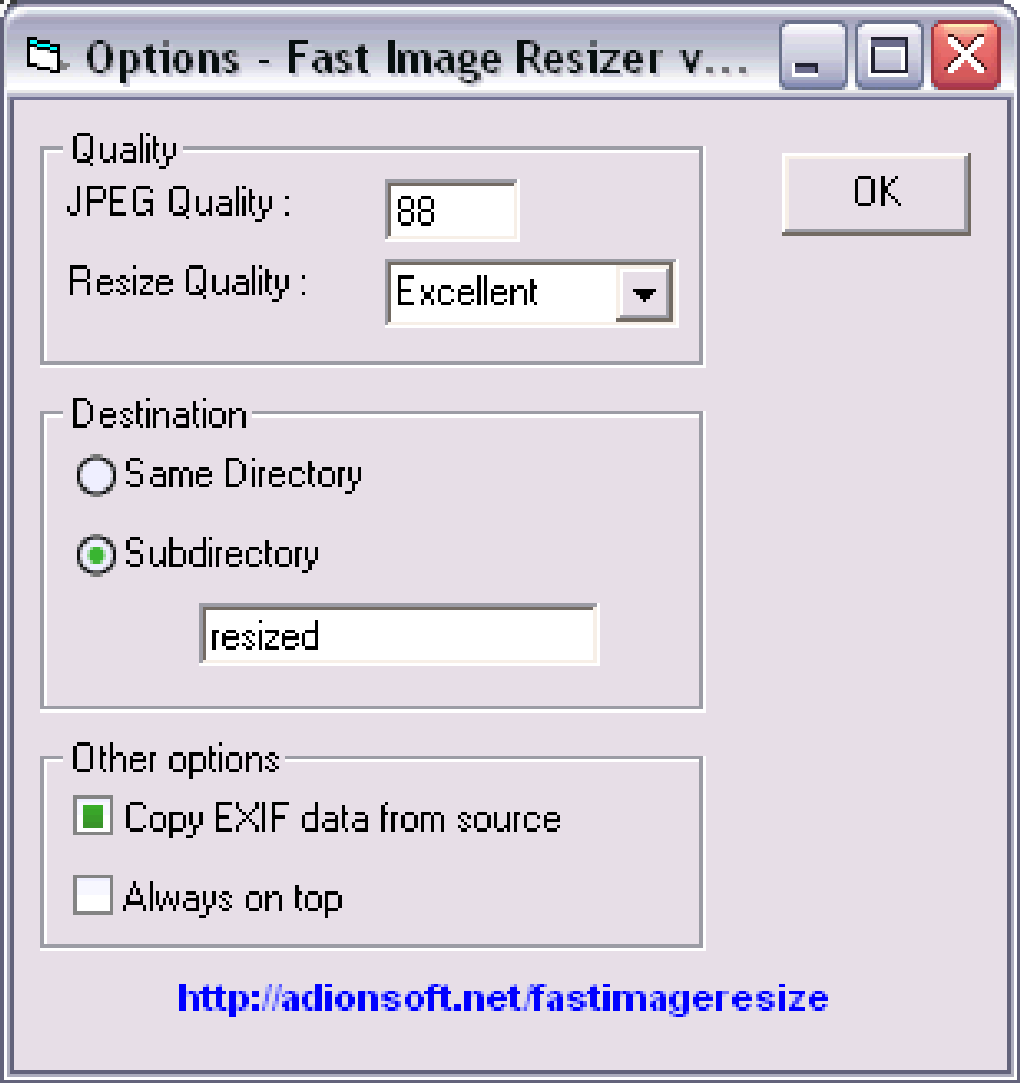
Beyond basic resizing, Fast Image Resizer provides users with several customizable settings to tailor the output to specific needs. The “Options” area allows users to define the output image format (JPEG, BMP, or PNG), a crucial element for controlling file size and image quality. The choice of JPEG allows for compression, reducing file size at the cost of some image detail, while PNG maintains lossless compression, offering higher quality but larger file sizes. Users can also specify the destination for the resized images, choosing to save them in the same folder as the originals, a newly created subfolder, or a user-defined folder. This level of control ensures that users can maintain a well-organized image library. Furthermore, the ability to specify a mask for the output file names allows for batch renaming, preventing accidental overwriting of original images and facilitating better file management.
Advanced Features for Enhanced Control
While its simplicity is a strength, Fast Image Resizer also incorporates several advanced features that enhance its versatility. The software allows for image rotation based on EXIF data (metadata embedded in images), automatically correcting the orientation of images shot in portrait or landscape mode. The option for automatic cropping provides another level of control, enabling users to easily remove unwanted portions of the image during the resizing process. Additionally, users can choose to overwrite original files or preserve them, depending on their workflow preference. The “always on top” function further enhances the user experience, preventing the application window from being obscured during the resizing process. The progress bar during conversion provides constant feedback, and the display of the average time per picture upon completion adds a practical measure of efficiency.
Seamless Integration with Windows Explorer
Fast Image Resizer seamlessly integrates into the Windows Explorer interface, adding a “Send To” menu command. This convenient addition further streamlines the image resizing workflow, allowing users to right-click on images directly within Explorer and send them to the application for quick resizing. This eliminates the need for users to navigate to the application’s interface separately, accelerating the entire process. This level of integration exemplifies the design philosophy behind Fast Image Resizer: prioritizing ease of use and efficiency.
User Experience and Feedback
User reviews consistently praise Fast Image Resizer for its speed, simplicity, and ease of use. Many users highlight the software’s ability to quickly process large batches of images, a feature often lacking in more complex image editing programs. The compact interface is appreciated for its intuitiveness, allowing even novice users to quickly grasp the functionality and begin resizing images within minutes. Positive feedback emphasizes the application’s reliability and lack of errors or crashes during the resizing process, even during demanding tasks involving numerous images.
Some users express a preference for PNG over JPEG for preserving image quality, highlighting a potential area for future development, possibly incorporating more advanced compression options or allowing for a finer degree of control over compression levels. However, the software’s existing options already cater to a wide range of user needs and preferences regarding file size and quality. The consistently positive feedback regarding speed and ease of use strongly suggests that the software effectively meets its core design objectives.
Comparison with Alternative Applications
Several alternative image resizing applications exist, ranging from basic tools to sophisticated image editors. However, Fast Image Resizer distinguishes itself through its focus on speed and simplicity. While more advanced applications like Photoshop offer significantly more features, they often come with a steeper learning curve and a higher system resource overhead. Fast Image Resizer fills a niche for users who need a fast and straightforward solution without the complexity of professional-grade software. Compared to other free or low-cost alternatives, Fast Image Resizer often outperforms competitors in terms of speed, making it a strong contender in its category. The program’s ease of use, especially its seamless Windows integration, makes it a more user-friendly option for individuals who primarily require bulk image resizing functionality.
Conclusion
Fast Image Resizer is a robust and user-friendly application that excels in its core function of rapid batch image resizing. Its intuitive interface, customizable output settings, and seamless integration with Windows Explorer make it an invaluable tool for users who regularly need to resize multiple images. While more advanced features might be desirable for some users, the software’s focus on speed, efficiency, and ease of use makes it a highly effective solution for its intended purpose. The overwhelmingly positive user feedback underscores its success in meeting the needs of its target audience, those seeking a fast, efficient, and easy-to-use solution for batch image resizing. The program’s simplicity and speed are compelling advantages that distinguish it in a market of often more complex alternatives.
File Information
- License: “Free”
- Version: “0.98”
- Latest update: “July 25, 2018”
- Platform: “Windows”
- OS: “Windows 2003”
- Language: “English”
- Downloads: “650.8K”
- Size: “449.56 KB”


