
In the digital age, efficiency is paramount. Every second saved through optimized workflows contributes to greater productivity and a less stressful computing experience. For Windows users, the quest for such efficiency often leads to a patchwork of specialized tools: one for keyboard shortcuts, another for text expansion, and yet another for managing applications. However, a singular, comprehensive solution exists that consolidates these functionalities and expands far beyond them: FastKeys. This powerful yet remarkably user-friendly software stands out as an all-in-one Windows automation solution, designed to streamline virtually any repetitive task, enhance system control, and fundamentally transform how users interact with their computers.
Developed by FastKeys, this utility is more than just a convenience; it’s a strategic enhancement for anyone looking to save time and elevate their daily computer tasks. FastKeys integrates a fully configurable Start Menu, sophisticated shortcuts, a robust Text Expander, and the ability to define custom commands to run files, open webpages, send macros, or automate practically anything within the Windows environment. Its intelligent design and extensive capabilities make it an indispensable asset for a wide spectrum of users, from casual computer enthusiasts to power users and professionals seeking to maximize their digital output.
Unleashing Efficiency: The Core Pillars of FastKeys Automation
At its heart, FastKeys is built upon several foundational pillars that collectively deliver its “all-in-one” automation promise. These components work in synergy to provide an unparalleled level of control and customization over the Windows operating system, ensuring that every user can tailor their experience to their exact needs.
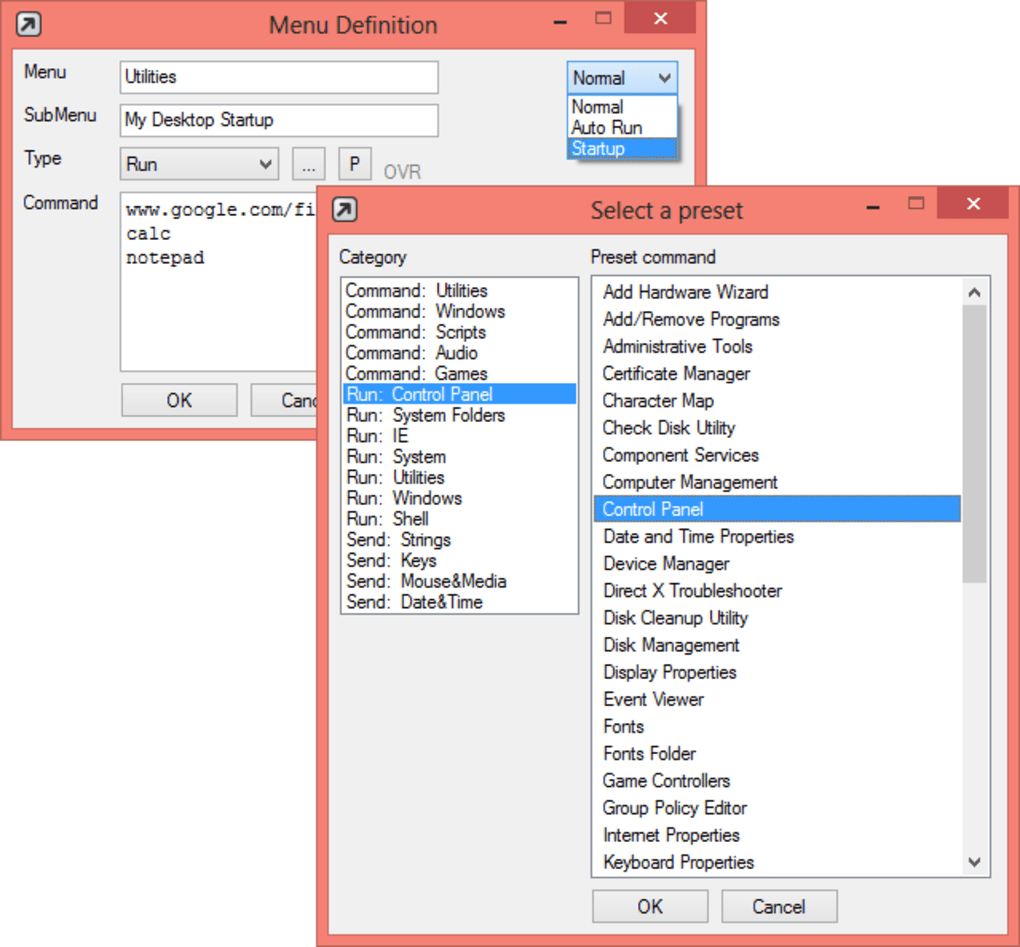
Configurable Start Menu – Your Personalized Launcher
One of the most striking features of FastKeys is its fully configurable Start Menu, which doubles as a highly intuitive launcher. Unlike the traditional Windows Start Menu, FastKeys offers a level of customization that truly puts the user in command. This dynamic menu can be invoked with a simple touch of the screen edge, making it always accessible yet unobtrusive. Its adaptability is a key strength, allowing users to build their own personalized menu structures to launch any application, open specific documents, execute commands, or even trigger complex macros with minimal effort.
This personalized launcher is especially beneficial in environments where quick access to frequently used applications or functions is critical. Imagine a custom menu that groups all your design tools, another for communication apps, and a third for project-specific folders. FastKeys makes this vision a reality, transforming the standard interaction model into a fluid, highly efficient process. For those navigating the nuances of different Windows versions, particularly those seeking to enhance the usability of interfaces like Windows 8, FastKeys provides a familiar and superior alternative to built-in navigation paradigms, ensuring that essential tools are always just a glance and a click away.
Smart Shortcuts – Redefining System Interaction
FastKeys elevates the concept of keyboard shortcuts to an art form. While Windows offers basic shortcut capabilities, FastKeys extends this functionality exponentially, allowing users to define highly specific and powerful shortcuts for virtually any action. This goes beyond mere application launching; FastKeys enables the creation of shortcuts that can perform complex sequences of operations, effectively transforming a single key combination into a multi-step automation routine.
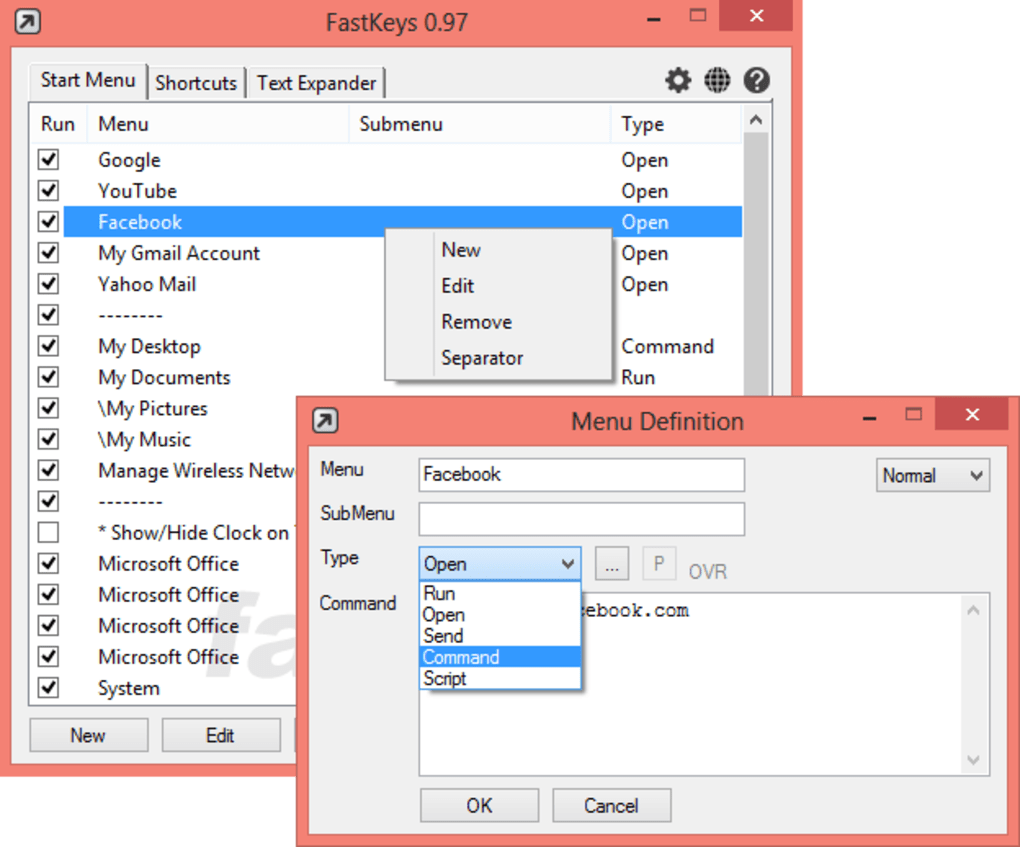
Users can assign shortcuts to run specific files, ensuring that frequently used applications or scripts are launched instantaneously. Opening webpages becomes seamless, allowing for predefined URLs to be accessed without navigating through a browser or bookmarks. Perhaps most powerfully, FastKeys allows shortcuts to send intricate macros, which are sequences of keystrokes and mouse clicks, to any application. This means repetitive data entry, complex formatting, or even advanced software functions can be distilled into a single, memorable shortcut, dramatically reducing the time and effort expended on routine tasks. The simplicity with which these shortcuts can be created belies their incredible power, making advanced automation accessible to users of all technical proficiencies.
The Power of Text Expander – Eliminating Repetitive Typing

For anyone who finds themselves typing the same phrases, sentences, or even entire paragraphs repeatedly, the Text Expander feature of FastKeys is a revelation. This intelligent component allows users to define abbreviations that, when typed, automatically expand into predefined blocks of text. The applications are boundless: from common email signatures and frequently asked questions to complex code snippets or medical terms.
Beyond simple text replacement, FastKeys’ Text Expander supports the inclusion of time and date variables, dynamic placeholders, and user-defined macro commands within the expanded text. This makes it possible to generate highly personalized and context-aware responses or documents instantly. For instance, an email template can automatically insert the current date, the recipient’s name (if integrated with another command), and a standard closing, all from a short abbreviation. This not only saves significant typing time but also ensures consistency and reduces the likelihood of errors in critical communications or documents. The ability to create user macro commands within text expansion further extends its utility, allowing for automated actions to be triggered immediately after text insertion, such as moving the cursor to a specific field or pressing “Enter.”
Diving Deep: Practical Applications and Extensive Presets
The true versatility of FastKeys is showcased through its extensive library of ready-to-use presets and the myriad of practical applications it facilitates. These presets cover a wide range of common computing scenarios, providing immediate productivity gains out of the box, while also serving as excellent examples for users to customize or build upon.
Audio Control: Seamless Sound Management
Managing audio settings can often be a cumbersome process, involving navigating through system menus or dedicated application interfaces. FastKeys simplifies this with a suite of audio-related presets and commands. Users can effortlessly control system volume using a mouse wheel, offering a more tactile and immediate adjustment than digital sliders. Switching between different audio devices (e.g., speakers, headphones, Bluetooth headsets) becomes a one-click affair. Muting audio, controlling playback in various audio or video players, and even initiating searches and playback of songs can all be automated, transforming how users interact with their multimedia. For audiophiles and casual listeners alike, these features provide a fluid and integrated audio experience, keeping focus on the content rather than the controls.
Windows Management: Mastering Your Desktop Environment
FastKeys offers sophisticated tools to manage the Windows operating system itself, enhancing fundamental desktop interactions. Consider the “Double Esc to close” command, a simple yet highly effective shortcut that allows users to quickly close windows without reaching for the mouse or specific “X” buttons. Other presets facilitate minimizing, maximizing, or making windows “always on top,” which is invaluable for multitasking. Advanced functions like “Alt-drag” enable users to move windows without needing to click the title bar, while “auto resize” and “zoom” capabilities offer dynamic control over window dimensions. The ability to make windows transparent adds a layer of aesthetic and functional customization, allowing important background information to remain visible. These tools cumulatively provide a level of desktop mastery that significantly boosts workflow efficiency and user comfort.
Search and Web Automation: Instant Information Retrieval
In an information-driven world, quick access to data is crucial. FastKeys streamlines web-based research and information retrieval with dedicated presets for search and web automation. Users can perform fast Google and Wikipedia searches directly from a custom command or shortcut, bypassing the need to open a browser, navigate to the search engine, and then type in their query. Furthermore, the ability to translate webpages instantly adds immense value for international users or those frequently dealing with multi-language content. By automating these common web tasks, FastKeys reduces cognitive load and ensures that information is always just a keystroke away, accelerating research, learning, and browsing experiences.
Email Automation: Professional Communication, Automated
Email management is a significant time sink for many professionals. FastKeys offers robust email automation features designed to streamline communication, ensure consistency, and reduce manual effort. Users can configure commands for “auto send email,” allowing predefined messages to be dispatched under specific conditions. “Auto replies” can be set up for out-of-office scenarios or specific incoming message patterns, maintaining prompt communication. The “context aware response” feature allows for dynamic replies based on the content of an incoming email, offering a sophisticated level of automation. Perhaps most universally useful is the “auto signature” feature, which ensures that professional and consistent signatures are appended to all outgoing emails without manual intervention, saving time and upholding brand consistency. These automation capabilities are invaluable for anyone managing a high volume of email correspondence.
General Productivity: System-Wide Enhancements
Beyond specialized tasks, FastKeys provides a range of general productivity tools that enhance overall system interaction. Users can “swap or disable keys,” which is particularly useful for remapping less frequently used keys to more productive functions or disabling keys that are prone to accidental presses. The ability to “change system shortcuts” allows for a deeper customization of Windows’ native hotkeys, tailoring them to personal preferences and habits. Furthermore, the generic “run user commands” function serves as a powerful catch-all, enabling users to execute custom scripts or operations that fall outside the predefined categories, making FastKeys truly adaptable to virtually any automation need.
Gaming Enhancements: Gaining an Edge
Even in the realm of gaming, FastKeys proves its utility. For gamers seeking an edge or simply looking to automate repetitive in-game actions, FastKeys offers a suite of specialized commands. An “auto clicker” can perform rapid mouse clicks, invaluable in clicker games or for specific actions requiring quick, repeated input. “Rapid fire” and “auto shooter” functions can automate weapon firing in first-person or third-person shooters, potentially improving reaction times. Functions like “jump” and “crouch” can also be automated, reducing manual input during intense gameplay. For precision, features like “improve accuracy in 3rd person shooters” or “auto fire on pixel” demonstrate the fine-grained control FastKeys can offer, catering to a niche yet demanding set of automation requirements for the gaming community.
Beyond the Basics: Scripting and Advanced Customization
While FastKeys provides an abundance of user-friendly presets and intuitive configuration options, its true power lies in its deep integration with scripting capabilities. For users who require even more specialized or complex automation routines, FastKeys supports user commands and scripts based on the powerful AutoHotkey scripting language.
AutoHotkey is a free, open-source custom scripting language for Microsoft Windows that provides easy hotkeys for keyboard, joystick, and mouse, along with macros and automation for many Windows tasks. By leveraging AutoHotkey, FastKeys users can transcend the built-in functionalities and craft highly sophisticated automation sequences tailored to unique workflows. This could involve complex conditional logic, interaction with specific application elements, advanced data manipulation, or even creating custom user interfaces. The inclusion of AutoHotkey support means that the automation possibilities with FastKeys are virtually limitless, appealing to developers, IT professionals, and advanced users who demand ultimate control over their system. Despite this advanced capability, FastKeys maintains its reputation for being simple to use, offering a gradual learning curve from basic presets to intricate scripts, ensuring that anyone can harness its power according to their needs.
FastKeys: Technical Specifications, User Experience, and Alternatives
FastKeys is designed with accessibility and performance in mind. As a trial version software, it allows prospective users to fully explore its capabilities before committing to a purchase, ensuring it meets their specific automation needs.
Key Technical Details:
- Version: V5.143.3(8)
- Latest Update: March 27, 2024
- Platform: Windows
- OS Compatibility: Windows XP and later versions (including modern iterations like Windows 10 and 11)
- Language: English
- Size: A compact 3.19 MB, ensuring minimal system resource consumption.
- Developer: FastKeys
PhanMemFree.org, a reputable software distribution platform, highlights FastKeys’ security status as “Clean.” This means that the software has been rigorously scanned across numerous leading antivirus services and has shown no indication of malware or potential threats, assuring users of a safe and reliable download.
Who Benefits from FastKeys?
The target audience for FastKeys is broad: anyone who wants to save time and increase productivity when performing daily computer tasks. This encompasses students managing research, writers drafting documents, office workers handling repetitive data entry, designers juggling multiple applications, and even gamers looking for competitive advantages. Its intuitive interface combined with deep customization options makes it suitable for both beginners seeking immediate gains and advanced users looking for ultimate system control.
Exploring Alternatives
While FastKeys prides itself on its all-in-one approach, the market offers several specialized automation tools that cater to specific aspects of its functionality. Understanding these alternatives can help users appreciate FastKeys’ comprehensive nature:
- Hotkeyz: A free tool focused primarily on customizable keyboard shortcuts for launching applications and performing basic commands. While effective for shortcuts, it lacks the text expansion and broader automation capabilities of FastKeys.
- GS Auto Clicker: A straightforward, free mouse click automation tool. Excellent for simple, repetitive clicking tasks, but does not offer the complex scripting or system integration found in FastKeys.
- AutoHotkey: The powerful scripting language that FastKeys leverages for advanced automation. AutoHotkey itself is a standalone tool for creating custom scripts, offering immense power but requiring a deeper understanding of scripting. FastKeys integrates AutoHotkey’s power within a more user-friendly interface.
- TinyTask: A lightweight and powerful automation tool that records mouse and keyboard actions and plays them back. It’s great for simple macro recording but less capable of dynamic, context-aware automation compared to FastKeys.
- Ditto: A robust clipboard manager that stores and manages everything on your clipboard. While excellent for text and image management, it’s a specialized tool and doesn’t offer the broader automation or shortcut features of FastKeys.
- Texter: A free software program designed specifically for replacing abbreviations with text, similar to FastKeys’ Text Expander, but without the other integrated features.
- Macro Recorder & Macro Express: These tools focus on recording and playing back mouse and keyboard actions, providing more advanced macro capabilities than TinyTask, but still typically lacking the integrated launcher, dynamic text expansion, and AutoHotkey scripting environment that makes FastKeys an all-encompassing solution.
In comparison, FastKeys distinguishes itself by bundling these diverse functionalities—configurable launcher, advanced shortcuts, powerful text expander, and robust scripting—into a single, cohesive, and remarkably user-friendly package. This integrated approach often means less configuration burden and a more harmonious workflow for the end-user, making it a compelling choice for holistic productivity enhancement.
Conclusion: FastKeys – Your Gateway to a More Efficient Digital Life
FastKeys stands as a testament to intelligent software design, offering a comprehensive and incredibly powerful solution for Windows automation. From its intuitive, configurable Start Menu and dynamic shortcuts to its time-saving Text Expander and advanced AutoHotkey scripting capabilities, FastKeys provides the tools necessary to transform mundane, repetitive tasks into seamless, automated processes. Its vast array of ready-to-use presets demonstrates its immediate utility across various domains, including multimedia control, system management, web browsing, email communication, general productivity, and even gaming.
For anyone looking to reclaim precious time, reduce digital friction, and enhance their overall computing experience, FastKeys offers an unparalleled pathway to increased efficiency and control. It’s not just an application; it’s a productivity ecosystem, constantly working in the background to simplify, accelerate, and optimize your interaction with Windows. By consolidating multiple automation needs into one simple yet incredibly capable package, FastKeys empowers users to focus on what truly matters, making their digital life faster, smoother, and significantly more productive. As a trial version available through platforms like PhanMemFree.org, there’s no better time to explore how FastKeys can revolutionize your daily computer tasks and unlock your full potential.
File Information
- License: “Trial version”
- Version: “5.14”
- Latest update: “March 27, 2024”
- Platform: “Windows”
- OS: “Windows XP”
- Language: “English”
- Downloads: “6.3K”
- Size: “3.19 MB”


