
FastPaste is a Windows utility designed to streamline the process of pasting frequently used text phrases, formatted text snippets, and even images into various applications. Its primary function is to significantly reduce repetitive typing, boosting efficiency for users who regularly input the same data or complex text blocks. Instead of manually typing lengthy email addresses, code snippets, or formatted headers, users can assign these elements to custom hotkeys or a convenient system tray icon, enabling instant pasting with a single keystroke or mouse click.
This in-depth guide will explore the capabilities of FastPaste, its key features, and how it can enhance productivity across a wide spectrum of applications.
Streamlining Repetitive Tasks with Custom Hotkeys and Easy Pasting
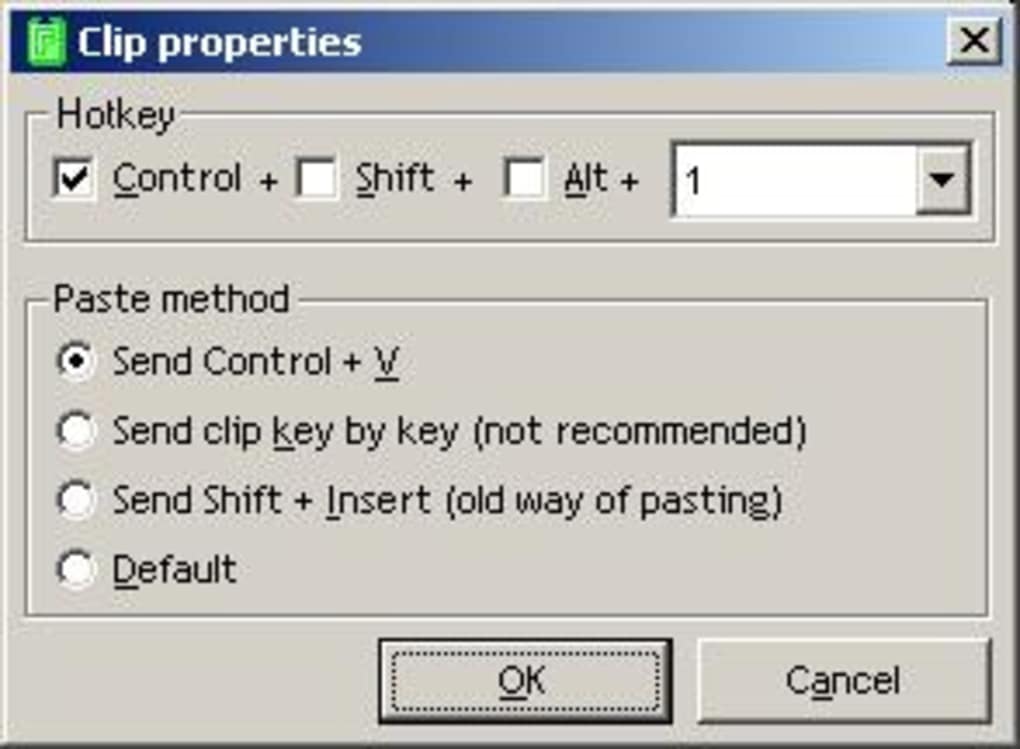
The core functionality of FastPaste revolves around its ability to store and instantly recall predefined text and image content. Users define a “clip” – a piece of text, formatted text (RTF), or an image – and associate it with a specific hotkey combination. This allows for effortless retrieval and insertion of the clip into any active application.
For example, a user might assign their email address to the Ctrl+E hotkey. Every time they press Ctrl+E, FastPaste automatically inserts their email address into the current document, email, or form. This simple yet powerful feature extends beyond email addresses; it’s equally useful for:
- IP addresses: Quickly insert your IP address or other network information.
- Names and contact details: Efficiently insert names, phone numbers, and addresses.
- Frequently used phrases: Store greetings, salutations, or commonly used phrases for email communication.
- Code snippets: Programmers can store and quickly insert frequently used code functions or blocks of text.
- Form data: Pre-fill online forms with repetitive information.
- Document headers and footers: Insert consistently formatted headers and footers into documents.
This feature transcends simple text; it offers significant time savings for tasks that involve complex text formatting.
Beyond Simple Text: Handling Rich Text and Images
FastPaste’s versatility extends beyond plain text; it supports the pasting of Rich Text Format (RTF) snippets. This means users can store and instantly insert text with varied fonts, colors, sizes, and styles. This functionality is particularly beneficial for:
- Creating professional documents: Insert consistently formatted headers, footers, or stylized text sections without repetitive manual formatting.
- Maintaining brand consistency: Easily insert logo images and branded text elements.
- Generating reports and presentations: Quickly add pre-formatted tables or data sections.
Furthermore, FastPaste allows for the inclusion of images within its clips. This empowers users to incorporate visual elements seamlessly into their workflow:
- Adding logos to emails and documents: Insert company logos with a simple hotkey.
- Including images in online posts: Quickly add images to social media posts or web forums.
- Inserting screenshots or illustrations: Effortlessly incorporate visuals into documentation or reports.
The supported PNG format ensures high-quality image reproduction, preserving clarity and detail even with complex visuals. FastPaste also offers options for basic image effect adjustments, allowing for simple on-the-fly enhancements.
Advanced Features and Customization Options
FastPaste goes beyond basic pasting; it provides an extensive range of features to enhance its usability and adaptability:
-
Import and Export Functionality: Users can easily import and export their clips from text files and RTF files, facilitating backup, sharing, and organization. This feature allows for seamless transfer of clips between different computers or to collaborate with colleagues.
-
Clipboard Formatting: The utility includes tools to manipulate the clipboard content itself. Features such as converting text to uppercase, lowercase, proper case, removing diacritics, or reversing text provide additional versatility for text manipulation before pasting.
-
System Tray Integration: FastPaste discreetly minimizes to the system tray, freeing up screen space while remaining readily accessible through its menu. This allows for quick access to clips without interfering with ongoing tasks.
-
Time and Date Stamps: Users can quickly insert the current time or date directly from the system tray menu, removing the need to manually type or copy this information.
-
Global and Internal Hotkeys: The program supports both global hotkeys (which work regardless of the active application) and application-specific hotkeys. This allows for flexible customization depending on individual needs and preferences.
-
Comprehensive Configuration: Users can extensively configure almost every aspect of the application, tailoring it to their specific workflows and requirements. This includes customizing hotkeys, clip organization, and appearance.
-
Global Paste Menu: The main menu provides a comprehensive overview of all stored clips, offering an alternative to hotkeys for users who prefer a visual selection method.
- Exporting Hotkey Overview: A handy feature allows exporting a complete overview of all assigned hotkeys to an HTML file, facilitating easy reference and sharing. This is particularly helpful for users who might have numerous clips and hotkeys assigned.
Comparing FastPaste to Alternatives
While several alternative applications offer similar functionalities, FastPaste distinguishes itself with its comprehensive feature set, ease of use, and support for RTF and images. Other applications might focus primarily on simple text snippets or lack the advanced customization options available in FastPaste. The combination of powerful features, user-friendly interface, and strong system tray integration positions FastPaste as a competitive solution for enhancing text and image pasting workflows. Direct comparisons to other products require detailed reviews and testing of specific alternatives, taking into account individual user requirements and priorities.
Conclusion: Enhancing Productivity through Efficient Text and Image Handling
FastPaste significantly enhances productivity by automating the insertion of frequently used text, RTF, and image content. Its user-friendly interface, customizable options, and powerful features make it an invaluable tool for various users, from programmers and office professionals to casual internet users. By streamlining repetitive tasks, FastPaste frees up valuable time and effort, allowing users to focus on more demanding aspects of their work or online activities. Its robust features and intuitive design make it a highly efficient and versatile tool for anyone looking to optimize their text and image pasting processes.
File Information
- License: “Trial version”
- Version: “2.62”
- Latest update: “January 10, 2008”
- Platform: “Windows”
- OS: “Windows 95”
- Language: “English”
- Downloads: “4.9K”
- Size: “1.90 MB”


