
File Scavenger is a powerful data recovery software designed to retrieve lost or deleted files from a wide range of storage devices. Whether you’ve accidentally deleted a crucial document, suffered a hard drive failure, or dealt with a corrupted file system, File Scavenger offers a robust solution to recover your precious data. This comprehensive review will explore its capabilities, user interface, pros and cons, and compare it to alternative data recovery tools.
Understanding File Scavenger’s Capabilities
File Scavenger distinguishes itself through its ability to recover data from various storage mediums and file systems. Its core strength lies in its adaptability to different scenarios, including accidental deletions, formatted drives, and even severely corrupted storage devices.
The software excels in recovering files from hard drives (both internal and external), memory cards (SD cards, CF cards, etc.), flash drives, and other removable storage devices. It supports a broad spectrum of file systems, including NTFS, FAT32, exFAT, Ext2, Ext3, Ext4, HFS+, APFS, and UFS, ensuring compatibility with various operating systems like Windows, macOS, and Linux (though the application itself is primarily for Windows). This wide compatibility minimizes the chance of incompatibility issues and allows recovery from diverse storage devices used across different platforms.
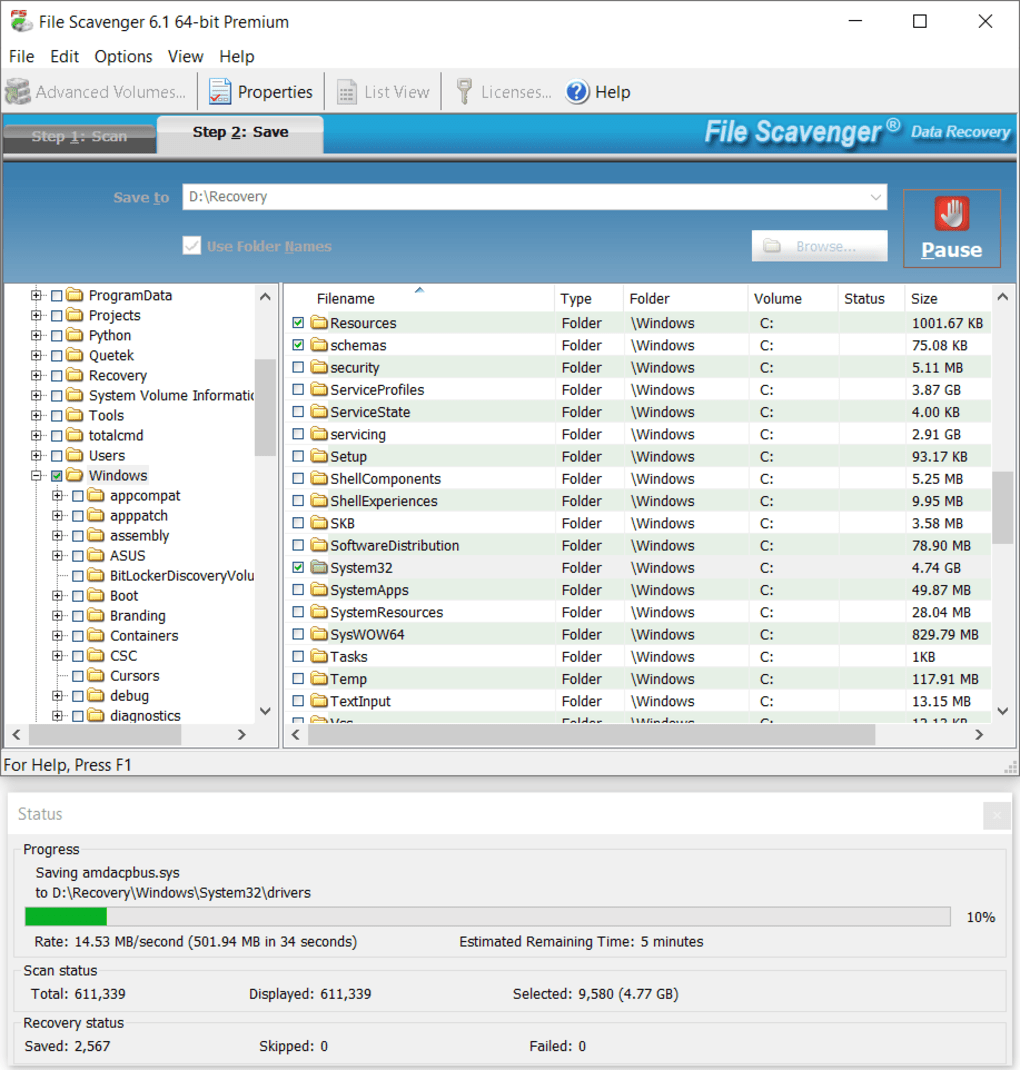
One significant advantage is its ability to recover files even from reformatted or corrupted partitions. Data loss often occurs due to accidental formatting, partition corruption, or even drive failures. File Scavenger employs advanced algorithms that can navigate through corrupted data structures and extract recoverable information, providing users with the best possible chance of retrieving their data, even in critical situations.
Beyond basic file recovery, File Scavenger can also reconstruct damaged RAID arrays and spanned volumes. RAID (Redundant Array of Independent Disks) systems and spanned volumes are used to enhance storage capacity and reliability. However, data loss in such configurations can be particularly challenging. File Scavenger offers specialized tools to reconstruct these structures, allowing for the retrieval of data even when the system’s integrity has been compromised. This advanced feature sets it apart from many consumer-level data recovery utilities.
Furthermore, File Scavenger allows users to create an image of a hard drive, essentially creating an exact bit-by-bit copy of the drive’s contents to a file. This functionality is crucial for forensics, archiving, or preserving the state of a damaged drive before attempting recovery. Creating an image allows for safer analysis and recovery without risking further data loss from direct access to a potentially failing drive.
User Interface and User Experience
File Scavenger aims for a balance between user-friendliness and advanced features. While some users have criticized its appearance as outdated, its intuitive design means most users will find it straightforward to navigate. The interface is designed to be accessible to both casual and power users. The main screen presents options for selecting the drive to scan and initiating the recovery process.
The scanning process, while sometimes lengthy depending on the size of the drive, is generally well-managed. The software displays progress updates, allowing users to monitor the scan’s status without interruption. Once the scan is complete, recovered files are presented with their original file names, folder paths, and timestamps, making identification and organization easier.
File Scavenger also features a demo mode. This mode allows users to test the software’s capabilities before committing to a full purchase. While the demo mode has limitations (recovering only files smaller than 64 KB and allowing previews of image files), it offers a valuable opportunity to assess the software’s potential for recovering specific file types before investment. This is a crucial element for users uncertain about the software’s effectiveness or who need to quickly evaluate its capabilities in a specific data recovery context.
However, some users have reported a steep learning curve, particularly when dealing with advanced options and complex recovery scenarios. While the basic functions are intuitive, mastering all the software’s nuances might require some time and effort. The lack of extensive documentation and in-depth tutorials for advanced features could be improved to cater better to power users.
Pros and Cons of File Scavenger
Pros:
- Powerful recovery capabilities: Handles various file systems, storage devices, and data loss scenarios, including reformatted drives and corrupted partitions.
- RAID and spanned volume reconstruction: Unique feature that significantly enhances the chances of recovery in complex storage configurations.
- Drive imaging: Creates bit-by-bit copies of hard drives for safer analysis and recovery.
- Intuitive interface for basic tasks: The core recovery process is designed for ease of use.
- Demo mode: Allows for a risk-free test run before purchase.
- Multiple language support: Facilitates wider accessibility across different regions.
Cons:
- Outdated interface: The visual design might seem dated compared to more modern software.
- Limited documentation and tutorials: Could benefit from more comprehensive guides for advanced features and complex scenarios.
- Not entirely free: The demo version has limitations, requiring purchase for full functionality. The pricing structure may also be a factor for some users.
- Potential for lengthy scan times: The scan duration can be significant for large drives or heavily damaged storage media.
- Customer support may be limited: User feedback suggests inconsistencies in the level and responsiveness of customer support, potentially leaving users with unresolved issues.
Comparison with Alternative Data Recovery Software
Several other data recovery tools compete with File Scavenger. Some notable alternatives include Recuva, GetDataBack, Recover4all, and others. These tools often offer varying strengths and weaknesses, particularly regarding functionality, user experience, and pricing.
Recuva, for instance, is known for its user-friendly interface and free version, making it accessible to a broader audience. However, it may not offer the same advanced features or handle complex data loss scenarios as effectively as File Scavenger.
GetDataBack, on the other hand, is a powerful tool geared towards more technical users, offering advanced options and superior capabilities in certain complex scenarios. However, its interface is considered less user-friendly than File Scavenger, potentially posing a steeper learning curve.
Recover4all strikes a balance between functionality and ease of use, but may lack the specialized features for RAID reconstruction and drive imaging found in File Scavenger.
The choice between File Scavenger and alternative tools ultimately depends on individual needs and technical expertise. Users seeking a straightforward solution with robust basic capabilities might find Recuva suitable. Those requiring advanced features and comfortable with complex settings might prefer GetDataBack. File Scavenger sits in the middle, catering to a wider range of users with a balance of functionality and ease of use, particularly those who require the advanced features of RAID and spanned volume recovery.
Conclusion
File Scavenger is a powerful and versatile data recovery tool capable of retrieving lost or deleted files from a broad spectrum of storage devices and file systems. Its ability to handle complex recovery scenarios, including corrupted partitions and damaged RAID arrays, sets it apart. While its interface might not be the most modern, its user-friendliness for basic tasks and powerful features for more advanced users make it a strong contender in the data recovery market. However, potential users should carefully consider the pricing, the limitations of the demo version, and the need for potentially advanced technical knowledge when utilizing some of its more advanced features. Comparing it with alternative options based on individual requirements is essential before deciding if File Scavenger is the right choice for your specific data recovery needs.
File Information
- License: “Trial version”
- Latest update: “September 18, 2024”
- Platform: “Windows”
- OS: “Windows 8”
- Language: “English”
- Downloads: “224.9K”
- Size: “7.19 MB”


