
FileList is a free, command-line utility designed for Windows operating systems, offering a robust solution for organizing and managing files within directories. Its core function is to generate comprehensive CSV (Comma Separated Value) files containing detailed metadata about the files and folders within a specified directory, providing a powerful tool for efficient file organization and retrieval. This in-depth review will explore FileList’s capabilities, comparing it to similar tools and examining its strengths and weaknesses for both novice and experienced users.
FileList’s Core Functionality: Generating Detailed File Lists
At its heart, FileList excels at creating detailed, customizable inventories of directory contents. Instead of simply listing file names, it provides a rich dataset including file names, sizes, paths, creation dates, last access times, and last modification times, all neatly organized in a CSV format. This structured output is readily importable into spreadsheet software like Microsoft Excel or databases for advanced analysis and manipulation. This functionality transcends simple file listings; it transforms raw directory data into structured information suitable for various analytical and organizational purposes.
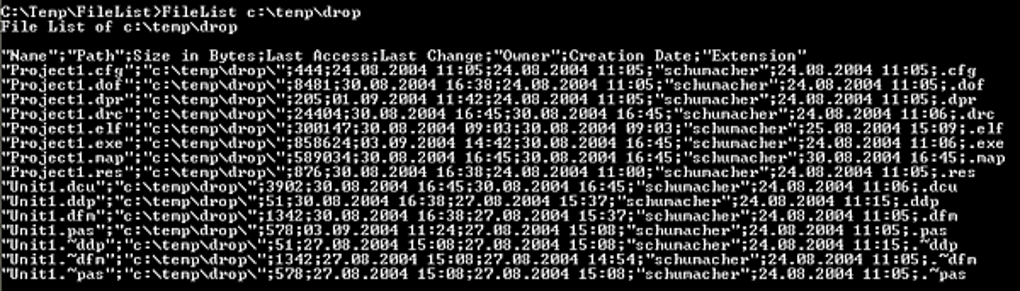
The CSV format chosen by FileList facilitates seamless integration with other applications. The structured data allows for effortless importing into spreadsheets for data analysis, sorting, and filtering, or into databases for long-term storage and management. This interoperability is a key advantage, extending FileList’s utility beyond its primary function. The program cleverly bridges the gap between raw file system data and the structured formats preferred by many productivity and data management tools.
Advanced Filtering Capabilities: Precision in Organization
FileList’s true power lies in its highly customizable filtering options. Users can specify criteria to narrow down the generated file list, focusing on specific files based on various attributes. These filters extend beyond basic parameters, enabling refined searches based on file name, extension, size, timestamps (creation, access, modification), and even directory depth. This granular control is invaluable when dealing with large, complex directories containing numerous files.
For instance, a user could easily generate a list of only Microsoft Office Suite files created within a specific timeframe, or isolate files exceeding a particular size threshold. This ability to tailor the output directly to specific needs dramatically improves efficiency, eliminating the need to manually sift through vast amounts of data. The power of these filters is not just in isolating specific files, but also in the speed and efficiency gained. This efficiency makes FileList a valuable tool for users facing the challenges of managing massive directories and complex file structures.
This precision is crucial for tasks like identifying large files to free up disk space, locating specific files created during a project, or auditing the contents of a directory for compliance or security purposes. The flexibility inherent in the filter options transforms FileList from a basic listing utility into a powerful tool for managing large and complex data sets. The meticulous filtering features distinguish FileList from simpler file explorers and elevate it to a sophisticated file management instrument.
Seamless Integration with Other Software and Workflows
FileList is not merely a standalone utility; it’s designed for integration into larger workflows. Its ability to seamlessly integrate with scripting languages and other software extends its versatility significantly. Users can easily incorporate FileList commands into batch scripts, automating repetitive file management tasks. The consistent and structured output allows for straightforward parsing and manipulation of the data by other applications, further enhancing automation possibilities.
This ability to integrate with external tools and scripts makes FileList exceptionally adaptable to diverse workflows. It allows power users to incorporate file listing and analysis into custom solutions tailored to their precise needs, automating tasks and streamlining their processes. This level of integration distinguishes FileList from standalone file management tools and solidifies its position as a valuable asset within a broader software ecosystem.
The CSV output format is another aspect facilitating this seamless integration. The standardized format allows for easy import into various applications without complex data transformation steps, simplifying the overall workflow. This approach promotes efficiency and reduces the reliance on manual data handling, allowing for a more streamlined and automated experience.
Comparison to Similar Utilities: FileList vs. Vim
FileList often gets compared to text editors and command-line utilities like Vim, especially in the context of file management tasks. Both are command-line tools catering to advanced users comfortable with the command-line interface. However, their focuses differ significantly. Vim is a powerful text editor focused on editing files directly, whereas FileList’s primary strength is generating detailed reports of directory contents.
While both tools require a certain level of technical proficiency, FileList is generally considered more user-friendly for beginners compared to Vim. Vim, with its complex command structure and extensive customization options, often presents a steeper learning curve for those unfamiliar with it. FileList, in comparison, presents a more straightforward and intuitive user experience, despite its command-line nature. This difference in complexity stems from their distinct design goals. Vim’s design prioritizes speed and comprehensive editing capabilities, leading to a complex command structure, while FileList focuses on simplicity and efficient report generation.
While Vim offers file exploration as a secondary functionality, it is not its primary purpose. FileList, on the other hand, is designed specifically for generating comprehensive file listings. Therefore, although both serve overlapping functions in file management, their core strengths and approach to file management are fundamentally different. The choice between them depends heavily on the user’s primary need: comprehensive text editing (Vim) or detailed file listing (FileList).
User Experience and Accessibility: A Balancing Act
FileList’s command-line interface, while powerful, may pose challenges for novice users unfamiliar with command-line tools. The numerous shortcut keys and the requirement for precise command syntax can be daunting. While the documentation assists, mastering the tool requires dedicated time and effort. This aspect represents a trade-off between power and ease of use.
However, for experienced users comfortable with command-line interfaces, FileList offers unmatched speed and efficiency. The ability to quickly generate highly specific file lists using command-line arguments is a significant advantage over graphical file explorers, which can become cumbersome when dealing with numerous files and complex directory structures. The intuitive use of filters and the efficient CSV export format are significant strengths, despite the technical proficiency required to use the command-line interface effectively.
The program does, however, provide complete control and customization. This control extends to defining column headers and sorting options, tailoring the output precisely to the user’s needs. The degree of customization is substantial, giving experienced users a significant degree of flexibility and power in managing their files.
Conclusion: FileList - A Powerful Tool for the Right User
FileList is a highly versatile and powerful command-line utility specifically designed for efficient file management. Its strengths lie in its ability to generate highly detailed and customizable file lists, making it indispensable for users dealing with large directories and complex file structures. The granular filtering capabilities allow for incredibly precise selection of files based on numerous criteria. Seamless integration with other software further expands its utility.
However, its command-line interface and the complexity of its features may pose a challenge for novice users. While the learning curve can be steep initially, mastering FileList significantly enhances file management efficiency, especially for users comfortable with command-line tools. The power it provides comes at the cost of a steeper learning curve than a traditional GUI application.
Overall, FileList is a valuable asset for users who require advanced file management capabilities and who are comfortable with a command-line interface. Its precision and customization options are unmatched, providing a significant advantage in efficiency and organization. While not suited for every user, it offers a potent solution for managing large, complex file systems.
File Information
- License: “Free”
- Latest update: “February 21, 2022”
- Platform: “Windows”
- OS: “Windows XP”
- Language: “English”
- Downloads: “22.2K”
- Size: “2.14 MB”


