
FileTypesMan is a free, portable utility for Windows that provides a powerful and detailed interface for managing file type associations. Unlike the built-in Windows settings, FileTypesMan offers a comprehensive view of all registered file types and extensions, allowing users to easily edit, repair, and restore file associations. This in-depth guide will explore FileTypesMan’s features, benefits, and potential drawbacks, providing a complete understanding of this essential tool for advanced Windows users.
Understanding File Type Associations in Windows
Before delving into the specifics of FileTypesMan, it’s crucial to grasp the concept of file type associations in Windows. A file association links a specific file extension (e.g., .docx, .jpg, .pdf) to a particular application. When you double-click a file, Windows uses the associated application to open it. These associations are vital for seamless file handling, allowing users to effortlessly open various file formats using their preferred programs.
However, installing numerous software applications can often lead to conflicting or broken file associations. This can result in files opening with the wrong program, failing to open altogether, or causing unpredictable behavior within the operating system. Manually resolving these issues through Windows’ built-in settings can be tedious and time-consuming, particularly for users with numerous applications and complex file association configurations. This is where FileTypesMan steps in, providing a streamlined and efficient solution.
FileTypesMan: Key Features and Functionality
FileTypesMan’s core functionality revolves around providing a centralized and user-friendly interface for managing Windows file type associations. Its key features include:
-
Comprehensive File Type Listing: Unlike the limited view provided by Windows’ default settings, FileTypesMan displays a complete list of all registered file types, including their associated extensions, descriptions, MIME types, perceived types, flags, and more. This comprehensive view enables users to quickly identify potential issues or conflicts.
-
Easy Editing of File Type Properties: FileTypesMan allows users to easily modify the properties of any registered file type. This includes changing the default application associated with an extension, altering the description displayed in file explorers, and modifying various flags that control how the file type behaves within the operating system.
-
Action Management: Beyond simply associating file types with applications, FileTypesMan facilitates management of the actions associated with a file type. These actions are the options that appear when you right-click on a file (e.g., “Open with,” “Print,” “Edit”). FileTypesMan allows users to add, edit, remove, and reorder these actions, giving precise control over the context menu options.
-
Adding New File Types: FileTypesMan enables the creation of new file type associations. This is particularly useful when dealing with less common or custom file formats that might not be automatically recognized by Windows.
-
Repairing Broken Associations: One of FileTypesMan’s most valuable functions is the ability to easily repair broken or conflicting file associations. By providing a clear overview of all associations, users can quickly identify and correct problems, restoring normal file-opening functionality.
-
Portable and Installation-Free: Unlike many other system utilities, FileTypesMan is completely portable. This means it doesn’t require installation and can be run directly from a USB drive or any other location. This makes it incredibly convenient for troubleshooting file association issues on multiple computers.
Utilizing FileTypesMan: A Step-by-Step Guide
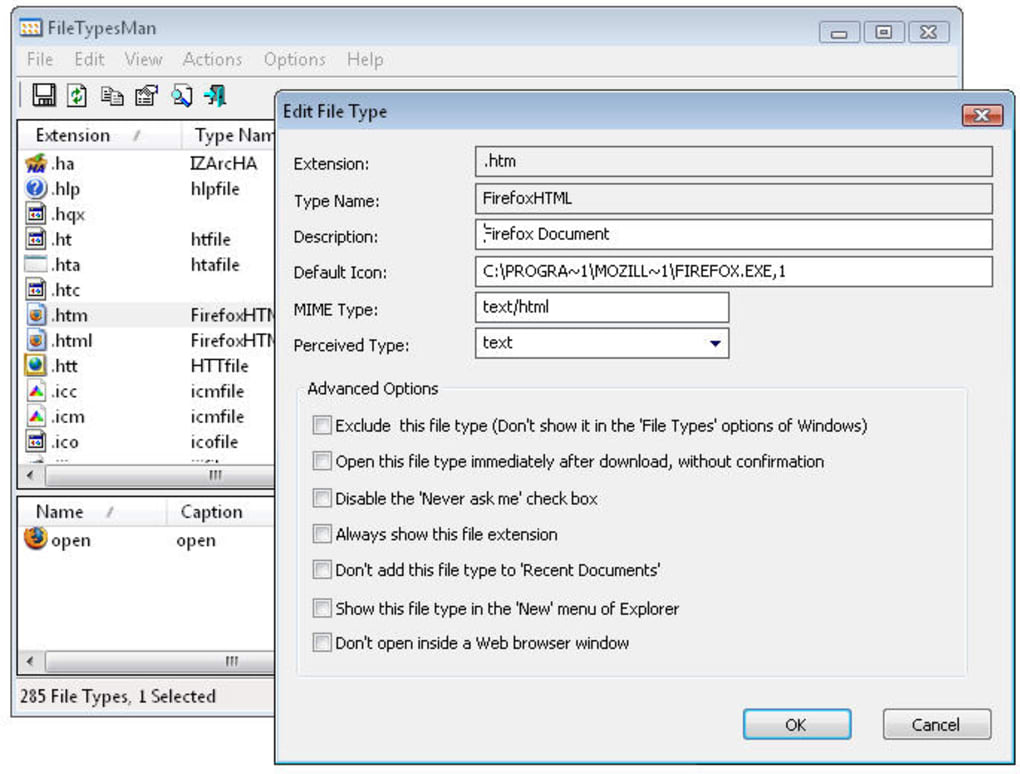
Navigating FileTypesMan’s interface is relatively straightforward, even for users unfamiliar with advanced system settings. The main window displays a comprehensive list of all registered file types, allowing for easy identification and selection. Each file type entry contains numerous details, including its name, extension, description, and associated application.
To edit a file type’s properties, simply select the entry and press F2 or select the “Edit File Type” option from the context menu. This opens a new window containing a series of editable fields. Carefully review and modify the settings as needed, remembering that incorrect changes can potentially affect the system’s stability. After making the desired changes, click “OK” to save the modifications.
Adding a new file type is equally simple. Use the “Add File Type” option to open a dialog window where you can specify the new extension, the application to associate with it, and other relevant information.
Repairing broken associations usually involves identifying the problematic entry and editing its properties, either by assigning the correct default application or removing conflicting entries.
Advantages and Disadvantages of FileTypesMan
FileTypesMan offers several advantages over relying solely on Windows’ built-in file association management tools:
-
Comprehensive Overview: FileTypesMan provides a complete and organized view of all file associations, making it easier to identify and resolve conflicts.
-
Simplified Editing: Modifying file associations is significantly simplified through FileTypesMan’s intuitive interface.
-
Portable and Convenient: Its portable nature makes it an ideal troubleshooting tool for multiple computers.
-
Advanced Features: FileTypesMan offers functionalities not available in Windows’ default settings, such as detailed flag management and comprehensive action control.
However, FileTypesMan also has some potential drawbacks:
-
Technical Complexity: The utility may be slightly too technical for novice users unfamiliar with system settings and file type management. Incorrect modification of file type settings could lead to system instability or data loss.
-
Potential for Errors: While FileTypesMan simplifies the process, there’s always a risk of accidentally causing further problems if settings are not carefully adjusted.
Alternatives to FileTypesMan
Several alternative applications offer similar functionality to FileTypesMan, each with its own strengths and weaknesses. These include dedicated file association editors, as well as more comprehensive system utilities that incorporate file association management as one of their features.
Conclusion: FileTypesMan as a Powerful Tool for Advanced Users
FileTypesMan stands out as a valuable tool for advanced Windows users seeking efficient and comprehensive control over file type associations. Its portable nature, intuitive interface, and powerful features make it an excellent resource for resolving file association conflicts, improving system stability, and streamlining workflows. However, its technical complexity might make it less suitable for novice users. For those comfortable navigating system settings and handling file type modifications, FileTypesMan offers a powerful and effective solution for managing file associations in Windows. Remember to always exercise caution and back up your system before making significant changes to file associations using FileTypesMan or any similar utility.
File Information
- License: “Free”
- Latest update: “July 29, 2025”
- Platform: “Windows”
- OS: “Windows Vista”
- Language: “English”
- Downloads: “36K”
- Size: “75.62 KB”


