
In an increasingly digital world, where our lives are captured, stored, and shared through countless images, the challenge of managing vast photo libraries has become universal. From professional photographers with gigabytes of raw files to casual smartphone users accumulating thousands of cherished memories, digital clutter is an inevitable byproduct of our modern habits. This deluge of data often leads to duplicate images – identical or near-identical copies that consume valuable storage space, slow down system performance, and make organizing photos a daunting task. Enter FindSameImagesOK, a remarkable, free, and portable utility designed to tackle this very problem head-on.
Developed by SoftwareOK, FindSameImagesOK is a powerful photography utility for Windows PCs that simplifies the often-tedious process of identifying and eliminating duplicate photographs. It’s a tool built for efficiency, allowing users to quickly scan their entire system, specific drives, or individual folders for redundant image files. What truly sets FindSameImagesOK apart in a crowded field of duplicate photo finders, such as Duplicate Photo Cleaner or Awesome Duplicate Photo Finder, is its sophisticated ability to detect images that aren’t just exact copies but also variations like rotated, mirrored, or even negatively processed versions. This granular approach ensures a more thorough cleanup, making it an indispensable asset for anyone serious about digital asset management.
Unleashing Digital Efficiency with FindSameImagesOK
FindSameImagesOK operates on a principle of simplicity married with powerful underlying algorithms. As a portable application, it requires no complex installation, making it incredibly convenient to use directly from a USB drive or any location on your PC. This “install-free” characteristic aligns perfectly with the needs of users who prefer lean, non-intrusive software solutions that don’t bloat their operating system. Its lightweight nature, at just under 1MB, belies its robust capabilities, ensuring it runs swiftly without consuming excessive system resources.
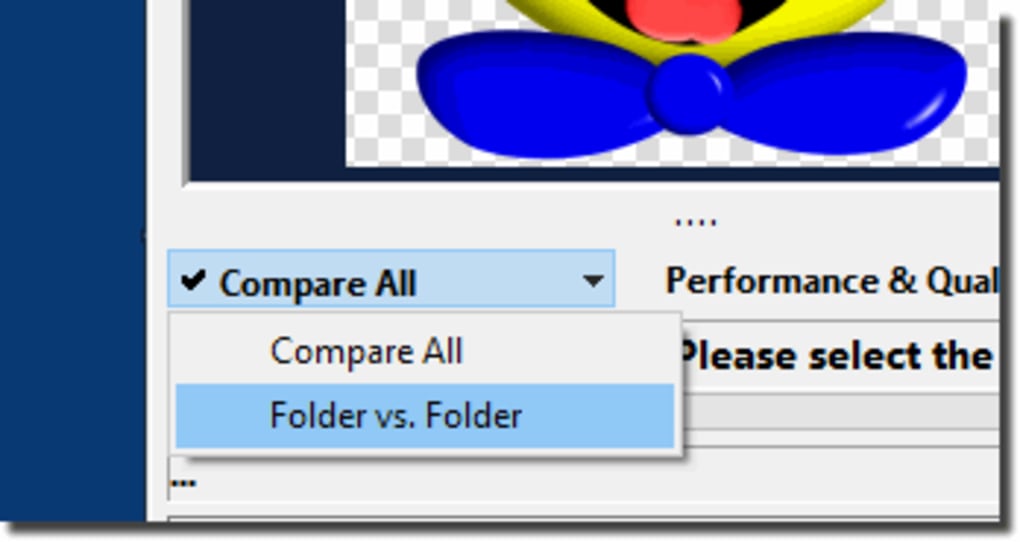
The primary function of FindSameImagesOK is to act as a digital detective, meticulously scouring your chosen directories for image files that are identical or strikingly similar. The process begins with the user defining the scope of the search. This can be as broad as an entire hard drive or as focused as a specific subfolder containing a recent photo shoot. Users simply click the “Add” or “Explore” button to designate the locations to be scanned. A unique feature allows for side-by-side comparison of two distinct locations, which is particularly useful for consolidating images from different sources or drives.
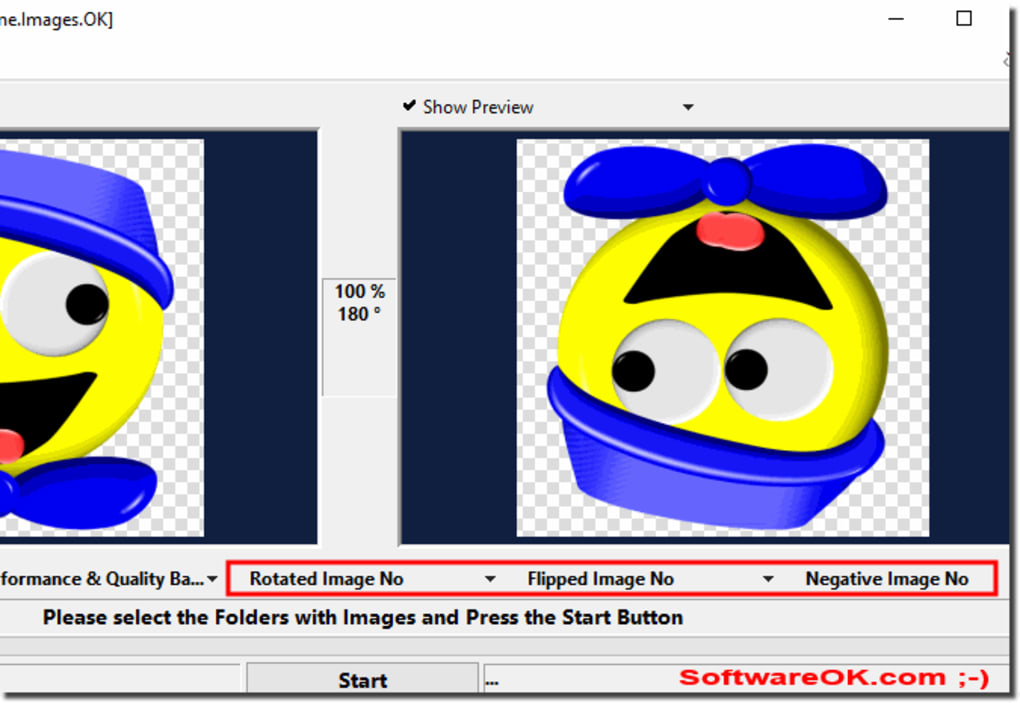
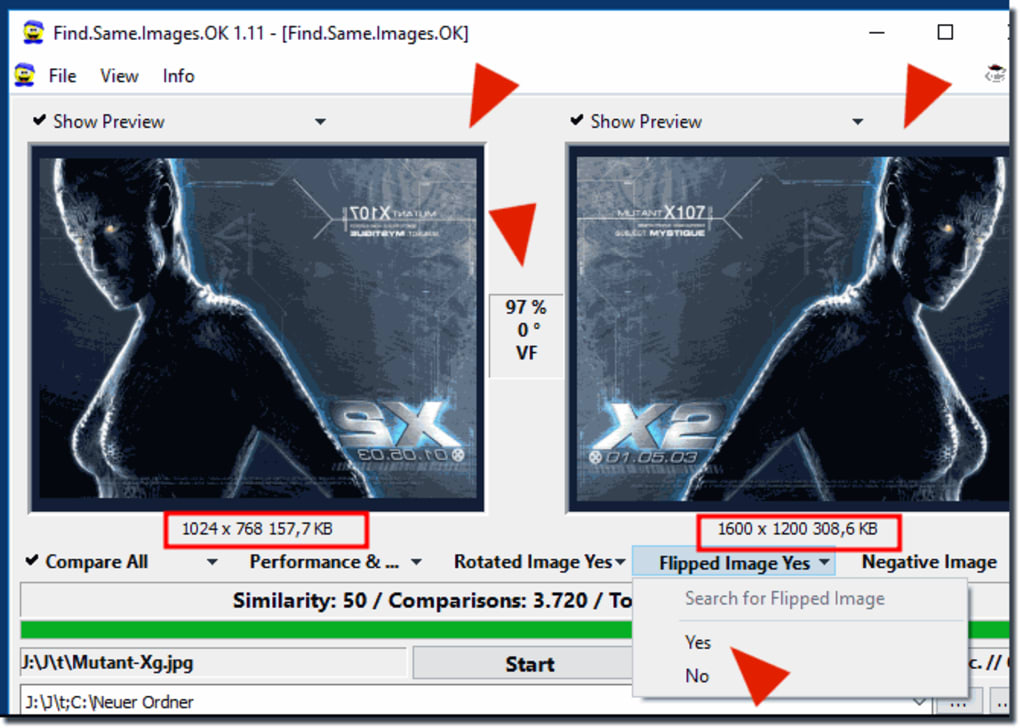
Once the target areas are selected, the user initiates the scan with a click of the “Start” button. This is where FindSameImagesOK distinguishes itself from more basic tools. Beyond looking for exact byte-for-byte duplicates, it offers advanced parameters that significantly enhance its detection capabilities. Users can opt to have the utility check for images that have been rotated, flipped horizontally or vertically, or even inverted (negative images). This is incredibly valuable because many common photo editing operations or even camera settings can create such variations, which, while visually different, might still be considered duplicates in the context of storage management.
Upon completion of the scan, FindSameImagesOK presents its findings in a clear, organized list in the bottom half of its interface. Each potential duplicate pairing is displayed with critical information: their respective file paths, sizes, and, crucially, a similarity percentage. This percentage is a key indicator, allowing users to gauge how close two images are, especially for “near-duplicate” detections. This level of detail empowers users to make informed decisions about which files to keep and which to discard. The interface, while noted for its somewhat unconventional layout by some users, provides all necessary information at a glance for efficient processing.
Users then have the flexibility to manage the detected duplicates. They can choose to process all identified duplicates in one go, a time-saving feature for massive cleanup operations. Alternatively, they can address each pair individually, reviewing the images and their criteria to prevent accidental deletion of a genuinely desired variant. A crucial safety net implemented by FindSameImagesOK is its integration with the Recycle Bin. All deleted images are initially moved to the Recycle Bin, providing a grace period during which users can restore any files if they change their mind or realize a mistake was made. This thoughtful design minimizes the risk of permanent data loss, offering peace of mind during large-scale cleanups.
FindSameImagesOK: A Cornerstone of Digital Asset Management within Multimedia & Photography
In the realm of multimedia, and specifically photography, effective digital asset management (DAM) is not just a convenience; it’s a necessity. FindSameImagesOK positions itself as an essential tool within this ecosystem, directly addressing one of the most pervasive challenges: managing the sheer volume and redundancy of image files.
The Imperative of Clean Digital Photo Libraries
Every shutter click, every screenshot, every downloaded image contributes to the ever-growing digital footprint on our devices. Without proper management, these collections quickly become unwieldy. Duplicate images are a significant contributor to this chaos. They unnecessarily consume precious storage space on hard drives, SSDs, and cloud services, leading to faster degradation of storage media and increased costs for cloud subscriptions. More subtly, a cluttered photo library can significantly impact system performance. Indexing services work harder, backups take longer, and photo editing software struggles to load and process files efficiently when faced with redundant data.
Beyond the technical implications, the psychological impact of a disorganized photo library cannot be overstated. Finding a specific photograph among thousands of duplicates can be frustrating and time-consuming, diminishing the joy of revisiting memories or utilizing images for creative projects. For professionals, this inefficiency translates directly into lost productivity and potential missed deadlines. FindSameImagesOK tackles these issues by offering a streamlined, automated solution to identify and remove these digital deadweights, thereby restoring order, freeing up space, and improving overall system responsiveness. It transforms a cumbersome chore into a quick, manageable task, allowing photographers and enthusiasts to focus on creation rather than curation.
Beyond Simple Duplicates: Advanced Search Parameters
The true power of FindSameImagesOK, and what elevates it above many competitors, lies in its intelligent detection capabilities. While many tools can find exact byte-for-byte duplicates, real-world photo management often involves more subtle redundancies. Consider a scenario where an image is cropped slightly, rotated for aesthetic purposes, or even subtly retouched and saved under a new name. To a basic duplicate finder, these would appear as entirely different files. However, to a user, they might still represent the “same image” in essence, and one of the versions might be redundant.
FindSameImagesOK addresses this by allowing users to include “partial matches” in their search criteria. This means it doesn’t just look for pixel-perfect matches but can intelligently compare images based on their visual characteristics, even if they have undergone minor transformations. The ability to detect rotated, flipped, or negative versions is particularly ingenious. A photographer might inadvertently save multiple versions of the same shot, rotated differently, or a user might download an image and later encounter a mirrored version on a different website. FindSameImagesOK is equipped to identify these variations, presenting them as potential duplicates and empowering the user to consolidate their collection with unparalleled precision. This advanced functionality ensures that the cleanup process is not only fast but also exceptionally thorough, leaving behind a truly optimized and organized photo library.
Optimizing Your Workflow: How FindSameImagesOK Elevates Productivity & System Performance
The benefits of using a tool like FindSameImagesOK extend far beyond simply freeing up disk space. By decluttering your digital environment, you inherently streamline your workflow and enhance the overall performance of your computing system. This ties directly into the broader categories of productivity and system utilities, where efficiency and optimal operation are paramount.
Streamlining Digital Workspaces for Enhanced Productivity
Productivity in the digital age is heavily influenced by the organization and accessibility of information. A cluttered digital workspace, laden with redundant files, acts as a significant impediment to efficiency. Imagine a graphic designer searching for a specific asset, only to wade through multiple versions of the same image, wasting precious minutes that could be spent on creative work. Or a student trying to locate a reference photo for a project, hindered by numerous unnecessary copies.
FindSameImagesOK directly contributes to an enhanced workflow by creating a cleaner, more manageable digital environment. By removing duplicate images, it ensures that when you search for a file, you’re more likely to find the unique, intended version quickly. This reduces cognitive load, minimizes frustration, and allows users to focus on their primary tasks without the distraction of digital clutter. For professionals who rely heavily on visual assets, such as content creators, marketers, or architects, a streamlined image library means faster project completion, smoother collaboration, and ultimately, greater productivity. The time saved from manually sifting through files or waiting for slow applications to process redundant data can be redirected towards more valuable, output-generating activities.
The Role of File Utilities in Overall System Health
Modern operating systems are robust, but they still benefit significantly from regular maintenance and optimization. File utilities, such as FindSameImagesOK, play a critical role in maintaining system health and ensuring peak performance. When hard drives are cluttered with duplicate files, the file system becomes fragmented, and the operating system’s indexing services have to work overtime. This can lead to slower file access times, longer boot-up sequences, and a general feeling of sluggishness.
By efficiently identifying and removing duplicate images, FindSameImagesOK contributes to a healthier file system. It frees up storage space, which is crucial for the optimal functioning of your OS, especially with modern applications that require ample temporary space. Less clutter also means faster backups, as backup software doesn’t need to process redundant data. Furthermore, a cleaner system is often a more stable system, reducing the likelihood of errors or crashes related to disk space issues. In essence, FindSameImagesOK is not just a photo management tool; it’s a vital component of a comprehensive suite of utilities designed to keep your PC running smoothly and efficiently, ensuring longevity and consistent performance.
Exploring the Broader Software Ecosystem on PhanMemFree.org
FindSameImagesOK, while a niche utility, exists within a much larger ecosystem of software designed to enhance various aspects of our digital lives. PhanMemFree.org, as a comprehensive platform for software downloads, offers a vast array of tools and applications that cater to diverse user needs, ranging from system security to creative development. Understanding where FindSameImagesOK fits into this broader landscape helps appreciate its value and the importance of a holistic approach to software utilization.
Security & Privacy: Safeguarding Your Digital Landscape
While FindSameImagesOK directly addresses storage and organization, it indirectly supports robust security and privacy practices. A well-organized system with minimal clutter is inherently easier to secure and maintain. Redundant files can sometimes hide malicious elements, or at the very least, make it harder to identify legitimate files from suspicious ones. On PhanMemFree.org, users can find a wide range of essential tools for digital protection, including Antivirus software to combat malware, VPNs for secure browsing and data encryption, Password Management solutions to safeguard credentials, and Ad Blockers to enhance privacy and browsing speed.
Integrating a tool like FindSameImagesOK into a routine that includes regular security checks ensures that your digital environment is not only clean and efficient but also secure. By reducing the overall data footprint, you also potentially reduce the attack surface for certain types of cyber threats. A system bogged down by unnecessary files can also be slower to update its security definitions or run full system scans, making optimization tools like FindSameImagesOK an indirect but valuable ally in your digital defense strategy.
Development & IT: Tools for Creators and Innovators
For developers, IT professionals, and anyone involved in content creation, managing digital assets is a daily challenge. Projects often involve thousands of image files, from icons and textures to UI elements and prototypes. Duplicate assets can quickly lead to version control issues, bloated project directories, and increased build times. FindSameImagesOK can be an invaluable utility in this context.
On PhanMemFree.org, the Development & IT section offers a plethora of tools vital for software development and system administration. This includes IDEs/Source Editors for coding, FTP Clients for file transfers, Database management tools, and Backup & Cloud Storage solutions to protect critical project data. For a developer, incorporating FindSameImagesOK into their workflow, perhaps as part of a pre-commit hook or a regular project cleanup routine, ensures that their development environment remains lean and efficient. This not only speeds up development cycles but also reduces the size of deployment packages and facilitates easier collaboration by minimizing redundant data in repositories. It underscores how even a simple utility can have a significant impact on complex professional workflows.
The Versatility of Utilities & Tools: Beyond Duplicate Finding
FindSameImagesOK is a prime example of a specialized utility – a tool designed to perform a specific function exceptionally well. The Utilities & Tools category on PhanMemFree.org is a treasure trove of such applications, each serving to simplify, optimize, or enhance various aspects of computing. From File Managers that offer advanced control over your file system, to Data Recovery software for unforeseen emergencies, and File Compression tools for efficient storage, these utilities are the unsung heroes of digital life.
FindSameImagesOK fits squarely within this category, demonstrating the immense value that highly focused tools bring. It handles a problem that, while seemingly minor on its own, can have cumulative detrimental effects on user experience and system performance. The utility’s lightweight, portable, and effective nature makes it a perfect embodiment of what a good utility should be: a powerful solution to a common problem, without unnecessary complexity or resource overhead. Its existence on a platform like PhanMemFree.org alongside a diverse array of other utilities highlights the platform’s commitment to providing users with the means to maintain, optimize, and control their digital environments comprehensively.
Conclusion
In the sprawling landscape of digital files, the challenge of managing an ever-growing collection of photographs is a universal concern. FindSameImagesOK emerges as an exceptionally practical, free, and efficient solution to this modern dilemma. Its ability to swiftly identify not only exact duplicates but also rotated, flipped, or negatively processed variations sets it apart, offering a level of thoroughness crucial for anyone with a substantial image library.
Despite a user interface that some might find unconventional, its core functionality – fast operation, lightweight design, and powerful search parameters – makes it an indispensable tool. Whether you are a professional photographer aiming for a pristine portfolio, a graphic designer managing numerous assets, or simply an individual seeking to reclaim valuable storage space and organize cherished memories, FindSameImagesOK delivers tangible benefits.
By integrating seamlessly into a broader strategy for digital asset management and system optimization, FindSameImagesOK helps streamline workflows, enhances productivity, and contributes to the overall health and performance of your PC. It stands as a testament to the power of specialized utilities available on platforms like PhanMemFree.org, empowering users to take control of their digital lives. We highly recommend FindSameImagesOK for anyone looking to declutter their photo collection and experience a more organized, efficient digital experience.
File Information
- License: “Free”
- Version: “4.55”
- Latest update: “August 23, 2021”
- Platform: “Windows”
- OS: “Windows 10”
- Language: “English”
- Downloads: “711”
- Size: “972.78 KB”


