
FinePrint is a versatile Windows printer driver designed to significantly enhance your printing experience by offering comprehensive control over print output, ultimately saving you ink, paper, and time. Unlike typical printer settings, FinePrint provides a suite of advanced features that streamline workflows and optimize print jobs for various needs. This guide delves into the functionality and benefits of FinePrint, exploring its key features and demonstrating how it can revolutionize your printing processes.
Mastering Print Output: FinePrint’s Core Features
FinePrint’s core strength lies in its ability to fine-tune print jobs beyond the limitations of standard printer drivers. This translates to significant savings and improved efficiency across various printing tasks. Key features include:
1. Print Preview and Editing: The integrated universal print preview isn’t merely a display; it’s a fully functional editor. Before committing to printing, users can add or delete pages, rearrange the sequence of pages within a document, and generally manipulate the layout to their exact specifications. This eliminates wasted paper and prevents costly reprints due to errors. The precision offered by this interactive preview is a significant advantage over simpler print preview functionalities.
2. Ink-Saving Capabilities: FinePrint incorporates several methods to minimize ink consumption without compromising readability. The “Ink Saver” feature allows users to convert colored text to black and white, effectively reducing the amount of colored ink used. Additionally, FinePrint offers the option to skip graphics entirely, further minimizing ink usage. This feature is particularly useful for printing documents that don’t require high-quality images or colored text, such as drafts or internal memos. The cost savings accumulate quickly, especially when dealing with large print volumes.
3. Multiple Pages per Sheet: For situations demanding efficient paper usage, FinePrint allows users to print multiple pages onto a single sheet. Options for printing 2, 4, or 8 pages per sheet drastically reduce paper consumption. This feature is invaluable for creating handouts, drafts, or any scenario where conserving paper is a priority. The environmental benefits, as well as the cost savings, are substantial.
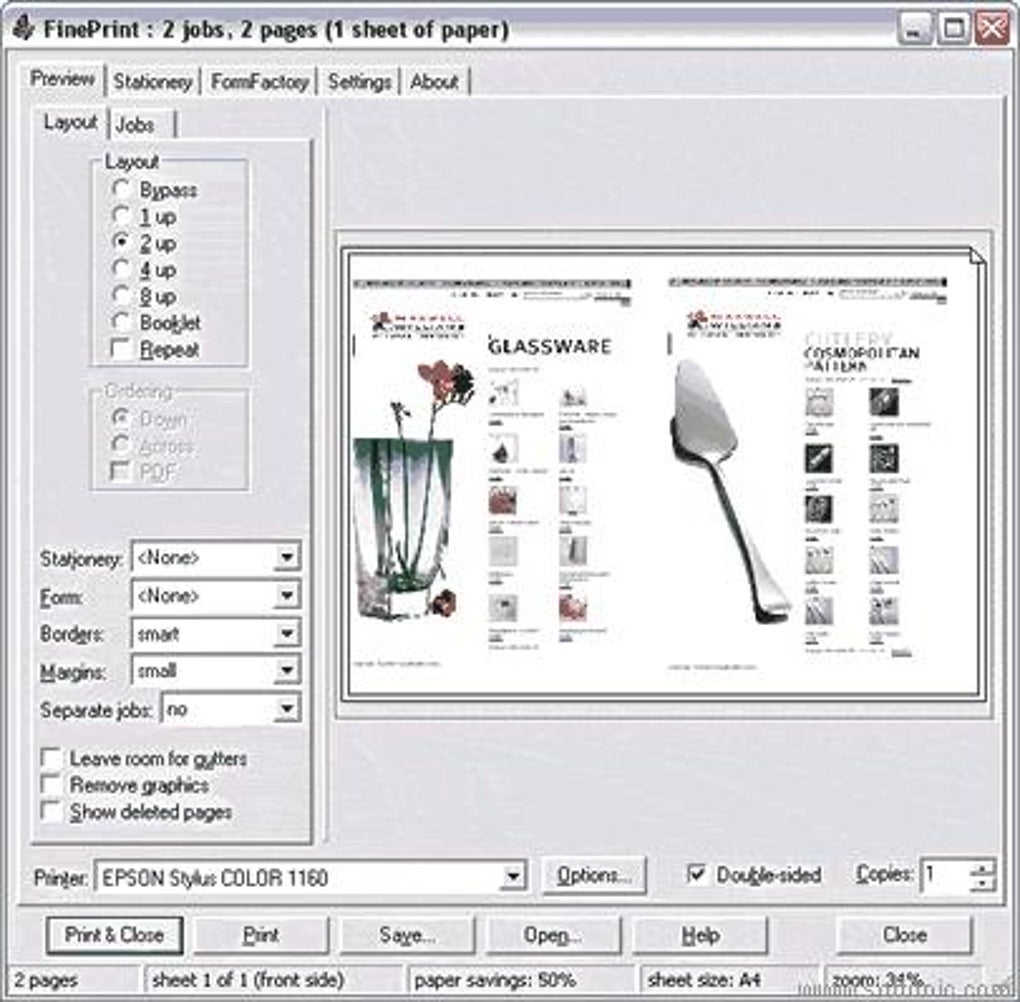
4. Advanced Page Customization: FinePrint empowers users to personalize their print output with watermarks, headers, and footers. These customizable elements can include dates, timestamps, system variables, or custom text, enhancing the professionalism and organization of printed documents. Watermarks are ideal for marking confidential documents or drafts, while headers and footers provide clear identification and pagination. This level of customization goes far beyond the basic capabilities found in most printer drivers.
5. Form and Letterhead Creation: The software simplifies the process of creating and managing electronic forms and letterheads. Users can easily design and implement customized templates, ensuring consistent branding and accurate data capture. The intuitive interface makes creating professional-looking forms and letterheads straightforward, even for users without design experience. This feature alone can save considerable time and effort spent on manual form creation.
Streamlining Workflows: Enhanced Productivity with FinePrint
Beyond individual feature benefits, FinePrint’s impact on workflow efficiency is substantial. Several features contribute to this improvement:
1. Combined Print Jobs: FinePrint facilitates the merging of multiple documents into a single print job. This is particularly useful for creating booklets from web pages, consolidating multiple documents into a single report, or preparing presentations from various sources. The convenience of combining documents before printing eliminates the need for multiple print runs and saves significant time.
2. Versatile File Saving: The software allows users to save pages and entire jobs in various formats, including TIFF, JPEG, BMP, text, and its proprietary FP format. This feature is useful for archiving printed material, sharing documents, or transferring print jobs between different systems. The diverse format options cater to various needs and compatibility requirements.
3. Clipboard Integration: Any printed output can be readily copied to the clipboard, enabling seamless pasting into other applications. This functionality is invaluable for incorporating printed content into digital documents, presentations, or emails. The ease of transferring content between FinePrint and other programs boosts productivity significantly.
4. Double-Sided Printing and Booklet Creation: FinePrint supports double-sided printing, reducing paper usage by half and minimizing the environmental impact. Furthermore, the software enables the effortless creation of professional-looking booklets, streamlining the process of producing bound documents. This feature is particularly useful for creating reports, brochures, or any publication requiring a professional presentation.
Advanced Options: Fine-Tuning for Optimal Results
FinePrint goes beyond basic printing functionalities, offering several sophisticated options for precise control:
1. Paper Scaling: The software efficiently handles pages that exceed standard paper sizes (like Letter or A4) by allowing users to scale them down to fit. This prevents the need to manually adjust page settings or resort to splitting large pages across multiple sheets.
2. Margin Adjustment: FinePrint provides granular control over margins, enabling users to increase text sizes for improved readability by maximizing the usable space on the page. This customization allows for optimal presentation of information, ensuring clarity and accessibility.
3. Gutter Support: The program provides the ability to incorporate gutters, the space between pages in a bound document. This feature is essential for ensuring proper binding and preventing text from being obscured. The gutter setting is easily adjustable to accommodate various binding methods.
4. Multiple FinePrinters: Users can create multiple FinePrinter instances, each with its own unique settings. This allows for optimized printing configurations for various tasks or document types. For example, one FinePrinter could be configured for high-quality image printing, while another is optimized for ink-saving text documents. This flexibility enhances workflow efficiency for users with varied printing needs.
FinePrint vs. Alternatives: A Comparative Analysis
While several alternative printing management tools exist, FinePrint distinguishes itself through its comprehensive feature set, user-friendly interface, and robust functionality. Many alternatives may focus on specific aspects like ink saving or double-sided printing, but FinePrint combines these functionalities with advanced features such as print preview editing, combined print jobs, and versatile file saving options. This integrated approach makes FinePrint a superior choice for users seeking a comprehensive solution for all their printing needs.
The ease of use contributes significantly to FinePrint’s appeal. The intuitive interface makes it accessible to both novice and experienced users, ensuring a smooth and efficient workflow without requiring extensive technical expertise.
Conclusion: Elevating Your Printing Experience with FinePrint
FinePrint is more than just a printer driver; it’s a powerful tool that streamlines workflows, optimizes print jobs, and significantly reduces costs. Its comprehensive feature set, combined with its user-friendly interface, makes it an invaluable asset for individuals and businesses alike. From saving ink and paper to enhancing the presentation of documents, FinePrint offers a compelling solution for anyone seeking to improve their printing experience. Its versatility extends to various applications, from casual home printing to demanding professional printing tasks, making it a truly indispensable tool in the modern digital landscape. Whether prioritizing cost savings, environmental responsibility, or enhanced workflow efficiency, FinePrint provides the comprehensive solution to meet these objectives.
File Information
- License: “Trial version”
- Latest update: “July 17, 2025”
- Platform: “Windows”
- OS: “Windows 2000”
- Language: “English”
- Downloads: “30.6K”
- Size: “27.41 MB”


