
FineShare FineCam is a sophisticated AI-powered virtual camera designed to elevate your video recording and conferencing experience. Whether you’re creating professional-quality videos for online courses, product demonstrations, or simply enhancing your video calls, FineCam offers a comprehensive suite of tools to transform your webcam feed and streamline your workflow. This in-depth review explores its capabilities, features, and overall user experience.
Enhanced Video Quality and AI-Driven Features
FineShare FineCam’s core strength lies in its ability to significantly enhance video quality through intelligent AI processing. The application utilizes advanced algorithms to automatically fine-tune your webcam output, delivering high-definition video with improved clarity, sharpness, and color accuracy. This intelligent enhancement goes beyond simple adjustments, resulting in a more polished and professional look for your videos.
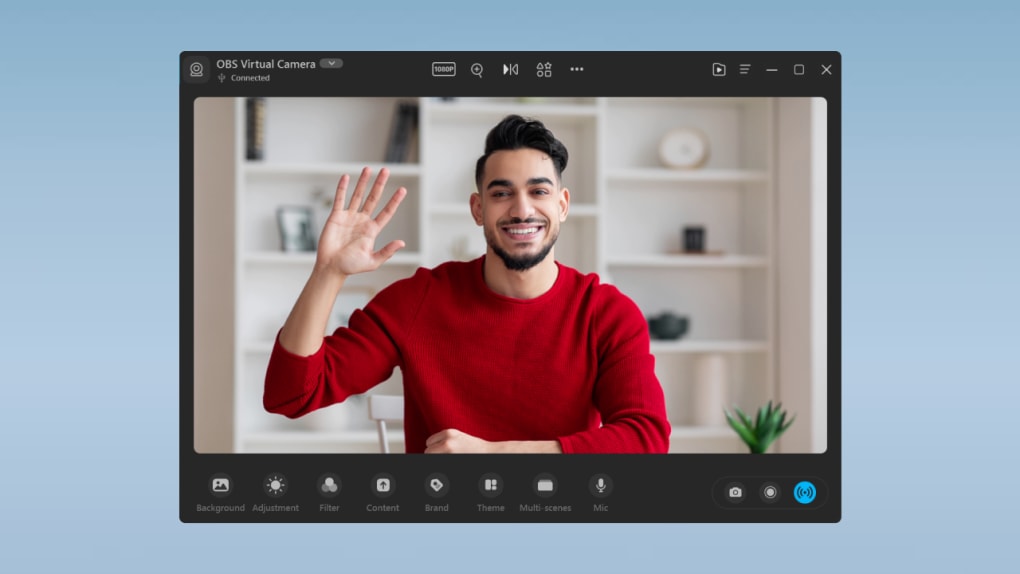
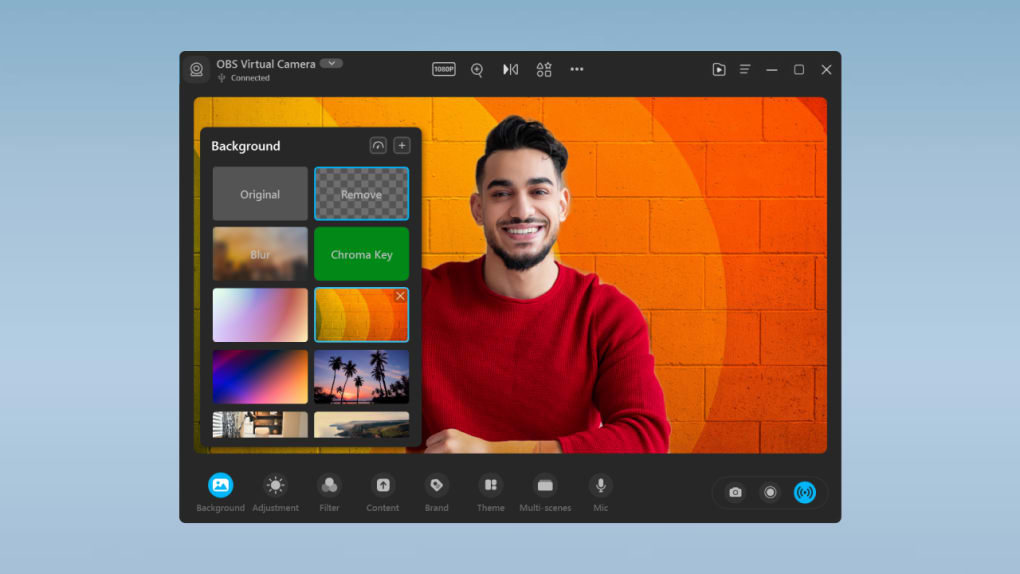
One of its standout features is the real-time AI background removal. This innovative function leverages AI technology to seamlessly remove your background, replacing it with a variety of options, including customizable images, animated backgrounds, or even a subtle blur effect. The application achieves this realistic effect through a combination of AI face recognition and Chroma Key technology, ensuring that you remain the focal point of your video, free from distracting backgrounds. This feature is particularly useful for those working from home or in environments that may not be ideal for professional video presentations. The level of background blur is also adjustable, offering users a degree of control over the final aesthetic. Even if you choose not to utilize background replacement, FineCam subtly modifies your original background to minimize distractions, contributing to a more focused and professional presentation.
The integration of a Smart Portrait mode further enhances the visual appeal of your videos. This mode intelligently optimizes your appearance, ensuring that you look your best on camera. Coupled with partially blurred backgrounds, the Smart Portrait mode ensures that you stand out, capturing the attention of your audience effectively. The combination of these AI-powered features transforms even the most basic webcam into a powerful tool for professional-grade video creation.
Versatile Screen Capture and Recording Capabilities
Beyond its webcam enhancements, FineShare FineCam offers robust screen recording and mirroring functionalities. This makes it a versatile tool for creating presentations and demonstrations that involve screen sharing. The built-in screen recorder allows users to capture webpages directly within the application, eliminating the need to switch between different programs. This streamlining increases efficiency and simplifies the process of creating video presentations. The direct access eliminates the extra steps often involved in capturing screen content, optimizing workflow and reducing the possibility of errors.
Similarly, the app’s screen mirroring capability allows users to seamlessly stream content from their smartphones or tablets, providing a convenient and integrated solution for showcasing mobile applications or presentations. This feature broadens the application’s utility, making it a central hub for diverse video creation needs. It’s especially useful for tutorials, product demos, and other scenarios where presenting mobile content is required. The elimination of the need for additional apps or software further streamlines the process, making content creation more efficient.
Intuitive Video Editing Tools
FineShare FineCam includes a user-friendly overlay editor for basic video editing. While not a comprehensive video editing suite, this editor offers essential tools such as cutting, splicing, and adjusting video clips. The interface is designed with intuitive icons, making it easy to navigate and learn, even for those without prior video editing experience. This simple but effective approach facilitates quick modifications and customization of recorded videos. The focus on user-friendliness ensures accessibility for a broad range of users, regardless of their technical expertise.
This built-in editor eliminates the need for additional software, keeping the workflow centralized and efficient. However, it is important to acknowledge the limitations in advanced editing capabilities. For users requiring advanced functionalities like color grading, advanced effects, or multi-track editing, a dedicated video editing software may be necessary. FineShare FineCam provides a valuable balance between convenience and functionality, catering to users who need simple editing tools integrated directly into their video recording workflow.
Pricing and Subscription Plans
FineShare FineCam offers a free trial version, allowing users to explore its core features before committing to a subscription. For continued use and access to the full range of features, including 24/7 priority support, users can choose from three subscription tiers: a 1-month plan, a 1-year plan, and a lifetime plan. The subscription model provides access to the complete set of Pro features and ensures consistent access to the application’s functionalities. The various subscription options allow users to tailor their access to their specific usage patterns and budget. The lifetime plan offers long-term cost savings for frequent users, while the shorter-term options provide flexibility for those with less continuous needs.
Compatibility and Integration
FineShare FineCam is compatible with a wide range of video calling, video editing, and streaming applications. This broad compatibility ensures seamless integration with popular platforms such as Zoom, Microsoft Teams, Twitch, OBS, Adobe Premiere Pro, and YouTube. This wide spectrum of compatibility enhances its versatility, making it a convenient and readily adaptable tool for users across different platforms and workflows.
Advantages and Disadvantages
Pros:
- AI-powered background removal: Offers efficient and realistic background removal.
- Versatile screen recording and mirroring capabilities: Allows direct screen capture and mobile device mirroring, streamlining workflow.
- User-friendly video editing tools: Facilitates quick and easy video adjustments.
- Smart Portrait mode: Enhances the user’s appearance for a polished professional look.
- High-definition video output: Delivers improved clarity and image quality.
- Wide compatibility: Integrates seamlessly with various applications and platforms.
- Free trial available: Allows users to test features before purchasing.
- Multiple subscription plans: Offers flexible options to suit different budgets and needs.
Cons:
- Limited advanced video editing features: Lacks advanced editing options found in dedicated video editing software.
- Subscription model: Access to full functionality requires a paid subscription.
Conclusion
FineShare FineCam is a powerful and versatile virtual camera application that successfully combines AI-driven enhancements with user-friendly functionality. Its real-time background removal, screen recording features, and basic video editing tools make it an ideal solution for individuals and professionals alike seeking to enhance their video conferencing and content creation experiences. While the advanced editing features are limited, the convenience and accessibility of its core functionalities make it a valuable asset for anyone who wants to produce professional-quality videos effortlessly. The availability of a free trial and varied subscription options caters to diverse user needs and budgets, ultimately solidifying FineShare FineCam’s position as a compelling and effective virtual camera solution.
File Information
- License: “Trial version”
- Version: “2.0.0”
- Latest update: “July 11, 2023”
- Platform: “Windows”
- OS: “Windows 11”
- Language: “English”
- Downloads: “11.5K”
- Size: “5.55 MB”


