
FineShare FineVoice, often shortened to FineVoice, is a versatile and powerful multimedia software application designed to transform your voice in a multitude of ways. Developed by FineShare Co., Ltd., this AI-driven program offers a comprehensive suite of tools for voice modification, enhancement, and audio manipulation, making it a compelling option for various applications, from casual voice alteration to professional audio production. This review delves into FineVoice’s features, user experience, and overall value proposition.
Transforming Your Voice with AI-Powered Precision
FineVoice stands out due to its real-time voice-changing capabilities. This feature is particularly beneficial for applications requiring immediate vocal adjustments, such as live streaming, online gaming, video conferencing (Zoom, Google Meet, etc.), and podcasts. The software seamlessly integrates with popular recording and communication platforms, allowing you to modify your voice on the fly without interrupting the workflow. Beyond real-time alteration, FineVoice boasts powerful post-processing functionalities. You can upload pre-recorded audio files and apply a wide range of voice effects, transforming them into entirely new soundscapes.
The program’s AI-powered engine is the driving force behind its impressive capabilities. It allows for the realistic simulation of various voices, spanning diverse ages, genders, and even mimicking the vocal characteristics of popular characters. This feature opens doors to creative content creation, allowing users to produce engaging voiceovers for videos, podcasts, audiobooks, and presentations with a level of authenticity previously only achievable with professional voice actors. The sheer range of options is impressive, with over 60 voice effects and over 220 built-in natural-sounding voices across 40 languages supporting the text-to-speech function. Beyond voices, the software also provides over 200 sound effects, ranging from subtle ambience enhancements to comical soundbites, adding another layer of creative control.

Beyond Voice Changing: Transcription and Audio Editing
FineVoice’s capabilities extend beyond simple voice alteration. It incorporates robust text-to-speech (TTS) and speech-to-text (STT) functionalities. The STT feature accurately transcribes audio recordings into editable text, which can be exported in various formats (TXT, VTT, SRT, and JSON), facilitating easy sharing and collaboration. This feature is exceptionally valuable for transcribing meetings, interviews, or lectures, streamlining the workflow for tasks that traditionally require manual transcription. The speed and accuracy of the transcription are noteworthy and rival that of other dedicated transcription software. The TTS function, on the other hand, empowers users to generate natural-sounding voiceovers from written text. This function can be utilized for various tasks like creating presentations, e-learning materials, or even generating audio versions of text files.
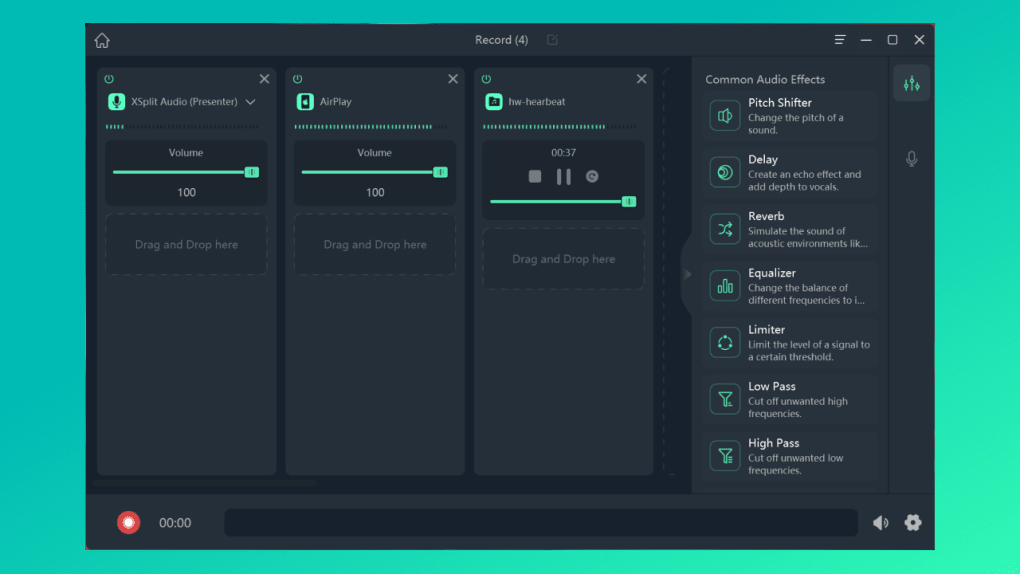
Furthermore, FineVoice offers extensive audio editing tools. Users can record audio from various sources – their PC’s microphone, mobile devices, or applications – and then easily merge these tracks or keep them as separate audio files, making post-production significantly easier. The ability to record audio in high-quality WAV format at 48kHz ensures that recordings retain their fidelity, preventing any loss of detail during processing. In addition to basic recording and merging, FineVoice offers a range of audio enhancement tools, such as noise reduction, reverb, and equalization. These features allow users to fine-tune their audio, removing unwanted background noise and improving the overall clarity and quality of the recording.
User Interface and Ease of Use
Despite the wealth of features, FineVoice boasts a surprisingly intuitive and user-friendly interface. While lacking a formal built-in tutorial, the software’s straightforward design ensures a smooth learning curve. Upon installation, users are prompted to select the primary use case for the program (e.g., podcasting, video creation, online teaching). This customization simplifies the main menu, presenting users with relevant tools and options based on their chosen application.
The main interface features five primary tabs on the left-hand panel: Home, Record Projects, My Library, Account, and AI Virtual Camera. The “Record Projects” tab serves as the central hub for recording sessions, allowing real-time voice modification or the processing of pre-recorded audio files. The right-hand panel houses the Audio Effects and Voice Effects options, clearly displayed with intuitive icons. Standard controls, such as play/pause, volume adjustments, and recording settings, are conveniently located at the bottom of the interface. The “My Library” tab neatly organizes all recordings, categorizing them by type, providing easy access to past projects. The “Account” tab displays user account information and license details. The “AI Virtual Camera” tab offers a simple way to download FineShare’s complementary software, FineCam, which extends the functionality of FineVoice.
Pricing and Subscription Plans
FineShare FineVoice offers an unlimited free trial version, enabling users to explore the program’s core functionalities without any time restrictions. However, some features remain limited in the trial version. To unlock the full suite of tools and remove feature limitations, users can subscribe to one of three paid plans: 1-month, 1-year, and lifetime subscriptions. All paid plans offer the same feature set but differ slightly in terms of the number of PCs they support and the monthly transcription limits. Specifically, the 1-month plan only covers one PC, while the yearly and lifetime plans support two. The lifetime plan includes a maximum of 300 minutes of transcription, while the 1-year plan offers 120 minutes per month. All plans include a 30-day money-back guarantee, mitigating any risk for users considering a purchase. This tiered pricing model caters to different usage patterns and budgets, providing flexibility for both casual and professional users.
Conclusion: FineShare FineVoice – A Powerful and Versatile Tool
FineShare FineVoice successfully blends powerful AI-driven voice transformation technology with an intuitive user experience. Its capacity for real-time voice changing, comprehensive audio editing capabilities, and integrated transcription tools make it a highly versatile program suitable for a vast range of applications. The unlimited free trial allows for thorough exploration of the software’s functionalities before committing to a paid plan, while the three tiered subscription options cater to various user needs. While the differences between the paid plans in terms of transcription minutes might seem somewhat arbitrary, the overall value proposition remains strong, especially considering the extensive feature set and the 30-day money-back guarantee. Whether you’re a casual gamer, a podcaster, a live streamer, or a professional audio editor, FineShare FineVoice offers a robust and user-friendly solution for transforming your voice and enhancing your audio productions. The extensive library of voices, effects, and audio enhancements, combined with the straightforward interface, makes FineShare FineVoice a valuable asset for anyone working with audio.
File Information
- License: “Trial version”
- Version: “1.0.1”
- Latest update: “March 21, 2023”
- Platform: “Windows”
- OS: “Windows 10”
- Language: “English”
- Downloads: “7.4K”


