
Fitbit has established itself as a leading brand in the fitness tracking industry, offering a diverse range of wearable devices designed to cater to various user needs and preferences. From entry-level trackers to sophisticated smartwatches, Fitbit provides users with comprehensive tools to monitor their activity levels, sleep patterns, heart rate, and more. This guide will explore the Fitbit ecosystem, focusing on the functionality of its popular desktop application and the wider range of devices and services available.
Fitbit Devices: A Range of Options for Every User
The Fitbit product lineup boasts a variety of devices, each with unique features and price points. This allows users to select a tracker that perfectly aligns with their fitness goals and budget. As of 2025, some of the prominent models include:
-
Fitbit Inspire 3: This entry-level fitness tracker offers a sleek design and essential tracking capabilities, making it an excellent option for beginners or those seeking a simple and affordable way to monitor their activity. The Inspire 3 typically features a basic heart rate monitor, step tracking, sleep tracking, and notifications from a connected smartphone. Its intuitive interface and long battery life are additional attractive features.
-
Fitbit Charge 6: Stepping up from the Inspire 3, the Charge 6 provides a more advanced feature set, including improved heart rate monitoring with SpO2 (blood oxygen saturation) measurement, advanced sleep tracking with sleep stages analysis, and built-in GPS for accurate tracking of outdoor workouts. The Charge 6 often includes a larger, brighter display compared to the Inspire 3, offering a better user experience.
-
Fitbit Versa 4: This smartwatch offers the most comprehensive features in Fitbit’s lineup. Beyond the features found in the Charge 6, the Versa 4 usually includes a vibrant color touchscreen, app support, contactless payments (depending on the region and payment provider), and more advanced health metrics. It is designed for users who want a versatile device that combines fitness tracking with smartwatch functionality.
Beyond these models, Fitbit continuously updates and expands its product line, introducing new features and technologies. It’s crucial to research the latest models and their specifications before making a purchase to ensure they meet individual requirements. Considerations like display size, battery life, GPS capabilities, and built-in sensors should all be factored into the decision-making process.
The Fitbit Desktop App: Extending the Functionality of Your Tracker
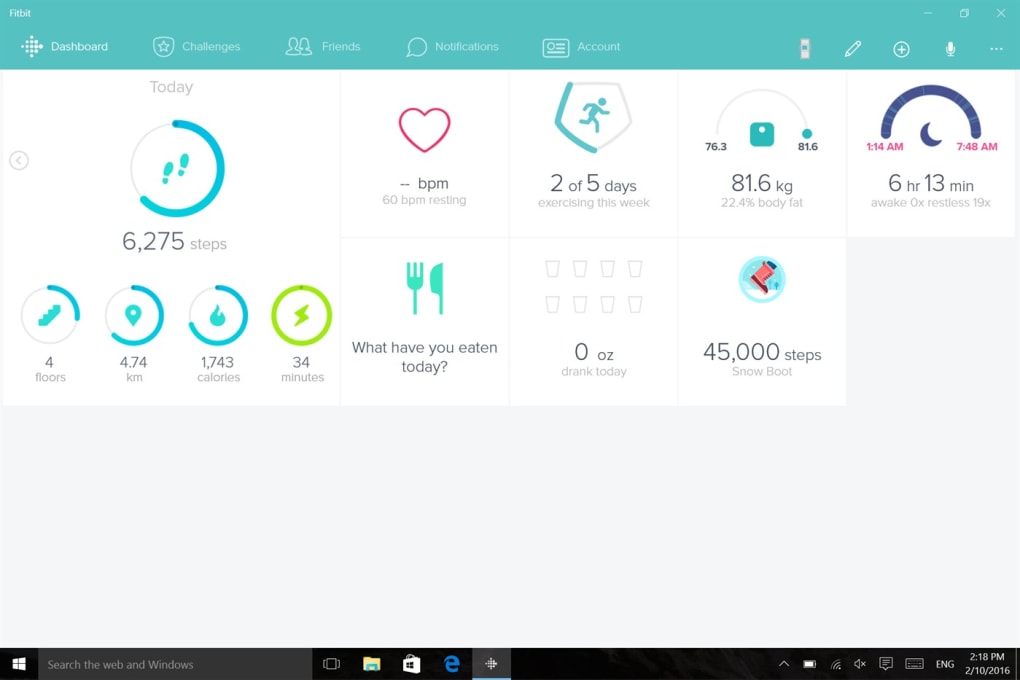
The Fitbit desktop application acts as a powerful extension of the Fitbit wearable devices. While the tracker itself provides real-time data and basic insights, the desktop app allows for more detailed analysis, data logging, and personalized goal setting. The app’s functionality includes:
-
Data Synchronization: The cornerstone of the app is its ability to seamlessly synchronize data collected by the Fitbit tracker. This ensures all activity, sleep, and heart rate information is readily available for review on a larger screen. The synchronization process is generally straightforward and typically occurs automatically when the device is within range of a connected computer or smartphone.
-
Detailed Data Visualization: The desktop app provides much more comprehensive data visualization capabilities than the tracker’s display. Users can explore detailed charts and graphs depicting trends in their activity, sleep, and heart rate over time. This allows for a better understanding of progress and identification of areas for improvement.
-
Manual Data Logging: In addition to automatically recorded data, the Fitbit desktop app allows for manual data entry. This feature is particularly useful for logging activities not automatically tracked by the device, such as strength training sessions or specific food consumption. Users can manually input details about their workouts and nutrition, enriching the overall data picture and enabling more accurate analysis.
-
Goal Setting and Progress Tracking: The app facilitates setting personalized fitness goals, providing a framework for users to track their progress and stay motivated. Users can set goals for steps taken, distance covered, calories burned, sleep duration, and other key metrics. The app monitors progress towards these goals and provides visual cues to enhance motivation.
-
Nutritional Insights: By logging food intake and water consumption, users can gain valuable insights into their nutritional habits. The app may provide reports on calorie intake, macronutrient balance, and other relevant nutritional metrics. This data can help users make informed dietary choices and support their overall health goals.
-
Sleep Tracking and Analysis: Sleep tracking is a key feature of the Fitbit ecosystem. The app provides a detailed breakdown of sleep patterns, including total sleep time, sleep stages (light, deep, REM), and sleep disturbances. This information can be valuable for users who wish to improve their sleep quality and overall well-being. The app may offer recommendations and suggestions to optimize sleep hygiene based on the collected data.
-
Customizable Display Settings: The desktop app often offers customization options, enabling users to personalize their dashboard and prioritize the metrics most relevant to their fitness goals. The level of customization varies depending on the app’s version and platform.
-
Alarm and Notification Management: Users can set alarms and manage notifications directly within the desktop application, consolidating this functionality in one location.
-
Community Features (Potentially): Some versions of the Fitbit desktop app may integrate community features, enabling users to connect with friends, share their progress, and participate in challenges. However, the availability and extent of these community aspects may vary.
Limitations of the Fitbit Desktop App
While the Fitbit desktop app offers a wealth of features, it’s essential to acknowledge its limitations:
-
Overall Progress Visualization: While the app provides detailed data, the presentation of overall progress trends might not always be intuitively clear. Users may need to actively analyze the data to identify significant patterns or long-term changes in their fitness levels.
-
Basic Data Entry Features: Some users might find the manual data entry features slightly basic compared to the capabilities of dedicated nutrition or workout tracking apps.
-
Dependence on Fitbit Device: The app’s functionality is inherently tied to a Fitbit device. Without a connected tracker, the app’s core features are severely limited.
Fitbit’s Ecosystem and Beyond: Apps, Integrations, and Community
The Fitbit experience extends beyond the device and the desktop app. Fitbit offers a mobile app (available for both iOS and Android) that mirrors many of the desktop app’s features, allowing users to access and manage their data on the go. Furthermore, Fitbit integrates with other health and fitness platforms, allowing for data sharing and integration with a wider range of services.
Fitbit’s online community plays a vital role in user engagement. Users can connect with friends, participate in challenges, and share their progress, fostering motivation and camaraderie. This sense of community can enhance the overall fitness journey and provide additional support.
Conclusion: Fitbit as a Comprehensive Health and Fitness Solution
Fitbit offers a comprehensive ecosystem for individuals seeking to improve their health and fitness. The combination of wearable devices, mobile and desktop applications, and community features provides a holistic approach to tracking and managing personal well-being. While the Fitbit desktop app has some limitations, its strong features and integration with the wider Fitbit ecosystem make it a valuable companion for users dedicated to achieving their health goals. The choice of Fitbit device and the extent to which users leverage the app and other features largely determine the effectiveness and overall satisfaction with the Fitbit experience.
File Information
- License: “Free”
- Version: “2.44.1997.0”
- Latest update: “August 13, 2025”
- Platform: “Windows”
- OS: “Windows 8.1”
- Language: “English”
- Downloads: “64.2K”


