
FL Studio, formerly known as FruityLoops, has cemented its place as a leading Digital Audio Workstation (DAW) for music production. Its intuitive interface, powerful features, and extensive plugin support have attracted millions of users worldwide, from aspiring bedroom producers to seasoned professionals. This comprehensive guide delves into the various aspects of FL Studio, exploring its strengths, weaknesses, and overall suitability for different users.
Interface and Workflow: User-Friendly Powerhouse
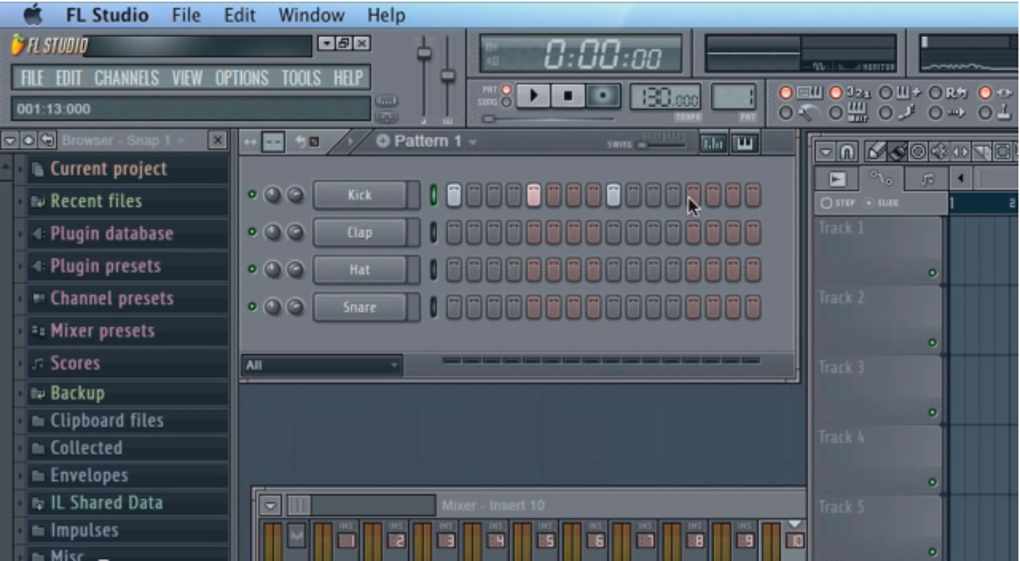
FL Studio’s core strength lies in its uniquely designed interface, often praised for its ease of use and efficient workflow. Unlike some DAWs that adopt a linear, project-based approach, FL Studio utilizes a piano-roll-centric workflow built around the concept of the “Pattern.” Patterns are essentially sequences of notes and events that can be arranged and chained together to create entire songs. This system allows for a highly flexible and non-linear approach to music composition, enabling users to experiment freely and rearrange sections with ease.
The software’s layout is generally considered intuitive, with tools and functions clearly organized. Experienced users often highlight the speed and efficiency of working within FL Studio’s environment, as the pattern-based system minimizes unnecessary clicks and navigations. The software’s channel rack, mixer, and playlist effectively manage different aspects of the production process, offering a cohesive workflow from melody creation to mixing and mastering. However, the non-linearity can be daunting to newcomers, requiring a learning curve to fully grasp the nuances of pattern-based arrangement. There’s a noticeable difference between the experience of a seasoned user smoothly navigating the system and a beginner attempting to understand the intricacies of pattern chaining and arrangement.
The visual appeal of the interface is generally well-received, with the option for customizable themes and skins allowing users to personalize their working environment. The various components, such as the piano roll, mixer, and playlist, seamlessly integrate, promoting smooth transitions between different stages of the production process. The overall feel is modern and professional, minimizing clutter and maximizing screen real estate for efficient work.
Features and Functionality: A Comprehensive Suite for Music Production
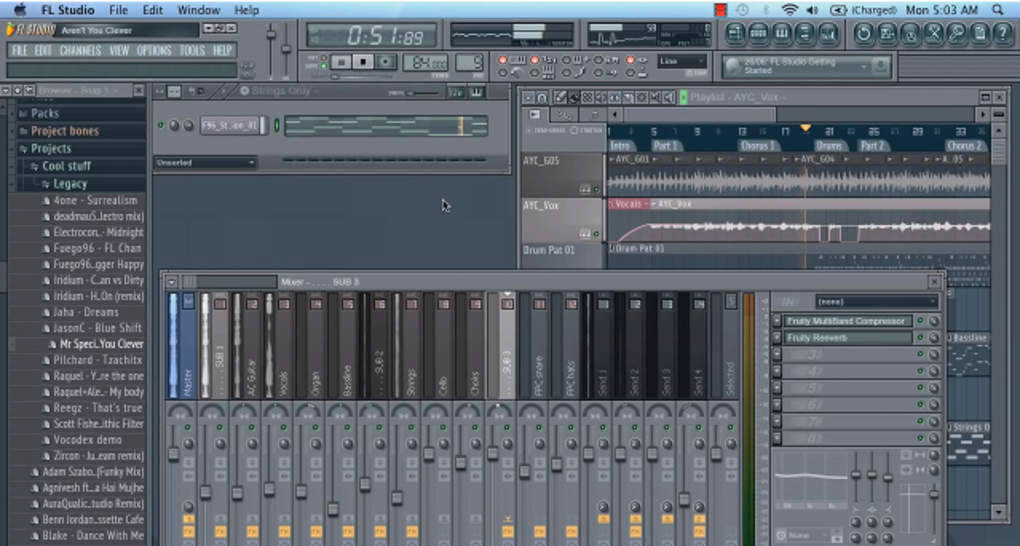
FL Studio boasts a comprehensive suite of features designed to cater to virtually every aspect of music production. Its core functionality includes:
- Pattern-Based Sequencing: As mentioned earlier, this is a defining feature, allowing users to create and arrange musical ideas in a non-linear fashion. This approach fosters creativity and experimentation, enabling users to easily rearrange and manipulate musical segments.
-
Piano Roll Editor: FL Studio’s piano roll is a highly versatile tool for note input, offering numerous features such as quantizing, velocity editing, and automation control. This precision allows for detailed musical control, vital for both melody crafting and complex rhythmic patterns.
-
Channel Rack: This acts as a central hub for managing various instruments and audio channels within a project. Users can easily route audio, apply effects, and manipulate individual tracks through the channel rack, facilitating organized and controlled mixing.
-
Mixer: The mixer allows for detailed control over the final audio output. Each track can be individually adjusted with various effects and EQs, providing the power needed for professional-level mixing.
-
Playlist: This serves as the arrangement view, where users assemble and organize their patterns to form a complete song. Features like automation and time-stretching allow for sophisticated arrangements and transitions.
-
Extensive Plugin Support: FL Studio boasts compatibility with a wide range of VST plugins, allowing users to expand their sonic palette and incorporate additional effects and instruments. This expansive compatibility enhances versatility and customization, allowing users to tailor the DAW to their specific needs.
-
Built-in Instruments and Effects: FL Studio comes equipped with a wide variety of built-in synthesizers, samplers, and effects, providing a solid foundation for music creation. This reduces reliance on external plugins, particularly beneficial for beginners who may have limited plugin collections.
-
Automation: FL Studio’s robust automation capabilities empower users to manipulate parameters over time, enabling dynamic and nuanced changes in sound and arrangement. This is crucial for creating professional-sounding tracks with evolving soundscapes.
Beyond the Basics: Advanced Features
FL Studio’s feature set extends beyond basic music production, offering more advanced capabilities targeted towards experienced users:
-
Advanced MIDI Editing: FL Studio offers a robust MIDI editor with comprehensive capabilities beyond basic note input. Features like step-sequencing, automation, and advanced event editing enable users to create intricate and complex musical passages.
-
Sampling and Sound Design: The built-in sampler allows for extensive manipulation and layering of samples, facilitating powerful sound design. This enables users to build custom sounds and textures from scratch or modify existing ones.
-
Advanced Mixing and Mastering Tools: FL Studio’s mixing capabilities are strengthened by high-quality effects processors and sophisticated routing options. Detailed equalization, compression, and mastering tools enable users to achieve a polished and professional final mix.
-
Scripting and Customization: For advanced users, FL Studio supports scripting, allowing users to customize and extend the software’s functionality. This enables power users to tailor the DAW perfectly to their specific needs and workflows.
System Requirements and Compatibility: Accessibility and Limitations
FL Studio has system requirements that are relatively modest compared to some other professional DAWs. However, performance can be affected by the complexity of projects and the number of plugins used. It’s important to note that using a vast number of plugins concurrently can significantly strain system resources, potentially leading to performance issues such as latency and crashes. Regular optimization and management of plugins and project complexity are advised for smooth workflow.
The software’s compatibility is largely focused on the Windows operating system. While a Mac version exists, it is a wrapper utilizing a Windows emulator (CrossOver), potentially leading to compatibility issues and performance limitations compared to the native Windows version. Users should weigh this limitation against the desire to use FL Studio on a Mac platform. The emulator-based solution represents a compromise, and users should be aware that some functionality might be limited or unstable compared to the native Windows version.
Community and Support: A Thriving Ecosystem
FL Studio benefits from a large and active online community, providing ample resources for users of all skill levels. Numerous tutorials, forums, and online courses are readily available, making learning and troubleshooting relatively straightforward. The active community creates a supportive environment where users can share tips, tricks, and solutions to common problems. This collaborative ecosystem fosters a continuous learning experience for users, accelerating their skill development. Furthermore, Image-Line, the developer of FL Studio, offers official documentation and support channels, addressing issues and providing updates to ensure software stability and ongoing improvement.
Conclusion: A Powerful Tool for Music Creators
FL Studio stands as a compelling DAW, particularly for its user-friendly interface and powerful feature set. Its pattern-based workflow, while initially requiring a learning curve, fosters creativity and efficiency. The comprehensive feature set, combined with extensive plugin support, caters to both beginners and professionals. The active community and readily available learning resources further enhance its accessibility. However, potential users should be aware of the Mac version’s limitations, stemming from its emulation-based implementation. Overall, FL Studio remains a popular and powerful choice for a broad spectrum of music creators. Its unique strengths make it an excellent option for those seeking a flexible, intuitive, and ultimately powerful platform for their musical endeavors.
File Information
- License: “Free”
- Latest update: “May 6, 2025”
- Platform: “Mac”
- OS: “Mac OS X”
- Language: “English”
- Downloads: “47.4K”
- Size: “1.13 GB”


