
FL Studio Mobile, a digital audio workstation (DAW) available on the Google Play Store, brings professional-grade music production capabilities to Android devices. Developed by Image-Line, the creators of the renowned desktop DAW FL Studio (formerly Fruity Loops), this mobile application offers a surprisingly robust set of tools for creating and editing music on the go. While it’s not a direct, feature-for-feature replica of its desktop counterpart, FL Studio Mobile provides a powerful and accessible environment for both seasoned producers and aspiring musicians. This review delves into the app’s strengths and weaknesses, offering insights into its usability, sound quality, limitations, and overall value proposition.
A Familiar Interface, Reimagined for Mobile
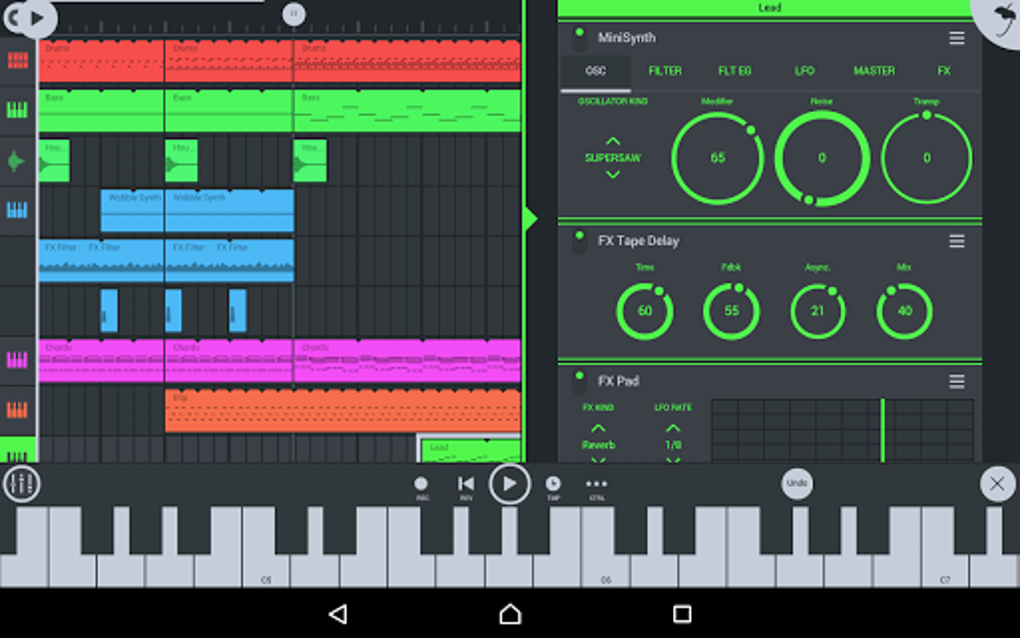
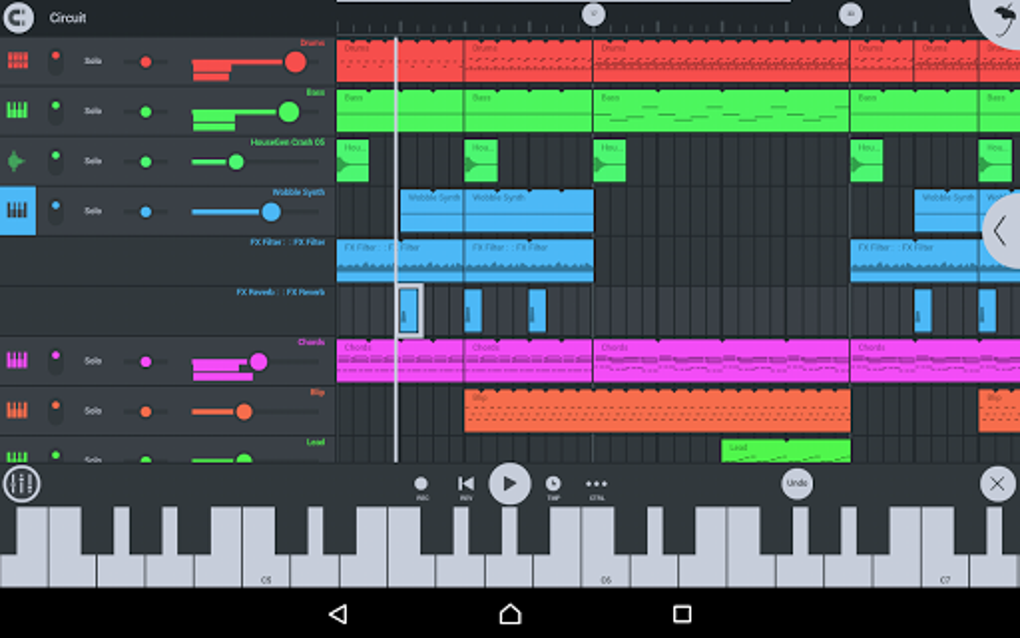
For veteran FL Studio users, the transition to the mobile version will feel remarkably seamless. Image-Line has cleverly adapted the core functionalities and interface elements of the desktop application, making the learning curve relatively gentle. The layout maintains a strong resemblance to its desktop predecessor, featuring familiar sections and controls, allowing for intuitive navigation and workflow. This familiarity extends to the sequencer, which sits at the heart of music creation within FL Studio, both on desktop and mobile. This consistency promotes a comfortable user experience, especially for those already comfortable with the FL Studio workflow.
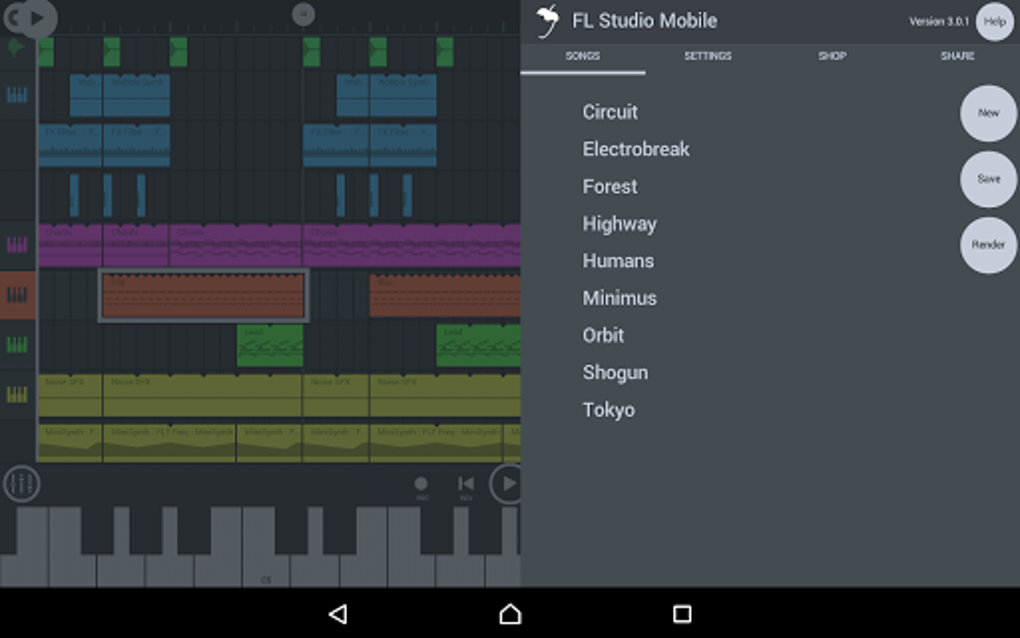
However, the mobile environment presents unique challenges. The smaller screen size necessitates a more condensed interface, which, while well-designed, can feel slightly cramped at times. Navigating through menus and accessing less frequently used tools might require a bit more precision and patience than on a larger desktop monitor. While the app effectively presents essential features in a readily accessible manner, some more nuanced controls or settings are buried within nested menus, requiring several taps to reach. This is a common trade-off in adapting desktop software for mobile platforms, and FL Studio Mobile handles it relatively well, but it’s a point worth noting for users accustomed to the vast workspace afforded by a computer screen.
Despite the condensed space, the app maintains a clean and modern aesthetic. The color palette is well-chosen, providing sufficient contrast to maintain visual clarity without overwhelming the user with excessive brightness or jarring color schemes. Button sizes are generally generous, minimizing accidental taps, and the overall layout encourages efficient workflow.
Sound Quality and Instrument Selection
One of FL Studio Mobile’s major selling points is its surprisingly high-quality sound library. The app boasts over 50 synthesizer voices and a wide variety of drum machine sound packs, all remarkably free from the digital artifacts (hiss, static, or noticeable compression) that often plague mobile audio applications. The instrumental selection is also impressive, with over 20 instruments available at launch, providing a good starting point for a range of musical styles. The quality of these sounds is commendable, making FL Studio Mobile suitable for creating professional-sounding tracks, even on a mobile device.
However, the lack of sound editing capabilities is a significant limitation. Users cannot modify or customize the existing sounds. They are presented with a fixed selection of presets, which, while extensive initially, can lead to a sense of repetition over time. This limitation is arguably the biggest drawback and is likely a deliberate choice to manage file sizes and maintain performance on a variety of mobile devices. This inevitably leads to the discussion of in-app purchases.
In-App Purchases: Expanding the Sonic Palette
FL Studio Mobile’s pricing model reflects its professional features: it is a paid application with additional in-app purchases for expanding the sound library. While this might initially seem off-putting, it’s crucial to consider it within the context of the app’s overall capabilities. The high-quality sounds included by default are a solid foundation, but the option to purchase additional sound packs allows users to tailor their sonic palette to specific genres or creative projects.
The cost of these sound packs varies. While a single purchase might provide a considerable influx of new sounds, the long-term cost of expanding the library significantly can add up, potentially making FL Studio Mobile a more expensive option than some competitors. This raises the question: is the cost of additional sound packs justified when compared to the overall capabilities of the app and potential alternatives? This is a personal decision that depends on individual needs and budgets. The lack of a free or demo version to test the full feature set limits the ability to try before you buy, which is a significant factor for potential users.
User Perception and Overall Value
User reviews of FL Studio Mobile are somewhat mixed, reflecting the inherent trade-offs between the app’s strengths and weaknesses. While many praise its intuitive interface, ease of use, and the high-quality of the included sounds, others express disappointment with the limited number of sounds initially available and the cost of expanding the library through in-app purchases. It’s crucial to research user experiences before making a purchase, paying particular attention to feedback from users with similar musical styles and production goals.
FL Studio Mobile ultimately delivers a powerful and versatile mobile DAW, particularly for those already familiar with the FL Studio ecosystem. Its strengths lie in its user-friendly interface, high-quality sounds, and a broad selection of included instruments. However, the lack of sound editing and the in-app purchases for expanding the sound library represent significant limitations.
The question of whether FL Studio Mobile is “worth it” depends entirely on the individual user’s needs and priorities. For seasoned producers who frequently need a mobile solution and already have familiarity with the FL Studio workflow, the benefits might outweigh the costs. However, for casual users or those with tighter budgets, the relatively high price point and limitations might prompt consideration of more affordable alternatives. It is essential to carefully weigh the pros and cons and consider whether the capabilities offered by FL Studio Mobile align with your specific musical aspirations and financial constraints.
Pros and Cons of FL Studio Mobile
Pros:
- High-quality instrumental sounds: The included sounds are impressive, lacking the digital artifacts that often plague mobile audio apps.
- User-friendly interface: The interface is intuitive and relatively easy to navigate, especially for existing FL Studio users.
- Large number of instruments: A wide variety of instruments are available from the outset, allowing for diverse musical styles.
- Multiple export options: Export your finished tracks in various formats (e.g., WAV, M4A, MIDI) for diverse sharing and further editing.
Cons:
- No demo version: The lack of a trial version prevents users from testing the app’s limitations before purchasing.
- No sound editing: Users cannot modify or customize the included sounds.
- Limited number of sounds (initially): While there are a good amount at the start, the lack of customizability leads to repetitive sounds.
- Expensive for a mobile app: The app itself is costly, and expanding the sound library through in-app purchases can quickly add to the total expenditure.
Ultimately, FL Studio Mobile offers a potent combination of professional features and mobile convenience. However, potential users must carefully consider its limitations and pricing structure to determine if it’s the right tool for their creative needs. Researching user reviews and comparing it to alternative mobile DAWs is highly recommended before committing to a purchase.
File Information
- License: “Full”
- Latest update: “August 10, 2025”
- Platform: “Android”
- OS: “Android 15.0”
- Language: “English”
- Downloads: “1.5M”
- Download Options: “Google Play”


