
In the vast and ever-evolving landscape of the internet, technologies come and go, each leaving its unique footprint on how we interact with digital content. One such technology, Adobe Flash (formerly Macromedia Flash), once dominated the web, powering everything from interactive websites and online games to captivating animations and multimedia experiences. During its heyday, users often encountered engaging Flash content they wished to save for offline viewing, archival, or simply to revisit without an internet connection. This desire gave rise to specialized tools, and among them, “Flash Catcher” emerged as a straightforward solution for Windows users.
Flash Catcher, as listed on platforms like PhanMemFree.org, was a trial version software designed with a singular, effective purpose: to “save flash animations to your hard drive in one click.” While its utility might seem niche today in a world largely devoid of Flash, understanding Flash Catcher requires a historical perspective, a look into the vibrant, often chaotic, early days of web multimedia, and the broader categories of software it inhabited – from Internet & Network tools to specialized Download Managers and Multimedia utilities.
The Rise and Fall of Flash: Context for Flash Catcher
To truly appreciate a tool like Flash Catcher, one must first understand the environment it was built for. The late 1990s and early 2000s marked a pivotal era for the internet. Broadband internet was becoming more accessible, paving the way for richer web experiences beyond static text and images. HTML, while foundational, lacked the dynamic capabilities needed for truly interactive and visually rich content. This void was brilliantly filled by Macromedia Flash.
Flash allowed designers and developers to create intricate vector graphics, animations, and interactive elements that could run within a web browser via a plugin. It was a game-changer, enabling a new generation of visually stunning websites, captivating banner ads, and, crucially for many users, an explosion of online games and short animated cartoons. These “Flash animations” (typically in the .SWF format – Small Web Format or Shockwave Flash) were compact, could be streamed relatively quickly even on moderate internet connections, and offered a level of artistic freedom that was unparalleled at the time.
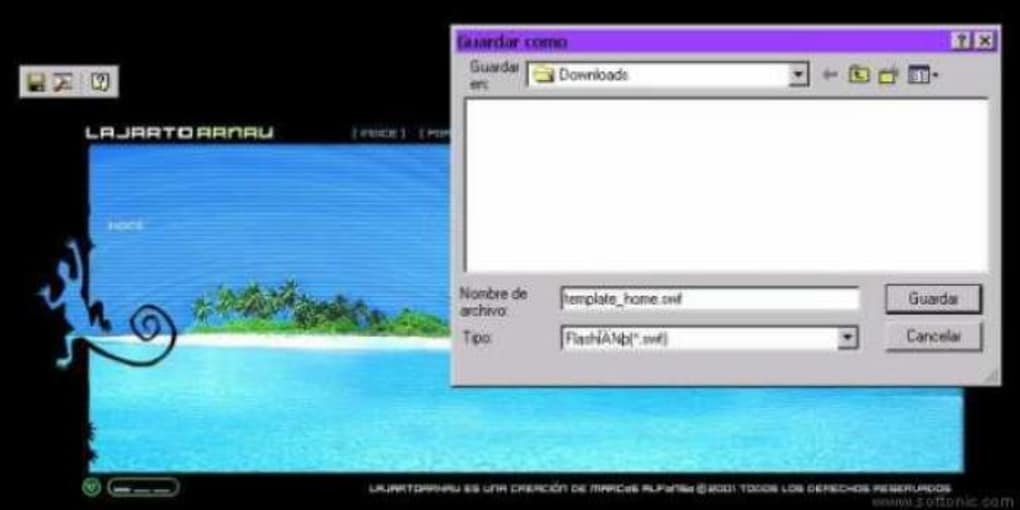
Users would spend hours on websites like Newgrounds, Homestar Runner, or countless independent artist portfolios, immersed in Flash-driven creativity. The desire to capture these fleeting digital experiences grew naturally. What if a favorite animation was removed? What if one wanted to show it to friends offline? This is precisely where Flash Catcher found its purpose. It tapped into a very real need among a segment of internet users who wished to “collect” or “archive” the digital ephemera of the web.
However, Flash’s dominance was not to last. As the internet matured, so too did its challenges. Flash became increasingly associated with security vulnerabilities, performance issues (it was notoriously CPU-intensive), and its incompatibility with the burgeoning mobile device ecosystem (famously blocked by Apple’s iOS). The rise of HTML5, CSS3, and JavaScript offered native browser capabilities for animation and interactivity without the need for a plugin, effectively rendering Flash obsolete. Adobe officially ended support for Flash Player at the end of 2020, marking the end of an era. Flash Catcher, therefore, is a relic of this bygone age, a testament to a specific moment in internet history.
Flash Catcher’s Place in the Software Ecosystem
Flash Catcher wasn’t a standalone anomaly; it fit neatly into several established categories of software, each contributing to its functionality and appeal. On platforms like PhanMemFree, software is meticulously categorized to help users navigate vast libraries of tools. Flash Catcher’s primary home was under Internet & Network, specifically within Download Managers, but it also shared characteristics with Utilities & Tools.
Internet & Network: Navigating the Digital Landscape
The Internet & Network category encompasses a broad spectrum of software designed to facilitate, manage, and enhance online activities. This includes everything from web browsers and email clients to file-sharing applications and tools for network diagnostics. Flash Catcher, by virtue of its function—interacting directly with web content to extract specific files—was an integral part of this digital toolkit.
In the early 2000s, internet browsing was often a more hands-on experience. Users were accustomed to downloading files directly, managing browser caches, and using specialized tools to get the most out of their online time. Flash Catcher fit perfectly into this paradigm. It extended the capabilities of a standard web browser, allowing users to do something that the browser itself didn’t natively offer: systematically identify and download embedded Flash content.
This category also includes tools like Add-Ons & Tools for browsers, which Flash Catcher essentially acted as, albeit as a standalone application rather than a browser extension in the modern sense. It aimed to augment the user’s internet experience, providing a targeted solution for a specific type of web content that was prevalent at the time. For many, Flash Catcher was an essential utility for making the most of the rich, animated web content that characterized the era.
Download Managers: Streamlining Content Acquisition
Flash Catcher’s most direct classification was under Download Managers. This software category is dedicated to optimizing the process of downloading files from the internet. While standard web browsers have built-in download capabilities, dedicated download managers often offer advanced features like resuming interrupted downloads, scheduling, managing multiple downloads simultaneously, and segmenting files for faster transfers.
Tools like “Neat Download Manager,” “Internet Download Manager,” and “Free Download Manager” (also listed on PhanMemFree.org as top downloads in this category) are well-known examples of comprehensive download managers. Flash Catcher, however, was a highly specialized download manager. It wasn’t designed to download large software packages or entire websites; its focus was laser-sharp: identifying and capturing Flash (.SWF) files.
This specialization was its strength. Instead of sifting through network traffic or browser caches manually, Flash Catcher provided a user-friendly interface that could detect Flash content on a webpage and offer a “one-click” solution for saving it. This simplified a process that would otherwise require technical know-how or tedious manual effort. It was a testament to the idea that sometimes, a highly focused tool can be more effective than a general-purpose one for a specific task. Its “light software” footprint (1.25 MB) further aligned with the download manager ethos of efficiency and speed, ensuring it didn’t bog down system resources while performing its targeted function.
Utilities & Tools: Enhancing System Functionality
Beyond its direct Internet & Network and Download Managers classifications, Flash Catcher also functions as a general Utility & Tool. This broad category on PhanMemFree includes applications that perform specific, often supplementary, tasks to enhance a computer’s functionality or user experience. Examples range from File Managers and Screen Capture tools to Clocks & Alarms and Data Recovery software.
Flash Catcher was undeniably a utility in this sense. It provided a specific capability—Flash animation capture—that wasn’t inherent to the operating system or common applications. It filled a gap, offering a practical solution for users who wanted more control over the Flash content they encountered online. Like a Screen Capture tool captures images of what’s on the screen, Flash Catcher captured the underlying data of a Flash animation, preserving its interactive and animated qualities. Its simplicity and “one-click” operation made it highly user-friendly, typical of many effective utilities designed to streamline particular tasks.
Delving into Multimedia: The World Flash Catcher Served
The very content Flash Catcher aimed to capture – Flash animations – belongs firmly within the Multimedia category. On PhanMemFree.org, Multimedia is a comprehensive section covering Audio, Video, Graphic & Design, Movies & TV, Music & Radio, Photography, and Streaming Videos. Flash content often blurred the lines between these subcategories, frequently combining animation (graphics), sound (audio), and sometimes even short narrative structures (akin to Movies & TV).
Flash was, in essence, a multimedia platform within the browser. It enabled interactive experiences, richly animated storytelling, and dynamic user interfaces that were groundbreaking for their time. Flash Catcher, by preserving these Multimedia artifacts, allowed users to take them out of the ephemeral web environment and make them a permanent part of their local digital collection.
Consider the landscape of early digital multimedia. Before widespread high-definition video streaming, Flash offered a viable way to deliver animated shorts and interactive narratives online. Flash games were a precursor to modern web-based gaming, providing casual entertainment that was easily accessible. Flash Catcher allowed enthusiasts to save these games or animations, perhaps to play offline, study their construction, or simply ensure their continued availability in an era where online content was less stable than it is today.
The light footprint of Flash Catcher (1.25 MB) also meant it was easy to download and install, a feature that resonated with users interested in quickly acquiring multimedia content without extensive setup. Its popularity in countries like China, Turkey, and Saudi Arabia might reflect regional preferences for Flash content or specific internet infrastructure conditions where local storage of popular multimedia was a significant advantage. This global appeal underscores the universal desire to collect and control digital media.
Security, Modern Alternatives, and the Legacy of a Niche Tool
While Flash Catcher served a valuable purpose in its time, discussing it today inevitably brings up broader considerations, particularly concerning Security & Privacy, and how its functionality has been superseded by modern web standards and tools. The Security & Privacy section on PhanMemFree.org includes essential categories like Antivirus, Firewalls, VPN, and Password Management, highlighting the critical importance of digital safety.
Security & Privacy: Navigating the Digital Wild West
The very nature of downloading content from the internet, especially from less reputable sources, has always carried security risks. While Flash Catcher itself was a legitimate tool, the Flash files (.SWF) it downloaded were not always benign. Flash’s inherent security vulnerabilities were a major reason for its deprecation. Malicious actors could embed exploits within seemingly innocent Flash animations, potentially leading to malware infections, data theft, or system compromise. Using an older tool like Flash Catcher, which last saw a significant update in March 2017 (though the initial listing on PhanMemFree was in 2011 for version 2.6, indicating its long-standing presence), might expose users to unpatched vulnerabilities if used in a modern context, especially if the Flash content itself is from untrustworthy sources.
Furthermore, running old software on modern operating systems can sometimes introduce compatibility issues or even security holes if the software interacts with system components in ways not anticipated by newer OS versions. For these reasons, while Flash Catcher holds historical interest, its practical recommendation for current use is limited, particularly given the near-total disappearance of Flash content from the active web.
Modern Alternatives and the HTML5 Revolution
With the decline of Flash, the need for a “Flash Catcher” diminished significantly. Modern web development, driven by HTML5, CSS3, and JavaScript, allows for rich multimedia and interactive experiences natively within browsers, without plugins. If a user wishes to “capture” web animations today, the approach is entirely different:
- Browser Developer Tools: Most modern browsers include developer tools that allow users to inspect network requests, save embedded media (like videos or images), and even download JavaScript animations as code.
- Screen Recording Software: For dynamic or interactive content, screen recording applications are the go-to solution, capturing the live playback as a standard video file.
- Dedicated Video Downloaders: For streaming video content (which Flash was sometimes used for), numerous tools and browser extensions exist to download media from platforms like YouTube or Vimeo.
These modern solutions are often more secure, compatible with current web standards, and versatile enough to handle the diverse range of multimedia content found online today.
The Legacy of a Niche Tool
Flash Catcher, version 2.6, with its 1.25 MB size and support for Windows 95 and prior versions (including Windows NT as per its app specs), represents a specific moment in computing history. It was a “light software” that required “less free space than the average program in the section Downloading software,” a characteristic valued in an era when hard drive space was more precious. Its download figures (42,595 downloads since 2011 on PhanMemFree, with 5 downloads in a specific week reported, and 8.6K lifetime downloads with 2 in the last month as per App specs, illustrating its dwindling but persistent niche appeal even after Flash’s decline) speak to its popularity among those seeking to preserve Flash content.
The developer, justdosoft, created a focused, effective utility for its time. While Flash Catcher itself is largely obsolete due to the deprecation of Flash technology, its existence serves as a reminder of the internet’s dynamic nature. It highlights how user needs drive software development and how tools emerge to fill specific gaps in our digital experience. It’s a nostalgic nod to an era when web animations were cutting-edge, and a simple “one-click” solution could bring immense satisfaction to those eager to capture a piece of the burgeoning digital world.
In conclusion, Flash Catcher, a modest yet effective tool, embodies a specific chapter in internet history. It stands as a testament to the creativity enabled by Macromedia/Adobe Flash and the enduring human desire to collect, preserve, and revisit digital experiences. Though its direct utility has faded with the demise of Flash, its story remains a fascinating footnote in the evolution of Internet & Network software, Download Managers, Multimedia tools, and the broader digital landscape that PhanMemFree.org continues to document and categorize for generations of users.
File Information
- License: “Trial version”
- Version: “2.6”
- Latest update: “March 10, 2017”
- Platform: “Windows”
- OS: “Windows NT”
- Language: “English”
- Downloads: “8.6K”
- Size: “1.25 MB”


