
Flash Player, once a ubiquitous tool for web browsing, remains a subject of both nostalgia and technical discussion. While its dominance has waned due to security concerns and the rise of HTML5, understanding its legacy and the tools built around it, such as “Flash Player Pro,” provides valuable insight into the evolution of internet technology. This review delves into the capabilities, limitations, and historical context of Flash Player and similar applications, exploring their impact and relevance in the modern digital landscape.
Flash Player: A Retrospect of the Golden Age of Web Animation
Adobe Flash Player, at its peak, was revolutionary. Its ability to deliver rich, interactive content directly within web browsers transformed the online experience. Before the widespread adoption of HTML5’s video and animation capabilities, Flash was the undisputed king, powering countless websites, games, and animations. Its impact was pervasive, shaping how users interacted with the internet for over a decade. Flash Player’s ease of use contributed to its widespread adoption; even novice computer users found it intuitive to install and use.
The platform’s versatility was another key to its success. Flash Player handled everything from simple animations to complex video games and interactive advertisements. YouTube, for a considerable period, heavily relied on Flash for video playback. The plugin’s compatibility with diverse content types made it an indispensable tool for both content creators and consumers.
The availability of numerous add-ons and regular, free updates further enhanced the user experience. Adobe consistently worked to improve the software’s performance and security, striving to address vulnerabilities and maintain its relevance. However, these efforts couldn’t entirely counter the growing concerns surrounding Flash Player’s security.
Despite its popularity and capabilities, Flash Player’s era wasn’t without its challenges. The most significant criticism centered on security vulnerabilities. Exploits were frequently discovered, making users susceptible to malware and other security threats. This inherent instability prompted significant security concerns, ultimately leading to its eventual decline.
While Adobe continued to release updates to patch vulnerabilities, the inherent architecture of Flash Player made it difficult to eliminate all security risks entirely. This ultimately contributed to major browsers phasing out support for Flash Player, rendering it obsolete for most users.
Flash Player Pro: Expanding the Functionality of Flash
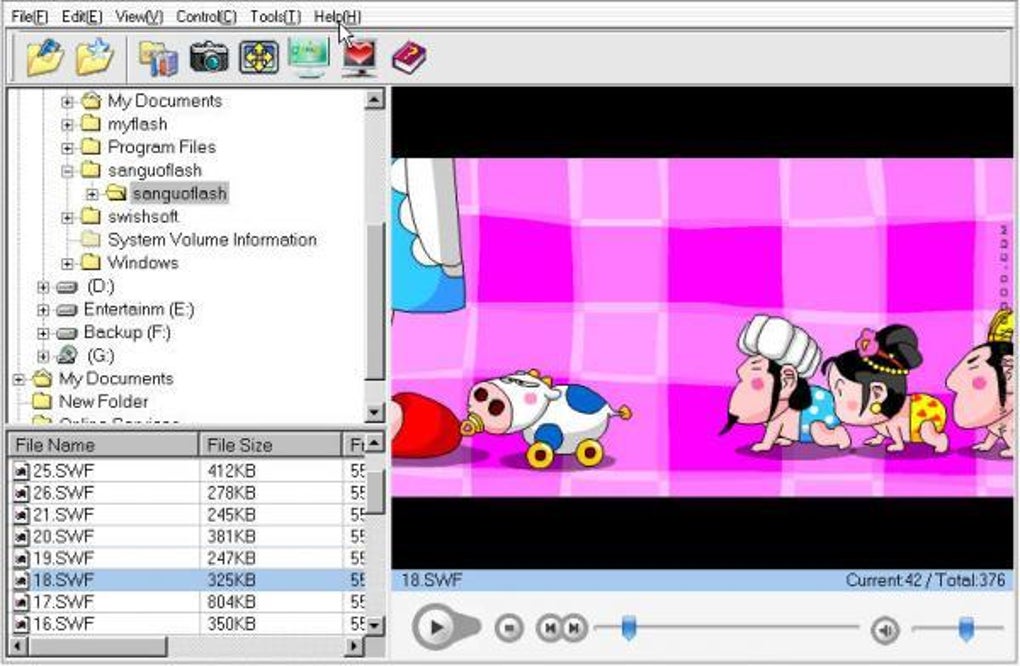
Flash Player Pro aimed to go beyond the basic functionalities of the standard Flash Player. While exact features varied depending on specific versions and developers, it commonly included additional tools designed to enhance the user experience and extend Flash’s capabilities. These features often included:
-
Flash Movie Downloading: A key feature of many Flash Player Pro applications was the ability to download Flash movies directly from websites. This allowed users to save their favorite animations or games for offline viewing or use.
-
Flash Movie Preview and Browsing: The ability to easily preview and browse Flash files locally, without needing to open a browser, added to the user’s convenience and control over their Flash content.
-
Flash Image Capture and Wallpaper Setting: Some versions incorporated the ability to capture images from Flash animations and set them as desktop wallpaper, providing a unique way to personalize the computer interface.
-
Flash Screensaver Creation: The capacity to create custom Flash screensavers added a creative dimension, allowing users to transform their computer’s idle screen into interactive entertainment.
-
SWF to EXE Conversion: A powerful feature often integrated into Flash Player Pro software, allowing users to convert SWF (Shockwave Flash) files into executable EXE files. This made the Flash content more accessible, shareable, and independent of a browser. This conversion could also improve performance in certain scenarios.
These enhanced capabilities made Flash Player Pro a more comprehensive and user-friendly tool for those who regularly worked with Flash content.
The Decline of Flash and the Rise of HTML5
The dominance of Flash Player was eventually challenged and ultimately superseded by HTML5. HTML5’s superior security, performance, and cross-platform compatibility offered a more robust and reliable alternative. Unlike Flash, HTML5’s integration into web browsers didn’t require the installation of separate plugins, eliminating a primary source of security vulnerabilities.
Furthermore, HTML5’s superior support for video and animation inherently improved user experience. HTML5 videos streamed more smoothly and offered better compatibility across various devices and browsers. The ability to embed video and animation directly into websites without relying on external plugins was a significant advantage, offering simplified development and smoother functionality.
The combination of security concerns surrounding Flash Player and the advantages offered by HTML5 led major web browsers to phase out support for Flash. This transition, though initially disruptive for some, ultimately improved internet security and enhanced the overall web experience for most users. The shift was gradual, but the end result was the clear dominance of HTML5 as the standard for interactive web content.
Flash Player Pro in the Modern Context
With the widespread abandonment of Flash Player by major browsers, Flash Player Pro applications have become largely obsolete. The functionality once provided by these programs is now either integrated into modern browsers or easily accomplished using alternative software and HTML5 techniques.
The legacy of Flash Player Pro, however, highlights the evolution of web technology and the constant push for improved security and functionality. The tools it offered, particularly the SWF to EXE conversion and advanced management features, served specific user needs at the time, reflecting the technological limitations and capabilities of the era.
Today, users can achieve similar results using a variety of modern tools. For video playback, HTML5 video players are the standard, while numerous applications offer animation and multimedia editing capabilities. The shift from Flash Player to HTML5 reflects a broader trend in web development – a continuous drive towards more secure, efficient, and universally compatible technologies.
Alternatives to Flash Player and Flash Player Pro
A plethora of alternatives emerged to fill the void left by Flash Player. These options are generally categorized into:
-
HTML5-based video and animation players: Modern web browsers natively support HTML5 video and animation, eliminating the need for external plugins. This integrated approach offers improved security and cross-platform compatibility.
-
Standalone video players: Various standalone video players, such as VLC Media Player, offer broad support for various video formats, including those previously handled by Flash Player. These players are often more feature-rich than simple browser-based players.
-
Multimedia editing software: Numerous applications, including Adobe After Effects and other professional-grade software, provide extensive tools for creating and editing animations and multimedia content, often with far greater capabilities than Flash Player ever offered.
The transition from Flash Player to a variety of modern alternatives signifies a significant improvement in web technology, showcasing the progress made in browser capabilities, security standards, and multimedia content delivery. The move away from Flash represents a necessary step toward a more robust and secure online experience. While the nostalgia for the Flash era remains for many, the modern alternatives have demonstrably improved upon many of its aspects.
File Information
- License: “Trial version”
- Version: “3.1”
- Latest update: “January 24, 2023”
- Platform: “Windows”
- OS: “Windows 98”
- Language: “English”
- Downloads: “201.6K”
- Size: “1.81 MB”


