
Flash Share Lite is a free, fast, and easy-to-use file-sharing application designed for Android devices. It allows users to seamlessly transfer large files of any type between Android devices without the need for internet connectivity or complex setup procedures. This comprehensive guide will explore the features, benefits, and usage of Flash Share Lite, examining its capabilities for personal and business use.
App Overview and Functionality
Flash Share Lite eliminates the limitations of traditional file-sharing methods, providing a simple and efficient solution for transferring large files between Android devices. Unlike methods relying on cloud storage or internet connections, Flash Share Lite leverages a direct peer-to-peer connection, ensuring swift transfer speeds and reduced reliance on network stability. This is particularly advantageous for sharing large files such as high-resolution videos, extensive photo collections, or sizable application installers, where traditional methods can be slow, unreliable, or data-intensive.
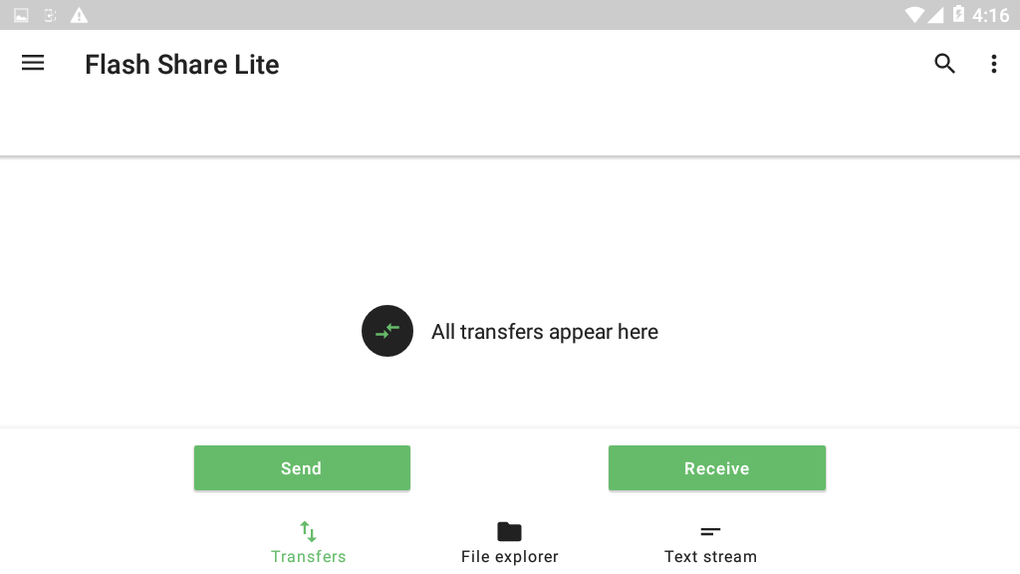
The application boasts a user-friendly interface, designed for intuitive navigation and ease of use. The process of sharing a file is straightforward: select the file, choose the recipient device (from a list of available devices within the app’s network range), and initiate the transfer. The app handles the technical aspects, automatically establishing the connection and monitoring the transfer progress. Users are notified upon successful completion of the transfer. This simple workflow caters to users of all technical skill levels, from novice to experienced Android users.
The app’s strength lies in its ability to handle large file sizes efficiently. Many other file-sharing apps struggle with larger files, experiencing slow transfer speeds, interruptions, or even failures. Flash Share Lite addresses these shortcomings by utilizing an optimized transfer protocol, ensuring consistent and reliable performance, even for substantial file sizes. This feature makes it ideal for sharing large media files, software installations, and other demanding file types.
One key advantage of Flash Share Lite is its lack of reliance on internet connectivity. This is particularly useful in areas with limited or unreliable internet access, making it a practical solution for a wider range of users and situations. It removes the dependence on network bandwidth and stability, providing a consistent and predictable file transfer experience.
Another notable aspect is the absence of root access requirements. Many applications demand root access, potentially compromising device security or voiding warranties. Flash Share Lite operates without requiring root access, ensuring greater security and compatibility across various Android devices.
Apps, Games, and News Sharing Capabilities
Flash Share Lite’s broad applicability extends to various file types, encompassing apps, games, news articles, and more. Its ability to handle diverse file formats makes it a versatile tool for sharing a wide array of digital content.
Sharing Apps: The app facilitates the seamless transfer of Android application files (.apk files) between devices. This allows users to share downloaded apps, games, or utility programs quickly and conveniently without needing to rely on app stores or internet access. This simplifies the process of sharing apps between personal devices or providing apps to others.
Sharing Games: Sharing large game files can be cumbersome. Flash Share Lite simplifies this process by enabling the efficient and reliable transfer of even the largest game files. The speed and stability of the transfer process ensure that the game data remains intact and is ready to play on the receiving device.
Sharing News Articles and Documents: Flash Share Lite can share news articles, documents, and other textual information efficiently. This feature is beneficial for sharing research materials, collaborating on projects, or providing access to important information quickly. The ease of sharing such content directly between devices eliminates the need for intermediate steps or email attachments.
Flash Share Lite for Business Use
Flash Share Lite offers several advantages for businesses, especially those operating in environments with limited or unreliable internet connectivity. The ability to share large files quickly and reliably without internet dependence makes it a cost-effective and practical solution for various business applications.
Improved Collaboration: Within a business setting, Flash Share Lite can significantly improve collaboration by facilitating the rapid exchange of project files, documents, and presentations. This quick sharing can save valuable time and resources, boosting productivity.
Efficient Data Transfer: The app streamlines the transfer of large datasets between colleagues or departments, eliminating the bottlenecks often associated with traditional methods. This efficiency is crucial for businesses relying on the prompt exchange of large files.
Secure File Sharing: While not a replacement for encrypted file-sharing solutions for highly sensitive data, Flash Share Lite offers a secure method for transferring files between devices within a controlled environment. The direct peer-to-peer connection reduces the risk of interception inherent in some online file-sharing methods.
Cost Savings: By eliminating the reliance on internet-based file transfer services, Flash Share Lite can significantly reduce associated data costs for businesses. This is particularly beneficial for organizations with high data transfer requirements or those operating in areas with expensive internet access.
Android Compatibility and Technical Specifications
Flash Share Lite is designed for Android devices running Android 9.0 (Pie) and later versions. Its compatibility extends across a variety of Android devices, including smartphones, tablets, and Android TV boxes. The app’s lightweight design ensures minimal impact on device performance, maintaining a responsive user experience even on less powerful devices.
Key Technical Specifications:
- Operating System: Android 9.0 (Pie) and above
- Language: English (and other languages as indicated by the availability of alternative app downloads in various languages on the website)
- Size: 7.38 MB (relatively small size, minimizing storage space usage)
- Version: 1.8 (current version at the time of writing. Future updates may introduce additional features and improvements)
- Developer: F tech (provides contact information for user support and inquiries)
- License: Free (available for download and use at no cost)
The small size of the app contributes to its accessibility. It can be downloaded and installed quickly, consuming minimal storage space on the Android device. This characteristic is particularly appealing for users with limited device storage capacity.
The app’s current version (1.8) reflects ongoing development and improvements. Future updates are likely to address any issues, incorporate user feedback, and potentially introduce new functionalities, further enhancing the overall user experience.
User Reviews and Community Feedback
At the time of writing, user reviews for Flash Share Lite are limited. However, its straightforward functionality and efficient transfer capabilities suggest positive user experiences are likely. Future user feedback and ratings will provide valuable insight into user satisfaction and areas for potential improvement. The availability of user review sections on app stores and dedicated platforms will allow users to share their experiences and contribute to a collective understanding of the app’s strengths and weaknesses. This feedback loop is crucial for the continued development and improvement of the app.
Alternative Apps and Comparisons
While Flash Share Lite provides a solid solution for local file sharing, several alternative applications offer similar functionalities, but might have differing features or strengths. A comparison with these alternatives could illuminate the unique advantages of Flash Share Lite. These comparisons should consider factors like speed, ease of use, file size limitations, support for different file types, and security features. A comprehensive analysis would help users make informed choices based on their specific requirements.
Conclusion
Flash Share Lite offers a robust and user-friendly solution for sharing large files between Android devices without needing an internet connection. Its ease of use, speed, and compatibility make it suitable for a variety of applications, from personal file sharing to business collaborations. While user feedback is still limited, its streamlined design and effective functionality suggest a positive user experience. The app’s ongoing development and updates indicate a commitment to improvement and the addition of potentially valuable features in future versions. Flash Share Lite’s efficiency and reliability make it a strong contender in the field of local file-sharing applications for Android.
File Information
- License: “Free”
- Version: “1.8”
- Latest update: “January 10, 2024”
- Platform: “Android”
- OS: “Android 9.0”
- Language: “English”
- Downloads: “1.9K”
- Size: “7.38 MB”
- Download Options: “APK, Google Play”
- Filename: “com-fb-ftransfer-2010-63990164-8058e15587156f4ca7e037dd8aa0524f.apk”


