
Flatbook, a now-retired Windows-only e-reader application, offered a unique approach to on-screen text document viewing. While no longer actively developed or supported, its innovative design aimed to minimize eye strain and enhance the overall reading experience by mimicking the feel of a physical book. This exploration delves into the features, history, and impact of this unique software.
Mimicking the Physical Book Experience
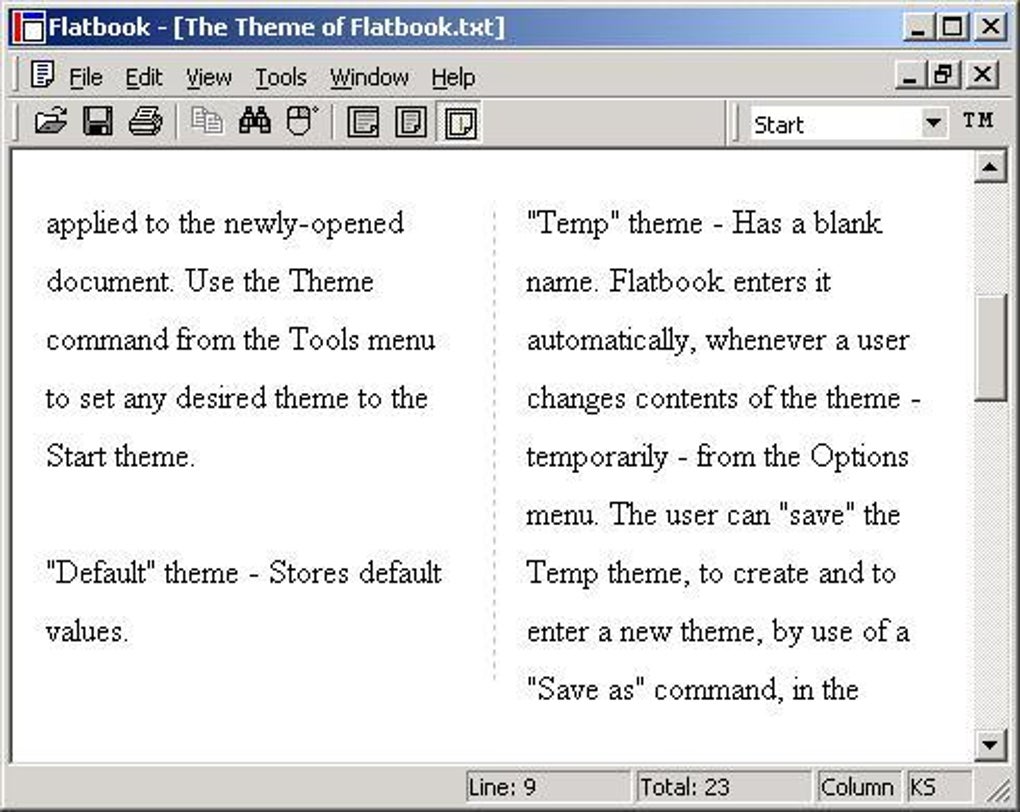
Flatbook’s core innovation centered around its page-based interface. Unlike many contemporary e-readers that presented text as a continuous scroll, Flatbook displayed content in distinct pages, similar to turning the pages of a traditional book. This design choice was deliberate, intended to reduce the visual fatigue often associated with extended periods of on-screen reading. The continuous scrolling model, while efficient for browsing, can lead to eye strain due to the constant movement required to track the text. Flatbook’s page-turning approach aimed to alleviate this, creating a more restful reading environment.
This page-based system was further enhanced by the application’s theming capabilities. Users could customize their reading experience by adjusting page size, font type and size, color schemes, and margins. This level of customization allowed users to tailor the appearance to their preferences and visual comfort, further reducing eye strain and improving readability. The ability to personalize the visual presentation made Flatbook adaptable to various reading styles and individual needs. A user who preferred a larger font size and wider margins could easily implement these changes, while another might prefer a more compact, dense page layout. This flexibility was a key differentiator.
Technical Specifications and Legacy
Released in 2005, Flatbook was a lightweight application designed for Windows 98 and earlier versions. Its relatively small file size ensured compatibility with older systems with limited storage capacity, a crucial factor in its time. While the software was eventually discontinued, it garnered a modest but dedicated following, achieving 731 installations by the time it was removed from distribution channels. The last known update was on October 31, 2005, highlighting its relatively short lifespan. Though outdated by modern standards, its simplicity and focus on ease of reading established a niche.
The application, developed by Safesite, was offered as a trial version, meaning full functionality was likely limited until a purchase was made. Information on the exact pricing model or whether a full version was ever released is not readily available in accessible resources. The software was available in English and required minimal system resources, making it accessible even on less powerful machines. This emphasis on accessibility broadened the potential user base, particularly among users of older computers.
Comparing Flatbook to Modern E-readers
While Flatbook’s design philosophy was ahead of its time in terms of prioritizing eye comfort, modern e-readers have significantly surpassed it in functionality and features. Contemporary applications offer features like:
- Advanced text rendering: Modern e-readers employ sophisticated algorithms for text rendering, optimizing readability across different devices and screen sizes. This enhances clarity and further reduces eye strain compared to the relatively basic rendering capabilities of Flatbook.
- Extensive format support: Modern e-readers typically support a wide range of e-book formats, including EPUB, MOBI, PDF, and others, catering to a wider variety of reading materials. Flatbook likely had more limited format support.
- Integrated libraries and cloud sync: Many contemporary e-readers seamlessly integrate with online libraries and cloud storage services, allowing users to access and manage their reading lists across multiple devices. This functionality was absent in Flatbook.
- Enhanced accessibility features: Modern e-readers often include robust accessibility features, such as text-to-speech, adjustable font sizes, and color schemes designed for users with visual impairments. While Flatbook offered customization, its accessibility features were likely more limited.
- Advanced annotation and note-taking capabilities: Modern e-readers typically allow users to highlight text, add notes, and create bookmarks, enhancing their engagement with the reading material. Flatbook’s annotation features, if any, were likely quite basic.
Flatbook’s Enduring Relevance: A Case Study in Design Principles
Despite its obsolescence, Flatbook serves as a valuable case study in the design principles of software intended for extended use. Its focus on minimizing eye strain through page-based navigation and customizable themes highlights the importance of user experience, even in seemingly simple applications. The design choices made by the developers demonstrate a clear understanding of user needs, particularly the often-overlooked aspect of visual fatigue associated with digital reading.
Although modern e-readers offer vastly superior features and functionality, Flatbook’s core principles of reducing eye strain and enhancing readability remain relevant. The lessons learned from its design, especially its emphasis on user comfort, continue to shape the development of today’s reading applications and contribute to a better user experience overall. Even in a technologically advanced era, the fundamental concepts of usability and ergonomics which underpinned Flatbook’s design remain vital considerations for software developers. The software may be gone, but the emphasis on a user-centered approach to interface design continues to resonate.
File Information
- License: “Trial version”
- Version: “1.0”
- Latest update: “February 13, 2019”
- Platform: “Windows”
- OS: “Windows 98”
- Language: “English”
- Downloads: “1.9K”
- Size: “4.57 MB”


