
Flawless Widescreen is a powerful utility designed for Windows users who crave an immersive ultrawide gaming experience. It bridges the gap between the increasing popularity of ultrawide monitors (with aspect ratios such as 21:9 and 32:9) and games that haven’t yet fully embraced these wider resolutions. This often results in frustrating black bars appearing on either side of the screen, significantly reducing the visual impact and immersion of the gameplay. Flawless Widescreen cleverly tackles this problem, allowing players to enjoy their games in their monitor’s full glory, regardless of native game support.
How Flawless Widescreen Works: Resolving the Aspect Ratio Dilemma
The core function of Flawless Widescreen revolves around dynamically adjusting the field of view (FOV) within games. By manipulating this setting, the program effectively stretches the game’s rendered image to fill the entire ultrawide screen. This isn’t a simple scaling operation; it’s a sophisticated process that aims to preserve the game’s intended visual elements and proportions as much as possible while eliminating those distracting black bars. The result is a more expansive and engaging gaming experience. The software achieves this through game-specific plugins. These aren’t generic modifications but rather custom-tailored solutions designed to work seamlessly with individual game titles. This ensures optimal compatibility and avoids potential conflicts or glitches that could arise from a one-size-fits-all approach.
The process of using Flawless Widescreen is relatively straightforward. After installation, the program scans for installed games and provides a list of compatible titles. Users can then select the desired game and choose from a range of preset options or manually fine-tune the settings to achieve the perfect balance between visual fidelity and screen coverage. The software intelligently assesses the game’s internal parameters and applies adjustments accordingly, often minimizing the need for extensive manual tweaking. For experienced users, however, Flawless Widescreen allows for advanced customization options offering granular control over various aspects of the FOV and display settings, letting them optimize the visuals to their preferences.
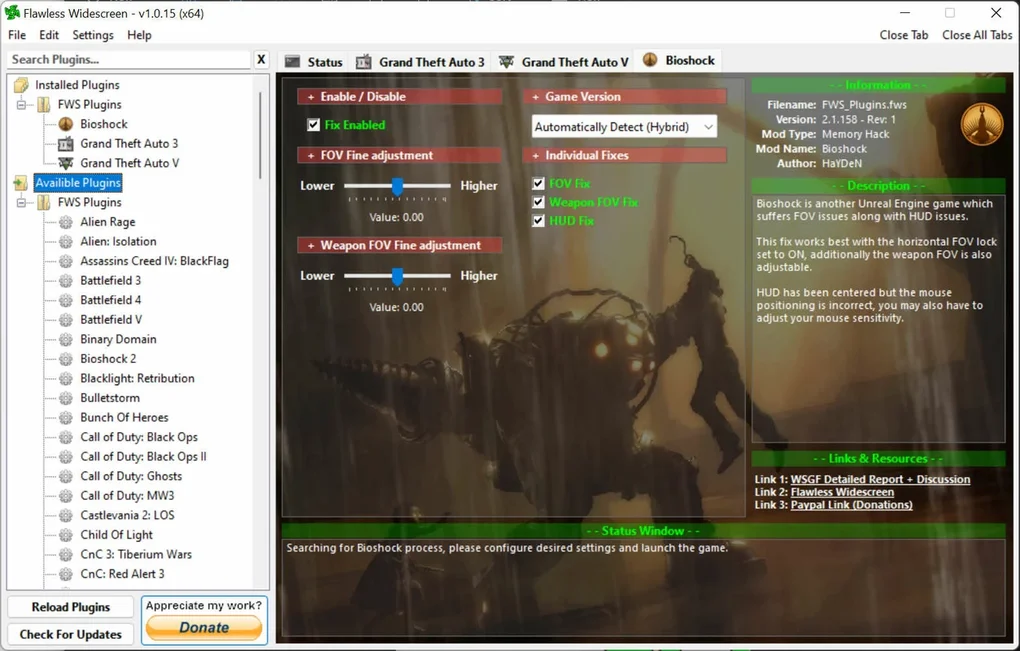
Beyond FOV: Multi-Monitor Support and Enhanced Features
Flawless Widescreen’s capabilities extend beyond simple FOV adjustments. A significant advantage is its support for multi-monitor setups. For those using multiple displays for an even wider gaming arena, Flawless Widescreen seamlessly integrates with these configurations. The program cleverly handles the distribution of game elements across multiple screens, ensuring a consistent and cohesive visual experience. Whether you have a two-monitor, three-monitor, or even more extensive setup, Flawless Widescreen aims to make the most of your expanded display real estate.
Further enhancing its functionality, the software often includes additional features designed to improve the gaming experience. These can vary depending on the game and the specific plugin but might encompass:
- First-person and third-person view toggles: Allowing for optimized FOV adjustments for different camera perspectives within a game. This ensures that both close-quarters combat and broader panoramic views are displayed optimally on the ultrawide screen.
- Customizable aspect ratio presets: Offering pre-defined aspect ratios beyond the standard 21:9 and 32:9, allowing users to experiment with different screen proportions.
- Enhanced HUD (Heads-Up Display) scaling: Ensuring that the in-game interface elements remain legible and appropriately scaled to fit the wider screen. This avoids the common issue of HUD elements appearing too small or distorted when using ultrawide resolutions.
- Support for various game engines: Flawless Widescreen strives for compatibility with a wide range of game engines, maximizing the number of supported titles. However, due to the unique nature of game development, some games may present greater challenges in terms of compatibility.
Game Compatibility and Plugin Management: Navigating the Landscape
While Flawless Widescreen strives for widespread compatibility, it’s crucial to acknowledge that not all games are supported. The complexity of game engines and the variability in their rendering techniques can create limitations. The software relies heavily on its user-contributed plugin system. This collaborative approach allows the community to contribute plugins for games not initially supported by the developers. Therefore, the extent of Flawless Widescreen’s effectiveness for a given game hinges significantly on the availability and quality of its corresponding plugin.
The plugin system requires careful management. Users must download and install the correct plugins for each game they wish to use with Flawless Widescreen. Mismatched or outdated plugins can lead to instability or unexpected visual artifacts. The software generally provides clear instructions for installing and managing plugins, usually involving a straightforward download and placement of the plugin files within the Flawless Widescreen directory. Regular updates to both the main software and the plugins are crucial to maintain compatibility and enhance performance. Checking for updates regularly ensures that users benefit from bug fixes, performance optimizations, and expanded game support.
Setting Up and Using Flawless Widescreen: A Step-by-Step Guide
The installation and configuration of Flawless Widescreen are generally user-friendly. The process typically involves:
-
Downloading and installing the main application: This is usually a straightforward process, similar to installing other Windows software. The installer guides the user through the basic steps.
-
Scanning for games: After installation, Flawless Widescreen scans the user’s system to identify installed games that are compatible with its plugins.
-
Downloading and installing plugins: The user selects the games they want to play in ultrawide mode and downloads the necessary plugins. These plugins are usually readily available through the Flawless Widescreen interface or its official website.
-
Configuring settings: Once the plugins are installed, users can configure the settings for each game. This typically involves adjusting the FOV and potentially other parameters, such as aspect ratio and HUD scaling. The software often provides presets, simplifying the configuration process.
- Launching the game: Once the settings are configured, the user can launch the game as they normally would. Flawless Widescreen will automatically apply the modifications, resulting in an ultrawide gaming experience.
Conclusion: A Valuable Tool for Ultrawide Gamers
Flawless Widescreen represents a significant contribution to the ultrawide gaming community. While not a perfect solution for every game, its effectiveness and user-friendly interface make it a valuable tool for many players. Its ability to significantly enhance the visual experience of games that lack native ultrawide support makes it a worthwhile addition to the arsenal of any gamer using an ultrawide monitor. The ongoing community support and regular updates help to ensure its continued relevance and expanding game compatibility, cementing its place as a preferred solution for those seeking a truly immersive ultrawide gaming experience. The combination of its core functionality, multi-monitor support, and potential for customization makes it a compelling option for improving the visual fidelity and overall enjoyment of PC games on ultrawide displays.
File Information
- License: “Free”
- Version: “1.0.15”
- Latest update: “July 2, 2024”
- Platform: “Windows”
- OS: “Windows 11”
- Downloads: “510”
- Size: “1.32 MB”


