
FlipFlip is a free and open-source slideshow creation program for Windows PCs, developed by indie developer iffify. This multimedia tool empowers users to transform image folders and online web albums into engaging and customizable slideshows. Beyond simple image displays, FlipFlip offers a wide array of effects and customization options, making it a powerful tool for personal or even semi-professional presentations. This review delves into its features, ease of use, and overall effectiveness compared to other slideshow makers available on the market.
A Deep Dive into FlipFlip’s Features and Functionality
FlipFlip distinguishes itself through its intuitive interface and extensive feature set. The program boasts a clean, modern design, with a left-side toolbar providing easy access to its various functions. The main interface is streamlined, avoiding overwhelming the user with excessive options upfront. The “hamburger” menu at the top of the toolbar expands to reveal all the available tools, making navigation straightforward once users familiarize themselves with the layout.
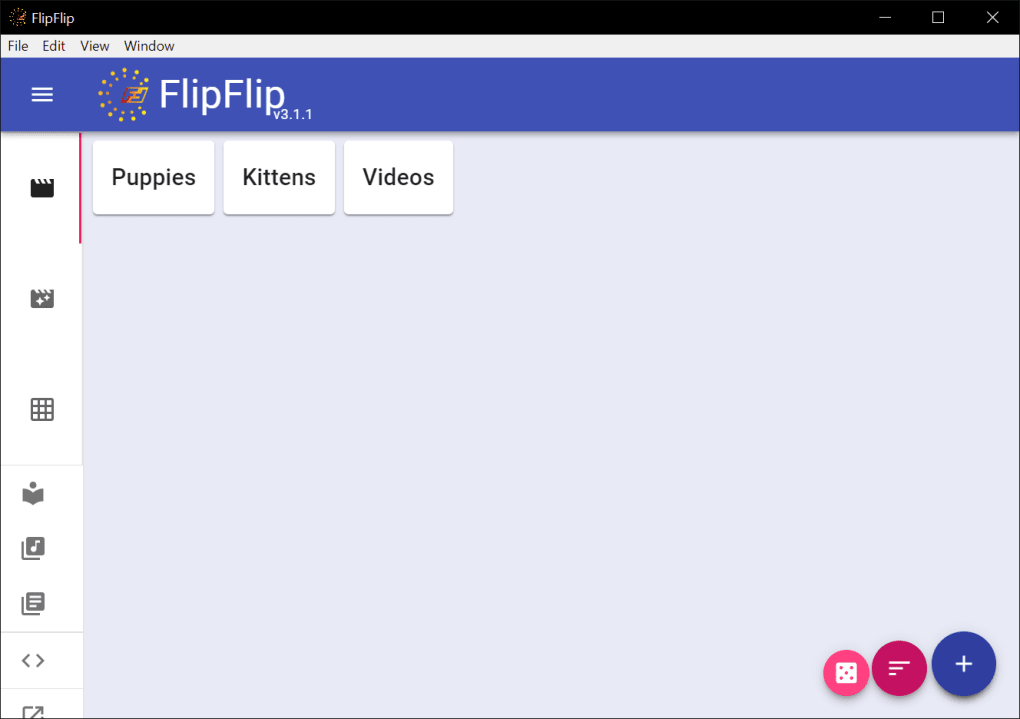
The core functionality revolves around the creation and management of scenes. Adding a new scene is initiated by clicking the circular “+” button located in the bottom-right corner. From there, users can either import media files directly from their local storage or incorporate images from a web album URL. This dual-source capability offers considerable flexibility, accommodating both offline and online image collections.
Once a scene is created, users can access an extensive range of customization options. The left-hand toolbar allows for the addition of various presentation effects, such as transitions between images, filters to adjust color and tone, and the integration of custom text overlays. Users are not limited to visual enhancements; the ability to incorporate audio tracks adds another layer of sophistication to the slideshows. This feature allows for the synchronization of visuals with background music or narration, transforming a static image sequence into a fully immersive multimedia experience.
After adding media and effects, the scene can be previewed using the play button located next to the scene’s title. This immediate feedback loop is crucial for iterative design, allowing users to fine-tune their creations without needing to complete the entire slideshow.
Furthermore, FlipFlip includes advanced features designed for efficient management of multiple scenes. The “Scene Generators” option provides a shortcut for automating the creation of scenes from the user’s media library. This is particularly useful for users with large image collections who wish to create multiple slideshows quickly. The “Scene Grid” feature streamlines the management of numerous scenes, providing a visual overview of the project’s structure and allowing for easy reordering and manipulation of individual scenes.
Ease of Use and Learning Curve: Navigating FlipFlip’s Interface
While FlipFlip boasts a plethora of features, its ease of use is a double-edged sword. The program’s initial simplicity can be deceiving. While the basic workflow of adding scenes and media is straightforward, exploring the full range of customization options may prove somewhat overwhelming, particularly for first-time users. The sheer number of available effects and settings can be initially daunting, requiring users to spend some time familiarizing themselves with the program’s functionality.
However, this potential difficulty is mitigated by FlipFlip’s built-in tutorial. The tutorial acts as an invaluable guide, taking users through the core functionalities step-by-step. It effectively addresses the learning curve, making the extensive features accessible even to individuals without prior experience with slideshow creation software. The comprehensive nature of the tutorial makes the initially complex interface manageable and ensures users can quickly grasp the program’s capabilities.
Sharing and Exporting Slideshows: A Point of Improvement
Despite its strengths, FlipFlip’s sharing functionality presents a notable area for improvement. While the process of creating and customizing slideshows is intuitive and relatively straightforward, the process of sharing completed projects appears more complicated than it needs to be. The lack of clear instructions or a streamlined export process could be a significant deterrent for users accustomed to more user-friendly software. This complexity might hinder the widespread adoption of FlipFlip, despite its powerful features. Improvements in this area could greatly enhance the overall user experience and potentially broaden the program’s appeal.
FlipFlip Compared to Other Slideshow Creators: A Competitive Landscape
In the crowded market of slideshow creation software, FlipFlip stands as a viable contender. Compared to established players such as PhotoStage and Icecream Slideshow Maker, FlipFlip offers a competitive feature set, particularly in its range of customization options and the inclusion of features like Scene Generators and the Scene Grid. While some of its competitors might offer a simpler, more intuitive interface, FlipFlip compensates with its depth of functionality and free, open-source nature.
The free and open-source aspect is a key differentiator, making it accessible to a wider range of users. This advantage alone sets it apart from many commercial alternatives that often come with subscription fees or limited free versions. For users prioritizing cost-effectiveness and open-source principles, FlipFlip emerges as a strong and attractive option.
However, the complexity in the sharing and exporting process could be perceived as a disadvantage when compared to more streamlined competitors. While PhotoStage and Icecream Slideshow Maker may be easier to learn and use, FlipFlip’s superior functionality and customization options make it a compelling alternative for users willing to invest the time to master its interface.
Conclusion: A Powerful Tool with Room for Refinement
FlipFlip presents a compelling option for users seeking a free and open-source slideshow creation program. Its extensive feature set, including a wide array of effects, audio integration, and advanced scene management tools, makes it a powerful and versatile tool capable of producing professional-quality slideshows. However, the complexity of its sharing features and the initial learning curve represent areas where improvement could significantly enhance the user experience.
Despite these minor drawbacks, FlipFlip’s strengths outweigh its weaknesses. For those willing to invest the time to learn its capabilities, the rewards are significant. The ability to create highly customized and engaging slideshows, combined with the advantages of being free and open-source, makes FlipFlip a worthwhile addition to any user’s multimedia toolkit. Future updates addressing the sharing process and perhaps offering simplified workflows could elevate FlipFlip to become an even more dominant player in the slideshow creation software market.
File Information
- License: “Free”
- Version: “3.1.1”
- Latest update: “July 15, 2022”
- Platform: “Windows”
- OS: “Windows 8”
- Language: “English”
- Downloads: “329”
- Size: “56.17 MB”


