
Fluent Reader is a free and open-source RSS feed reader application designed for Windows PCs. Developed by independent developer Haoyuan Liu, this program stands out for its sleek and modern user interface, heavily inspired by Microsoft’s Fluent Design System. This design philosophy results in an intuitive and visually appealing experience, making it a compelling alternative to established RSS readers like Newsflow and Feedly. In essence, Fluent Reader acts as a central hub, aggregating news and information from your preferred online sources into a single, easily navigable platform. Its dark mode option further enhances user comfort and reduces eye strain during extended usage. This review delves deeper into Fluent Reader’s features, functionality, and overall user experience.
User Interface and Functionality
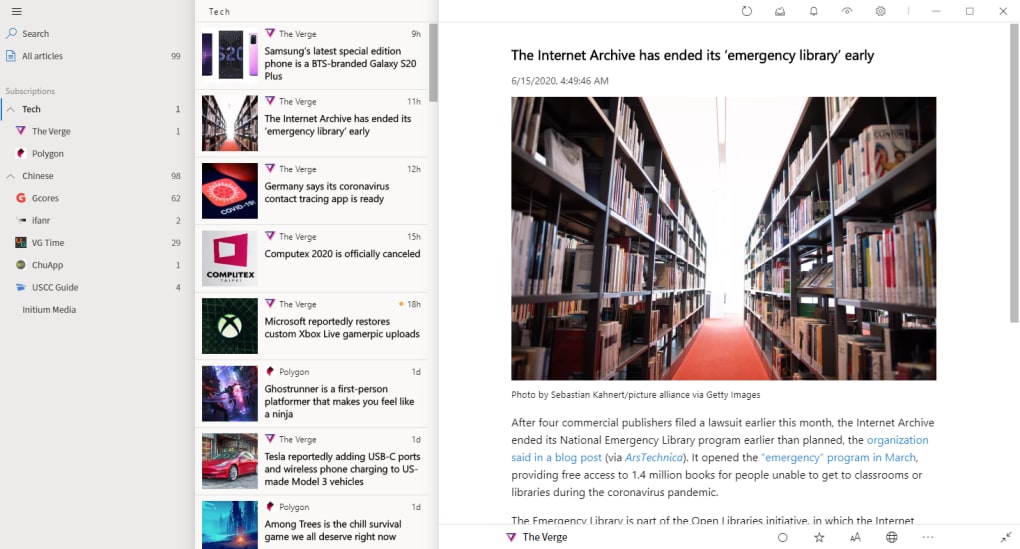
Fluent Reader’s most striking feature is its user interface. The application seamlessly integrates the principles of Microsoft’s Fluent Design System, resulting in a clean, modern, and intuitive experience. The layout is uncluttered, prioritizing ease of navigation and efficient content consumption. The use of subtle animations and visual cues contributes to a polished and responsive feel, enhancing the overall user experience.
Adding new RSS feeds is straightforward. Users can easily import OPML files containing pre-existing feed subscriptions or manually enter the URL of their desired news sources. This flexibility caters to users who prefer different methods of managing their feeds. Once added, feeds can be customized extensively, allowing users to modify feed names, select custom icons, and define update frequencies, thereby personalizing their information streams.
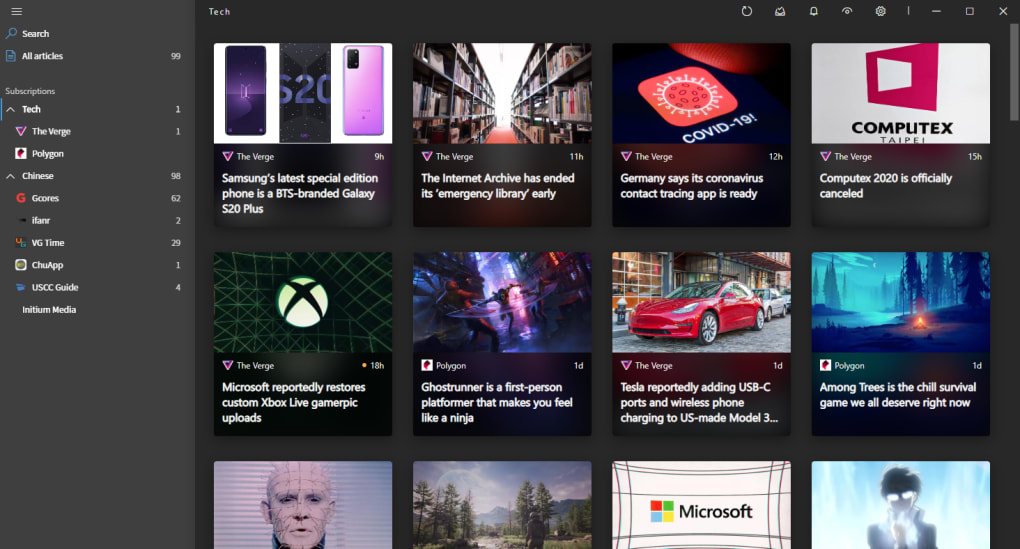
News articles are presented in the form of thumbnail cards, providing a visual overview of each item. However, this view can be altered to suit individual preferences, offering users a degree of control over their content presentation. A handy hamburger menu, located in the top-left corner, expands to reveal a sidebar containing a comprehensive list of all subscribed feeds and their corresponding groups. This allows for easy browsing and selection of different news sources.
Clicking on an article opens it in a full-text view, offering a complete reading experience within the application. This full-text display can also be customized to match personal preferences. Furthermore, Fluent Reader incorporates several automation features. Users can effortlessly mark articles as read or add them to a favorites list with minimal effort. The implementation of numerous keyboard shortcuts further streamlines the user experience, enabling rapid navigation and interaction.
While Fluent Reader offers a highly refined interface and an extensive array of features, one notable limitation is its default behavior regarding automatic feed fetching. Unlike some competing RSS readers, Fluent Reader does not automatically refresh and update feeds. Users must manually initiate the update process. This lack of automatic updates could be a drawback for users who value the constant availability of fresh news.
Customization and Personalization
A significant strength of Fluent Reader lies in its extensive customization options. Beyond the basic personalization of feed names and icons, users possess considerable control over the application’s appearance and behavior. These options enable users to tailor the application to their exact needs and preferences. The adaptability of the interface ensures that Fluent Reader caters to a broad spectrum of user preferences and workflows.
The flexibility extends to the display of news articles. Users can choose from various view modes, allowing them to optimize the presentation of information according to their reading habits and screen size. This adaptability is a key factor in enhancing user experience and overall satisfaction.
Automation and Efficiency
While the automatic feed refresh feature is absent, Fluent Reader still offers a selection of useful automation capabilities. The ability to mark articles as read with a single click or to star important posts for later review significantly contributes to efficient information management. The integration of keyboard shortcuts provides a further boost to productivity, enabling users to navigate and interact with the application rapidly. These streamlined interactions enhance the overall usability and efficiency of the application.
Cross-Platform Compatibility and Availability
Fluent Reader’s development aims for cross-platform compatibility, enabling users to access their news feeds and configurations across multiple devices. While the initial focus has been on Windows, the potential for expansion to other operating systems suggests broader accessibility in the future. The ability to seamlessly transition between different devices enhances the application’s utility and versatility.
The application is available as a free download, promoting accessibility and adoption among a wider user base. This open-source nature contributes to transparency and allows for community contribution to the application’s ongoing development.
Comparison with Other RSS Readers
Compared to other prominent RSS readers like Feedly and Newsblur, Fluent Reader stands out with its emphasis on modern design and ease of use. While Feedly boasts a large user base and advanced features, its interface might feel overwhelming to new users. Newsblur, known for its highly customizable settings, can have a steeper learning curve. Fluent Reader strikes a balance between a clean interface and sufficient functionality, making it a user-friendly choice for those new to RSS readers or those seeking a minimalist approach. Its inherent simplicity makes it an appealing alternative to the more feature-rich, sometimes more complex, alternatives.
Strengths and Weaknesses
Strengths:
- Sleek and modern UI: The Fluent Design System-inspired interface is visually appealing and intuitive, promoting a positive user experience.
- Extensive customization: Users have considerable control over feed settings, article views, and other aspects of the application.
- Automation features: Functions like marking articles as read and adding them to favorites enhance efficiency.
- Keyboard shortcuts: Streamlined navigation and interactions for faster operation.
- Free and open-source: Accessibility and transparency are ensured through open-source development and free availability.
Weaknesses:
- Lack of automatic feed updates: Manual refreshing is required, which can be inconvenient for users wanting the latest information constantly.
- Limited platform support (currently): While aiming for cross-platform functionality, currently it primarily focuses on Windows.
Conclusion
Fluent Reader presents a compelling option for Windows users seeking a modern and user-friendly RSS reader. Its intuitive design, combined with extensive customization capabilities and a selection of helpful automation features, creates a positive user experience. While the absence of automatic feed updates is a notable limitation, the overall strengths of the application, including its free availability and clean design, make it a worthwhile consideration for those looking for a fresh approach to managing their RSS feeds. The potential for future development and cross-platform compatibility further enhances its long-term prospects. The developer’s commitment to continuous improvement suggests that many of the current minor shortcomings might be addressed in future releases. For users prioritizing a sleek and easy-to-use interface, Fluent Reader offers a strong and attractive alternative in the landscape of RSS readers.
File Information
- License: “Free”
- Version: “1.0.1”
- Latest update: “July 20, 2021”
- Platform: “Windows”
- OS: “Windows 10”
- Language: “English”
- Downloads: “423”
- Size: “56.33 MB”


