
In the vast digital landscapes we navigate daily, the humble folder stands as a fundamental unit of organization. Yet, for decades, its visual representation has remained largely unchanged: a sea of identical yellow rectangles. This uniformity, while ensuring consistency, often breeds confusion and inefficiency, particularly for users managing hundreds or even thousands of files across countless directories. Imagine sifting through an endless cascade of identical yellow icons, struggling to differentiate urgent projects from archived documents, or completed tasks from those yet to begin. It’s a scenario that most Windows users have encountered, leading to wasted time, increased frustration, and potential oversight of critical information.
Enter Folder Marker, a utility designed to inject much-needed visual distinction and intelligence into your digital filing system. Born from the simple yet profound need for better visual organization, Folder Marker offers a straightforward solution to a pervasive problem: transforming generic folders into visually meaningful indicators of priority, status, and importance. With just a single click, this ingenious software empowers users to assign custom icons and colors to their folders, breaking the monotonous yellow barrier and bringing clarity to their cluttered digital lives.
The Ubiquitous Yellow Folder: A Call for Visual Clarity
Before delving into the specifics of Folder Marker, it’s crucial to understand the context and the problem it seeks to solve. For generations of Windows users, the default folder icon—a cheerful yet nondescript yellow—has been the standard. While functional, its lack of differentiation can become a significant impediment to productivity. Consider a professional juggling multiple projects, each with its own dedicated folder. Without a visual cue, quickly identifying the folder for the “Urgent Client A Report” versus “Archived Marketing Materials” becomes a mental exercise that adds cognitive load and slows down workflow.
The human brain is remarkably adept at processing visual information. Colors, shapes, and unique icons can convey information far more rapidly and effectively than text labels alone. In a world increasingly reliant on digital documents, the ability to intuitively categorize and prioritize information visually is not merely a luxury but a necessity. The “sea of yellow” problem isn’t just an aesthetic inconvenience; it’s a bottleneck to efficient information retrieval and management. This is where Folder Marker steps in, acting as a personal assistant, an ardent fighter for convenience and comfort in any kind of computer work. By allowing users to mark their folders, it transforms a mundane organizational task into an intuitive and empowering experience.
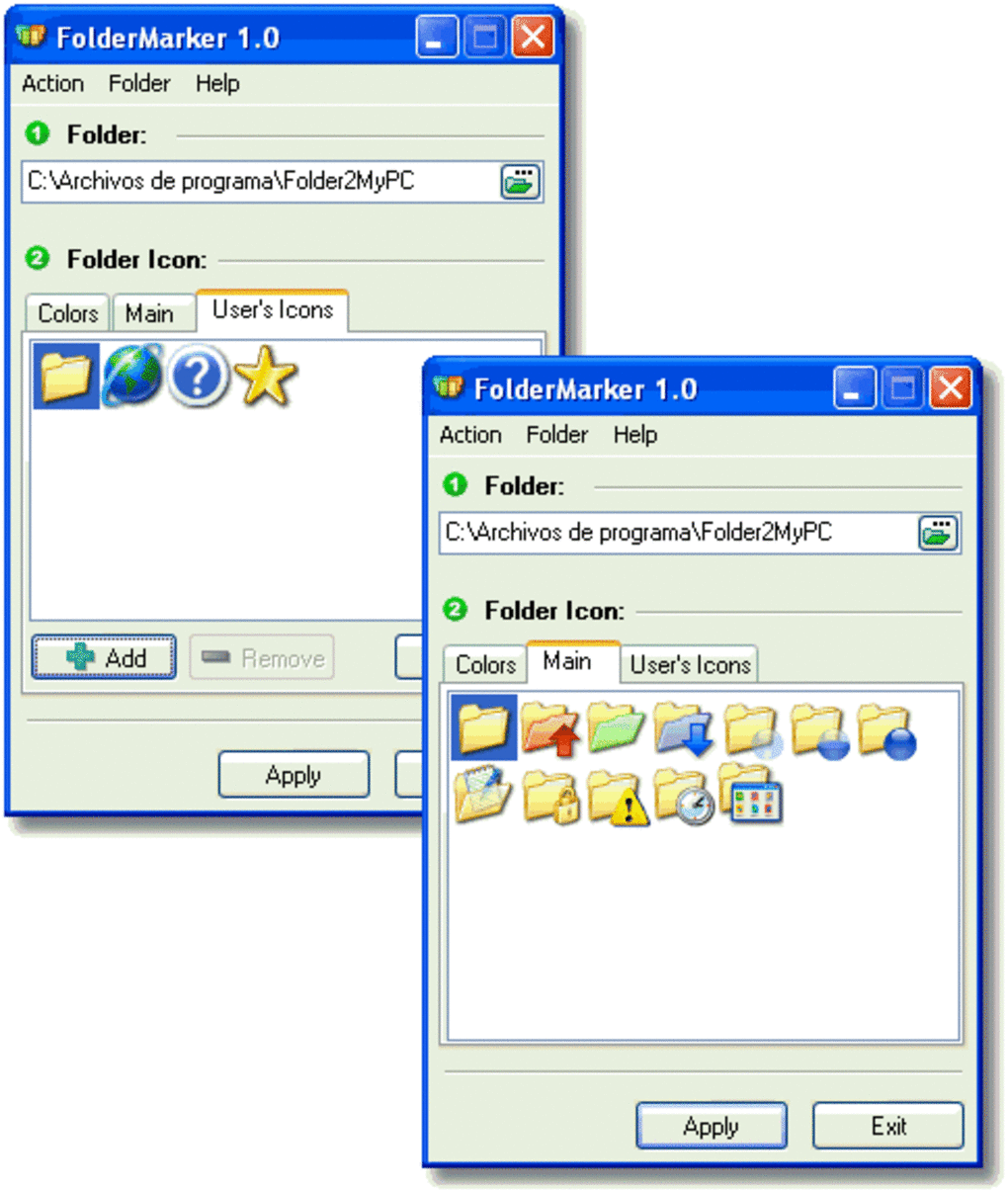
Folder Marker’s Core Functionality: A Click Away from Order
At its heart, Folder Marker is built around simplicity and immediate utility. Its primary promise is to change folder icons or colors with “just one click.” This isn’t an exaggeration; the software seamlessly integrates into the Windows operating system, specifically into the folder popup (context) menu. Right-clicking on any folder reveals a new “Mark Folder” option, which, upon selection, presents a range of predefined icons and color options. This direct accessibility eliminates the need to navigate through complex menus or system settings, making the process of customization incredibly fast and user-friendly.
The impact of this seemingly small change is profound. Suddenly, a bland yellow folder can transform into a vibrant red one, signaling high priority. A green folder might denote a completed project, while a blue one indicates ongoing work. This visual language is instantly understandable, reducing the mental effort required to process information and allowing users to grasp the status or importance of a folder at a glance. For anyone who spends considerable time organizing files, this feature alone can be a game-changer, fostering a more intuitive and less stressful interaction with their computer.
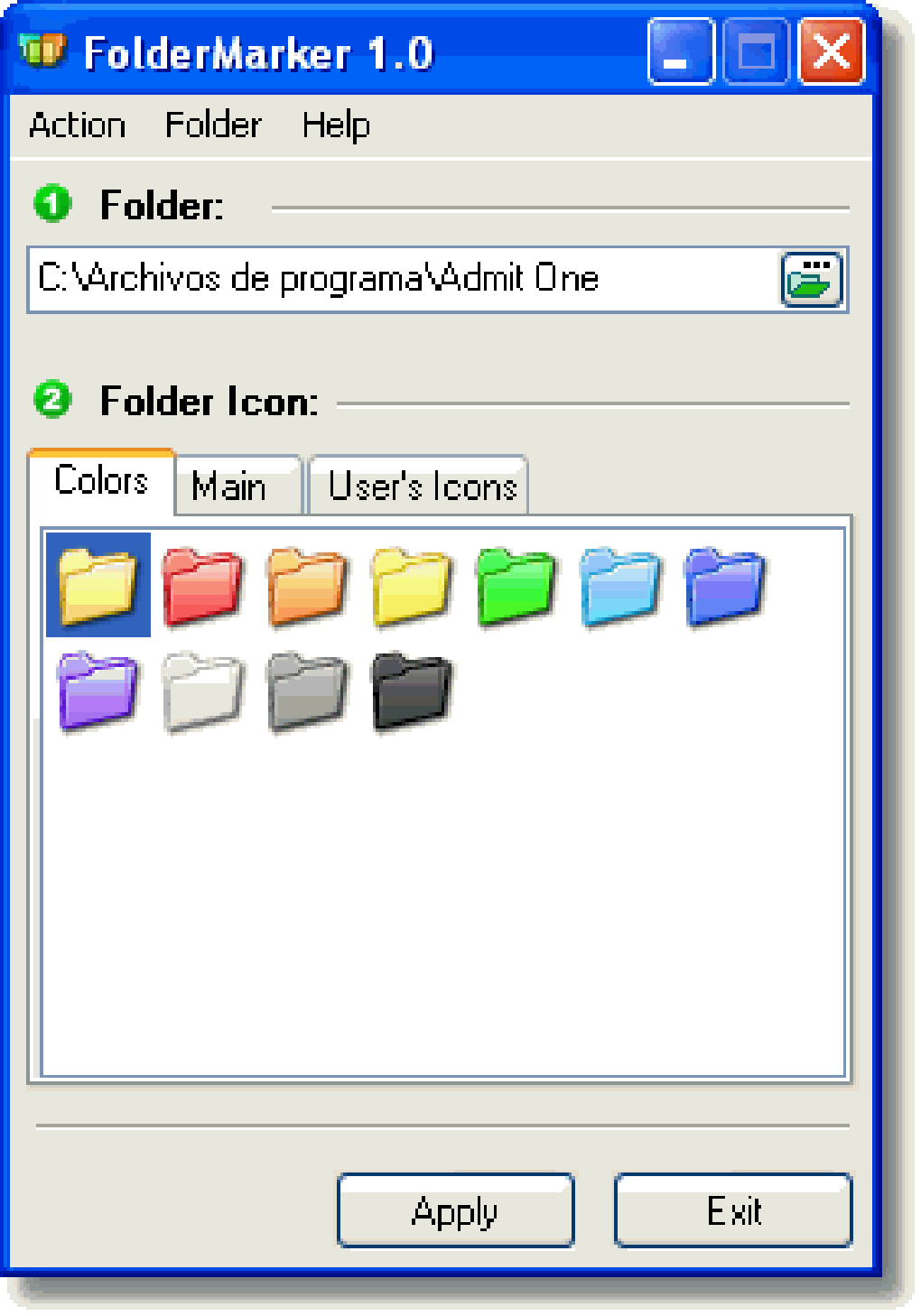
Beyond Aesthetics: Prioritization and Status Tracking
While the visual appeal of custom folder icons is undeniable, Folder Marker’s utility extends far beyond mere aesthetics. Its true power lies in its ability to facilitate a sophisticated system of visual prioritization and status tracking. The software allows users to assign specific meanings to different icon styles or colors, effectively creating a personalized visual code for their digital workspace.
Imagine a project manager overseeing several concurrent initiatives. Each project involves numerous documents, tasks, and deadlines. With Folder Marker, they can designate specific colors or icons to represent:
- High Priority: A vivid red folder, instantly screaming “attention!”
- Normal Priority: A standard blue or green, indicating routine tasks.
- Low Priority: A muted gray or white, for archival or non-urgent items.
Similarly, the software can be used to track the progress or status of various operations:
- Finished Completely: A folder marked with a green checkmark or a specific shade of green.
- Half-Done/In Progress: An orange folder or one with a partially filled icon.
- Haven’t Started Yet: A stark red folder or one with a cautionary symbol.
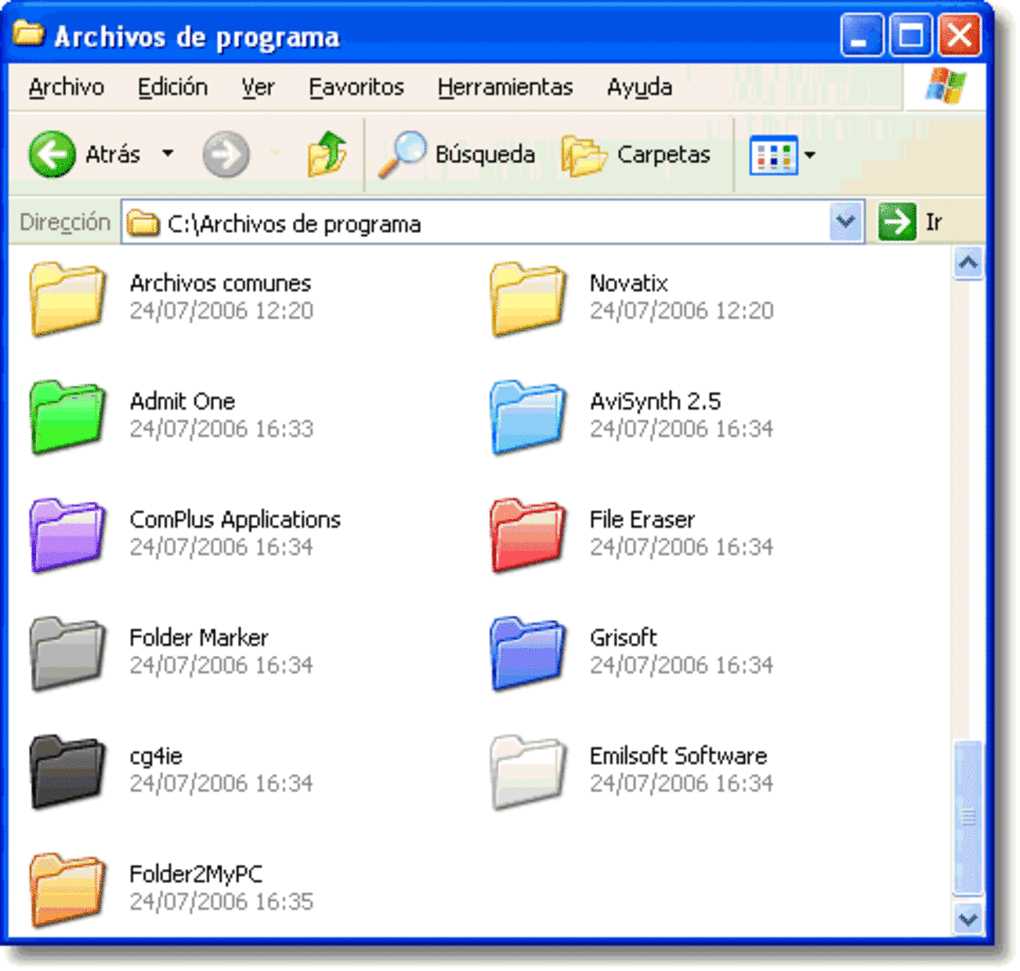
This system provides an immediate overview of one’s digital landscape, making it clear at once which documents demand immediate attention, which are progressing smoothly, and which are awaiting initiation. This proactive approach to organization significantly enhances personal productivity and reduces the cognitive load associated with information management. No longer do users need to open folders or read extensive labels to understand their contents’ relevance; the icon speaks volumes.
Enhancing Data Security and Collaboration
Another often overlooked benefit of Folder Marker is its potential to enhance data security and foster better collaboration, particularly in shared computing environments or within teams. In scenarios where multiple users might access the same computer or network drive, the risk of unintentional deletion or modification of critical information is always present. A generic yellow folder containing vital personal or professional data is indistinguishable from one holding temporary downloads or casual media files.
By using Folder Marker, individuals can visually flag sensitive or important folders, effectively creating a silent warning system. Marking a folder with a “Do Not Delete” icon, a bright red alert, or a specific security-themed emblem immediately communicates its significance to anyone who might encounter it. This visual cue acts as a deterrent, prompting other users to exercise caution before interacting with or deleting the contents of such a folder. It minimizes the chances of accidental data loss and ensures that critical information remains secure by being visually distinct.
This feature is particularly valuable for:
- Families sharing a home computer: Children are less likely to accidentally delete a parent’s marked work folder.
- Small offices or collaborative environments: Team members can easily identify shared project folders that are vital versus temporary storage.
- Individuals with backup systems: Marking backup folders clearly can prevent them from being mistaken for redundant copies and deleted.
In essence, Folder Marker helps to cope with the “standard yellowness” not just for personal convenience but also as a subtle yet effective tool for data protection and improved digital citizenship within shared spaces.
Diving Deeper: Technical Specifications and Historical Context
To fully appreciate Folder Marker, it’s helpful to examine its technical background and how it fits into the broader history of utility software. The version referenced, 1.4, was last updated on August 2, 2007. This date is significant, placing the software firmly in an earlier era of Windows computing, primarily catering to users of Windows 98 and prior versions, including Windows NT. This historical context explains some of its characteristics and positioning within the software landscape.
Key Specifications:
- License: Free
- Version: 1.4 (Last updated: February 8, 2007)
- Platform: Windows
- Operating System Compatibility: Windows 98 and prior versions (including Windows NT)
- Language: English
- Downloads: Reported 86,625 installations by 2007, with 7 installations in a recent week (as of the reference data). Total downloads for PC cited at 19.2K with 42 last month’s downloads (likely referring to more recent data snapshot or another source than the 2007 specific data).
- Size: A lightweight 1.01 MB, indicating it was not a heavy program and didn’t require much storage, which was a significant advantage in the early 2000s.
- Developer: Foldermarker
The fact that it was “heavily used in United States, Germany, and Czech Republic” underscores its global appeal even with its specific language limitation. Its longevity, having joined the PhanMemFree selection in 2007 and still being referenced, speaks volumes about its enduring utility, even if its primary target OS is now legacy. While Windows has evolved considerably since 2007, the core problem Folder Marker addresses — the lack of visual distinction in folder icons — remains relevant. Many modern Windows users still seek ways to customize their environment beyond the default options.
The minimal system requirements and small file size meant Folder Marker was accessible even on less powerful machines of its time, making it a practical choice for a wide range of users. Its free license further lowered the barrier to entry, allowing anyone to download and experience its benefits without financial commitment. This combination of functionality, accessibility, and affordability likely contributed to its popularity during its prime.
User Perspectives: A Look at Real-World Feedback
User reviews often provide the most candid insights into a software’s real-world performance and perceived value. Folder Marker, like many utilities, has garnered a mixed bag of feedback, highlighting both its strengths and potential weaknesses.
One user, Vicki Cosby, reviewing on April 2, 2020, praised the software’s ease of use: “IT’s quick with instructions and installation. Both are easily understood.” This positive feedback reinforces the software’s design philosophy of simplicity and user-friendliness. For a utility tool, an intuitive installation process and clear instructions are paramount, ensuring that users can quickly integrate it into their workflow without hassle. This aspect is crucial for attracting non-technical users who simply want a problem solved without needing to become IT experts.
However, not all feedback was as glowing. Anđelka Anđa Mladenović, reviewing on June 12, 2020, provided a stark contrast, labeling the software as “SHIT !!!!!!!!!!!!!!!!!!!!!!!!!!!!!!!!!” and detailing significant issues: “After changing right click panel is black and empty, folders and folder names disapear from time to time. Colors work only if folder view is set as list, small and detail. Every other preview folder is empty folder pictures.”
This negative review points to critical compatibility and stability issues that likely emerged in later Windows operating systems, far beyond its original Windows 98/NT target. As Windows evolved, particularly with changes to the shell, explorer, and display rendering, software designed for older architectures often struggles to function correctly. A “black and empty right click panel” or disappearing folders suggests conflicts with the modern Windows Explorer shell. The observation that “colors work only if folder view is set as list, small and detail” further indicates a rendering problem, where the custom icons or colors fail to display correctly in other view modes (like large icons or thumbnails). This is a classic symptom of outdated software struggling to adapt to new display APIs or UI frameworks.
These reviews, though conflicting, offer a valuable lesson: while a software may be excellent for its intended environment, its performance can degrade significantly when pushed beyond its design parameters. Folder Marker’s success in its era (Windows 98/NT) was evident, but its functionality on modern Windows versions (as implied by the 2020 review dates) appears to be inconsistent or broken. This highlights the ongoing challenge for utility developers to maintain compatibility across rapidly evolving operating systems. Despite these issues, the core idea behind Folder Marker – visual folder customization – remains universally appealing and sought after.
Navigating the Ecosystem: Alternatives and Modern Solutions
Given Folder Marker’s historical context and potential compatibility issues on contemporary Windows systems, it’s natural for users to seek modern alternatives that offer similar functionality. The market for folder customization and desktop organization tools is robust, with several options providing varying degrees of features, integration, and cost. PhanMemFree.org lists several alternatives, each with its own unique approach to solving the digital clutter problem.
Here’s a look at some notable alternatives and how they compare to Folder Marker:
-
Stardock Fences: This is a more comprehensive desktop organizer (rated 3.3, Trial version). While Folder Marker focuses solely on folder icons/colors, Fences helps users organize desktop shortcuts into shaded, resizable areas, making for a much tidier desktop. It’s a different beast, tackling broader organization rather than just folder aesthetics, but it speaks to the same underlying need for order. Its “trial version” status indicates it’s a premium product, unlike Folder Marker’s free model.
-
Custom Folder: (Rated 2.6, Free) This tool provides a “New Folder” option to Windows Explorer. While useful for streamlining folder creation, it doesn’t offer the visual customization that Folder Marker specializes in. Its functionality is complementary rather than directly competitive in terms of visual differentiation.
-
ViPad: (Rated 3.7, Free) ViPad is described as providing “a new and innovative way to launch your favourite apps and acts a complete super desktop replacement.” This tool is more akin to a custom launcher or virtual desktop environment, a much broader scope than Folder Marker’s niche. It aims to revolutionize how users interact with their entire desktop, rather than just customizing folders.
-
Folder Colorizer: (Rated 3.5, Free) This app directly competes with Folder Marker’s core feature: “Assign any color to any folder!” Being a free tool and focused specifically on color, it offers a modern take on one of Folder Marker’s primary benefits. It suggests that the demand for simple color-coding remains high.
-
Folder Painter: (Rated 4.5, Free) Similar to Folder Colorizer, Folder Painter aims to “Organize and embellish your folders.” Its higher rating suggests a more polished or effective implementation for modern Windows versions, making it a strong contender for users seeking a direct replacement for Folder Marker’s color-changing capabilities.
-
Folder Icon Changer: (Rated 3.3, Free) This tool’s description, “Search and replace the standard icons of folders/drives,” indicates it directly addresses the icon customization aspect. Like Folder Colorizer and Folder Painter, it offers a focused approach to changing folder visuals, providing an up-to-date solution to the “yellow folder” problem.
-
Folderico: (Rated 3.7, Free) Yet another tool for easily customizing folder icons, Folderico further illustrates the ongoing need for this functionality. Its free nature makes it accessible, much like Folder Marker was in its time.
These alternatives, particularly Folder Colorizer, Folder Painter, and Folder Icon Changer, demonstrate that the spirit of Folder Marker lives on in new software designed for contemporary operating systems. They build upon the foundational concept that visual cues are essential for efficient digital organization. While Folder Marker might have been a pioneer in its day, the modern ecosystem offers a richer selection of tools, often with better compatibility and more extensive feature sets, sometimes at a cost. However, the availability of free alternatives ensures that the power of visual folder customization remains accessible to all.
Conclusion: The Enduring Legacy of Visual Organization
Folder Marker, despite its origins in an earlier computing era and the potential compatibility challenges on modern systems, represents a crucial step in the evolution of personal computing utilities. It addressed a fundamental human need for order, clarity, and visual distinction in a digital world that often felt monotonous and overwhelming. By offering a simple, one-click solution to customize folder icons and colors, it transformed a mundane organizational task into an intuitive act of personalization and prioritization.
The software’s ability to denote priority, track progress, and even serve as a visual warning system for important data underscores its profound impact beyond mere aesthetics. It empowered users to create a personalized visual language for their digital files, enhancing productivity and reducing cognitive load. Its lightweight nature and free license made it a widely adopted tool in its heyday, leaving a lasting impression on users who sought to tame their digital clutter.
While newer, more sophisticated alternatives like Folder Colorizer and Folder Painter have emerged to cater to the demands of modern Windows environments, the core principle championed by Folder Marker remains as relevant as ever. The ubiquitous yellow folder continues to be a canvas awaiting personalization, and the desire for instant visual cues to navigate complex digital landscapes persists. Folder Marker may be a relic from a past computing generation, but its legacy as an innovator in visual organization continues to influence the design and development of desktop utilities, reminding us that sometimes, the simplest solutions can have the most profound impact on our daily digital lives. Its spirit of bringing order and individuality to the digital workspace will undoubtedly continue to inspire new tools for the foreseeable future.
File Information
- License: “Free”
- Version: “1.4”
- Latest update: “February 8, 2007”
- Platform: “Windows”
- OS: “Windows NT”
- Language: “English”
- Downloads: “19.3K”
- Size: “1.01 MB”


