
In the bustling digital landscape of modern computing, where countless files and folders populate our hard drives, efficient organization is paramount. Yet, for all its sophistication, the Windows operating system has historically offered limited options for personalizing the visual identity of its core organizational units: folders. Users have long been accustomed to the default yellow folder icon, a standard that, while functional, offers little in the way of visual distinction or aesthetic appeal. This is where tools like Folder Painter step in, offering a much-needed solution for users seeking to imbue their digital workspaces with clarity, individuality, and a touch of personal flair.
Developed by Sordum, a prolific software company known for its array of web solutions and utility tools, Folder Painter emerges as a powerful yet elegantly simple personalization utility for Windows desktop devices. Its core function is to empower users to swiftly and effortlessly alter the icons and colors of their folders, transforming them from generic yellow receptacles into vibrant, color-coded visual cues. This innovative approach provides a unique and highly effective method for organizing files within Windows Explorer, moving beyond mere alphabetical or chronological sorting to leverage the power of visual memory and immediate recognition. With Folder Painter, the mundane task of navigating digital directories becomes an intuitive and visually engaging experience, allowing users to instantly identify specific folders at a glance. Remarkably, this enhancement extends to the latest iteration of Microsoft’s operating system, with Folder Painter already fully compatible with Windows 11.
The Imperative for Visual Folder Organization
The human brain is wired to process visual information far more efficiently than text. In a typical Windows environment, a screen filled with identically colored and shaped yellow folders can quickly become a monotonous expanse, making it challenging to locate a specific directory amidst a sea of similar-looking icons. This cognitive load can lead to wasted time, increased frustration, and a less productive workflow. Imagine a scenario where you’re juggling multiple projects, each with its dedicated folder. Without visual differentiation, you rely solely on textual labels, which requires careful reading and scanning.
Folder Painter directly addresses this inherent limitation by introducing a layer of visual hierarchy and segmentation. By allowing users to assign distinct colors and icons to folders, it taps into our innate ability to categorize and recall information based on visual cues. A red folder might instantly signify “Urgent,” a green folder “Completed,” a blue folder “Work,” and a purple folder “Personal.” This color-coding system transcends language barriers and allows for rapid identification, drastically cutting down the time spent searching for specific files or projects.
Beyond mere efficiency, the aesthetic aspect of personalization plays a significant role in user satisfaction and comfort. A visually organized and appealing workspace can reduce digital fatigue and foster a more positive computing experience. Just as people decorate their physical offices to reflect their personality and improve their mood, customizing the digital environment can enhance focus and make working on the computer a more enjoyable endeavor. Folder Painter offers an accessible means to achieve this, transforming a utilitarian interface into a personalized canvas that supports both productivity and peace of mind.
Diving Deep into Folder Painter’s Functionality
One of the most remarkable aspects of Folder Painter is its commitment to user-friendliness and seamless integration with the existing Windows environment. Unlike many other personalization tools that might require complex interfaces or system-level modifications, Folder Painter operates with an elegant simplicity that makes it accessible to users of all technical proficiencies.
Seamless Integration via the Context Menu
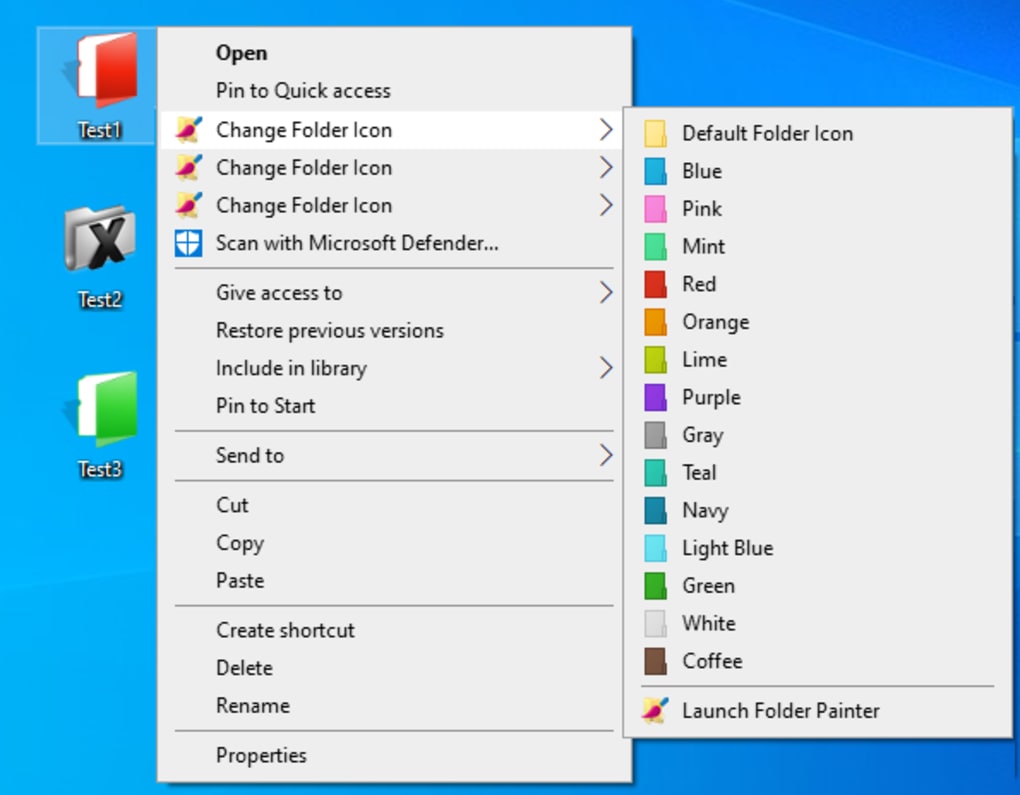
The genius of Folder Painter lies in its unobtrusive operation. Upon installation, the application doesn’t clutter your desktop with a standalone interface window or demand constant attention. Instead, it embeds itself directly into the Windows context menu – the familiar pop-up menu that appears when you right-click on an item. This design choice ensures that the personalization options are always precisely where you need them: next to the folder you intend to modify.
To change the color or icon of a folder, the process is straightforward:
- Navigate to the desired folder in Windows Explorer.
- Right-click on the folder.
- Hover your mouse over the Folder Painter entry in the context menu (which can be custom-named, as we’ll discuss).
- A sub-menu will unfurl, presenting you with a selection of colors and designs.
- Simply click on your preferred pigment and design, and the folder’s appearance will instantly update.
This direct, contextual access eliminates the need to open a separate application, browse for the folder, and then apply changes, streamlining the personalization workflow significantly. To revert a folder to its original, default yellow icon, the steps are identical; you simply select the “Use default folder icon” option from the same context menu. This reversibility ensures that users can experiment freely without fear of permanent or irreversible alterations.
A Rich Tapestry of Customization Options
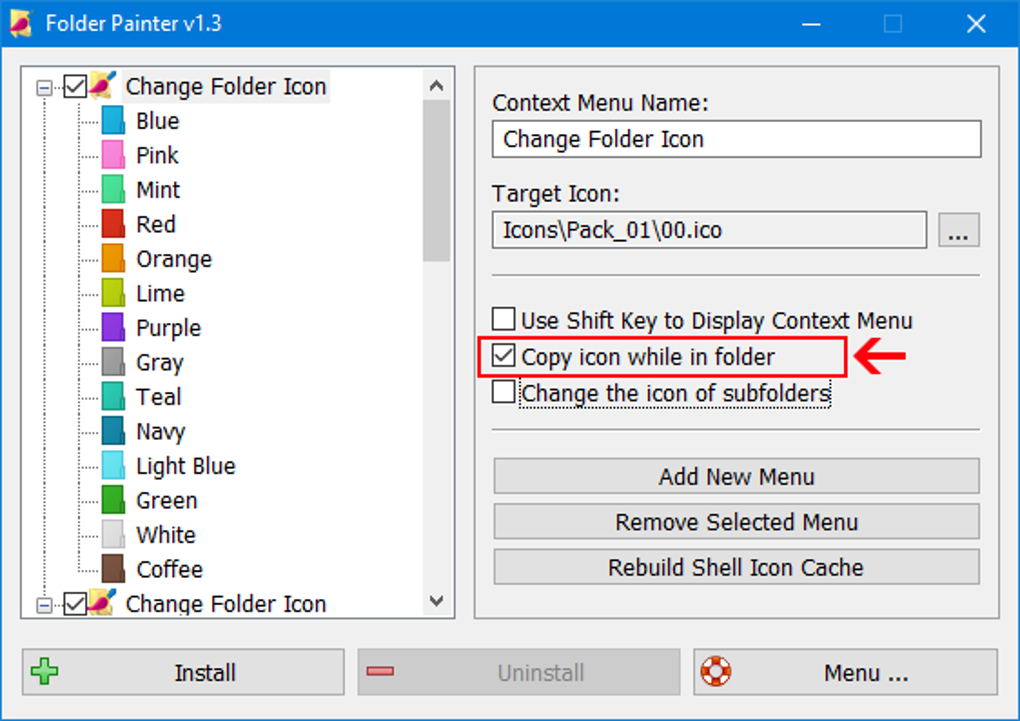
While the context menu integration simplifies the application of changes, Folder Painter offers a surprisingly deep level of customization. Upon initial setup, or when configuring the tool, users will encounter a simple and straightforward prompt. This configuration window is typically divided into two intuitive panes, designed to make the customization process clear and efficient.
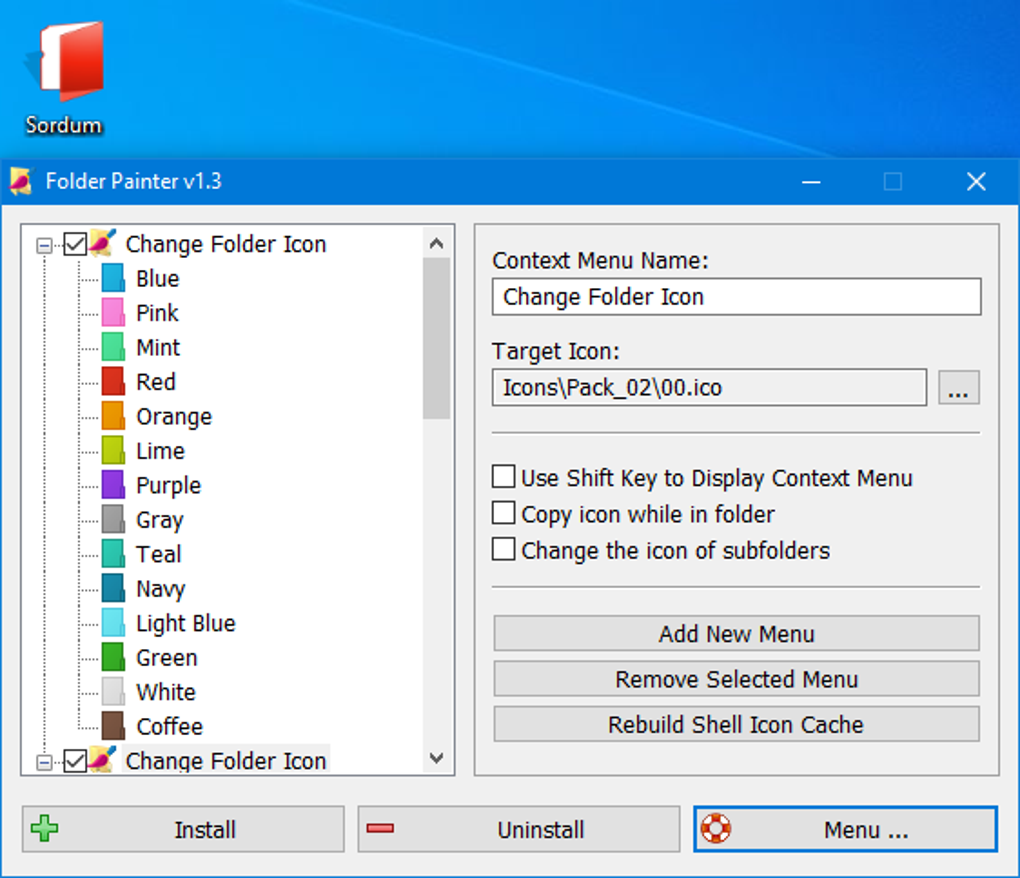
The left pane of this configuration interface serves as your visual playground. Here, you’ll find a display of available folder icons that you can select. Below these icons, the system provides live previews of how different colors and designs will manifest on your folders. This immediate visual feedback is invaluable, allowing you to experiment with various combinations before committing to a particular style. It’s a dynamic way to envision how your customized folders will appear within Explorer.
The right pane is dedicated to refining your icon settings and managing the icon packages. By default, Folder Painter typically comes with three distinct icon packages pre-loaded. However, the true breadth of its customization capabilities is revealed by the fact that users can download and install up to a remarkable 21 icon packs in total. This extensive library ensures a vast array of aesthetic choices, catering to virtually any preference, from subtle color variations to distinctive icon designs that might signify specific content types or priority levels.
A particularly thoughtful feature addresses a known limitation within Windows: the operating system can only support a maximum of 16 items per context menu. Given that each icon pack might contain more options, Folder Painter allows users to enable multiple context menus. This is achieved by selecting and installing all three (or more) of the default or downloaded icon packs into Explorer’s shell. Each installed pack effectively creates its own named entry in your right-click menu. To further enhance usability, Folder Painter provides a “Context Menu Name” field, enabling you to customize the title of each menu. For example, you might title one “Folder Colors - Basic,” another “Folder Icons - Project Specific,” and a third “Priority Indicators.” This intelligent management of menu items ensures that all available customization options remain accessible without overwhelming the primary context menu, allowing for easy identification and selection of the desired theme or color set. This level of detail in managing menu options underscores Sordum’s commitment to delivering a truly “handy and easy-to-use” tool that respects Windows’ native capabilities while expanding user choice.
The Tangible Benefits of Enhanced Folder Personalization
The advantages of using a tool like Folder Painter extend far beyond mere aesthetics; they directly impact productivity, organization, and overall user experience.
Firstly, the most immediate and impactful benefit is the ease of identification. In a work environment where users might manage hundreds or thousands of files, instantly spotting a folder colored “Marketing Campaigns” in bright green or an “Urgent” folder in stark red can save precious minutes. This visual shortcut reduces cognitive load, as the brain no longer needs to parse textual labels but can instead rely on immediate color or icon recognition. For professionals dealing with tight deadlines or complex project structures, this swift identification can be a game-changer.
Secondly, Folder Painter fosters superior organization. While Windows’ built-in sorting options (by name, date, size, type) are useful, they don’t offer a personalized, intuitive grouping mechanism. Color-coding allows for thematic organization that transcends traditional file properties. A student might color all “Thesis Research” folders blue, “Coursework” green, and “Personal Files” purple. A designer might assign specific colors to different client projects. This creates an additional layer of organization that is entirely user-defined and immediately understandable to the individual.
Thirdly, the enhanced visual appeal of a customized workspace contributes significantly to user satisfaction. A personalized desktop environment, where folders are not just functional but also visually pleasing, can make computing a more engaging and less monotonous activity. It reflects the user’s personality and attention to detail, transforming a generic interface into a comfortable, inviting digital home. This psychological benefit can indirectly boost morale and focus, especially during long working hours.
Finally, the highly customizable nature of Folder Painter means that all colors and designs can be tailored precisely to the user’s liking. With an extensive range of icon packs and color palettes, the possibilities for customization are vast. Whether you prefer a minimalist approach with subtle color differentiation or a vibrant, distinct scheme for every category, Folder Painter provides the tools to achieve your ideal setup. This adaptability ensures that the tool remains relevant and useful across diverse user needs and preferences, truly making the digital workspace an extension of the individual.
Installation, Performance, and Technical Aspects
Folder Painter’s robust design and efficient execution contribute to its status as a reliable personalization utility. As with many Sordum applications, the focus is on lightweight performance and minimal system impact.
The application is distributed as a free utility, reflecting Sordum’s philosophy of providing valuable tools without a financial barrier. Its latest version, 1.34.5(11), demonstrates ongoing development and commitment to improvement. It is specifically designed for the Windows platform, supporting various versions including Windows 8.1 and, as noted, Windows 11. The installer itself is remarkably compact, typically around 2.39 MB, ensuring quick downloads and efficient storage use. This small footprint is a testament to its streamlined code and focused functionality, meaning it won’t bog down your system with unnecessary overhead.
The installation process, while not explicitly detailed in the source, is implied to be straightforward, likely involving a simple executable that integrates the necessary files into the Windows shell. Users report a smooth experience, indicating that the tool is stable and functions as expected across compatible Windows operating systems. The security status, as confirmed by PhanMemFree’s rigorous scanning process, is “Clean,” meaning it’s highly unlikely to contain any malware, viruses, or unwanted bundled software. This assurance is crucial for users who are understandably cautious about installing third-party system utilities.
Performance-wise, Folder Painter operates discreetly in the background, only activating when called upon via the context menu. This on-demand functionality ensures that it doesn’t consume valuable system resources or introduce any perceptible lag during regular computing tasks. The change to folder icons is instantaneous, reflecting an efficient application of graphical modifications without noticeable delays. The tool’s “not totally portable” characteristic, noted as a minor “con,” simply implies that it requires an installation to integrate with the Windows context menu and registry, rather than being a standalone executable that can be run directly from a USB drive without installation. This is a standard requirement for applications that deeply integrate with the operating system’s shell, and it doesn’t detract from its utility or ease of use for its intended purpose.
With tens of thousands of downloads last month alone (330,000 in total), Folder Painter’s popularity underscores its effectiveness and broad appeal among Windows users looking to enhance their desktop experience. Its developer, Sordum, maintains a positive reputation for producing reliable and practical utilities, further cementing Folder Painter’s credibility.
Comparing Folder Painter with its Peers
The market for Windows personalization tools, particularly those focused on folder customization, is not entirely barren. Several applications offer similar functionalities, prompting a natural comparison with Folder Painter. Examining these alternatives helps to highlight Folder Painter’s unique strengths and position in the ecosystem.
- Folder Colorizer: This tool is widely known for its ability to assign any color to any folder. It’s often praised for its simplicity and directness. While effective, Folder Painter generally offers a broader array of icon packs and perhaps a more granular control over menu organization (with its multi-menu system to bypass the 16-item limit).
- Rainbow Folders: As its name suggests, Rainbow Folders provides a free solution to change folder icon colors. It’s another solid option for basic color-coding. Folder Painter often surpasses it in the sheer volume and variety of custom icon designs beyond simple color changes.
- iColorFolder: This older utility also allows users to customize folder colors. It has been a staple for many years. However, newer tools like Folder Painter often offer better compatibility with the latest Windows versions and a more modern, intuitive interface for managing icon sets and context menu entries.
- Folderico: This tool focuses on easily customizing folder icons, often providing a more extensive library of predefined icons. While powerful, Folder Painter’s integration of both color and icon changes, coupled with its context menu management, offers a comprehensive solution that many users find appealing.
- Folder iChanger / Folder Icon Changer: These tools are primarily geared towards changing the icon image itself. While they provide flexibility, they may not always integrate the seamless color-coding feature that Folder Painter does, which combines both color and icon changes under one intuitive interface.
What sets Folder Painter apart from many of these alternatives is its balanced approach: it combines robust functionality with exceptional ease of use. Its clever management of multiple icon packs through customizable context menu titles directly addresses Windows’ limitations, allowing users to access a rich library of designs without cluttering their main right-click menu. The instantaneous application of changes, coupled with the ability to revert to default icons just as easily, speaks to a well-thought-out user experience. Furthermore, Sordum’s continuous support and development ensure its compatibility with new Windows versions, a crucial factor for a system utility. While other tools may excel in one specific aspect, Folder Painter offers a holistic and highly user-centric solution for comprehensive folder personalization.
Conclusion: A Must-Have for Windows Users
In a world increasingly reliant on digital organization, Folder Painter stands out as an indispensable utility for Windows users. It addresses a fundamental gap in the operating system’s native capabilities, offering a powerful yet incredibly user-friendly solution for visual folder personalization. Gone are the days of monotonous yellow folders; with Folder Painter, your digital workspace transforms into a vibrant, intuitively organized environment tailored precisely to your needs.
From project managers seeking to visually differentiate urgent tasks, to students categorizing their academic work, or simply anyone desiring a more aesthetically pleasing and efficient computing experience, Folder Painter delivers tangible benefits. Its seamless integration into the Windows context menu, coupled with a vast array of customizable icon packs and colors, makes the process of organization not just efficient but also enjoyable. The ability to instantly identify folders by color or a unique icon reduces cognitive load, minimizes search time, and ultimately boosts productivity.
Developed by the reputable Sordum and consistently updated for compatibility with the latest Windows versions, Folder Painter is a secure, lightweight, and performant application. Its free availability on platforms like PhanMemFree.org further lowers any barrier to entry, making this powerful personalization tool accessible to everyone. User testimonials, such as Buster King’s enthusiastic review praising its “Super Easy To Use !!!” nature and compatibility with various icons, underscore its practical value and widespread appeal.
For anyone who spends significant time navigating their Windows file system, Folder Painter is more than just a novelty; it’s a practical enhancement that elevates the entire computing experience. It empowers users to take control of their digital landscape, making it more intuitive, more efficient, and undeniably more personal. If you’re looking to bring order, clarity, and a splash of color to your Windows folders, Folder Painter is an essential download that promises to redefine how you interact with your files. Head over to PhanMemFree.org today and discover the transformative power of a truly personalized desktop.
File Information
- License: “Free”
- Latest update: “May 23, 2023”
- Platform: “Windows”
- OS: “Windows 8.1”
- Downloads: “35.1K”
- Size: “2.39 MB”


