
In the vast and intricate world of typography, where countless fonts exist to convey every conceivable mood and message, the challenge of identifying a specific typeface from an image or printed document is a common hurdle. Designers, marketers, students, and even casual users frequently encounter situations where they need to pinpoint a font they admire or match one provided by a client. While online tools have emerged to assist with this, they often fall short when the objective is to compare against a personal collection of fonts already residing on a computer. This is precisely where FontMatch, a specialized desktop utility developed by Stretchedout, carves out its niche.
FontMatch is a dedicated trial version program available for Windows (and previously for Mac), designed with a singular, focused purpose: to help users identify fonts from a given sample by comparing it against the fonts installed on their own system. Unlike services that scour vast internet databases, FontMatch operates locally, making it an invaluable tool for those who maintain extensive font libraries and need to ensure consistency, avoid redundant purchases, or simply identify a font from a physical sample. Categorized under desktop customization software, specifically within the Fonts utilities subcategory, FontMatch streamlines a process that can otherwise be time-consuming and frustrating. Its lightweight nature and intuitive comparison method offer a practical solution for a specific, yet widely experienced, typographic dilemma.
The Challenge of Font Identification in a Digital Age
The proliferation of digital content and design tools has made fonts more accessible than ever. However, this abundance also brings complexity. Identifying a particular font, especially when all you have is an image or a printed piece of paper, can be akin to finding a needle in a haystack. Graphic designers often face scenarios where clients provide legacy materials or physical samples and request new content to match the existing typography perfectly. Similarly, individuals might come across an appealing font in a magazine or on a webpage and wish to use it in their own projects, only to struggle with its identification.
The traditional methods for font identification often involve guesswork, searching through extensive font libraries manually, or consulting with other design professionals. These approaches are not only inefficient but can also lead to errors or wasted time. In a professional context, such inefficiencies can translate into missed deadlines and increased project costs. Moreover, for individuals, the frustration of an unidentified font can dampen creative enthusiasm.
Why Local Font Matching Matters
Many online font identification tools require users to upload an image, which is then analyzed against a massive database of fonts hosted on the internet. While these tools are powerful for discovering fonts from the wider web, they have significant limitations when the context shifts to a user’s personal font collection.
Consider these common scenarios where FontMatch truly shines:
- Client-Provided Samples: A client hands you a printed brochure from five years ago and says, “Can you update this, using the same font?” You could spend hours trying to manually identify the font, or you could use FontMatch to quickly scan your installed fonts for the best match.
- Avoiding Redundant Purchases: Many designers have purchased fonts over the years, accumulating a large library. It’s not uncommon to consider buying a new font only to realize, post-purchase, that you already owned a very similar or identical one that would have served the purpose perfectly. FontMatch helps prevent this by allowing you to compare a sample against your existing library, potentially saving money and frustration.
- Working Offline: Online tools require an internet connection. FontMatch, as a desktop application, allows for font identification even when offline, a crucial advantage for professionals who might work in various environments or have unstable internet access.
- Privacy and Security: Uploading sensitive design elements or proprietary images to online services can raise concerns about data privacy and intellectual property. A local application like FontMatch keeps your work on your own machine, offering a more secure alternative for sensitive projects.
- Specific Font Management: Professionals often curate their font libraries with specific licensing or project requirements in mind. FontMatch respects this by only searching within the fonts you have chosen to install, making the results directly applicable to your current working environment.
By focusing on the fonts already present on a user’s computer, FontMatch addresses a fundamental need in the design workflow that general-purpose online identifiers cannot. It acknowledges that for many, the question isn’t “What font is this globally?” but rather “Do I have this font, or something close to it, already?”
Unveiling FontMatch’s Unique Approach and Functionality
FontMatch distinguishes itself through a clever, localized approach to font identification. Instead of relying on vast cloud databases or complex artificial intelligence that might not be relevant to a user’s specific collection, it harnesses a method that mimics human perception, applied directly to your installed fonts. This makes it a highly practical tool for real-world design challenges.
How FontMatch Works: A Pattern Recognition Engine
The core of FontMatch’s functionality lies in its sophisticated pattern recognition engine. When you provide the program with an image or a scanned document containing the font you wish to identify, FontMatch doesn’t just look at pixel colors or basic shapes. It employs an analytical method that compares “positive and negative space in a manner very similar to the way your eyes do, matching patterns to determine the best ‘fit’.”
Here’s a breakdown of the process:
- Sample Input: The user feeds FontMatch a sample – this could be an image file containing text or a scanned snippet from a printed document. The program is designed to analyze this visual input.
- Local Font Scan: FontMatch then systematically scans through every font installed on your computer. This is its key differentiator; it doesn’t consult external databases, ensuring that any match found is immediately usable with your current setup.
- Pattern Matching: For each installed font, FontMatch renders the characters from your sample using that font. It then performs a detailed comparison, analyzing the intricate curves, serifs, stroke variations, and the spatial relationships between letters (the positive and negative spaces). This goes beyond simple shape matching to understand the subtle nuances that define a typeface.
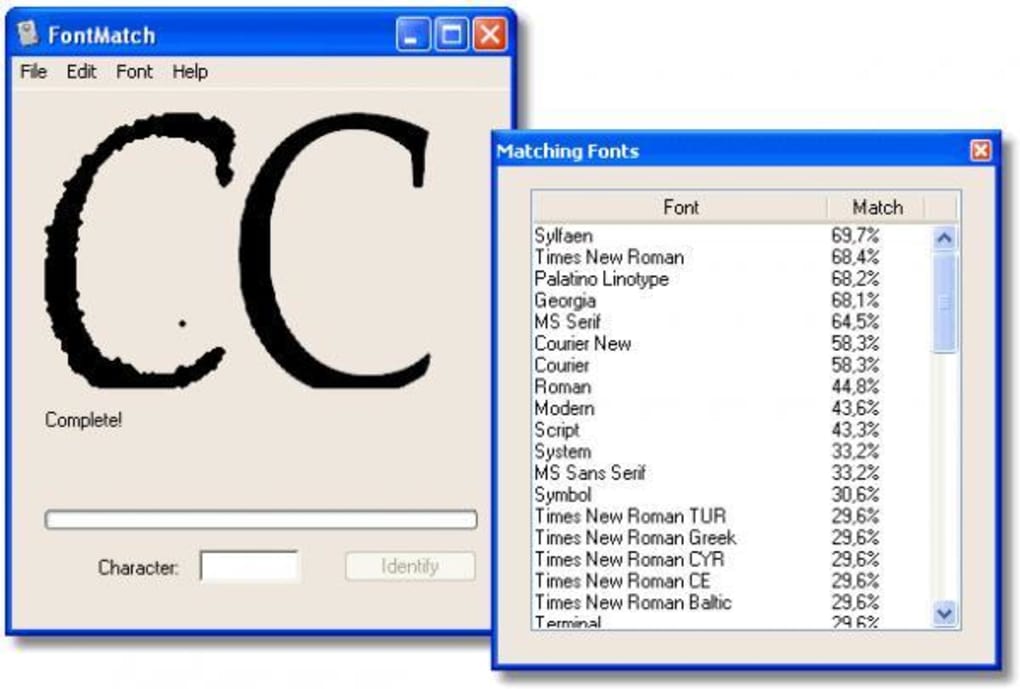
- Best Fit Determination: Through this pattern matching, FontMatch calculates a “closeness percentage” for each font in your library against the provided sample. The higher the percentage, the better the perceived match.
- Visual Output: Once the analysis is complete, FontMatch presents its findings in a clear, actionable format. It displays two images side-by-side: the original sample you provided and FontMatch’s top-ranked “best answer” using an installed font. Users can also scroll through other potential matches, each accompanied by its calculated percentage, allowing for a comprehensive review and subjective judgment of the fit.
This intuitive visual comparison, combined with a quantifiable percentage, empowers users to make informed decisions about font identification. It simplifies a complex task, turning hours of manual searching into a quick, automated process that respects the user’s existing typographic resources.
Key Features and Specifications
FontMatch, despite its specialized nature, comes with a set of characteristics that define its identity as a utility for desktop customization:
- Platform Availability: Primarily available as a trial version for Windows operating systems. The documentation indicates support for “Windows 98 and prior versions” as of its initial release, and later mentions “Windows 2000” in its app specifications, suggesting it was designed for older Windows environments. It was also available for Mac, indicating a cross-platform ambition by its developer, Stretchedout.
- Lightweight Footprint: One of its advantages is its modest resource consumption. It’s described as a “light program that requires less free space than most programs in the category Desktop customization software,” making it suitable even for systems with limited storage or older hardware. The application size is approximately 5.13 MB.
- Language: The program is available exclusively in English, streamlining its interface and documentation for a global audience familiar with the language.
- Trial Version: FontMatch is offered as a trial, which typically means users can test its functionality for a limited period or with certain feature restrictions before deciding to purchase a full license. This allows potential users to evaluate its effectiveness in their specific workflows.
- Developer: The software was developed by Stretchedout, a name associated with specialized utilities.
- Historical Popularity: While its overall download numbers since 2005 (14,814 downloads) might seem modest by today’s standards, its specific usage patterns are noteworthy. It was “very heavily used in some countries such as South Africa, India, and Greece,” suggesting it met a particular need or gained significant traction within those regions, perhaps due to local design communities or specific professional requirements.
- Version and Updates: The current version of the program is 1.2.4. Its last reported update was on October 21, 2005. While the PhanMemFree.org app specs sometimes show a “Latest update” date of March 9, 2017, this typically refers to the listing or page update date rather than an actual software update. Therefore, it’s accurate to consider the software’s functional development to have concluded around 2005, making it a legacy application that still provides its core utility.
These specifications paint a picture of FontMatch as a specialized, legacy utility designed for a specific purpose within the desktop customization and design sphere, particularly valuable for users who prefer local, resource-efficient solutions.
User Experience and Areas for Improvement
FontMatch, like any software, has its strengths and limitations. User feedback provides valuable insight into its performance and highlights areas where it could potentially evolve, especially considering its vintage. While its core functionality is well-received for its intended purpose, early user reviews pointed to specific aspects that could enhance its overall utility and modern appeal.
Initial Impressions and User Feedback
An anonymous review from June 24, 2015, succinctly captured the sentiment: “Decent start but needs a LOT of work.” This feedback, nearly a decade after the program’s last functional update, underscores both its inherent potential and the gap between its capabilities and contemporary expectations. The review specifically highlighted several key limitations:
- Restricted Font Folder Access: “Does not allow you to change the font folder, so you can check INSTALLED fonts only.” This is perhaps the most significant functional limitation. While FontMatch’s primary purpose is to compare against installed fonts, the inability to specify alternative font directories (e.g., portable font libraries, project-specific font folders, or fonts not yet permanently installed but available for use) restricts its flexibility. Many designers utilize font managers that allow temporary activation of fonts or organize them into logical project groups outside the default system font directory. FontMatch’s rigidity in this regard means users must first install all fonts they wish to compare, which can clutter system resources or violate workflow preferences.
- Limited Image Format Support: “Does not recognize PNGs.” In today’s design landscape, PNG (Portable Network Graphics) is a ubiquitous image format, particularly for graphics with transparency. The inability to process PNG files means users would have to convert their source images to a supported format (likely JPG or BMP, given the era), adding an extra step to the workflow and potentially compromising image quality for the analysis. This limitation can be a significant barrier to efficient use.
- Single-Character Identification: “Identifies only one character at a time.” This indicates that FontMatch’s pattern recognition engine might be optimized for individual glyphs rather than entire words or phrases. While useful for isolated characters, identifying a font from a sample often involves analyzing the interplay between multiple characters, kerning, and word spacing—elements that are crucial for accurate typeface identification. Processing one character at a time can be tedious and might miss the broader typographic context that a designer relies on.
Despite these criticisms, the fact that users still bothered to review it years after its last update suggests that the underlying problem FontMatch aims to solve remains relevant and its core mechanism holds promise. The “decent start” acknowledges the value of a local, pattern-matching identification tool.
The Future of Font Identification: Desired Enhancements
If FontMatch were to be updated for the modern era, addressing the aforementioned criticisms would be paramount. Such enhancements would not only improve user experience but also broaden its appeal and utility:
- Broader Image Format Support: Full compatibility with modern image formats like PNG, JPG, GIF, and even potentially PDF snippets (especially for text layers within PDFs) would make it far more versatile.
- Configurable Font Directories: Allowing users to specify custom font folders for comparison, or even integrate with popular font management software, would align FontMatch with contemporary professional workflows. This could include the ability to scan uninstalled fonts from a chosen directory.
- Multi-Character/Word-Level Analysis: Evolving the pattern recognition to process multiple characters or entire words simultaneously would drastically improve accuracy and efficiency. This would allow the engine to consider kerning, leading, and other typographic metrics that define a font’s character.
- Updated User Interface and Experience (UI/UX): A refreshed interface that aligns with modern operating system aesthetics and interaction patterns would make the program more approachable. This could include drag-and-drop functionality for samples, clearer result displays, and perhaps even dark mode support.
- Integration with System Font Management: Deeper integration with Windows’ (or macOS’) native font management features could simplify the process of installing identified fonts or managing duplicates.
- Cloud Font Service Integration (Optional): While FontMatch’s local-first approach is its strength, an optional integration with popular online font libraries (e.g., Google Fonts, Adobe Fonts) could offer a hybrid approach, allowing users to broaden their search if no local match is found. This would need to be carefully implemented to preserve its core local value.
- Character Set and Font Feature Detection: More advanced features could include identifying specific character sets (e.g., Cyrillic, Arabic), OpenType features (ligatures, stylistic alternates), or even suggesting similar fonts based on identified characteristics if an exact match isn’t found.
While FontMatch remains a functional tool for its original design, the evolution of operating systems, design software, and user expectations means there’s significant room for growth. Its legacy status highlights a foundational need that modern solutions continue to address, often building upon the very ideas FontMatch pioneered.
Exploring Alternatives and Complementary Tools
The ecosystem of font-related software is diverse, with tools designed for every aspect of font management, viewing, and identification. While FontMatch offers a unique local comparison mechanism, it’s also part of a larger family of applications that users might employ in conjunction with it or as alternatives, depending on their specific needs.
Other Tools in the Font Ecosystem
Users seeking font utilities often look for a range of functionalities. Here are some categories and examples of alternative or complementary tools mentioned in the reference material:
-
Font Viewers and Managers: These programs allow users to browse, organize, activate, and deactivate their font collections efficiently.
- AMP Font Viewer (3.9 Free): A simple yet effective text font viewer. It lets users see what their fonts look like without needing to open a design application.
- NexusFont (Efficient font manager and viewer): Offers more robust features for managing large font libraries, including previewing installed and uninstalled fonts, organizing them into sets, and identifying duplicates.
- The Font Thing (4.1 Free): Described as a free desktop customization program for Windows, likely offering font viewing and basic management.
- FontViewOK (3.9 Free): Focuses on making font browsing easy, allowing users to quickly preview fonts on their system.
- FastFontPreview (3.4 Free): Specifically designed to preview both installed and uninstalled fonts, offering a quick visual reference.
- Font List (4.6 Free) and dp4 Font Viewer (4.3 Free): These tools aim to visualize all installed fonts, often with options for customized text previews.
-
Font Identification Tools (Online & Offline): While FontMatch specializes in local comparison, other tools focus on identifying fonts from images or web pages using different methodologies.
- WhatFont (3.4 Free): This is typically a browser extension that allows users to identify fonts on web pages by simply hovering over them. It’s excellent for web typography but doesn’t handle images or local files.
- FontPicker (3.8 Free): Described as a font picker with a font comparison feature. This might offer a more visual way to select and compare fonts, potentially from a dropdown list or a visual gallery.
-
Font Editors: For advanced users who need to modify existing fonts or create new ones, font editors are essential.
- TypeTool (2.1 Trial version): A powerful font editor for various formats including TrueType, Type 1, and OpenType. This is for users who need deep control over typeface design.
- FontCreator (Sick of Times New Roman? Create your own font!): Another program for creating custom fonts, catering to those who want to design unique typefaces.
How FontMatch Stands Out and How to Combine Tools
FontMatch differentiates itself by its precise focus: identifying a font from a visual sample against your existing, installed font library. This is a crucial distinction from general font viewers or web-based identifiers.
- Viewers help you see what fonts you have.
- Managers help you organize and activate/deactivate them.
- Web identifiers tell you what a font is on a webpage.
- Editors let you create or modify fonts.
FontMatch fills the specific gap of “I have an image/printout of text, and I need to know if I already have that font on my computer.” It’s less about exploring new fonts and more about solving a matching problem within your established resources.
For a comprehensive workflow, a user might combine FontMatch with other tools:
- Identify with FontMatch: Use FontMatch to determine if a sample matches an existing font in your collection.
- Manage with NexusFont: Once identified (or if a new font needs to be acquired), a font manager like NexusFont can help activate, deactivate, or organize the font within a broader library.
- Explore with WhatFont: If no local match is found, or for web-based inspiration, a tool like WhatFont can be used to identify fonts from the internet.
- Edit with TypeTool: For bespoke projects requiring unique typography, a font editor can be used to customize or create fonts.
Ultimately, FontMatch serves a vital, albeit niche, role in the font software landscape. Its local, pattern-matching capabilities make it a specialized asset for designers and professionals who frequently work with physical samples or need to leverage their existing font assets efficiently. While newer tools and online services offer broader identification capabilities, FontMatch’s focus on the user’s local environment ensures its enduring relevance for specific use cases. Users looking for this particular function can download a trial version directly from PhanMemFree.org to experience its unique approach firsthand.
Conclusion
FontMatch, developed by Stretchedout, stands as a testament to specialized utility in the realm of desktop customization and graphic design. Launched with Windows 98 and prior versions in mind, and also available for Mac, it carved a niche by providing a unique solution to a common typographic dilemma: identifying a font from a visual sample by comparing it against the fonts already installed on a user’s computer. This localized approach is its defining feature, setting it apart from broader online font identification services that scour the internet.
Its core strength lies in its intuitive pattern recognition engine, which analyzes the positive and negative spaces of a given text sample in a manner akin to human perception. This allows FontMatch to present users with highly relevant matches from their own font library, complete with a visual side-by-side comparison and a percentage indicating the closeness of the fit. For designers tasked with matching legacy projects, avoiding redundant font purchases, or simply confirming the presence of a specific typeface in their collection, FontMatch offers a streamlined and efficient process. Its lightweight design (5.13 MB) further enhances its appeal, ensuring it doesn’t burden system resources.
While its last functional update dates back to 2005, and user feedback highlighted areas for improvement such as broader image format support (like PNG), multi-character identification, and enhanced font folder management, FontMatch’s foundational utility remains undeniable. Its historical popularity in regions like South Africa, India, and Greece underscores its effectiveness in meeting a specific need within various design communities.
In an era saturated with cloud-based solutions, FontMatch serves as a reminder of the enduring value of dedicated, offline desktop applications. It’s not about discovering the next trending font, but about efficiently managing and utilizing the typographic assets you already possess. For those seeking a reliable tool to bridge the gap between a visual sample and their personal font library, FontMatch continues to offer a practical, focused, and secure solution. Experience its unique local identification capabilities by downloading the trial version from PhanMemFree.org today.
File Information
- License: “Trial version”
- Version: “1.2.4”
- Latest update: “March 9, 2017”
- Platform: “Windows”
- OS: “Windows 2000”
- Language: “English”
- Downloads: “7.8K”
- Size: “5.13 MB”


