
FontViewer is a free, lightweight Windows application designed to simplify the process of browsing and managing fonts installed on your system. Tired of manually opening each font file to preview its appearance? FontViewer offers a streamlined alternative, allowing you to quickly view numerous fonts within a single interface, significantly reducing the time and effort involved in font selection. This comprehensive review delves into its functionality, ease of use, and overall effectiveness as a font management tool.
A User-Friendly Interface for Font Exploration
FontViewer presents a straightforward and intuitive interface, ideal for users of all technical skill levels. Upon launching the application, users are presented with a simple directory selection window. This allows users to specify the folder containing the font files they wish to browse. Once selected, the fonts within that directory are displayed in a list on the right-hand side of the window, each clearly labeled with its file name. This clear organization ensures easy navigation through even extensive font collections.
The preview functionality is arguably the most significant feature of FontViewer. Upon selecting a font from the list, a preview window at the bottom of the screen instantly displays a sample text rendered using the selected font. This allows for immediate visual assessment of the font’s style, weight, and character set. Users can customize the sample text, adjusting the size, and applying bold or italic formatting to gain a more comprehensive understanding of the font’s characteristics before installation. This interactive preview feature eliminates the need to install each font individually for assessment, a significant time saver when dealing with many fonts.
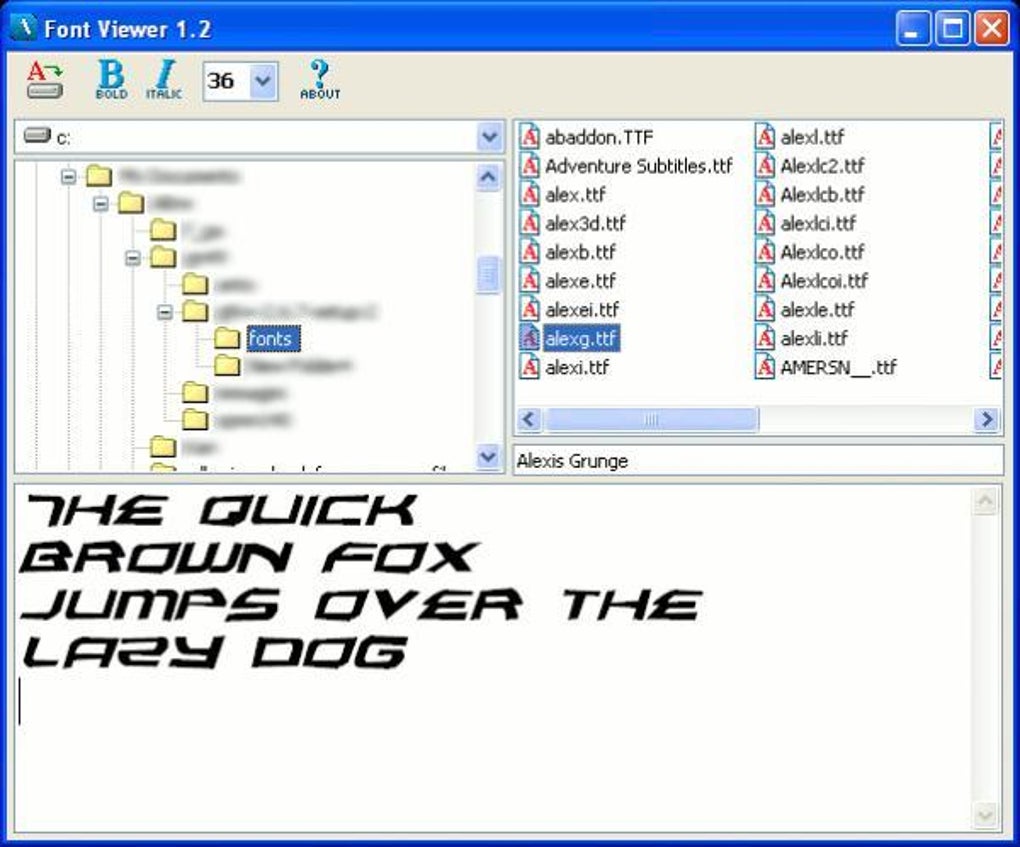
Beyond its ease of use, FontViewer’s design reflects an understanding of user needs. The simple, uncluttered interface avoids unnecessary complexities, allowing users to focus on the core function: browsing and previewing fonts. The absence of distracting elements enhances the overall user experience, making the font selection process more efficient and enjoyable.
Beyond Viewing: Installing Fonts with Ease
FontViewer’s utility extends beyond simple font previewing. The inclusion of a dedicated “install” button offers seamless integration with the Windows operating system. Once a user identifies a desired font, they can install it directly through the application, avoiding the need to navigate to the file explorer and manually install the font file. This streamlined installation process contributes to the application’s overall efficiency, enhancing the user workflow significantly.
The integration of an installation feature within the application itself improves the user experience by consolidating all the necessary actions within a single window. This centralized approach minimizes the disruption to the user’s workflow, keeping them focused on the task at hand. The elimination of extra steps reduces potential for errors and contributes to a more user-friendly environment.
Performance and System Requirements
FontViewer is notable for its lightweight nature. Its compact size and efficient design mean minimal impact on system resources, ensuring a smooth and responsive user experience, even on older or less powerful machines. The application’s minimal system requirements make it accessible to a broad range of users, regardless of their computer specifications. This accessibility makes FontViewer a versatile tool suitable for various computing environments.
This small footprint ensures that the application doesn’t consume significant processing power or memory, leaving ample system resources for other applications. This is a considerable advantage, especially for users with older or resource-constrained computers where heavy applications could lead to performance bottlenecks. The light memory usage means the application runs efficiently without slowing down the system.
Furthermore, FontViewer’s relatively low disk space requirements are a testament to its efficient coding and lean design. The application’s installation and subsequent operation consume minimal disk space, making it an ideal choice for users with limited storage capacity. This is particularly beneficial on systems with limited storage space, where space efficiency is a primary concern.
Comparing FontViewer to Alternatives
While FontViewer offers a straightforward and effective solution for font browsing and management, it’s important to consider its position within the broader landscape of font management software. Several alternative applications provide similar functionality, each with its own strengths and weaknesses. Some alternatives offer more advanced features such as font organization, advanced search capabilities, and more extensive customization options. However, these often come at the cost of increased complexity and higher system requirements.
FontViewer’s primary advantage lies in its simplicity and ease of use. Its minimalistic approach caters to users who prioritize ease of access and a straightforward user experience above advanced features. Users who simply need a quick and efficient way to browse and install fonts will find FontViewer to be a highly effective tool. In contrast, users requiring more complex features, such as extensive font organization and custom sorting options, might find alternative applications more suitable.
Ultimately, the choice between FontViewer and other font management applications depends on individual user needs and preferences. For users prioritizing simplicity and efficiency, FontViewer’s streamlined interface and straightforward functionality represent a significant advantage. For more demanding users requiring comprehensive features, other applications with more extensive functionalities may be a better fit.
Conclusion: A Practical and Efficient Solution
FontViewer remains a valuable tool for Windows users seeking a simple and effective way to browse and manage their font collections. Its user-friendly interface, efficient performance, and straightforward design make it accessible to all users, regardless of technical expertise. While it might lack the advanced features of some competitor applications, its focus on simplicity and ease of use makes it a strong contender for users who prioritize a quick and straightforward font management solution. Its small footprint, quick loading times, and streamlined interface make it an ideal tool for users needing a simple yet effective way to explore and install new fonts. The ability to preview fonts before installation is a significant advantage that saves time and effort. Overall, FontViewer remains a worthwhile addition to the toolkit of any Windows user frequently working with fonts.
File Information
- License: “Free”
- Latest update: “August 26, 2009”
- Platform: “Windows”
- OS: “Windows 2000”
- Language: “English”
- Downloads: “27.5K”
- Size: “425.60 KB”


