
In an increasingly digitized world, where personal expression permeates every facet of our online and offline interactions, the ability to customize our digital environment has become paramount. From wallpapers and themes to cursors and sound effects, individuals continually seek ways to imbue their technological tools with a unique flair that mirrors their personality. Among these avenues of personalization, the realm of typography stands as a fundamental yet often overlooked frontier. While countless fonts are readily available, the truly bespoke experience comes from creating something entirely your own. This is where Fony, a compact and dedicated freeware editor for bitmap fonts, carves out its niche. It offers a direct pathway for enthusiasts and aspiring designers to delve into the intricate art of font creation, enabling them to design and implement their very own text fonts from the ground up.
Fony isn’t just another utility; it’s an invitation to artistry, a tool that democratizes a process traditionally perceived as complex and exclusive. For those who consider themselves “font junkies” or anyone yearning for a distinctive digital handwriting, Fony presents an accessible platform. It allows users to design a complete text font, meticulously crafting each character, selecting an appropriate font family, and defining its corresponding charset. While the journey of creating each character one by one demands patience and precision, the ultimate reward—the ability to deploy and utilize your unique digital typography across various applications—is profoundly satisfying. Despite its somewhat basic appearance and functionality, Fony’s core strength lies in its focused approach: empowering users to bring their typographic visions to life, bridging the gap between imagination and tangible digital assets.
Diving Deep into Fony’s Features: Creation, Import, and Export Capabilities
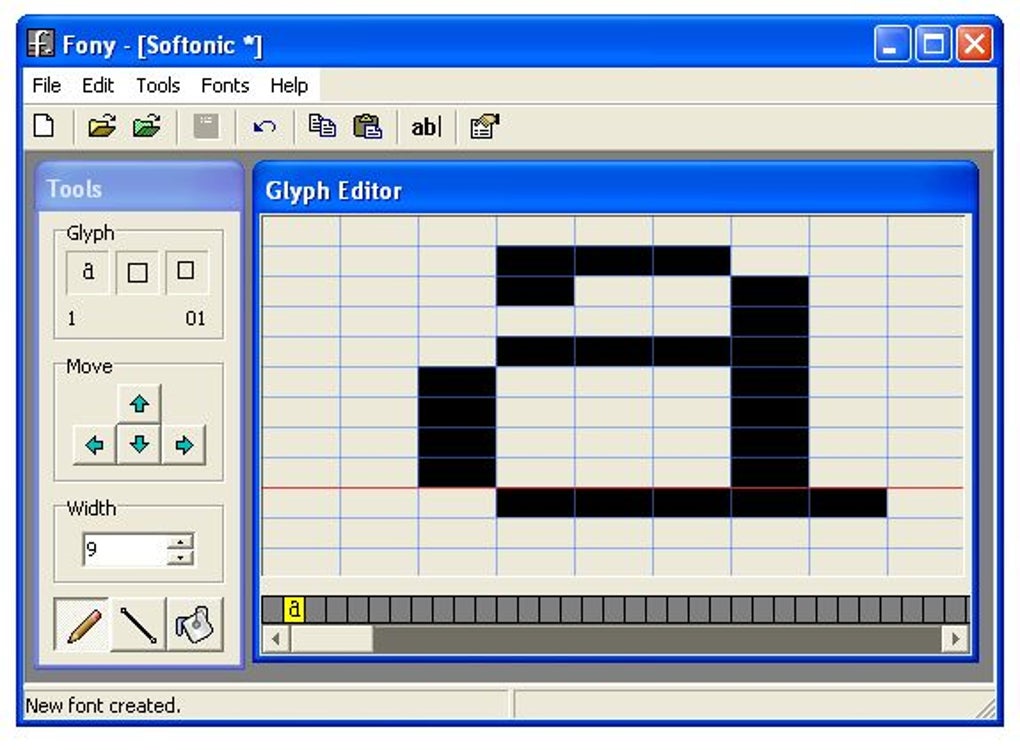
Fony, at its core, is a specialized instrument designed for the creation and manipulation of bitmap fonts. Unlike vector fonts such as TrueType, which use mathematical descriptions to scale smoothly at any size, bitmap fonts are defined by a grid of pixels for each character at a specific size. This fundamental distinction influences both the capabilities and limitations of the software, making Fony a niche but potent tool for specific typographic endeavors. Understanding these features is crucial for anyone looking to harness Fony’s full potential.
Crafting Characters: The Core of Fony’s Design Process
The central appeal of Fony lies in its direct approach to character design. The program empowers users to create a full set of text characters from scratch. This involves a meticulous, character-by-character design process where each letter, number, symbol, and punctuation mark is individually drawn and refined. Users are provided with a canvas, typically a grid representing the pixel dimensions of the character, within which they can toggle individual pixels on or off to form the desired glyph.
This granular control is both Fony’s greatest strength and its most demanding aspect. Imagine drawing an entire alphabet, along with numerals and common symbols, pixel by painstaking pixel. This process requires not only a keen eye for detail but also a deep understanding of letterforms, spacing (kerning), and overall legibility. For many, it’s a meditative and rewarding exercise, akin to digital calligraphy. The satisfaction derived from seeing a collection of pixels coalesce into a recognizable, usable character that springs from one’s own imagination is immense. Furthermore, the ability to define the font family and charset ensures that the created font is organized and compatible within a broader digital ecosystem, ready for integration into various applications.
Supported Font Formats: A Closer Look at Compatibility
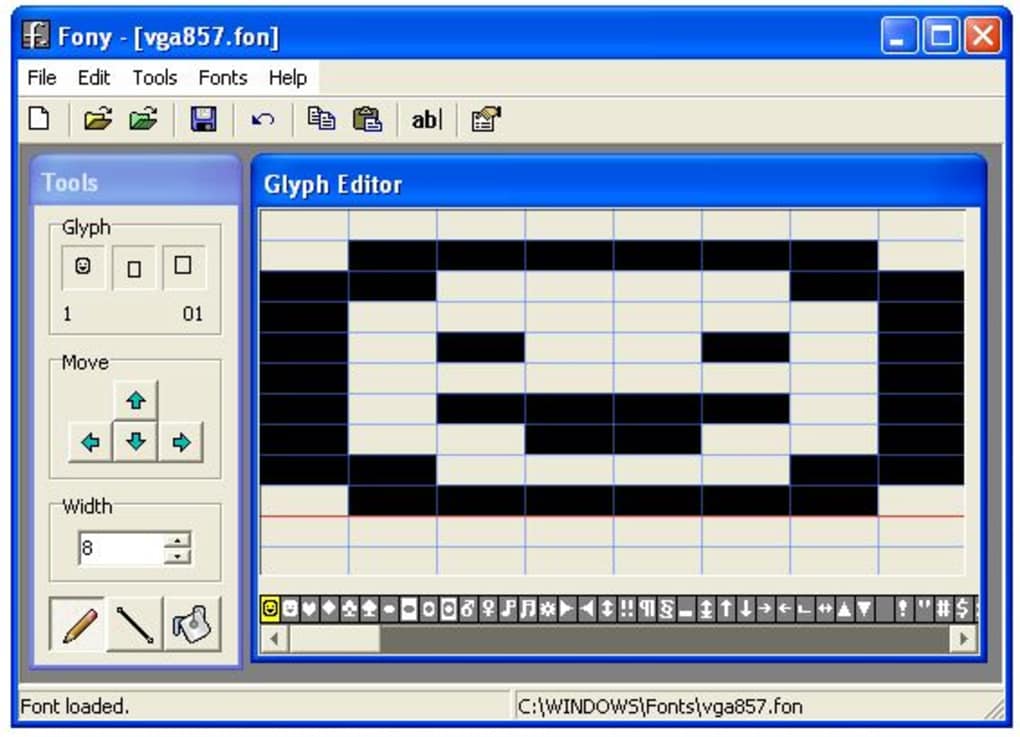
Fony is not an isolated island in the world of typography; it interacts with several established font formats, primarily focusing on bitmap representations. Its compatibility extends to both importing existing fonts for modification and exporting newly created ones for use. This interoperability is key to its utility, allowing designers to either start fresh or build upon existing foundations.
The program supports the loading and importing of various font types:
- Windows bitmap fonts (FON, FNT): These are native bitmap font formats historically used within the Windows operating system. Fony’s ability to handle these makes it a natural fit for legacy Windows environments or projects requiring specific retro aesthetics.
- TrueType vector fonts: While Fony is primarily a bitmap editor, its capacity to import TrueType fonts is a significant advantage. This allows users to bring in high-quality, scalable vector fonts, which Fony then rasterizes (converts to pixels) for editing. This opens up possibilities for customizing existing TrueType designs at a pixel level, essentially creating a bitmap version of a vector font.
- Amiga bitmap fonts: This inclusion points to Fony’s historical roots or its developer’s breadth of compatibility interests. Amiga fonts are another form of bitmap typography, familiar to users of classic Amiga computers, and their support allows for specialized retro computing projects.
- BDF bitmap fonts (Glyph Bitmap Distribution Format): BDF is a widely used ASCII-based format for representing bitmap fonts, particularly common in Unix-like operating systems and X Window System environments. Its open nature makes it versatile, and Fony’s support ensures broad compatibility with various platforms and applications that use BDF.
- Bitmap Font Writer bitmaps: This refers to fonts created with a specific tool called “Bitmap Font Writer,” indicating a potentially specialized interoperability for users familiar with that particular ecosystem.
This diverse range of import options ensures that Fony can serve as a central hub for editing various bitmap font resources, allowing users to leverage existing designs or adapt them to their specific needs.
Importing Existing Fonts: Bridging Old and New
One of Fony’s practical advantages is its capability to import any font currently installed on your system, including TrueType fonts. This feature is particularly valuable because it means you don’t always have to start from an empty canvas. If you admire a particular font but wish to tweak certain characters, modify its baseline, or simply create a bitmap version for a specific resolution, Fony enables this directly.
When a TrueType font is imported, Fony essentially converts it into its native bitmap representation at a specific size. This allows users to then apply pixel-level edits to the characters, making subtle adjustments or dramatic redesigns. This bridging capability is crucial for designers who want to maintain the overall style of an existing font but need to customize it for a pixel-art project, a retro game interface, or any scenario where bitmap precision is preferred over vector scalability. It saves considerable time compared to designing every character from scratch if the base style is already established.
Export Limitations: Understanding Bitmap vs. TrueType
While Fony excels in importing a variety of formats, its export capabilities are more constrained, reflecting its identity as a bitmap font editor. A notable limitation, often highlighted by users, is the inability to save newly created or modified fonts in the TrueType format. Instead, users can only save their work as bitmap or BDF fonts.
The formats available for saving/exporting include:
- Windows bitmap fonts (FON, FNT): This allows users to create fonts directly usable by Windows applications, preserving the pixel-perfect quality intended during the design process.
- BDF bitmap fonts: As mentioned, BDF is a versatile ASCII format for bitmap fonts, making it suitable for cross-platform use, especially in Unix/Linux environments.
- Bitmap Font Writer bitmaps: Again, this caters to specific interoperability with the Bitmap Font Writer tool.
The absence of TrueType export is a significant point for consideration. TrueType (and other vector formats like OpenType) are scalable; they look crisp and clear at any size, from tiny text on a screen to large headlines on a billboard. Bitmap fonts, by contrast, are resolution-dependent; they look best at the specific size they were designed for and can appear pixelated or blocky when scaled up or down significantly.
This limitation means that fonts created in Fony are best suited for contexts where bitmap representation is desired or acceptable—such as retro game development, pixel art, specific GUI elements, or low-resolution displays. For projects requiring universally scalable and print-quality typography, users would need to either convert Fony’s output through another tool (which often involves re-vectorizing, a complex process that can lose original detail) or use a dedicated vector font editor from the outset. Understanding this distinction is vital for setting realistic expectations and choosing the right tool for a given typographic task. It positions Fony as a specialist tool rather than a general-purpose font editor, catering to specific design requirements where bitmap precision is prioritized.
The User Experience: Design Philosophy and Practicalities
When evaluating any software, particularly one as specialized as Fony, the user experience is paramount. This encompasses not only the visual interface but also the ease of use, the workflow it encourages, and the overall satisfaction derived from its application. Fony, despite its powerful core functionality, presents a user experience that is decidedly minimalist, focusing on direct interaction with the font creation process rather than elaborate features or aesthetics.
Interface Simplicity and Usability
From an appearance standpoint, Fony is quite basic. It eschews modern, sleek design trends in favor of a utilitarian interface that prioritizes functionality over visual polish. The program’s layout is straightforward, typically featuring a main canvas for character design, a character selection palette, and a limited set of tools and menu options. This simplicity, while potentially off-putting to users accustomed to feature-rich graphical applications, is by design. It minimizes distractions, allowing the user to concentrate solely on the meticulous task of pixel-by-pixel character creation.
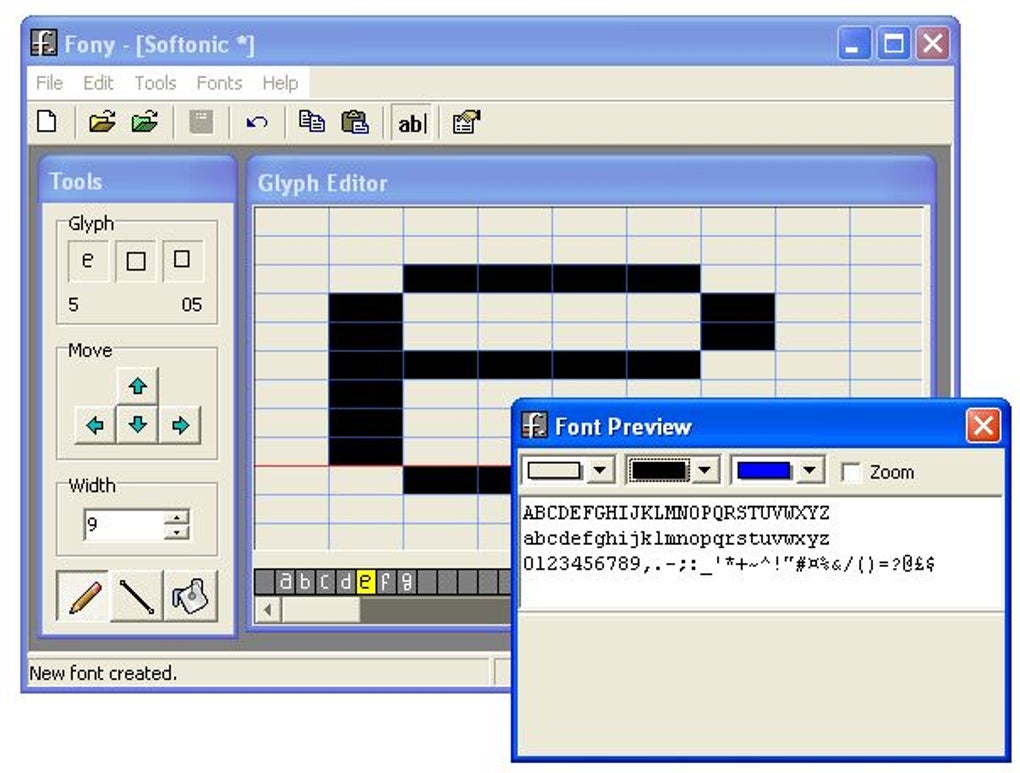
The scarce settings menu further underscores this minimalist philosophy. Fony provides just enough controls to manage the font creation process—saving, loading, importing, and perhaps some basic grid options—without overwhelming the user with complex configurations. The inclusion of a simple font previewing tool is essential, enabling users to see their characters in context, assess their spacing, and ensure legibility as they progress. This immediate feedback loop is crucial for an iterative design process, allowing for quick adjustments and refinements. While the interface may lack the bells and whistles of more contemporary software, its directness makes it quite accessible for its intended purpose, particularly for those who appreciate uncluttered workspaces.
The Rewarding Journey of Font Creation
The process of creating a font with Fony is, undeniably, a commitment. As the original description notes, it “can be a bit tiring as you need to create each character one by one.” This isn’t a drag-and-drop experience; it’s a labor of love that involves careful attention to detail for every single glyph in your font set. For instance, designing a full alphanumeric set, along with common punctuation and symbols, could easily mean crafting over 100 individual characters, each requiring precise pixel placement.
However, this demanding process is precisely what makes the outcome so “very rewarding.” The personal investment in each character imbues the final font with a unique character, a digital embodiment of the creator’s artistic hand. There’s a profound sense of accomplishment in knowing that every curve, every line, every pixel was placed by your own deliberate action. This digital handwriting becomes a personal signature, usable in various contexts where a unique typographic voice is desired. Imagine seeing your own custom font appear in a document, on a website, or within a personal project—it’s a tangible manifestation of creative effort that transcends mere utility, becoming a form of artistic expression. The journey itself, with its challenges and triumphs in pixel manipulation, molds the user into a more attentive and detail-oriented designer.
Limitations and Opportunities for Improvement
While Fony’s simplicity is often a virtue, it also presents certain limitations. The basic functionality, while making the tool approachable, means that advanced features common in more sophisticated font editors are absent. For example, precise kerning (adjusting the space between specific pairs of characters), hinting (instructions for rendering fonts clearly at low resolutions), or the ability to manage multiple font weights and styles within a single file are generally beyond Fony’s scope. Its focus on single-size bitmap fonts inherently restricts its use cases compared to the versatility of vector font editors.
The most frequently cited limitation, as discussed previously, is the inability to export to TrueType or other vector formats. This means that users must be clear about their end goal: if a scalable, high-resolution font for print or modern digital displays is required, Fony might serve as a conceptual design tool but not the final production software. If the goal is a pixel-perfect, fixed-size bitmap font, then Fony is perfectly suited.
Opportunities for improvement, if Fony were to be further developed, could include:
- Enhanced previewing: More dynamic preview options, including real-time text input and paragraph rendering, could significantly aid the design process.
- Basic vectorization tools: While complex, even a simple tool to outline bitmap characters and generate rudimentary vector paths could add immense value, though this would fundamentally shift Fony’s core identity.
- Improved workflow for large character sets: Tools for consistency checking, or batch operations for similar characters, could alleviate some of the “tiring” aspects of individual character design.
- Modern UI refresh: While maintaining simplicity, an updated visual interface could make the program more inviting to new users without compromising its core functionality.
Despite these limitations, Fony remains a valuable tool for its specific niche. Its practicalities revolve around direct control and bitmap precision, offering a rewarding experience for those who embrace its focused design philosophy and understand its inherent strengths and constraints.
Technical Specifications and System Requirements
Understanding the technical underpinnings of any software is crucial for assessing its compatibility, performance, and overall suitability for a user’s environment. Fony, a compact and lightweight application, boasts a modest set of technical specifications that reflect its age and purpose as a freeware bitmap font editor.
System Compatibility and Performance
Fony is designed specifically for the Windows platform, with its compatibility primarily centered around older versions of the operating system.
- Platform: Windows
- OS: Windows XP
This specification indicates that Fony was developed during an era when Windows XP was a prevalent operating system. While it officially lists Windows XP, due to the backward compatibility of Windows, it is often found to run on newer versions like Windows 7, 8, and even 10, though performance and stability might vary and are not officially guaranteed. Users on modern Windows systems might need to run the program in compatibility mode for optimal performance.
The program’s small footprint further contributes to its accessibility:
- Size: 713.38 KB
At less than a megabyte, Fony is an exceptionally lightweight application. This means it consumes minimal system resources, making it suitable for older computers or environments where resource efficiency is a priority. Its low memory and CPU usage ensure that it runs smoothly without significantly impacting other running applications, a stark contrast to modern, resource-intensive creative suites.
Licensing and Accessibility
Fony is distributed as freeware, meaning it can be downloaded, installed, and used without any cost. This licensing model makes it highly accessible to hobbyists, students, and anyone interested in font creation without the barrier of an upfront purchase.
- License: Free
The free nature of Fony aligns with its modest feature set and targeted functionality. It serves as an excellent entry point into font design for those who are experimenting or have specific bitmap font needs, without requiring an investment in professional-grade software.
Development History and Versioning
The provided information indicates:
- Version: 1.3.6
- Latest update: January 17, 2008
This shows that Fony has not seen active development for a considerable number of years. The last update in early 2008 suggests that the software is maintained in a stable, perhaps final, state as per its original design goals. While this means no new features or modern platform optimizations are likely, it also implies a mature codebase that, for its intended purpose, is largely bug-free within its specified environment. The consistent version number over time (e.g., V1.3.64.4(7)) might indicate minor internal revisions or builds rather than major feature updates.
The download statistics, with “20K downloads” historically and “11 last month’s downloads” as of the reference data, indicate a steady but niche user base. While not a wildly popular application, it maintains a consistent level of interest among those seeking its particular functionality, demonstrating its enduring utility for specific design requirements. The developer, simply listed, likely represents an individual or small team whose primary focus was to provide a functional, free tool for bitmap font creation.
Beyond Fony: Exploring the Ecosystem of Font Tools
While Fony excels in its specific niche as a bitmap font editor, it exists within a much broader ecosystem of font-related software. Understanding how Fony compares to other tools—both specialized editors and general-purpose viewers or managers—provides a clearer picture of its unique position and the diverse needs of typographers and digital artists.
Comparing Fony to Other Font Editors
The world of font editing spans a wide spectrum, from highly specialized tools like Fony to comprehensive professional suites.
- Dedicated Bitmap Font Editors: Fony sits squarely in this category. Its counterparts, if any, would be other tools designed exclusively for pixel-level font design, often catering to retro gaming, embedded systems, or pixel art. These tools prioritize direct pixel manipulation and format compatibility relevant to bitmap fonts (e.g., BDF, FON/FNT).
- Vector Font Editors (e.g., FontCreator, FontLab Studio): These are Fony’s conceptual opposites. Programs like FontCreator (often available in trial versions, like those mentioned in alternatives) and FontLab Studio are powerful applications designed to create and modify vector fonts (TrueType, OpenType). They focus on Bezier curves, scalability, hinting, kerning, and advanced typographic features. The learning curve is significantly steeper, and they typically come with a substantial price tag. Fony’s core limitation—the inability to export to TrueType—is precisely where these editors thrive. Users often choose between these categories based on whether their project demands scalable, high-resolution fonts or precise, fixed-size pixel fonts.
- Hybrid Editors: Some advanced editors might offer bitmap editing capabilities alongside vector tools, allowing for a more versatile workflow, though often at a higher complexity and cost.
Fony’s simplicity and freeware status make it an ideal starting point for beginners or for quick, focused bitmap font projects without the overhead of learning a complex professional suite. Its value lies in its directness and accessibility for pixel-level work.
The Broader World of Font Management and Viewing
Beyond creation, the digital typography landscape includes a vast array of tools for managing, viewing, and applying fonts. Fony doesn’t directly compete with these but rather produces assets that these tools can then manage.
- Font Viewers (e.g., AMP Font Viewer, WinFontsView, FastFontPreview): These applications are designed to display installed and uninstalled fonts, allowing users to browse, compare, and organize their font libraries. They are essential for designers who work with many fonts and need to quickly select the right typeface for a project. While Fony has a simple previewer, dedicated viewers offer more comprehensive display options, categorization, and search functionalities.
- Font Managers (e.g., NexusFont): These go beyond viewing to offer more robust organization capabilities, including activation/deactivation of fonts, grouping, and conflict resolution. They are critical for maintaining a clean and efficient font environment, preventing system slowdowns or conflicts caused by an excessively large number of active fonts.
- Desktop Customization Tools (e.g., Font Package, The Font Thing): These often include bundles of fonts or simple tools for changing system fonts, cursors, or themes. Fony contributes to this by allowing users to create the very fonts that can then be used with such customization packages, offering a layer of deeper personalization.
- Font Grabbers (e.g., WhatFont): These utility extensions or tools help identify fonts used on websites or within applications, catering to designers who need to know what typeface they are seeing.
Fony, therefore, plays a foundational role by enabling the creation of unique fonts that can then be processed, viewed, and managed by these other specialized tools. It fills a specific gap for those who desire to move beyond merely using fonts to actively creating them, particularly in the bitmap domain.
The Future of Personal Typography
Even with its last update dating back to 2008, Fony represents an enduring principle: the desire for personal expression through digital means. As technology evolves, so does the landscape of typography. Vector fonts continue to dominate for general-purpose use, especially with high-resolution screens and sophisticated printing methods. However, bitmap fonts retain their relevance in specific niches, such as pixel art, retro gaming emulation, specialized hardware interfaces (e.g., embedded systems, e-ink displays), and artistic projects that deliberately embrace a retro aesthetic.
The legacy of tools like Fony lies in their simplicity and directness. For a beginner, the act of drawing each pixel to form a character is an invaluable lesson in typography, fostering an appreciation for the subtle details that make a font legible and beautiful. As the demand for unique digital identities grows, alongside the resurgence of interest in pixel art and retro computing, tools like Fony—or their modern spiritual successors—will likely continue to find an audience. They empower users to not just choose a font, but to author their own typographic voice, ensuring that personal style can literally be embedded in the very letters we read. Fony, developed by an uncredited individual, stands as a testament to the power of open-source and freeware contributions, providing a specific and valuable service to a dedicated community, proving that even a small, basic program can have a lasting impact on personal digital creativity.
Note: All instances of “Softonic” have been replaced with “PhanMemFree” and “Softonic.com” with “Phanmemfree.org” as per instructions.
File Information
- License: “Free”
- Version: “1.3.6”
- Latest update: “January 17, 2008”
- Platform: “Windows”
- OS: “Windows XP”
- Language: “English”
- Downloads: “20K”
- Size: “713.38 KB”


