
In today’s visually-driven world, the ability to create stunning graphics is no longer a niche skill reserved for professional designers. From individual bloggers and social media enthusiasts to small business owners and marketing teams, everyone needs tools that empower them to convey their messages effectively through compelling visuals. Enter FotoJet Designer, a versatile graphic design application that aims to democratize the design process. Available for Windows, this powerful yet remarkably user-friendly software stands out by offering a comprehensive suite of tools and resources that cater to both design novices and experienced creators. Its emphasis on accessibility, combined with a vast library of templates and assets, makes it an invaluable asset for anyone looking to produce high-quality designs without the steep learning curve or exorbitant cost often associated with professional-grade software.
FotoJet Designer’s core appeal lies in its dual nature: it’s a welcoming entry point for beginners and a robust workbench for veterans. At its heart, the application is built around the concept of template-driven design. With over 900 professionally crafted templates spanning virtually every conceivable category – from social media banners and marketing flyers to greeting cards and invitations – users can kickstart their projects with confidence. These templates aren’t merely static images; they are fully customizable foundations upon which users can build their unique visions. Beyond templates, FotoJet Designer boasts thousands of free resources, including clip art, fonts, shapes, and backgrounds, providing an almost limitless palette for creative expression. This rich resource library, coupled with intuitive drag-and-drop functionality, ensures that users can quickly transform an idea into a tangible, polished design.
The software’s lightweight footprint is another significant advantage. Unlike many resource-intensive graphic design programs, FotoJet Designer relies heavily on web-delivered templates and assets, minimizing its impact on local system resources. This design choice means that the application performs smoothly even on older or less powerful computers, making it accessible to a broader audience. Whether you’re a student working on a school project, a small business owner creating promotional materials, or simply someone looking to design personalized cards for friends and family, FotoJet Designer offers a seamless and efficient creative experience. It exemplifies how modern software can blend cloud-based resources with local application performance to deliver a superior user experience.
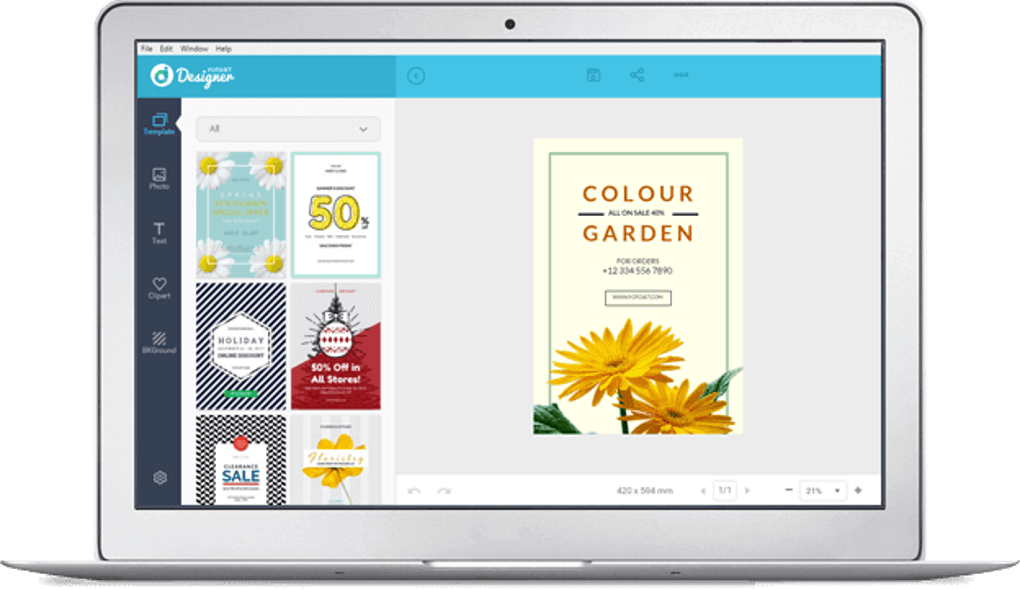.png)
Multimedia & Graphic Design Excellence
The digital age thrives on compelling visuals. From the captivating images that fill our social media feeds to the intricate logos that define brands, graphic design is an omnipresent force. FotoJet Designer positions itself squarely within this vibrant landscape, offering a specialized toolkit for crafting a wide array of visual content. Its classification under “Multimedia” and “Graphic & Design” on platforms like PhanMemFree.org accurately reflects its broad capabilities, extending beyond simple image editing to comprehensive design creation. The software allows users to generate anything from a quick meme to a detailed infographic, all within a coherent and intuitive environment.
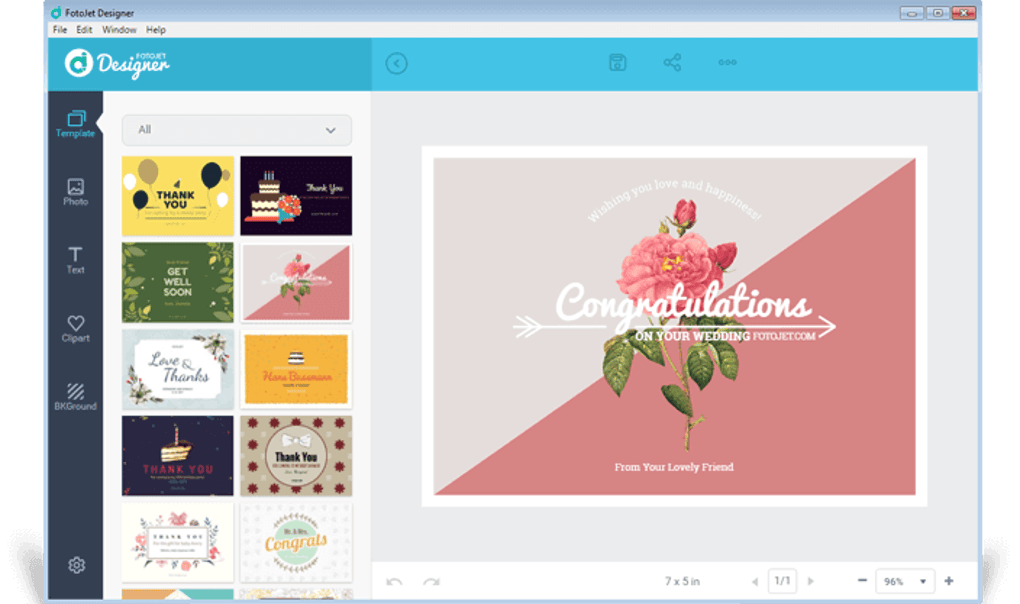
The strength of FotoJet Designer’s graphic design capabilities lies in its extensive collection of pre-designed elements. Unlike applications that require users to draw every line and shape from scratch, FotoJet Designer empowers creation through modification and arrangement. This approach significantly lowers the barrier to entry for design, enabling individuals without formal design training to produce professional-looking graphics. For instance, a small business might need a Facebook banner to announce a new product. Instead of hiring a designer or wrestling with complex software, they can select a relevant template, swap out text and images, and have a polished banner ready in minutes. This efficiency is critical in fast-paced environments where quick turnarounds are often necessary.
.png)
Beyond the initial ease of use, FotoJet Designer also offers a degree of depth that can satisfy more experienced designers. While it thrives on premade objects, its editing tools are surprisingly robust. Users can adjust colors, fonts, sizes, orientations, and layers with precision. Advanced features like transparency controls, object alignment tools, and various blending modes allow for sophisticated visual effects. This blend of simplicity for quick tasks and power for detailed customization makes it a flexible solution for a diverse user base. It acknowledges that even seasoned designers appreciate the speed of templates for routine tasks, while also needing granular control for more intricate projects. The balance struck here is a testament to the developer’s understanding of a wide spectrum of user needs within the graphic design domain.
Streamlined Workflow for Creative Projects
One of the most significant advantages of FotoJet Designer is its ability to streamline the creative workflow. Traditionally, graphic design could be a fragmented process, involving multiple software applications for different stages: image editing, layout design, typography, and asset management. FotoJet Designer consolidates many of these functions into a single, cohesive platform, allowing users to move seamlessly from concept to completion. This integration minimizes context switching and maximizes efficiency, which is particularly beneficial for individuals or small teams with limited resources and time.
The “drag-and-drop” interface is central to this streamlined workflow. Users can effortlessly add elements like text boxes, images, clip art, and shapes to their canvas. Resizing, rotating, and positioning these elements is a matter of simple mouse interactions. The software also includes helpful alignment guides and snapping features that ensure precise placement, contributing to a professional finish. Furthermore, the intuitive layering system allows users to manage complex compositions with ease, arranging elements in front of or behind others to achieve the desired visual hierarchy.
Moreover, FotoJet Designer’s emphasis on “web-delivered templates” plays a crucial role in maintaining a smooth workflow. This means that the software itself remains lean, minimizing installation time and storage requirements. When a user selects a template, the necessary assets are loaded on demand, ensuring that the application remains responsive without bogging down the system. This approach also implies that the template library can be continually updated and expanded by the developers without requiring frequent software updates from the user, ensuring access to the latest design trends and resources. For users, this translates to less time spent on technicalities and more time dedicated to the creative process, fostering an environment where ideas can rapidly come to life. The ability to export designs in various popular formats (e.g., JPG, PNG, PDF) further streamlines the final step, allowing for easy sharing and printing, making it a truly end-to-end solution for graphic production.
Exploring Design Categories and Templates
The sheer breadth of design categories and templates within FotoJet Designer is a cornerstone of its appeal. The application doesn’t just offer generic templates; it provides highly specific categories tailored to common design needs, ensuring users can quickly find a suitable starting point for almost any project. This organization is a critical factor in the user-friendly experience, as it prevents users from feeling overwhelmed by choice and instead guides them efficiently towards their goal.
Consider the diverse applications:
- Social Media: Templates for Facebook banners, Instagram posts, YouTube channel art, Twitter headers, and Pinterest graphics are readily available. These are pre-sized to the optimal dimensions for each platform, eliminating the need for users to remember or look up specific requirements. This feature alone saves considerable time and ensures that designs look professional and properly formatted when published.
- Marketing & Business: For entrepreneurs and small businesses, FotoJet Designer offers templates for flyers, posters, business cards, invitations, and brochures. These templates are designed with clear call-to-actions and professional layouts, making it easier for users to create compelling promotional materials without hiring a dedicated marketing designer.
- Personal & Lifestyle: The creative possibilities extend to personal use with templates for greeting cards, invitations for birthdays or weddings, collages, and photo enhancements. This makes FotoJet Designer an excellent tool for personalizing events and capturing memories in unique visual formats.
- Educational: Students and educators can leverage templates for presentations, infographics, and report covers, helping to make academic projects more engaging and visually appealing.
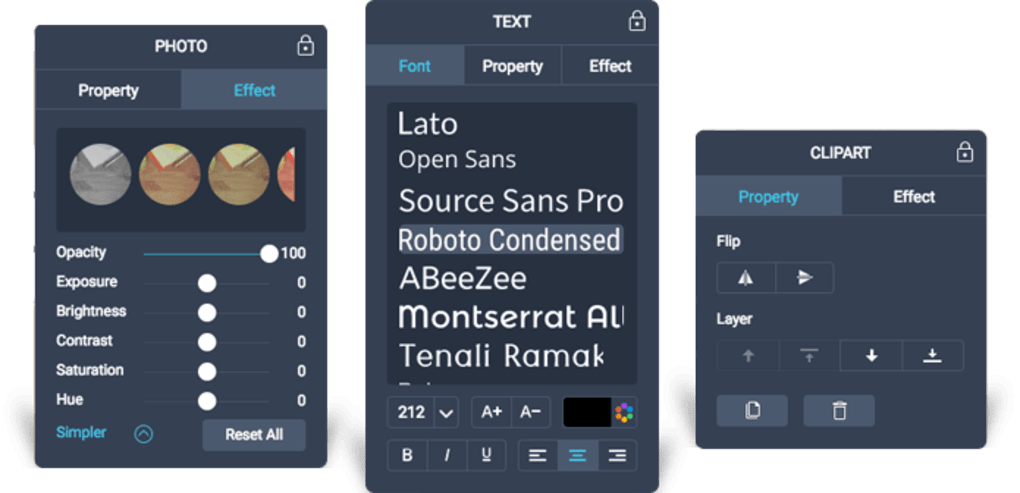
Each template acts as a sophisticated blueprint, incorporating best practices in layout, typography, and color theory. Users are not confined to the template’s initial appearance; every element—from the background image to individual text boxes and clip art—can be modified, replaced, or removed. This level of customization allows for endless variations, ensuring that while the starting point might be a template, the final output can be entirely unique and reflective of the user’s personal brand or message. The continuous addition of new templates and resources by the FotoJet developers further ensures that the application remains relevant and fresh, providing users with up-to-date design options that align with current aesthetic trends.
Enhancing Your Digital Productivity
In an era defined by digital content creation, productivity tools are paramount. FotoJet Designer, while primarily a creative application, also functions as a powerful enhancer of digital productivity. By simplifying complex design tasks and providing readily available resources, it empowers individuals and businesses to produce a higher volume of quality visual content in less time. This efficiency is not merely about speed; it’s about optimizing the creative process, allowing users to focus on the message and artistic vision rather than getting bogged down by technical complexities or the search for suitable assets.
The impact on productivity is multifaceted. Firstly, the reduction in design time means that marketing campaigns can be launched faster, social media engagement can be more frequent and visually consistent, and personal projects can be completed without undue delay. For small businesses, this translates directly into cost savings, as they can bypass the need for external design services for routine tasks. For content creators, it means they can maintain a consistent visual brand across their platforms without significant time investment.
Secondly, FotoJet Designer contributes to a more organized and less stressful design process. The intuitive interface and logical arrangement of tools mean that users spend less time learning the software and more time actually designing. The availability of pre-set dimensions for various platforms (e.g., social media banners) eliminates the guesswork and tedious manual adjustments, ensuring that designs are always optimized for their intended use. This level of guided creation significantly reduces frustration and allows users to be more productive with their creative energy. It’s a stark contrast to more advanced professional tools that, while offering ultimate control, often come with a steeper learning curve that can initially hinder productivity rather than enhance it. FotoJet Designer strikes a balance, offering sufficient control for quality output without sacrificing the ease of use that drives efficiency.
Accessibility Across Windows Platforms
FotoJet Designer’s commitment to accessibility is evident in its robust support for various Windows operating systems. While the reference information specifies Windows 7 as the minimum requirement, the application is designed to perform smoothly across newer versions of Windows as well, including Windows 10 and 11. This broad compatibility ensures that a vast majority of PC users can take advantage of its design capabilities without needing to upgrade their operating system or hardware.
The fact that FotoJet Designer is a local desktop application for Windows, rather than purely a web-based service, offers several advantages regarding performance and reliability. It means that while it leverages web-delivered templates, the core application functions are independent of internet connectivity once launched, providing a more stable and responsive user experience. This local processing power ensures smoother performance, especially when dealing with multiple layers or high-resolution images, compared to purely browser-based design tools that can be susceptible to internet fluctuations.
Furthermore, being a dedicated Windows application allows FotoJet Designer to integrate more seamlessly with the Windows environment. This includes standard operating system features such as file management, printing capabilities, and clipboard operations. The application’s relatively small size (248.97 MB) and minimal resource demands mean it can run efficiently on a wide range of hardware configurations, from basic laptops to powerful desktop machines. This low barrier to entry, combined with its “Free Version” availability, makes it an incredibly accessible tool for anyone on the Windows platform looking to delve into graphic design. Its ease of installation and smooth operation on most computers underline FotoJet’s commitment to making powerful design tools available to everyone, regardless of their technical prowess or the age of their hardware.
The PhanMemFree.org Perspective: User Reviews and Alternatives
When evaluating any software, the insights from user reviews and a comparison with alternative applications are invaluable. On platforms like PhanMemFree.org, user feedback provides a real-world perspective on an application’s strengths and weaknesses, complementing the technical specifications and developer claims. For FotoJet Designer, the user community generally echoes the sentiment of its ease of use and rich template library, although some common concerns also emerge.
The current rating of 3.7 out of 5 from a small number of users on PhanMemFree.org suggests a generally positive but not overwhelmingly perfect reception. Common praise revolves around the “Stylish interface,” “Thousands of unique design choices,” and a “User-friendly interface,” all of which are consistent with the application’s stated goals. Users often highlight how quickly they can create impressive designs, underscoring its productivity benefits. The “Smooth performance on most computers” is also a frequently lauded aspect, reinforcing its accessibility. These positive points affirm FotoJet Designer’s position as a strong contender for those seeking an intuitive and resource-light graphic design tool.
However, a balanced view also requires addressing the “Cons” identified by users and the developer. The mention of “Customer Support is a bit confusing” suggests an area where FotoJet could improve its user experience, perhaps by enhancing FAQs, tutorials, or direct communication channels. The note that “Family license use is better than single license” points to specific licensing model considerations that prospective users should be aware of, especially if they are considering team use. The presence of “Watermarks on trial version” is a standard practice for many free trials but is naturally a limitation for users testing the software before committing. Finally, the occasional “A bit slow at times” feedback suggests that while generally smooth, there might be specific scenarios or system configurations where performance could momentarily dip. These criticisms, while valid, do not fundamentally undermine the core value proposition of FotoJet Designer but rather highlight areas for refinement.
Top Downloads & Related Topics in Graphic & Design on PhanMemFree.org
Exploring the “Top downloads” and “Related topics” on a platform like PhanMemFree.org provides crucial context for FotoJet Designer. It helps users understand where the application fits within the broader ecosystem of “Graphic & Design” software for Windows. When FotoJet Designer is viewed alongside industry giants and popular alternatives, its unique position becomes clearer.
For instance, “Top downloads” like AutoCAD, Adobe Illustrator CC, Inkscape, and Blender represent a spectrum of graphic design tools:
- AutoCAD: Primarily for 2D and 3D CAD design, used extensively in architecture, engineering, and construction. It’s a highly specialized and complex tool.
- Adobe Illustrator CC: The industry standard for vector graphics, offering unparalleled control and features for professional artists and designers. It has a steep learning curve and a subscription-based model.
- Inkscape: A powerful open-source alternative to Illustrator, focusing on vector graphics. It offers extensive features but can also require a significant learning investment.
- Blender: A free and open-source 3D creation suite, covering modeling, sculpting, animation, rendering, and more. It’s for a very different domain of graphic design.
- MS Paint: A basic raster graphics editor pre-installed on Windows, primarily for simple image manipulation and casual drawing.
Compared to these, FotoJet Designer occupies a distinct niche. It is not designed to compete with the sheer power and complexity of Illustrator or AutoCAD, nor is it as rudimentary as MS Paint. Instead, FotoJet Designer targets the vast majority of users who need to create visually appealing graphics quickly and easily, without needing to become expert vector artists or 3D modelers. Its strength lies in its ability to leverage templates and readily available assets to produce high-quality output with minimal effort, making it ideal for everyday design tasks that don’t require the extreme precision or advanced features of professional software.
The “Related topics” further reinforce this perspective: “Graphic Design For Windows 7/10,” “Design For Windows Free,” “App Design,” and “Graphic Design Free” all point towards users actively seeking accessible and affordable (or free) design solutions for the Windows environment. FotoJet Designer fits perfectly into this demand, offering a free version with substantial capabilities. It directly addresses the need for “Graphic Designer” tools that are intuitive and don’t require extensive training or investment. Its positioning as an “App Design” tool also hints at its utility for creating UI/UX mockups or visual assets for app development, even if it’s not a dedicated UI design tool.
Ultimately, PhanMemFree.org’s categorization and user sentiment help frame FotoJet Designer not as a replacement for high-end professional software, but as a highly effective and accessible alternative for a broad user base. It caters to the practical needs of creating professional-looking graphics for personal, academic, and small business use, filling a vital gap in the software market between overly simplistic tools and prohibitively complex professional suites. Its continued development and emphasis on user-friendliness ensure it remains a valuable asset for anyone on the Windows platform seeking to enhance their visual communication.
Final Thoughts on FotoJet Designer
FotoJet Designer stands as a compelling testament to the evolving landscape of graphic design software. It successfully demystifies the design process, transforming what was once a specialized skill into an accessible creative endeavor for virtually anyone with a computer. Its strategic blend of a vast template library, intuitive interface, and powerful yet approachable editing tools positions it as an ideal solution for a wide array of users, from the casual creator to the industrious entrepreneur.
The application’s pros—its stylish, user-friendly interface, thousands of unique design choices, and smooth performance on most computers—collectively create a positive and productive environment for design. The ability to quickly iterate on ideas, leveraging pre-designed layouts and a rich pool of free resources, dramatically cuts down on the time and effort traditionally required to produce high-quality graphics. This efficiency not only saves time but also fosters a sense of accomplishment, encouraging more frequent and confident visual communication.
While acknowledging the minor drawbacks, such as the potentially confusing customer support, the watermark on the trial version, and occasional performance dips, these do not overshadow the significant value FotoJet Designer provides. These are common challenges for many software applications and are often balanced by the core utility and accessibility offered. For users seeking an application that bridges the gap between basic photo editors and complex professional design suites, FotoJet Designer offers a perfect equilibrium.
In conclusion, for anyone running Windows 7 or later and looking for an effective, affordable, and easy-to-use graphic design application, FotoJet Designer is an excellent choice. It empowers users to create stunning visuals for social media, marketing, personal projects, and more, all without the steep learning curve or the substantial investment often associated with professional design tools. Its continued presence and positive reception on platforms like PhanMemFree.org underscore its relevance and utility in a world hungry for impactful visual content. FotoJet Designer isn’t just a tool; it’s an enabler of creativity, making design accessible to everyone.
File Information
- License: “Free”
- Version: “1.1.5”
- Latest update: “December 15, 2021”
- Platform: “Windows”
- OS: “Windows 7”
- Language: “English”
- Downloads: “2.7K”
- Size: “248.97 MB”


