
FotoSketcher is a user-friendly software application designed to convert digital photographs into stylized pencil sketches, offering a quick and accessible way to transform your images into works of art. Whether you’re a seasoned artist or simply appreciate the aesthetic appeal of hand-drawn sketches, FotoSketcher provides a powerful yet intuitive tool for achieving professional-looking results in mere seconds. Its ease of use and impressive range of customizable effects make it a popular choice for both casual users and those seeking a simpler alternative to complex photo editing suites like Photoshop.
Effortless Sketch Creation: A Step-by-Step Guide
The core functionality of FotoSketcher centers around its remarkably simple workflow. The process of transforming a photo into a sketch involves just a few straightforward steps:
-
Image Import: Begin by importing the digital photograph you wish to convert. FotoSketcher supports a variety of common image formats, ensuring compatibility with most digital cameras and scanners. Simply browse your files and select the desired image.
-
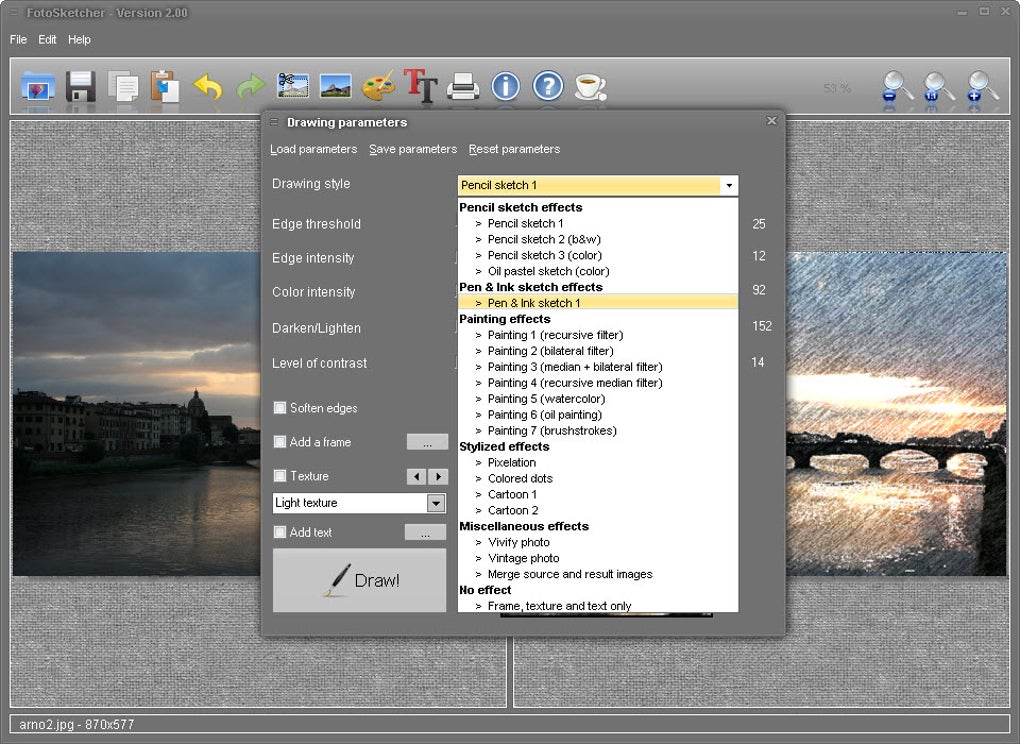
Style Selection: Once your image is loaded, FotoSketcher presents a wide array of drawing styles to choose from. These styles range from classic pencil sketches to more abstract and expressive effects. Each style offers a unique aesthetic, allowing you to tailor the output to your specific preferences. Experimentation is encouraged, as the software allows for quick switching between styles to see which best suits your image.
-
Parameter Customization: Beyond the pre-set styles, FotoSketcher provides a suite of customization options to fine-tune the final result. Adjustable sliders allow you to control various parameters, including color intensity, contrast, stroke thickness, and other elements that affect the overall appearance of the sketch. This level of control offers a significant degree of creative freedom, enabling users to achieve highly personalized outcomes. The intuitive slider interface ensures that even users with limited experience in image editing can easily manipulate these parameters to achieve their desired artistic vision.
-
Preview and Refinement: Before committing to the final conversion, FotoSketcher offers a preview window. Although described by some users as slightly small, the preview allows you to assess the effect of your style and parameter choices before proceeding. This iterative process enables users to experiment with different settings and refine their sketch until it perfectly captures their artistic intent. The ability to preview allows for a non-destructive workflow, ensuring that the original image remains untouched until you are entirely satisfied with the final sketch.
-
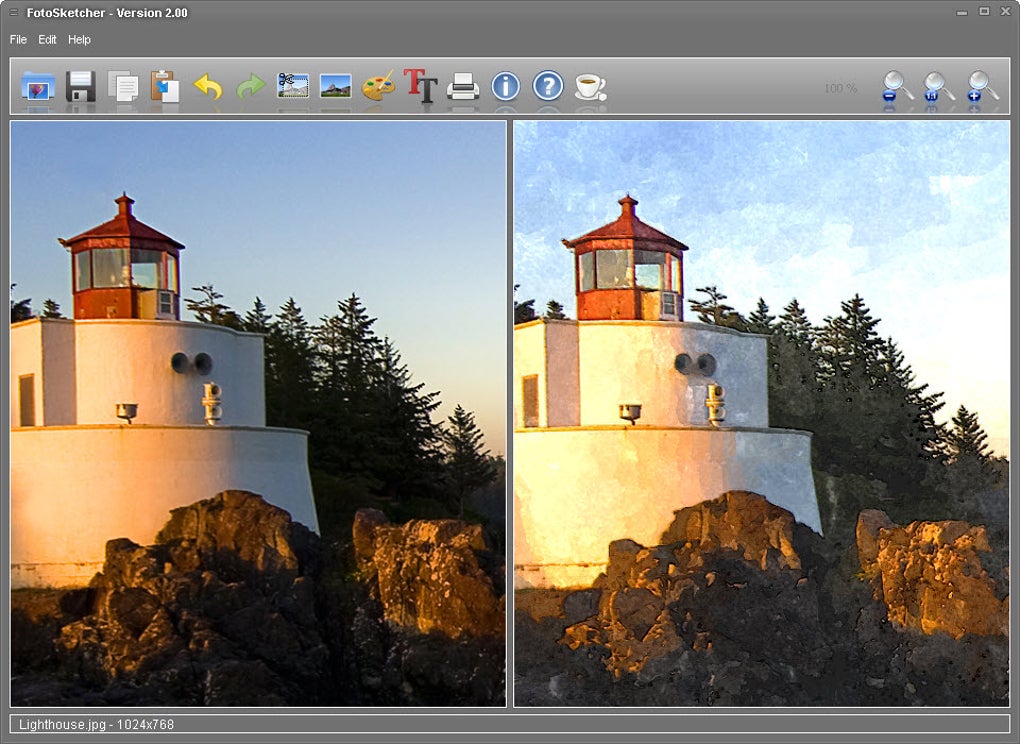
Final Output: Once you’re satisfied with the preview, a simple click of the “Draw!” button initiates the conversion process. FotoSketcher efficiently processes the image, applying the chosen style and parameters to generate the final sketch. The program then displays the resulting sketch alongside the original photograph, allowing for a direct comparison and highlighting the transformation achieved.
Beyond Basic Sketching: Advanced Features and Capabilities
While the core function of FotoSketcher revolves around sketch creation, it offers several additional features that enhance its versatility and appeal. These features extend beyond the basic sketch generation, adding value and making it a more complete image editing solution:
-
Batch Processing: FotoSketcher’s ability to handle multiple images simultaneously is a significant advantage, particularly for users with large collections of photographs. This batch processing capability significantly streamlines the workflow, saving valuable time and effort when applying the same style or effect to numerous images. This feature is particularly useful for photographers who want to consistently apply a stylistic treatment to a series of related images.
-
Basic Editing Tools: While not a full-fledged photo editor, FotoSketcher includes a set of basic image manipulation tools. These tools allow for minor adjustments to the source image before the sketch conversion, providing further control over the final result. This functionality addresses minor imperfections or adjustments required before transforming the image into a sketch.
-
Skin Customization: FotoSketcher allows users to personalize the appearance of the program’s interface through the use of customizable skins. This feature adds a layer of personal expression, allowing users to tailor the software’s look and feel to match their individual preferences. While purely aesthetic, this feature enhances user satisfaction and provides a more personalized experience.
-
Framing Options: Adding a frame to a finished sketch can enhance its presentation and visual appeal. FotoSketcher provides several framing options to accomplish this, further enhancing the overall aesthetic quality of the final product. This is a subtle yet important feature that elevates the finished product.
FotoSketcher: A Comparison with Other Software
While FotoSketcher stands out for its simplicity and speed, its capabilities should be viewed in comparison to more comprehensive image editing software. Programs like Photoshop offer a vastly wider range of editing options, including advanced tools for color correction, retouching, and manipulation, far beyond the scope of FotoSketcher’s capabilities. However, this comprehensive feature set also comes at the cost of increased complexity and a steeper learning curve.
FotoSketcher’s strength lies in its ease of use and targeted functionality. It’s the perfect solution for users who want to quickly and easily apply artistic sketch effects without needing to master a complex photo editing program. It bridges the gap between casual users and professional-level results, offering a middle ground for those who prioritize simplicity and speed over exhaustive editing options.
User Reviews and Feedback: A Mixed Bag
Online user reviews of FotoSketcher reflect a diverse range of experiences. While many praise the software for its ease of use, speed, and impressive results, some concerns have also been raised. Positive feedback consistently emphasizes the software’s intuitive interface and ability to quickly transform photos into aesthetically pleasing sketches. The free availability of the software also contributes significantly to its positive reception.
On the other hand, negative feedback often centers around the program’s relatively limited features compared to professional-grade software. The lack of granular control over lighting and color adjustments is a common criticism. Furthermore, some users have reported encountering potential compatibility issues or software conflicts, though these instances appear to be isolated. It’s crucial to download FotoSketcher from reputable sources to mitigate the risk of malware contamination, as highlighted by some previous user reviews.
Conclusion: FotoSketcher – A Valuable Tool for Artistic Expression
FotoSketcher provides a valuable and readily accessible tool for anyone seeking to transform their photographs into artistic sketches. Its simplicity, speed, and customizable effects make it a compelling option for users of all skill levels. While it may not match the extensive capabilities of professional-grade photo editors, its ease of use and impressive results firmly establish it as a valuable asset in the digital art toolkit. Whether you’re a seasoned photographer seeking a quick stylistic effect or a casual user looking for a fun and creative way to enhance your images, FotoSketcher delivers a powerful yet approachable solution for transforming your photos into visually stunning works of art. Its ease of use is its primary strength, making it readily accessible to a broad user base.
File Information
- License: “Free”
- Latest update: “August 7, 2024”
- Platform: “Windows”
- OS: “Windows 10”
- Language: “English”
- Downloads: “284.9K”
- Size: “17.00 MB”


