
FotoSketcher Portable is a free, user-friendly program designed to transform your photographs into stylized drawings or paintings, mimicking the look of hand-drawn artwork. Its portability and ease of use make it a compelling alternative to more complex image editing software. This review delves into its features, strengths, and weaknesses, providing a comprehensive overview for potential users.
Ease of Use and Core Functionality
FotoSketcher Portable’s greatest strength lies in its simplicity. The program boasts an intuitive interface that requires minimal technical expertise. The core function is straightforward: select an image, and with a single click, apply a filter that converts your photo into a sketch-like representation. This instant gratification makes it ideal for users who want quick results without navigating a complex workflow. The program’s speed is also a notable advantage; the transformation happens almost instantaneously, allowing for rapid iteration and experimentation.
Beyond the basic sketch effect, FotoSketcher Portable offers several customizable parameters to fine-tune the final product. Users can adjust the stroke style and thickness, influencing the overall appearance of the sketch. The color intensity is also adjustable, allowing users to create everything from full-color sketches to monochrome, black-and-white drawings, achieving a true “sketch” effect with minimal color saturation. This control allows for a degree of personalization, enabling users to tailor the output to their specific aesthetic preferences.
Advanced Features and Options
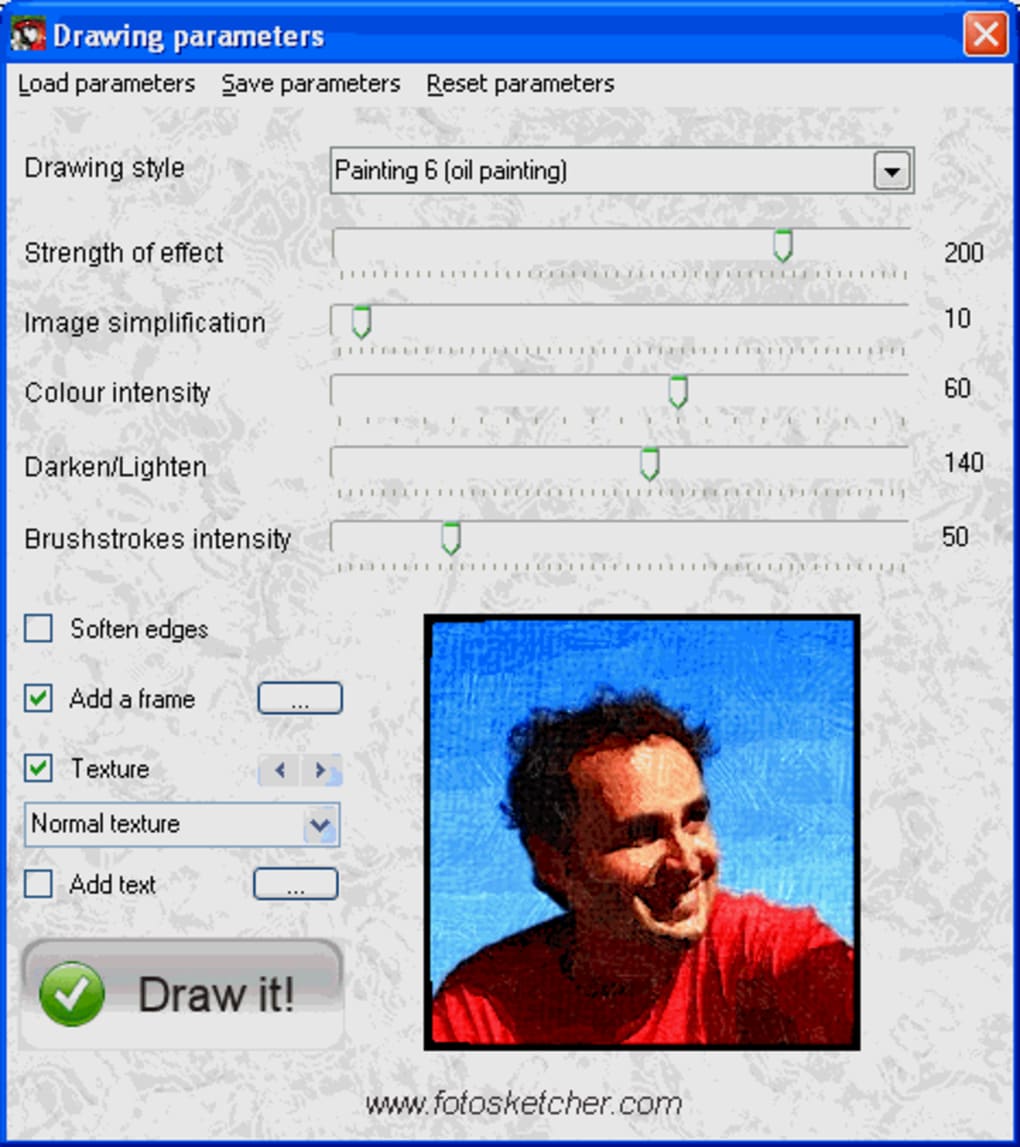
While its simplicity is a key selling point, FotoSketcher Portable also provides a few advanced features to enhance the creative process. These include:
-
Soften Edges: This option smooths the harsh lines and edges in the image, creating a softer, more painterly effect. This is particularly useful for portraits or images with fine details where a less defined look might be desirable.
-
Add a Frame: The ability to add a frame adds a finishing touch to the finished artwork, enhancing its presentation and giving it a more polished appearance. This feature allows users to choose from various frame styles to complement the image’s aesthetic.
-
Texture: This option simulates the texture of various surfaces, such as paper or canvas, adding another layer of realism and artistic flair. Applying a texture can significantly enhance the illusion of a hand-drawn piece, adding to the overall authenticity of the transformed image.
-
Add Text: While the text preview might not be entirely accurate in the interface, users can still add text to their images. This functionality allows for the inclusion of titles, captions, or personal messages, further customizing the final output. While the in-program preview may be limited, the final rendered image does include the added text.
Strengths and Weaknesses of FotoSketcher Portable
Strengths:
-
Portability: As the name suggests, FotoSketcher Portable is a portable application. This eliminates the need for installation, making it ideal for users who want to run the program from a USB drive or other portable storage devices. This ease of access makes it perfect for use on multiple computers without requiring administrative privileges.
-
Ease of Use: The intuitive interface is incredibly user-friendly, making it accessible even for individuals with limited experience in image editing software. The straightforward workflow allows users to quickly achieve satisfying results.
-
Speed: The program’s speed is noteworthy. The conversion process is almost instantaneous, making it efficient for batch processing or quick edits.
-
Free to Use: FotoSketcher Portable is freeware, eliminating the cost barrier for potential users. This accessibility makes it a viable option for individuals and hobbyists on a budget.
-
Variety of Effects: While the core function is the sketch effect, the customizable parameters and additional features like softening edges, adding frames, and applying textures provide a good degree of creative control and versatility.
Weaknesses:
-
Limited Preview for Text: A noted limitation is the imperfect preview of added text within the program. While the text is accurately rendered in the final output, the preview might not accurately display longer text strings, potentially leading to unexpected results if a user is heavily relying on the in-program preview to adjust the text placement and appearance.
-
Lack of Advanced Editing Tools: Unlike full-fledged image editing suites, FotoSketcher Portable lacks the advanced tools for detailed image manipulation. This is to be expected given its focus on creating stylized sketches rather than precise image editing. Users seeking more comprehensive editing capabilities will need to turn to more advanced software.
-
Dependence on Original Image Quality: The final output is directly influenced by the quality of the original image. A low-resolution or poorly lit photo will result in a sketch with corresponding limitations.
User Reviews and Overall Impression
User reviews overwhelmingly praise FotoSketcher Portable’s simplicity, speed, and the quality of its sketch effect. Many users appreciate its portability and the ability to quickly transform photos into artistic representations without the need for complex software. The free nature of the software also garners significant positive feedback.
While some users have expressed a desire for additional features, such as more diverse sketch styles or the ability to create caricatures, the overall sentiment towards FotoSketcher Portable is positive. The software efficiently fulfills its intended purpose: providing a user-friendly and quick method for converting photographs into aesthetically pleasing sketches.
Comparison with Alternative Software
Several alternative programs offer similar photo-to-sketch conversion capabilities. Some provide more sophisticated features and options, including more advanced filter styles, layered editing tools, and other features that cater to a more professional user base. However, these often come with a price tag or require a steeper learning curve. FotoSketcher Portable excels in its simplicity and ease of use, making it an excellent choice for users who prioritize convenience and speed over an extensive feature set.
The decision to use FotoSketcher Portable depends on the individual’s needs and priorities. For casual users seeking a simple and free way to convert photos into sketches, FotoSketcher Portable is a strong contender. For professional photographers or graphic designers requiring advanced tools and features, more robust (and often more expensive) image editing software might be a better option.
In conclusion, FotoSketcher Portable provides a valuable and easily accessible tool for those who want to transform their photos into visually appealing sketches quickly and without complex technical skills. While its features are limited compared to professional software, its simplicity, speed, and portability make it an excellent choice for many users. The free nature of the software makes it a highly attractive option for casual users and hobbyists.


