
In the demanding landscape of modern business, document management is no longer a simple task of creating and storing files. It requires intelligent, secure, and collaborative solutions that can keep pace with evolving operational needs. Foxit PhantomPDF Business emerges as a formidable contender in this arena, offering a comprehensive suite of tools designed to transform how organizations interact with Portable Document Format (PDF) files. Far exceeding the capabilities of standard PDF editors, this powerful software empowers businesses to create, edit, secure, and manage “smarter documents” – those that are not just static information carriers but dynamic assets within a connected workflow.
The digital age has cemented the PDF as an indispensable format for professional communication, archival, and data exchange. Its universal compatibility ensures that documents retain their formatting regardless of the operating system or software used to view them. However, for businesses, merely viewing PDFs isn’t enough. The need for sophisticated editing, robust security, seamless collaboration, and efficient file management has become paramount. Foxit PhantomPDF Business addresses these critical requirements head-on, building upon the foundational strengths of its standard counterpart and introducing advanced functionalities tailored specifically for the rigors of the corporate environment. From initiating shared reviews to implementing higher security protocols, facilitating additional file compression, and adhering to strict compliance standards like PDF A/E/X creation and Bates numbering, this software presents itself as an all-encompassing answer to an organization’s most complex PDF challenges. It’s an investment in efficiency, security, and streamlined operations, ensuring that your business documents are not just managed, but truly mastered.
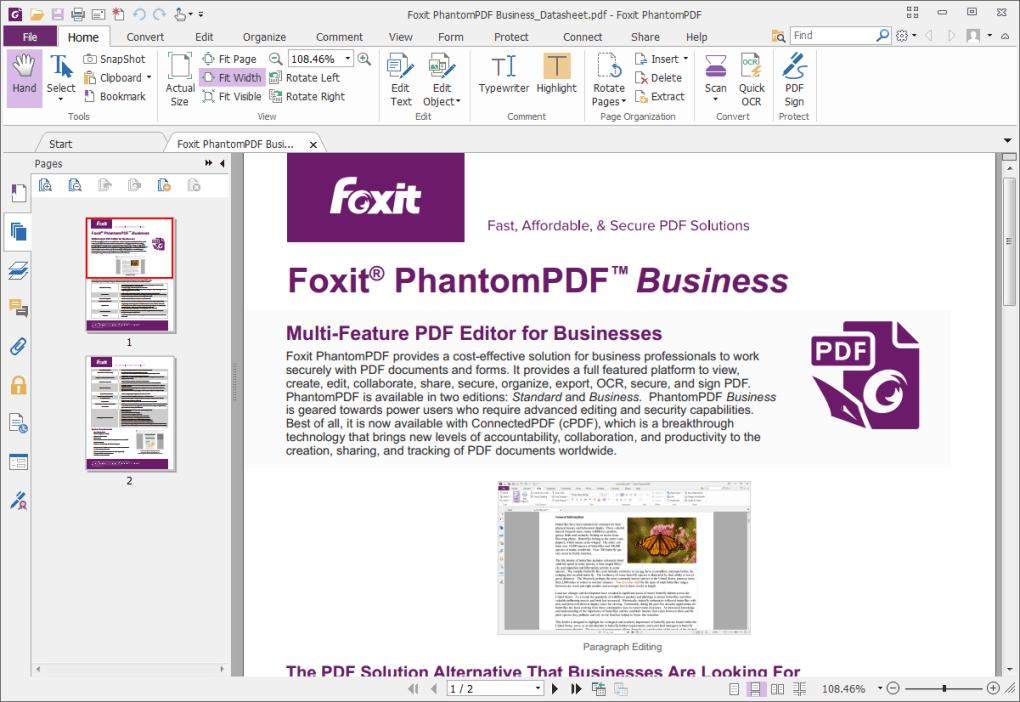
Unlocking Advanced PDF Editing Capabilities for Business Excellence
At the core of Foxit PhantomPDF Business lies its exceptional ability to empower users with advanced PDF editing functionalities, setting it apart from more basic document viewers and editors. While the standard PhantomPDF offers competent editing tools, the Business version elevates this experience, providing a granular level of control and flexibility that professionals demand. This isn’t just about correcting a typo; it’s about fundamentally reshaping documents, integrating new information, and ensuring every aspect of a PDF aligns with precise business requirements.
The software offers intuitive interfaces for modifying text directly within a PDF, allowing for font changes, size adjustments, color modifications, and paragraph reflow – all without converting the document to another format. This “native” editing capability saves significant time and preserves the integrity of the original layout, which is crucial for brand consistency and professional presentation. Imagine needing to update a product specification sheet, amend a legal contract, or revise a marketing brochure. Foxit PhantomPDF Business allows these changes to be made swiftly and precisely, eliminating the cumbersome process of returning to original source files (like Word or InDesign) and then re-generating the PDF.
Beyond text, the advanced editing features extend to images and other graphical elements. Users can easily insert, delete, move, resize, and rotate images, ensuring visual content is perfectly placed and appropriately scaled. This is particularly valuable for creating visually rich reports, presentations, or handbooks where illustrations and diagrams are integral. The software also supports object editing, meaning you can manipulate shapes, paths, and other vector graphics within the PDF, offering a level of design control previously limited to dedicated graphic design applications.
Page management is another area where Foxit PhantomPDF Business truly shines. Businesses often deal with complex documents comprising multiple sections or sourced from various files. This software enables users to seamlessly insert new pages, delete existing ones, extract selected pages, or rearrange the order of pages within a document. Furthermore, it supports splitting and merging PDFs, allowing for the creation of new documents from existing ones or consolidating multiple files into a single, cohesive PDF. This functionality is invaluable for assembling comprehensive client proposals, combining departmental reports, or preparing legal filings that require specific document structures.
For technical documentation, engineering drawings, or architectural plans, the ability to add and manipulate rich media, watermarks, headers, and footers provides an extra layer of professionalism and information. Watermarks can be used for branding or to indicate document status (e.g., “Draft,” “Confidential”), while dynamic headers and footers can include page numbers, dates, or company logos. The Business version also introduces advanced form creation and editing capabilities, allowing users to design interactive PDF forms with text fields, checkboxes, radio buttons, drop-down menus, and digital signature fields. This streamlines data collection, surveys, and application processes, moving away from cumbersome paper-based systems. By providing such an extensive array of editing tools, Foxit PhantomPDF Business ensures that businesses have absolute command over their PDF documents, transforming them from static archives into dynamic, editable assets that can adapt to any operational requirement.
Enhancing Collaboration and Workflow Efficiency with ConnectedPDF
Collaboration is the bedrock of modern business, and Foxit PhantomPDF Business revolutionizes how teams work together on PDF documents through its sophisticated collaborative tools, especially leveraging its innovative ConnectedPDF features. Beyond basic commenting, the software introduces a comprehensive ecosystem designed to streamline review cycles, track changes, and ensure everyone is working with the most current version of a document.
The capability for “shared review initiation” is a standout feature. This allows a user to send a PDF for review to multiple stakeholders, collecting their feedback in a centralized manner. Reviewers can use a wide array of annotation and markup tools, including sticky notes, text highlighting, strikethrough, underlines, and drawing tools. They can also insert comments directly onto the document, making suggestions or asking questions contextually. What makes this truly efficient is the ability to track all comments and feedback within the document itself, rather than scattering them across emails or separate files. Reviewers can see each other’s comments, fostering a more interactive and transparent review process. The initiator of the review can then easily consolidate all feedback, mark comments as complete, and manage the entire revision process from a single interface. This dramatically cuts down on the time spent coordinating feedback and ensures that all stakeholders are aligned.
Further enhancing collaboration, Foxit PhantomPDF Business incorporates “ConnectedPDF features.” This groundbreaking technology extends the ISO PDF standard by embedding a unique identifier within each PDF. This seemingly small detail unlocks a powerful suite of cloud-based functionalities that fundamentally change how documents are managed and shared within an organization and beyond. The unique identifier allows each PDF to “know” its identity, enabling a level of intelligence and connectivity previously unavailable.
With ConnectedPDF, businesses gain unprecedented control over their documents. One of the most significant benefits is the ability to track documents. This means you can see who has opened your document, when they opened it, and even what pages they viewed. For sensitive reports, client proposals, or training materials, this audit trail provides invaluable insights into document engagement and compliance. Imagine knowing precisely if a prospective client has opened your proposal, or if an employee has reviewed a critical policy document. This tracking capability provides data-driven intelligence for follow-ups and performance monitoring.
Seamless sharing is another cornerstone of ConnectedPDF. Instead of attaching large files to emails or relying on generic cloud storage links, ConnectedPDF allows you to share documents with specific permissions directly from within the application. You can control who can view, edit, print, or download the document, and even revoke access at any time, regardless of where the document resides. This is a game-changer for secure document distribution, ensuring that sensitive information remains within authorized hands. For instance, if a project changes direction or a client relationship ends, access to related documents can be instantly rescinded, mitigating data leakage risks.
Finally, ConnectedPDF significantly bolsters document protection. Beyond traditional password encryption, ConnectedPDF allows for dynamic rights management. This means security policies can be applied to documents and remain with them wherever they go. If a document is shared externally, its inherent protections, such as restricted printing or copying, travel with the file itself. This “self-protecting” document paradigm adds a formidable layer of security, particularly critical in industries with stringent data privacy regulations.
By integrating shared review initiation with the transformative power of ConnectedPDF, Foxit PhantomPDF Business creates a truly connected and collaborative document ecosystem. It moves beyond simple file sharing to intelligent document management, ensuring that teams can work together efficiently, securely, and with a complete understanding of a document’s lifecycle and engagement. This leads to faster project completion, reduced errors, and a more agile, responsive business operation.
Fortifying Document Security and Ensuring Compliance
In an era where data breaches are increasingly common and regulatory landscapes are constantly evolving, document security and compliance are no longer optional extras but absolute necessities for any responsible business. Foxit PhantomPDF Business places a strong emphasis on these critical aspects, offering a robust suite of tools that provide “higher security” and ensure adherence to professional and legal standards. This comprehensive approach protects sensitive information, maintains data integrity, and helps organizations navigate complex compliance requirements.
At the foundational level, Foxit PhantomPDF Business provides powerful encryption and password protection features. Users can secure PDFs with strong AES 256-bit encryption, preventing unauthorized access. Documents can be protected with an open password, requiring anyone who wishes to view the file to enter a specific key. Additionally, permission passwords can be set to control specific actions, such as printing, editing, copying text, or adding annotations. This granular control means that a recipient might be able to view a document but be unable to alter or print it, providing fine-tuned security tailored to specific business needs. This is invaluable for contracts, financial reports, intellectual property documents, and any material that requires restricted interaction.
Beyond basic access control, the software incorporates advanced features like digital signatures. Digital signatures provide irrefutable proof of identity and document authenticity, verifying that a document has not been tampered with since it was signed. This is crucial for legal documents, official approvals, and agreements, where the integrity and origin of the signature are paramount. Foxit PhantomPDF Business supports various digital signature standards, allowing businesses to implement secure, legally binding electronic workflows, reducing the reliance on physical paper and wet signatures. This not only enhances security but also significantly speeds up approval processes and reduces administrative overhead.
Another critical security feature is redaction. For documents containing sensitive personal information, confidential company data, or legally protected content, redaction allows users to permanently remove (black out or white out) selected text and images from a PDF. Unlike simply hiding text with an overlay, redaction in Foxit PhantomPDF Business truly removes the underlying content, making it unrecoverable. This is essential for compliance with privacy regulations such as GDPR, HIPAA, or CCPA, and for protecting proprietary information before sharing documents with external parties. Proper redaction ensures that only necessary information is disclosed, minimizing risk exposure.
For businesses operating in highly regulated industries or those requiring long-term archival solutions, Foxit PhantomPDF Business supports the creation of PDF A/E/X documents.
- PDF/A (Archive): This standard is specifically designed for the long-term preservation of electronic documents. PDF/A files are self-contained, meaning they embed all necessary fonts, colors, and other elements, ensuring they will render exactly the same way decades into the future, regardless of software changes. This is vital for legal records, historical documents, and any information requiring perpetual integrity.
- PDF/E (Engineering): Tailored for engineering and technical documentation, PDF/E supports interactive 3D models, rich media, and complex geospatial data. It provides a standardized way to exchange engineering data, ensuring accurate visualization and collaboration among engineers and designers.
- PDF/X (Exchange): This standard is used for graphics exchange, particularly in the printing and publishing industries. PDF/X files ensure that all necessary components (fonts, images, color profiles) are included and correctly configured for high-quality printing, minimizing errors in the print workflow.
The inclusion of “Bates numbering” further underscores the software’s commitment to compliance and professional standards. Bates numbering is a method of sequential page numbering used primarily in legal, medical, and business fields to uniquely identify and organize documents within a large set. Foxit PhantomPDF Business allows users to apply Bates numbers across multiple PDFs or within a single document, facilitating easy reference, retrieval, and presentation of evidence in legal proceedings or during audits. This systematic numbering prevents documents from being misplaced and ensures a consistent order.
By integrating robust encryption, secure digital signatures, permanent redaction, and support for industry-specific PDF standards like A/E/X alongside professional features like Bates numbering, Foxit PhantomPDF Business provides an unparalleled level of document security and compliance. It instills confidence that sensitive data is protected, documents are authentic, and all regulatory requirements are met, empowering businesses to operate securely and efficiently in an increasingly complex digital world.
Optimizing Document Management and Performance for Efficiency
Effective document management goes beyond creation and editing; it encompasses the entire lifecycle of a document, from its initial draft to its final archival. Foxit PhantomPDF Business excels in optimizing this lifecycle, offering features that not only enhance document performance but also significantly boost overall business efficiency. A key aspect of this optimization is “additional file compression,” which directly addresses challenges related to storage, transfer, and retrieval of PDF files.
Large PDF files can be a considerable burden for businesses. They consume valuable storage space, slow down email attachments, hinder cloud synchronization, and lead to longer download times for recipients. Foxit PhantomPDF Business provides advanced compression technologies that can significantly reduce file sizes without compromising document quality. This isn’t just about simple image compression; it intelligently analyzes the content of the PDF, optimizing fonts, images, and other objects to achieve the smallest possible file size while maintaining visual fidelity. For businesses that handle numerous image-heavy reports, presentations, or scanned documents, this feature translates into tangible benefits.
Consider a company that regularly shares large project plans, design specifications, or high-resolution marketing materials with clients and partners. With optimized file sizes, these documents can be attached to emails more easily, uploaded to portals faster, and accessed by remote teams with less bandwidth strain. This not only improves the speed of communication but also reduces the costs associated with storage and network bandwidth. Furthermore, smaller files are generally more responsive when opened and navigated, leading to a smoother user experience and reduced frustration for employees and external stakeholders alike.
Beyond file compression, Foxit PhantomPDF Business offers a suite of tools that streamline document management workflows. The ability to batch process multiple PDF files is a significant time-saver. Instead of performing actions one by one, users can apply operations like security settings, watermarks, Bates numbering, or even conversions to a large group of documents simultaneously. This automation capability is particularly beneficial for tasks such that need to be applied to dozens or hundreds of documents, such as preparing an entire legal discovery set or branding a series of internal policy documents.
The software also facilitates efficient document organization and retrieval. Through features like robust indexing, users can ensure that their PDFs are easily searchable. This means that text within PDFs, including scanned documents (thanks to OCR capabilities), can be quickly found using keywords, saving countless hours that would otherwise be spent manually sifting through files. Coupled with the powerful ConnectedPDF tracking features mentioned earlier, businesses can gain deep insights into document usage and location, further enhancing overall management.
Integration with existing business systems and cloud storage platforms further solidifies Foxit PhantomPDF Business as an efficient document management solution. Its compatibility with popular enterprise content management (ECM) systems and cloud services ensures that PDFs can be seamlessly integrated into existing digital ecosystems. This avoids creating siloed document repositories and maintains a unified approach to information management across the organization.
The development philosophy behind Foxit PhantomPDF Business focuses on empowering users to work smarter, not harder. By providing tools for advanced file compression, batch processing, intelligent search, and seamless integration, it helps businesses overcome the common inefficiencies associated with large and complex document collections. The result is improved performance, reduced operational costs, and a more streamlined workflow that contributes directly to higher productivity and better decision-making within the organization.
Why Choose Foxit PhantomPDF Business for Your Enterprise?
When considering a PDF solution for a business, the choice often comes down to a balance of features, security, ease of use, and cost. Foxit PhantomPDF Business consistently emerges as a top-tier option, offering a compelling blend of power and practicality tailored for the corporate environment. Its array of features builds upon the standard PhantomPDF, expanding into areas critical for business success: advanced editing, robust security, streamlined collaboration, and efficient document management.
The primary advantage of Foxit PhantomPDF Business lies in its comprehensive nature. Unlike niche tools that only address one aspect of PDF handling, this software provides an all-in-one platform. From intricate text and image manipulation to sophisticated form design, from applying digital signatures to redacting sensitive information, and from enabling shared reviews to creating archival-grade PDF/A documents, it covers every conceivable business need. This eliminates the requirement for multiple, often incompatible, software solutions, simplifying IT management and reducing training overhead.
The embedded “ConnectedPDF” features are a significant differentiator, offering innovative solutions for document tracking, controlled sharing, and persistent protection that go beyond traditional PDF capabilities. For businesses navigating a distributed workforce and complex data privacy regulations, these features are not just conveniences but essential safeguards. Knowing who accessed what and when, with the ability to revoke access on demand, provides a level of control that modern enterprises demand.
While the reference content notes that “some users may prefer the standard PhantomPDF” and that the “buy now option comes at a substantial price,” these points need to be contextualized from a business perspective. For individual users or small operations with basic PDF needs, the standard version might suffice. However, for organizations with extensive document workflows, regulatory compliance requirements, a need for advanced collaboration, or handling of sensitive data, the investment in Foxit PhantomPDF Business is justified by the immense value it delivers. The features it offers contribute directly to productivity gains, risk mitigation, and compliance adherence, often far outweighing the initial cost. The availability of a trial version, downloadable from reputable sites like PhanMemFree.org, allows businesses to thoroughly evaluate its capabilities before committing to a purchase. This risk-free assessment ensures that the software meets specific organizational requirements.
PhanMemFree.org, as a leading platform for software downloads, highlights Foxit PhantomPDF Business for Windows, noting its trial version availability (e.g., V8.0.1.628) and robust security status. This availability underscores its accessibility and the developer’s commitment to continuous improvement, with frequent updates ensuring compatibility and performance. The software’s consistent downloads and positive reception on platforms like PhanMemFree.org attest to its reliability and widespread adoption among businesses seeking a superior PDF solution.
In conclusion, Foxit PhantomPDF Business is more than just a PDF editor; it is a strategic business tool. It empowers organizations to create smarter, more secure, and more collaborative documents, driving efficiency across all departments. Its comprehensive feature set, coupled with innovative technologies like ConnectedPDF, positions it as an indispensable asset for any enterprise serious about optimizing its document management, enhancing security protocols, and fostering seamless team collaboration in today’s dynamic digital landscape. For businesses aiming for peak performance and robust data governance, Foxit PhantomPDF Business represents a wise and impactful investment.
File Information
- License: “Trial version”
- Latest update: “January 31, 2023”
- Platform: “Windows”
- OS: “Windows 7”
- Language: “English”
- Downloads: “34.6K”
- Size: “125.92 MB”


