
FoxyProxy is a powerful and versatile browser extension designed to simplify the often complex process of using proxy servers. Whether you need to circumvent geographical restrictions, enhance your online privacy, or simply explore different network connections, FoxyProxy offers a user-friendly interface and extensive features to manage your proxy settings directly within your Firefox browser. This in-depth review examines its capabilities, strengths, weaknesses, and overall usefulness for users seeking a robust proxy management solution.
Effortless Proxy Switching and Management
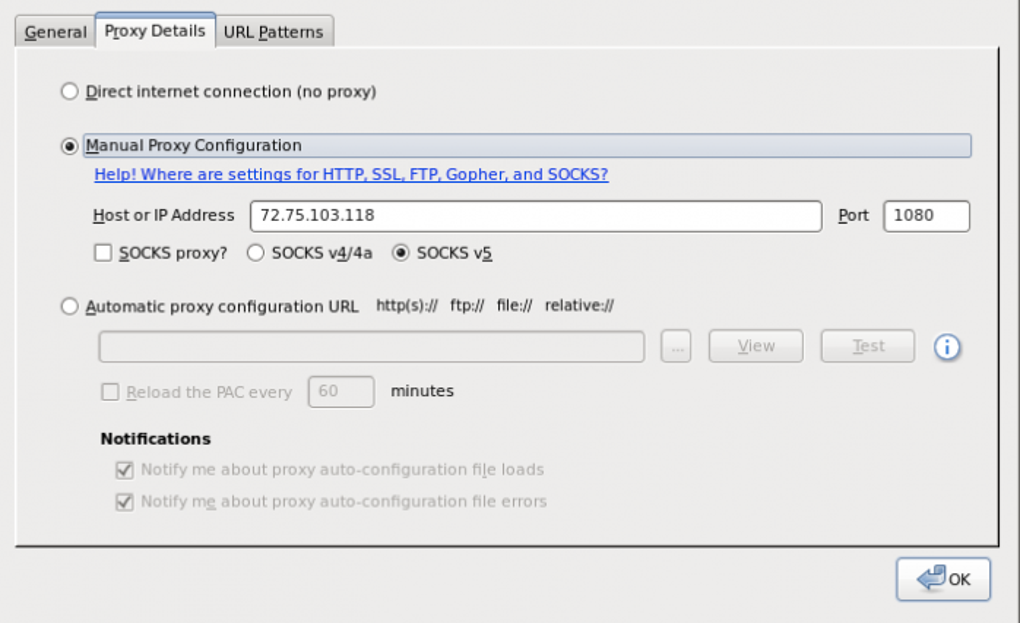
The core function of FoxyProxy is its ability to streamline the selection and activation of proxy servers. Unlike manually configuring proxy settings within the browser’s system preferences, FoxyProxy provides a centralized hub where you can add, organize, and quickly switch between numerous proxies. This eliminates the cumbersome task of repeatedly changing settings for each proxy you wish to utilize. Simply add your proxy details (server address and port) along with a descriptive name, and FoxyProxy will handle the rest. The intuitive interface allows for quick activation and deactivation of proxies with a single click from the toolbar icon, making it ideal for users who frequently switch between proxies based on their needs.
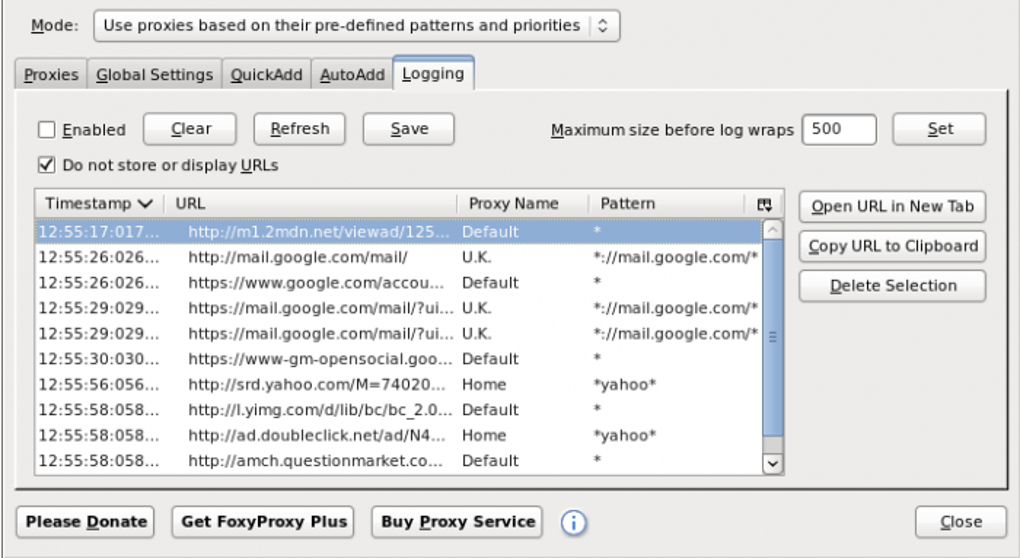
Furthermore, FoxyProxy’s “Quick List” feature allows you to create custom groups of frequently used proxies. This significantly speeds up the selection process, especially when working with a large number of proxies for different purposes. For example, you might create one list for accessing region-locked content and another for enhancing privacy while browsing. This organization simplifies workflow and ensures you always have quick access to the most pertinent proxies for a given task. The ability to quickly toggle between these custom lists transforms the process from a potentially tedious chore into a quick, efficient action.
Advanced Customization Options for Tailored Proxy Behavior
Beyond its ease of use, FoxyProxy provides a high degree of customization. This allows users to fine-tune the extension’s behavior to suit their specific preferences and needs. Users can configure various options, including:
-
Automatic Proxy Selection: FoxyProxy allows users to configure automatic proxy switching based on various factors, such as website URLs or specific keywords. This functionality can be particularly useful for users who require different proxies depending on the websites they visit. For example, you might set up a rule to automatically use a specific proxy when accessing a particular streaming service. This functionality is a powerful tool for users with complex proxy needs.
-
Customizable Mouse Clicks: The extension’s behavior can be adjusted to respond to specific mouse clicks. This allows for quick proxy switching based on contextual needs, adding another layer of efficiency. This highly tailored functionality makes FoxyProxy adaptable to individual workflows.
-
Pattern Matching: FoxyProxy allows users to define patterns to specify which proxies to use based on the website or domain being visited. This advanced feature offers fine-grained control over proxy usage, ensuring optimal performance and privacy depending on your location and chosen proxy servers.
-
Import and Export Settings: This feature facilitates backup and recovery of configurations, and also allows users to easily share their proxy settings with others. This function ensures continuity and simplifies the process of setting up FoxyProxy on multiple devices.
These extensive customization options are a significant strength of FoxyProxy, allowing users to create a highly personalized proxy management experience optimized for their specific usage patterns. However, the flexibility also introduces a learning curve for users unfamiliar with proxy servers and the intricacies of such advanced configurations. The many options may appear overwhelming to novice users, despite the well-structured interface.
Limitations and Areas for Improvement
While FoxyProxy offers considerable advantages, it’s not without limitations. One notable drawback is the absence of a built-in mechanism to identify and prioritize proxies based on speed and performance. Users must manually test each proxy to determine its suitability for their needs, which can be a time-consuming and tedious process, especially when working with numerous proxies. The lack of real-time performance indicators, such as latency or download speeds, is a notable deficiency that could significantly improve user experience.
The advanced customization options, while powerful, also present a potential challenge for less technically proficient users. The abundance of settings can be overwhelming and may require substantial time and effort to master. A streamlined, more intuitive approach to these settings, perhaps with improved documentation and tutorials, would be beneficial for broader user adoption.
Another minor drawback is the focus on Firefox. While FoxyProxy is a valuable tool for Firefox users, its lack of availability for other popular browsers limits its accessibility to a subset of internet users. Expanding compatibility with other major browsers such as Chrome, Edge, or Safari would broaden its appeal and significantly increase its market share.
User Feedback and Community Support
While the majority of user reviews are positive, citing FoxyProxy’s ease of use and extensive features, there are occasional reports of difficulties with customer support. Some users have experienced delays or lack of response to support requests, which may impact the overall user experience, especially for users encountering technical issues or requiring assistance with complex configurations. A more responsive and readily available support system would enhance user satisfaction and improve the overall reputation of the extension.
FoxyProxy Compared to Alternatives
Several alternative proxy management tools exist, each offering a unique set of features and capabilities. Some alternatives offer built-in speed testing for proxies, a feature noticeably absent from FoxyProxy. Others might focus on specific functionalities, like anonymity or security features, that may be more pronounced than FoxyProxy’s offering. However, FoxyProxy’s strong points remain its comprehensive range of customization options and its intuitive interface for managing a large number of proxies directly within Firefox. The choice of which proxy manager to use ultimately depends on individual priorities and needs. Users requiring comprehensive control over proxy settings with deep customization will find FoxyProxy particularly appealing. Users prioritizing speed testing and streamlined functionality might find alternative solutions more suitable.
Conclusion
FoxyProxy remains a valuable tool for managing proxies within the Firefox browser. Its ease of use, coupled with extensive customization options, makes it a strong choice for users who require control over their proxy configurations. While limitations exist regarding speed testing and limited browser compatibility, its overall strengths outweigh its weaknesses for many users. Improvements to customer support responsiveness and the addition of a built-in speed test would significantly enhance the user experience and further cement FoxyProxy’s position as a leading proxy management extension. For Firefox users with a variety of proxy needs and the technical aptitude to navigate its extensive settings, FoxyProxy provides a highly adaptable and functional solution.
File Information
- License: “Free”
- Latest update: “May 15, 2025”
- Platform: “Windows”
- OS: “Windows 2000”
- Language: “English”
- Downloads: “50.7K”


