
FoxyProxy Standard is a free Chrome extension categorized as an “Add-on & Tool,” offering users enhanced control over their internet browsing experience through proxy management. This review delves into its functionalities, ease of use, security implications, and overall value as a browser extension. While the extension itself remains largely unreviewed by the general public at the time of writing, this analysis aims to provide potential users with a clear understanding of its capabilities and potential benefits.
Understanding FoxyProxy Standard’s Core Functionalities
At its heart, FoxyProxy Standard serves as a proxy manager for Google Chrome. This means it allows users to configure and switch between different proxy servers with ease. Proxy servers act as intermediaries between your computer and the internet, masking your IP address and routing your traffic through a different location. This has several potential uses:
- Geo-Spoofing: Accessing geographically restricted websites or content. If a website only allows access from certain countries, using a proxy server located in one of those countries can grant access.
- Enhanced Privacy: Masking your real IP address can offer a degree of anonymity online, protecting your identity from potential tracking or surveillance.
- Bypass Censorship: In regions with internet censorship, a proxy server located outside of those restrictions can enable access to blocked websites.
- Improved Security: In certain situations, routing traffic through a secure proxy server can add an extra layer of security, particularly when using public Wi-Fi.
FoxyProxy Standard provides a user-friendly interface to manage these proxies. Users can define multiple proxy profiles, each with its own settings, and switch between them seamlessly within the browser. This eliminates the need for manual configuration changes, simplifying the process for users of all technical levels. The simple, intuitive design of the extension ensures ease of access and usage, even for individuals who lack extensive technical expertise. However, the ease of use might also mean that more advanced features or customization options are limited compared to dedicated proxy management software.
Security Considerations and Privacy Implications
While using a proxy server can enhance privacy, it’s crucial to understand the security implications. The security of your browsing experience depends largely on the proxy server you choose. Using a reputable and trustworthy proxy service is paramount. Public or free proxy servers may not offer the same level of security and privacy as paid, premium services.
The use of FoxyProxy Standard itself does not inherently compromise security if used responsibly. However, the extension’s core function of managing proxies highlights the importance of user due diligence. The security and privacy provided by the extension are directly tied to the security practices of the chosen proxy providers. Choosing untrustworthy or unsecured proxies can potentially expose users to vulnerabilities like man-in-the-middle attacks or data breaches.
It’s crucial to thoroughly research and vet any proxy service before using it with FoxyProxy Standard. Look for providers with a strong reputation for security, a clear privacy policy, and strong encryption protocols. Avoiding free or publicly available proxies is generally recommended, as these often lack adequate security measures.
Furthermore, using a proxy server doesn’t guarantee complete anonymity. While it masks your IP address, other data like your browsing history and online activity can still be tracked through other means.
Installation and User Experience
Installing FoxyProxy Standard is straightforward. Users simply need to add the extension from the Chrome Web Store. The installation process is quick and seamless, typical of most Chrome extensions.
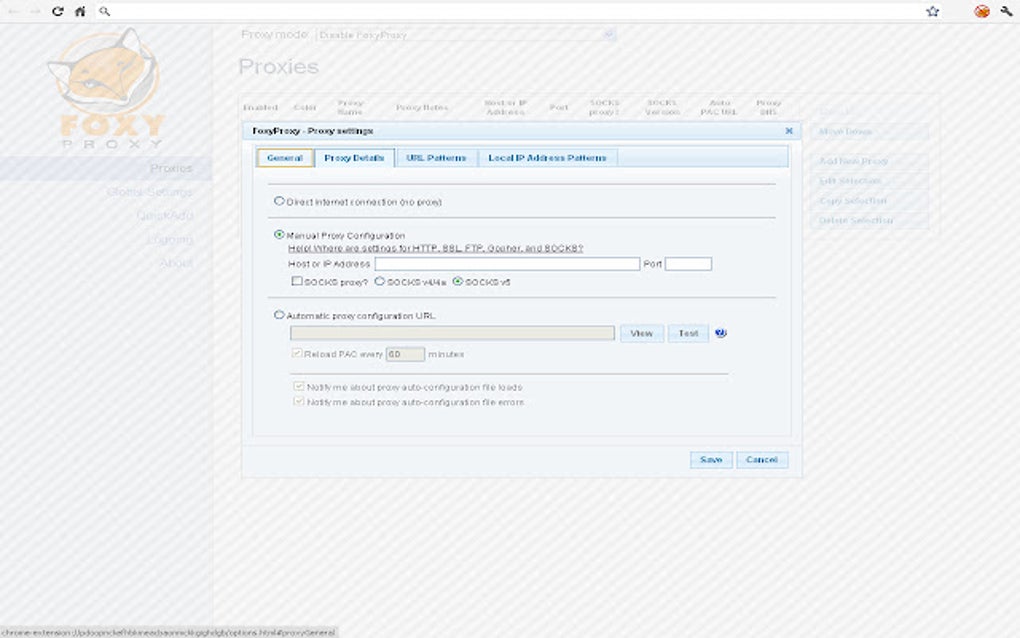
The user interface is designed for simplicity and ease of use. The main panel displays a list of configured proxy profiles. Users can add new profiles, edit existing ones, and enable or disable proxies with a few clicks. The settings allow for detailed configuration, including specifying proxy type (HTTP, HTTPS, SOCKS), server address and port, and authentication credentials if required.
The extension integrates seamlessly with Chrome, causing minimal disruption to the browsing experience. Switching between proxies is instantaneous, and there is minimal impact on loading times provided that the selected proxy server is responsive and performs well. The extension is lightweight and consumes minimal system resources.
Comparison with Alternative Proxy Management Tools
FoxyProxy Standard is not the only proxy management tool available for Chrome. Several alternative extensions and software applications provide similar functionality. However, FoxyProxy Standard stands out for its simplicity and ease of use. Many alternative tools are more complex and may target more technically advanced users. The ease of configuration and straightforward user interface of FoxyProxy Standard positions it well for users new to proxy management. However, users requiring advanced features like advanced scripting or integration with other tools might find alternative solutions more suitable.
Some alternative solutions may offer more comprehensive features, such as advanced proxy rotation, built-in security features, or specialized functionalities for specific use cases. Weighing the specific needs and technical proficiency of the user is key in choosing the optimal proxy management tool.
Conclusion: A Practical and User-Friendly Solution
FoxyProxy Standard provides a simple yet effective way to manage proxy servers in Google Chrome. Its intuitive interface and ease of use make it an excellent choice for users of all technical skill levels who need a straightforward method for managing multiple proxy profiles. The lightweight nature and seamless integration into the browser further enhance its usability.
However, potential users should exercise caution and responsibility when utilizing proxy servers. The selection of a reputable and secure proxy provider is crucial to maintaining online privacy and security. While FoxyProxy Standard itself is a reliable tool, its effectiveness is directly tied to the security measures taken by the chosen proxy services. Those seeking advanced features or specialized functionality might prefer other solutions; however, for straightforward proxy management, FoxyProxy Standard offers a practical and user-friendly solution. Its strength lies in its simplicity and accessibility, making it an excellent choice for users who prioritize ease of use without sacrificing fundamental proxy management capabilities.
File Information
- License: “Free”
- Version: “9.2”
- Latest update: “April 20, 2025”
- Platform: “chrome”
- Downloads: “3K”


