
Framer is a powerful design tool that empowers developers and designers to create innovative and intuitive app designs. It’s marketed as an all-in-one workspace, seamlessly blending the capabilities of a smart graphics tool with a simple code editor, all while facilitating secure and collaborative sharing. This comprehensive review delves into the features, benefits, drawbacks, and overall usability of Framer, providing a detailed analysis for potential users.
Framer’s Core Functionality: Bridging Design and Development
At its heart, Framer aims to streamline the app development process by providing a unified platform for both design and prototyping. This approach eliminates the need to switch between disparate tools, fostering a more efficient and cohesive workflow. The software’s intuitive interface allows designers to visually craft app layouts using a variety of tools and components, while simultaneously offering developers the ability to incorporate custom code for intricate functionalities and interactions.
Framer excels in creating responsive designs. The platform’s inherent flexibility allows developers to tailor app layouts to various screen sizes and orientations without extensive manual adjustments. This responsive design capability is crucial in today’s multifaceted digital landscape, ensuring app consistency across diverse devices. This responsiveness is not just limited to visual elements; Framer allows for the implementation of dynamic logic within the design, ensuring interactive elements behave appropriately across different contexts.
The collaborative features of Framer significantly enhance team workflows. The integrated sharing capabilities enable seamless collaboration among designers and developers, allowing for real-time feedback and iterative design improvements. This collaborative environment reduces communication bottlenecks and streamlines the overall design and development process.
Furthermore, Framer prioritizes security, ensuring that the sensitive design assets and project data are safeguarded throughout the development lifecycle. This security feature provides developers with peace of mind, knowing that their intellectual property remains protected.
User Interface and Experience: Intuitive Design Meets Powerful Capabilities
Framer boasts an intuitive and user-friendly interface, designed to minimize the learning curve for both seasoned professionals and newcomers alike. The platform’s clear visual hierarchy and logically organized tools facilitate quick navigation and streamlined workflows. This intuitive approach helps users focus on the creative process rather than navigating complex menus or understanding obscure functionalities.
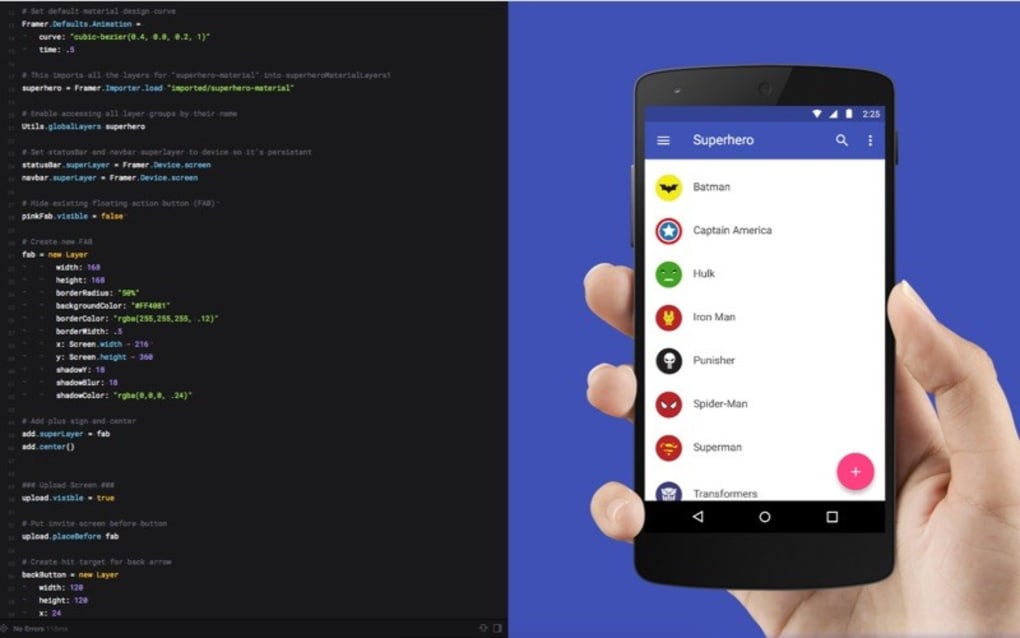
The software effectively combines visual design elements with code-based functionalities, allowing users to leverage both methods seamlessly. This blend of visual and code-based approaches caters to a wide range of skillsets and design preferences, making Framer accessible to both visual designers who prioritize intuitive drag-and-drop interfaces and developers who prefer hands-on coding control.
Advantages of Utilizing Framer: A Multifaceted Toolset
Framer’s strengths lie in its multifaceted approach to app development, offering a range of advantages that streamline the design and development process. Its key advantages include:
- All-in-One Workspace: Eliminates the need to switch between multiple tools, improving efficiency and streamlining workflows.
- Responsive Design: Adapts layouts seamlessly to different screen sizes and orientations, ensuring app consistency across devices.
- Intuitive Interface: The user-friendly interface simplifies the design process, minimizing the learning curve.
- Collaborative Features: Facilitates team collaboration through real-time sharing and feedback mechanisms.
- Secure Sharing: Protects design assets and project data, providing a secure environment for development.
- Code Integration: Allows developers to incorporate custom code for advanced functionalities and personalized interactions.
- Streamlined Prototyping: Facilitates rapid prototyping, allowing designers to quickly iterate on ideas and test different approaches.
Limitations and Drawbacks: Considerations for Potential Users
Despite its numerous advantages, Framer also presents certain limitations that potential users should consider:
- Paid Software: Framer is a subscription-based service, which can pose a financial barrier for some individuals or smaller development teams.
- Account Creation Required: The necessity of account creation might deter users who prefer standalone software without online registration requirements.
- Learning Curve: Although the interface is generally intuitive, mastering the advanced functionalities might still require a degree of learning and practice.
- Limited Plugin Ecosystem: Compared to some larger platforms, Framer’s plugin ecosystem might be less extensive, limiting its customizability in specific scenarios.
- System Requirements: The software has specific system requirements, which may not be compatible with all devices or operating systems.
Framer in the Broader Context: Comparing it to Alternatives
Framer occupies a niche in the app development tool market, offering a unique blend of design and coding capabilities. However, several alternative tools also cater to similar needs. A comparison with these alternatives helps highlight Framer’s strengths and weaknesses. While tools like Figma and Adobe XD focus more heavily on visual design and prototyping, they might lack the sophisticated code integration offered by Framer. On the other hand, more code-centric platforms may not provide the same level of intuitive visual design capabilities. The choice between Framer and other alternatives depends largely on the specific needs and preferences of the user or development team. The balance between visual design tools and code-based functionality is what distinguishes Framer from its competitors.
Conclusion: Assessing Framer’s Overall Value
Framer presents a compelling solution for developers and designers seeking a unified platform for app design and development. Its intuitive interface, responsive design capabilities, and collaborative features streamline the development process significantly. While the subscription model and learning curve might present minor barriers, the advantages of an all-in-one workspace and the seamless integration of visual design and coding functionality outweigh these drawbacks for many users. Ultimately, Framer’s value proposition rests on its ability to empower developers to create innovative and user-friendly applications with increased efficiency and collaborative ease. The decision of whether to utilize Framer hinges on the specific project requirements, team expertise, and budgetary constraints. However, for those seeking a powerful, efficient, and collaborative tool for app design, Framer deserves serious consideration.
File Information
- License: “Trial version”
- Version: “1.0”
- Latest update: “March 6, 2019”
- Platform: “Windows”
- Downloads: “1.8K”
- Size: “74.87 MB”


