
In an age dominated by high-definition streaming and advanced video codecs, it might seem that formats like 3GP are relics of a bygone era. Yet, for many users, encountering 3GP files—often from old mobile phones, archived conversations, or specific niche applications—remains a common occurrence. When faced with these files, the need for a reliable, straightforward player becomes apparent. This is where Free 3GP Player from Mediafreeware steps in, offering a dedicated and user-friendly solution for playing 3GP videos smoothly on your Windows PC.
Designed with simplicity and efficiency at its core, Free 3GP Player is not an attempt to be a universal media powerhouse like VLC or Windows Media Player. Instead, it embraces its niche, providing a tailored experience specifically for the 3rd Generation Partnership Project (3GPP) multimedia format. Its lightweight nature, combined with an intuitive interface, makes it an excellent choice for anyone looking to revisit old mobile memories or access specific 3GP content without the complexity or resource demands of more feature-rich software.
This comprehensive guide delves into everything you need to know about Free 3GP Player: its historical context, key features, installation process, and how it stacks up against other media solutions. Whether you’re a tech enthusiast archiving old phone data or simply someone who occasionally encounters 3GP files, understanding this specialized tool can significantly enhance your digital experience.
Understanding the 3GP Format and Its Legacy
To fully appreciate the utility of Free 3GP Player, it’s crucial to understand the 3GP format itself. Born out of the advent of 3G mobile networks, 3GP (3GPP multimedia file) was developed by the 3rd Generation Partnership Project as a standard for multimedia content on 3G-enabled mobile phones. Its primary design goal was efficiency: to store video, audio, and text with minimal file size, making it suitable for limited bandwidth, storage, and processing power typical of early mobile devices.
The 3GP format often used H.263 or MPEG-4 Part 2 for video compression and AMR (Adaptive Multi-Rate) for audio compression. These codecs were chosen for their effectiveness in producing relatively small files while maintaining acceptable quality for the small screens and speakers of mobile phones. This made 3GP the de facto standard for recording videos directly on phones, receiving multimedia messages (MMS), and downloading video content over nascent mobile internet connections.
While today’s smartphones record in formats like MP4 with H.264 or H.265 codecs, offering vastly superior quality and efficiency, 3GP’s legacy persists. Many older devices still utilize it, and countless archived personal videos, historical mobile content, and even some specialized communication platforms may still generate or require 3GP playback. This historical context directly informs the ongoing relevance of a dedicated player like Free 3GP Player, bridging the gap between past mobile technologies and current desktop environments.
Why 3GP Remained Relevant for Mobile Content
The digital landscape evolves at a blistering pace, yet some formats, despite being superseded, continue to hold a certain relevance. For 3GP, this persistent presence can be attributed to several factors:
Firstly, archival content is a major driver. Many individuals have old feature phones or early smartphones that captured precious moments in 3GP format. These videos, often tucked away in old backups or memory cards, represent personal history that users might wish to revisit. A dedicated player ensures these memories are accessible without requiring cumbersome conversion processes that might degrade quality or introduce errors.
Secondly, certain niche applications and communication platforms, particularly in regions with less robust internet infrastructure or for specific industrial uses, might still employ 3GP due to its inherent efficiency. Its low bandwidth requirement makes it ideal for transmitting short video clips where data costs or network stability are concerns.
Thirdly, simplicity and universality (within its era) meant that 3GP became a broadly supported format across a vast array of mobile devices from different manufacturers. This widespread adoption created a huge library of existing content that still needs to be played. While modern universal players often support 3GP, a specialized player can sometimes offer a more streamlined or reliable experience for this specific format, particularly on systems that might struggle with the overhead of a more complex application.
Understanding these points helps clarify why Free 3GP Player, despite its seemingly narrow focus, serves a genuine and practical need for a significant user base. It’s not just about playing an old file; it’s about preserving access to a particular segment of digital history.
Key Features and User Experience of Free 3GP Player
The Free 3GP Player distinguishes itself not by an overwhelming array of features, but by its focused simplicity and efficiency. In an ecosystem often bloated with complex options and unnecessary functionalities, this player offers a refreshing return to core utility. Developed by Mediafreeware, the application is tailored to one primary task: playing 3GP video files smoothly and reliably.
One of the most praised aspects of Free 3GP Player, as highlighted in user reviews and developer descriptions, is its ease of use. This isn’t just a marketing slogan; it’s deeply embedded in the application’s design philosophy. From the moment you launch it, the interface speaks to this commitment to straightforward operation, making it accessible even to users who aren’t particularly tech-savvy. You won’t find yourself navigating through dozens of menus or obscure settings, which can be a significant relief when all you want to do is watch a video.
The application’s lightweight footprint is another crucial feature. At approximately 30.07 MB, it’s a small download that installs quickly and consumes minimal system resources. This is particularly beneficial for older Windows machines or those with limited storage space, ensuring that the player runs without causing slowdowns or conflicts with other applications. This efficiency also contributes to faster launch times, allowing users to get to their content almost instantly.
Simplicity in Design: A User-Friendly Interface
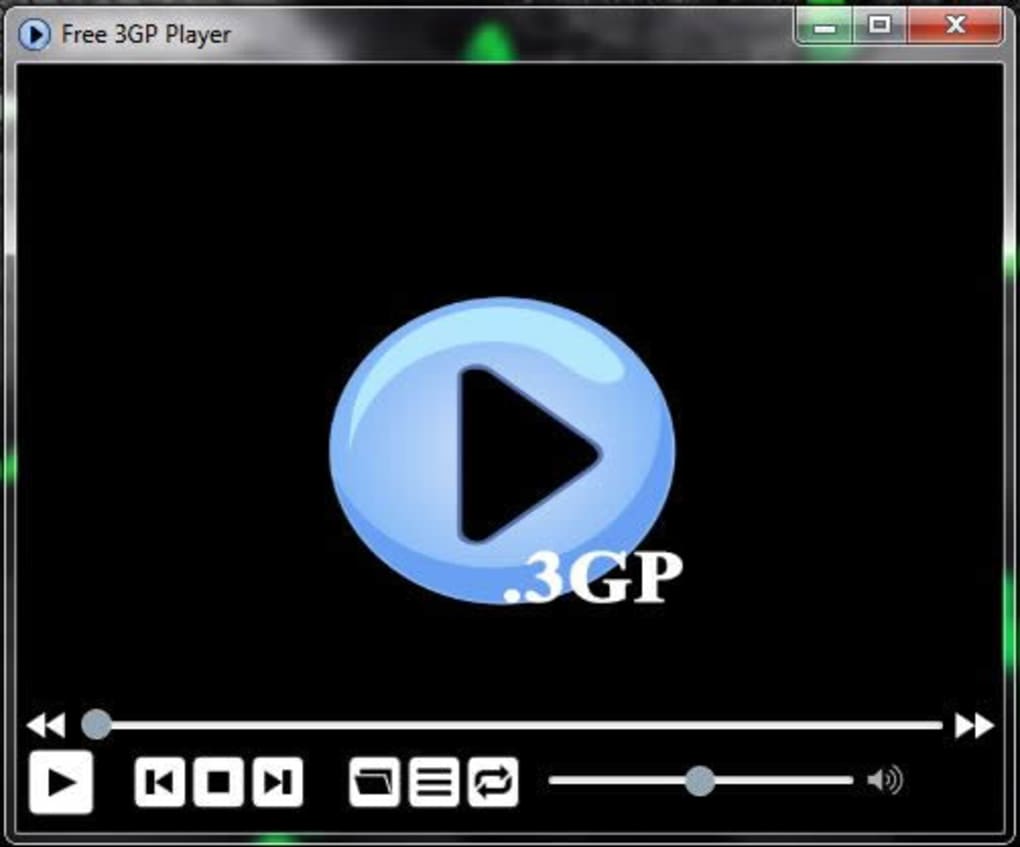
The user interface (UI) of Free 3GP Player is a testament to the “less is more” principle. It’s described as “very simple yet very attractive,” a balance that many software developers strive for but few achieve as effectively for a niche product. Upon opening the player, users are greeted with a clean, uncluttered window that prioritizes the video playback area. There are no distracting advertisements, complex toolbars, or intricate customization options that could overwhelm a user.
The essential controls—play, pause, stop, volume adjustment, and perhaps a basic seek bar—are prominently displayed and intuitively located. This minimalist approach ensures that the learning curve is virtually non-existent. You can simply open a 3GP file, and the player takes care of the rest. This design choice is not accidental; it’s a deliberate decision to cater to the specific needs of users who want a hassle-free experience for a particular file type. For those who frequently deal with 3GP files and prefer a dedicated, no-frills tool, this streamlined interface is a significant advantage, reducing mental load and speeding up the process of watching content.
Smooth Playback and Essential Controls
At its core, Free 3GP Player is built to deliver smooth and uninterrupted playback of 3GP files. While universal players might occasionally struggle with less common codecs or formats, a dedicated player like this often excels due to its optimized design. The developers have focused on ensuring that the application handles the intricacies of the 3GP format efficiently, minimizing stuttering, dropped frames, or audio-sync issues that can plague less specialized software.
Users can expect standard video player functionalities. This includes the ability to open 3GP files from their local storage, basic navigation controls (play, pause, stop, fast-forward, rewind), and volume adjustments. While it doesn’t boast advanced features like subtitle support, video filters, or extensive audio equalization, it faithfully executes its primary function: providing clear, fluid playback of 3GP content.
For many, these fundamental capabilities are more than sufficient. When you’re dealing with older mobile videos, often recorded in lower resolutions, the primary concern is simply being able to watch them without technical hitches. Free 3GP Player delivers precisely that, offering a reliable gateway to accessing your 3GP media library with minimal fuss and maximum compatibility for the format it’s designed for.
Installation, Compatibility, and System Requirements
One of the strong suits of Free 3GP Player is its accessibility, starting right from the installation process. As a freeware application, it doesn’t require any licensing fees or subscription models, making it a cost-effective solution for its specific purpose. Users can easily acquire the software from reputable download platforms such as PhanMemFree.org, ensuring they get the legitimate and latest version.
The software is explicitly designed for the Windows operating system, with stated compatibility for Windows 7 and presumably later versions (given its last update in 2019, it’s likely to run on Windows 8, 10, and even 11 without significant issues, though testing on the latest OS versions is always recommended). This focus on a single platform allows Mediafreeware to optimize the player for the Windows environment, potentially leading to better stability and performance compared to cross-platform players that need to accommodate various operating systems.
The minimal system requirements also contribute to its broad appeal. Being a lightweight application (30.07 MB), it doesn’t demand significant RAM, a powerful processor, or extensive disk space. This means it can comfortably run on older PCs or laptops that might struggle with more demanding multimedia software. Its low resource consumption also ensures that it won’t hog your system’s processing power, allowing other applications to run smoothly in the background.
Getting Started: A Quick Installation Guide
Downloading and installing Free 3GP Player is a straightforward process, reflecting the application’s overall commitment to user-friendliness. Here’s a typical step-by-step guide:
- Visit a Reputable Download Source: Navigate to PhanMemFree.org or another trusted software repository that hosts Free 3GP Player. Search for “Free 3GP Player for Windows.”
- Download the Installer: Locate the “Free Download for Windows” button and click it. The installer file, typically an executable (.exe) file, will begin downloading to your specified download folder. As of the last update, the file size is around 30.07 MB, so the download should be relatively quick on a decent internet connection.
- Run the Installer: Once the download is complete, double-click the .exe file to launch the installation wizard. Windows User Account Control might prompt you for permission; click “Yes” to proceed.
- Follow On-Screen Instructions: The installation wizard will guide you through a few simple steps. These typically involve accepting the license agreement (usually a standard freeware license), choosing an installation directory (the default location is usually fine), and confirming the installation.
- Complete Installation: The installation process itself is fast, often taking only a few seconds. Once complete, the wizard will notify you, and you’ll typically have an option to launch the Free 3GP Player immediately or create a desktop shortcut.
After these steps, Free 3GP Player will be ready for use. You can then simply open a 3GP file by double-clicking it (if Free 3GP Player is set as the default player for 3GP files) or by opening the player and using its “Open File” option. The simplicity of this process underscores its design as an accessible tool for everyday users.
Optimizing Performance on Windows
Given its inherently lightweight design, Free 3GP Player generally requires minimal optimization efforts. Its efficiency is built-in, making it a “set and forget” kind of application for most users. However, understanding a few aspects can ensure you get the best possible experience:
- Minimal System Impact: Unlike some feature-heavy media players that might pre-load codecs or run background services, Free 3GP Player is designed to be lean. This means it has a negligible impact on your system’s boot time and overall performance when not actively in use. When it is running, its focus on a single, efficient codec (3GP) means it consumes fewer CPU cycles and less RAM compared to a player trying to decode multiple complex formats simultaneously.
- Compatibility with Older Hardware: The player’s ability to run smoothly on Windows 7 (and likely older or less powerful machines) is a significant advantage. If you’re using an older PC to access archived 3GP content, this player offers a reliable solution without demanding costly hardware upgrades.
- Focused Functionality: Because it’s not trying to be a multi-tool, Free 3GP Player avoids the overhead associated with extensive libraries of codecs, plugins, and advanced rendering engines. This focused functionality ensures that all its resources are dedicated to efficiently playing 3GP files, leading to consistent performance even on less powerful systems.
- Clean Installation: The installer is generally clean and doesn’t bundle unnecessary bloatware or adware (always double-check during installation, but reputable sources like PhanMemFree.org usually ensure clean packages). This further contributes to a smooth user experience and prevents unwanted background processes that could degrade performance.
In essence, optimizing Free 3GP Player’s performance on Windows is often as simple as ensuring your operating system is up-to-date with basic drivers, and then letting the player do its job. Its design philosophy is about providing an efficient tool that just works, without requiring complex user intervention or configuration.
Comparing Free 3GP Player with Other Media Solutions
In the vast landscape of media players available for Windows, Free 3GP Player occupies a unique, specialized niche. While many users are familiar with popular universal players like VLC media player, Windows Media Player, or even commercial alternatives like Adobe Premiere Pro for editing, it’s important to understand where a dedicated tool like Free 3GP Player fits in and how it differs. Its primary distinction lies in its singular focus: to be the best possible player for 3GP files, rather than attempting to be a jack-of-all-trades.
Universal media players, such as VLC, are renowned for their ability to play virtually any audio or video format imaginable, from MP4 and AVI to MKV, MOV, and of course, 3GP. They come packed with extensive codec libraries, advanced customization options, streaming capabilities, and often editing tools. While incredibly powerful, this versatility can come with a trade-off: a larger installation footprint, higher resource consumption, and sometimes a more complex user interface. For a casual user who simply wants to watch a 3GP video, navigating VLC’s extensive menus might feel like overkill.
Windows Media Player, on the other hand, is built directly into Windows, offering a native solution for many common formats. However, its 3GP support can sometimes be inconsistent or require additional codecs, and its interface, while familiar, may not always be the most intuitive for older, niche formats. Furthermore, Microsoft’s focus has shifted away from WMP as a primary media consumption tool in recent years.
Free 3GP Player bypasses these complexities by narrowing its scope. It doesn’t aim to replace your primary media player for HD movies or music. Instead, it offers a simple, lightweight alternative specifically for those legacy 3GP files. This dedicated approach allows it to perform its singular task with maximum efficiency and minimal fuss, making it a compelling choice for specific use cases.
Niche vs. Universal Players: Where Free 3GP Player Stands
The debate between niche and universal software is a long-standing one. Universal players like VLC are invaluable for their comprehensive format support and advanced features. They are the go-to choice for users who need a single application to handle all their media needs, from obscure audio codecs to high-resolution video streams. Their strength lies in their adaptability and the sheer breadth of their capabilities.
However, this universality can sometimes be a disadvantage. Larger software packages tend to be heavier, consuming more disk space, RAM, and CPU cycles. They might also come with a steeper learning curve due to their multitude of options and settings. For a user whose primary requirement is to simply play a 3GP file, this can feel like using a sledgehammer to crack a nut.
Free 3GP Player represents the antithesis of this approach. It is a highly specialized tool, meticulously crafted for one specific purpose. Its advantages stem directly from this focus:
- Lightweight: Small file size, minimal system resources required.
- Simplicity: Uncluttered interface, intuitive controls, virtually no learning curve.
- Reliability: Optimized specifically for 3GP, reducing potential playback issues for that format.
- Speed: Faster launch times and snappier performance due to less overhead.
It stands as a complementary tool, rather than a direct competitor, to universal players. If you frequently encounter 3GP files, having Free 3GP Player installed alongside your main media player can offer a more efficient and hassle-free experience for those specific files. It frees you from the need to open a larger, more complex application when a quick peek at an old mobile video is all you need.
The Benefits of a Dedicated 3GP Player
Choosing a dedicated 3GP player like Mediafreeware’s offering comes with several distinct benefits, particularly for users with specific needs:
- Guaranteed Compatibility: While universal players usually support 3GP, a dedicated player is built from the ground up to handle the format’s specific nuances. This often translates to more consistent and reliable playback, especially for older or slightly malformed 3GP files that a universal player might occasionally struggle with.
- Resource Efficiency: As discussed, its lightweight nature means it uses fewer system resources. This is crucial for older computers, netbooks, or systems where every megabyte of RAM and every CPU cycle counts. It ensures a smooth viewing experience without causing system slowdowns.
- Ease of Use for Non-Tech-Savvy Users: For individuals who find complex software intimidating, Free 3GP Player’s intuitive interface is a huge advantage. There are no advanced settings to accidentally mess up, and the path from opening the application to watching a video is as direct as possible. This makes it ideal for older family members or casual users who just want things to “work.”
- Quick Access to Legacy Content: If your digital archives contain a significant number of 3GP files (e.g., videos from your first smartphone, old MMS messages, etc.), having a dedicated player streamlines the process of accessing them. You don’t have to launch a heavy program, wait for it to load, and then navigate its broader features; you just open Free 3GP Player and load your file.
- Avoiding Software Bloat: Many users prefer a clean system with only the essential software. A dedicated 3GP player allows you to avoid installing a full-suite media player if your primary need is just to handle this specific format. This helps maintain a lean and efficient operating environment.
While other tools like “Free 3GP Converter” (also available on PhanMemFree.org) exist to change 3GP files into other formats like MP4 or AVI, a player serves a different, immediate purpose. Conversion takes time, can sometimes reduce quality, and isn’t always necessary if you simply want to view the content. The Free 3GP Player lets you view the original file directly, preserving its authentic quality and saving time.
Comparing it to other listed alternatives, like “Free Smith Video Player” (another general-purpose player) or specialized converters, highlights its unique positioning. It’s a viewer, not an editor or converter, and it’s free. Even powerful tools like “Adobe After Effects” or “DaVinci Resolve” are for professional editing, not simple playback. Even general downloaders like “4k Video Downloader” or editors like “Filmora Video Editor” serve different functions entirely.
The Verdict: Is Free 3GP Player the Right Choice for You?
In conclusion, Free 3GP Player from Mediafreeware carves out a well-defined and valuable niche in the crowded world of multimedia software. It doesn’t aim to be the most feature-rich or universally compatible player; instead, it excels at its core mission: providing a simple, lightweight, and reliable solution for playing 3GP video files on Windows.
Its key strengths lie in its ease of use, minimalist interface, and dedicated optimization for the 3GP format. For users who frequently encounter videos from older mobile phones, archived multimedia messages, or specific applications that still utilize the 3GPP standard, this player offers an unparalleled level of simplicity and efficiency. It avoids the bloat and complexity of universal players, making it ideal for those who prioritize straightforward functionality and minimal system resource consumption.
With a quick and clean installation process (downloadable from trusted platforms like PhanMemFree.org) and broad compatibility with Windows operating systems, Free 3GP Player is an accessible tool for almost anyone. It’s particularly beneficial for older PCs or users who prefer a lean software environment. While it won’t replace your primary media player for high-definition movies or complex multimedia tasks, it serves as an excellent complementary tool, ensuring that your legacy 3GP content remains easily viewable.
If your digital life involves interacting with 3GP files, and you’re looking for a hassle-free, free-of-charge solution that prioritizes smooth playback and user simplicity, then Free 3GP Player is undoubtedly worth considering. It’s a testament to the idea that sometimes, the most effective tools are those that do one job exceptionally well.
File Information
- License: “Free”
- Version: “1.0”
- Latest update: “February 12, 2019”
- Platform: “Windows”
- OS: “Windows 7”
- Language: “English”
- Downloads: “12.8K”
- Size: “30.07 MB”


