
5KPlayer is a free, all-in-one media player that has quickly gained popularity for its extensive features and user-friendly interface. More than just a simple video player, 5KPlayer offers a robust suite of tools for playing, downloading, and managing multimedia content, making it a versatile solution for both casual and serious media consumers. This review delves into the capabilities of 5KPlayer, examining its strengths and weaknesses to help you determine if it’s the right media player for your needs.
Unmatched Playback Capabilities: Supporting Virtually Any Format
5KPlayer boasts impressive compatibility, smoothly handling a wide array of video and audio formats. Whether you have 4K, 8K, or even standard definition videos in formats like AVI, MTS, FLV, M2TS, WMV, and MP4, 5KPlayer plays them all without stuttering or lag. This impressive performance is due in part to its built-in hardware acceleration, which leverages your computer’s processing power to ensure a seamless viewing experience, even for the most demanding high-resolution content. The program’s support extends beyond video; it seamlessly plays audio files in formats such as AAC, MP3, WMA, and AC3, including advanced audio codecs like DTS and Dolby surround sound. The player intelligently detects and utilizes these codecs, providing optimal audio quality for an immersive listening experience.
Furthermore, 5KPlayer offers users a great degree of control over their playback. Features such as adjustable audio tracks, audio-video synchronization options, and selectable subtitle support allow for customization tailored to individual preferences. The ability to adjust the aspect ratio ensures that videos are displayed in their optimal proportions, further enhancing the viewing experience. This level of customization positions 5KPlayer as a superior alternative to many basic media players. Users can enjoy a truly personalized media experience, fine-tuning settings to perfectly suit their individual needs and tastes.
Beyond Playback: Downloading and Managing Your Media Library
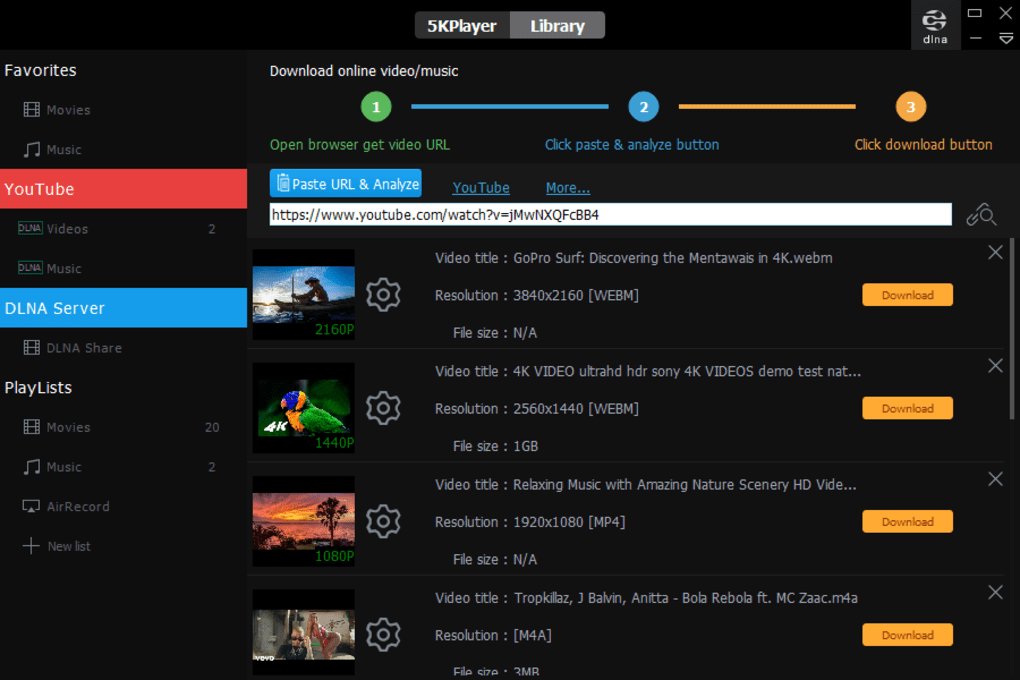
5KPlayer’s capabilities extend far beyond simple playback. It functions as a powerful media downloader, allowing users to easily acquire videos and music from a vast array of online sources. This feature greatly enhances its utility and sets it apart from other media players which often lack such functionality. The process is remarkably straightforward: simply copy the URL of the desired video or music track from websites such as YouTube, Instagram, Vimeo, Facebook, DailyMotion, and many others (over 300 sites are supported), paste it into 5KPlayer, and the program takes care of the rest. The intuitive interface guides users through the download process, requiring no technical expertise. This ease of use is a significant advantage for those who are less comfortable with complex downloading procedures.
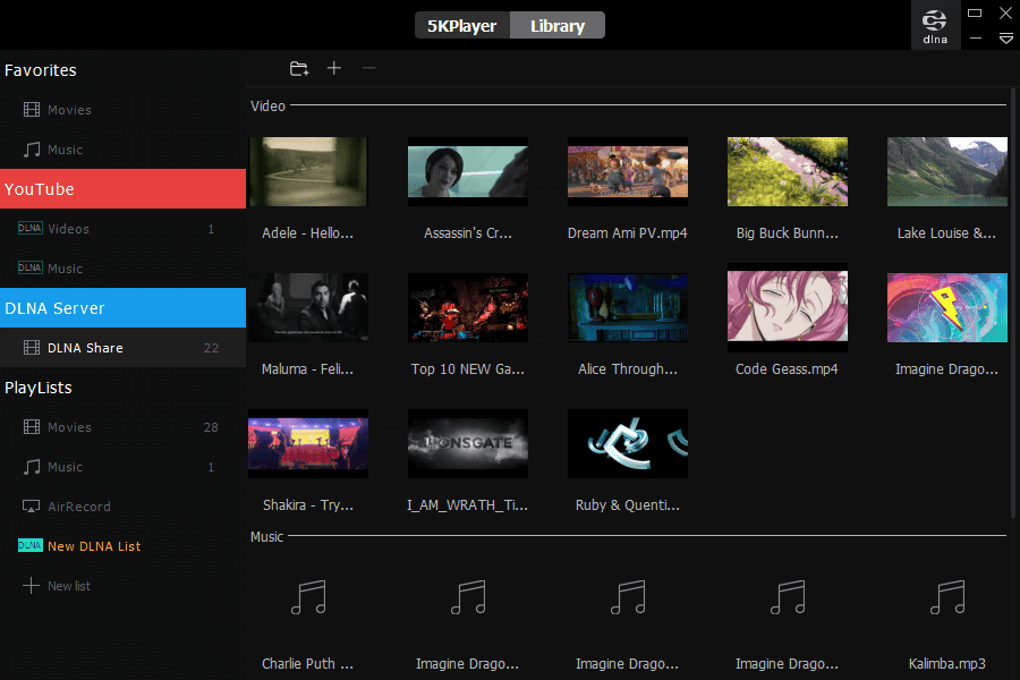
In addition to its comprehensive downloading capabilities, 5KPlayer includes a built-in video-to-audio converter. This allows users to extract the audio from videos, saving them as MP3 files or in other supported audio formats. This feature is particularly useful for users who prefer listening to audio tracks from movies or music videos without the visual component. The option to download only the audio significantly conserves storage space and bandwidth compared to downloading the entire video file.
Enhanced Features: Radio Streaming, DVD Playback, and AirPlay Support
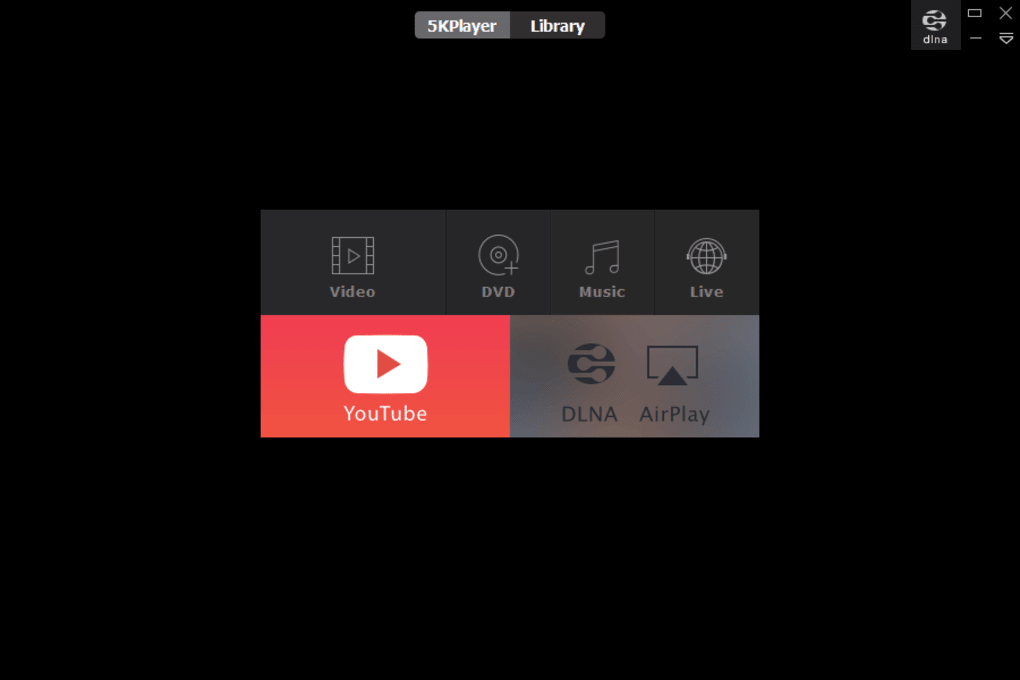
5KPlayer integrates several unique features that further enhance its appeal and versatility. Its built-in radio functionality provides pre-sets for popular radio channels, including well-known options like NBC, BBC Sports, and CBS Sports. Users can also manually add custom radio streams, expanding their listening options beyond the pre-selected channels. This feature turns 5KPlayer into a complete entertainment hub, catering to a diverse range of media preferences.
For users with extensive DVD collections, 5KPlayer offers comprehensive DVD playback support. It handles both physical DVDs and DVD image files, eliminating the need for separate DVD playback software. Moreover, its region-free capabilities allow playback of DVDs regardless of their regional encoding, expanding access to a wider range of content. This feature alone justifies 5KPlayer’s place in many users’ software arsenal.
Further demonstrating its commitment to seamless cross-device integration, 5KPlayer offers comprehensive AirPlay support. This allows users to mirror their iOS devices (iPhones and iPads) to their PCs, effortlessly streaming videos, music, and images between devices. This functionality is particularly beneficial for sharing content between mobile devices and larger screens for a more immersive experience. The prerequisite is simply ensuring both devices are connected to the same network. This feature transforms the PC into a versatile second screen for your iOS device, opening exciting possibilities for media consumption.
Performance and System Optimization: Smooth Playback and Efficient Resource Usage
5KPlayer’s performance is exceptional, thanks to its advanced hardware acceleration. This technology ensures smooth playback of even the most demanding high-resolution videos without straining system resources. Supported by DXVA 2.0, the player effectively offloads video processing to your computer’s graphics card (GPU), minimizing CPU usage and maintaining system responsiveness. This ensures that users can enjoy high-quality video playback without experiencing lag or performance issues, even on less powerful systems.
This efficient resource management allows for simultaneous multitasking. Users can seamlessly switch between 5KPlayer and other applications without experiencing performance degradation, maximizing the utility and productivity of their system. The well-optimized nature of 5KPlayer sets it apart, making it a suitable choice for even those with less robust hardware specifications.
Is 5KPlayer Right for You? A Comparison and Conclusion
While VLC Media Player and other media players are popular choices, 5KPlayer stands out with its combination of comprehensive features and ease of use. It surpasses many alternatives by incorporating a media downloader, a convenient video-to-audio converter, and AirPlay support. This all-in-one approach eliminates the need for multiple applications, streamlining the media consumption experience.
While registration is required to unlock all features, this process is simple and free, involving just providing an email address. The software is completely free from malware and unwanted bundled software, ensuring a safe and secure user experience. User reviews generally praise the software’s functionality and performance, with some users noting a minor background process that consumes minimal resources.
Pros:
- Completely free: The software is available for free without any hidden costs.
- Plays 4K and 8K formats: Handles high-resolution videos flawlessly.
- Multimedia downloader: Downloads videos and music from a vast array of websites.
- Supports AirPlay service: Enables seamless streaming from iOS devices.
- DVD playback: Plays both physical DVDs and image files.
- Integrated radio: Provides access to popular and custom radio streams.
- User-friendly interface: Easy to navigate and use, even for beginners.
- Efficient resource management: Minimizes system resource usage for smooth performance.
- Video-to-audio converter: Allows for the extraction of audio from video files.
Cons:
- Requires registration: While free, registration is needed to fully utilize all features.
- Minor background process: A minor background process runs after closing the application, though its resource consumption is minimal.
Alternatives:
While 5KPlayer offers a powerful and comprehensive suite of features, alternatives like VLC Media Player, MPC-HC, and PotPlayer exist. However, these often lack the integrated download and streaming features that make 5KPlayer particularly attractive. The choice depends on individual needs and preferences; if a complete, all-in-one media solution is desired, 5KPlayer is a strong contender.
In conclusion, 5KPlayer emerges as a formidable and versatile media player. Its ability to handle high-resolution videos, download content from a wide range of online sources, and integrate seamlessly with iOS devices via AirPlay, makes it a powerful tool for any media enthusiast. The ease of use and absence of intrusive ads or bundled software further enhance its appeal. While a few minor drawbacks exist, 5KPlayer’s strengths significantly outweigh its weaknesses, making it a highly recommended choice for those seeking a free, feature-rich, and user-friendly media player.
File Information
- License: “Free”
- Latest update: “November 25, 2024”
- Platform: “Windows”
- OS: “Windows 7”
- Language: “English”
- Downloads: “7.3M”


