
In the digital age, where screens dominate our daily lives, a tranquil screensaver can offer a much-needed respite. Free Aquarium Screensaver, developed by Media Freeware, provides just that: a visually calming underwater world right on your desktop. While screensavers may not be the essential utilities they once were in the days of CRT monitors, their capacity to add a touch of personality and visual interest to a computer remains undeniable. This review explores the features, strengths, and limitations of this popular free screensaver.
A Glimpse into the Underwater World
Free Aquarium Screensaver delivers a surprisingly realistic depiction of an aquarium environment. The software showcases a diverse range of fish, including the elegant koi, vibrant clownfish, and other aquatic inhabitants. The animation is smooth, creating a natural, flowing movement that’s both engaging and soothing. The attention to detail is noteworthy; the fish’s scales shimmer, their fins flutter, and their overall behavior mimics real-life aquatic life to a remarkable degree. The background also contributes to the overall realism, often depicting a serene underwater landscape with carefully rendered corals, rocks, and plants. This detailed rendering of the aquatic environment contributes to a visually rich and immersive experience.
Simplicity and Ease of Use
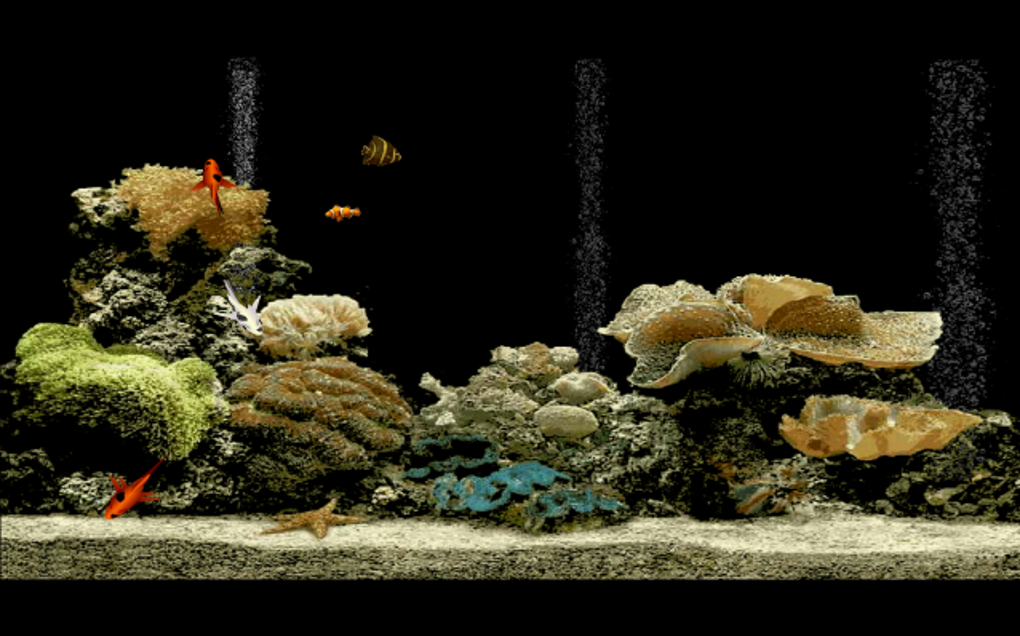
The software’s primary strength lies in its simplicity. The installation process is straightforward and requires minimal user interaction. The interface, once the screensaver is active, is completely passive. There are no controls or menus to navigate within the screensaver itself; it simply presents its underwater scene and allows the user to enjoy the calming visuals. This minimalist approach eliminates any potential distractions and ensures that the focus remains on the tranquility of the underwater world. This ease of use is a significant advantage, particularly for users who prefer a hassle-free screensaver experience.
Limitations and Potential Improvements
Despite its positive aspects, Free Aquarium Screensaver has some limitations. One significant drawback is the lack of customization options. Users cannot alter the types of fish displayed, adjust the background scenery, or modify other visual parameters. This lack of flexibility may disappoint users who prefer more personalized screensavers. The inability to modify aspects such as fish species or background scenery restricts the ability to tailor the visual experience to individual preferences. While the included fish and environment are aesthetically pleasing, the lack of customization could be perceived as a significant limitation for some users.
Furthermore, the screensaver appears to be designed for single-monitor setups. There’s no documented support for multi-monitor systems, meaning users with dual or triple monitor configurations may encounter compatibility issues. This limited compatibility restricts its usability for users employing multiple screens, which has become increasingly common among PC users.
Another notable drawback is the absence of help files or documentation. This lack of user guidance may leave some users feeling uncertain about the screensaver’s features or troubleshooting any potential issues. While the software is incredibly intuitive to set up and use, the lack of documentation could hinder problem-solving for less tech-savvy users.
Comparing Free Aquarium Screensaver to Alternatives
Several other aquarium screensavers are available, both free and commercial. Some offer more advanced features, including customization options, multi-monitor support, and interactive elements. The selection of alternative software presents a spectrum of options, each with its own set of features, advantages, and drawbacks. It’s essential to carefully consider the needs and preferences of individual users when selecting an appropriate application.
For instance, some alternative screensavers provide users with extensive customization features such as the ability to select different types of fish, alter the aquarium’s background, or even add interactive elements. Such features are lacking in Free Aquarium Screensaver. In contrast, other screensavers may focus on photorealistic rendering of aquatic life, offering superior visual quality but potentially requiring more system resources.
The choice between Free Aquarium Screensaver and its alternatives hinges on individual needs and priorities. If simplicity and a visually pleasing, readily available screensaver are the primary requirements, Free Aquarium Screensaver may suffice. However, if greater customization, advanced features, or multi-monitor compatibility are important, exploring alternative software is recommended.
System Requirements and Performance
Free Aquarium Screensaver is designed for Windows-based systems and has demonstrated compatibility with a wide range of Windows versions, including Windows Vista and later. The low system requirements mean that it should run smoothly on most modern PCs, minimizing the strain on system resources. This compatibility and relatively low system footprint make it an accessible screensaver for a broad user base.
However, users with older systems or less powerful hardware should test the screensaver and ensure it runs smoothly without impacting system performance. While generally resource-efficient, individual system configurations may affect the application’s performance. The efficient use of system resources allows the screensaver to operate without significant impact on other system functions.
User Reviews and Feedback
While detailed user reviews for Free Aquarium Screensaver are limited, existing feedback indicates overall satisfaction among users who have found the screensaver to be visually appealing and easy to use. The positive response generally points toward the screensaver’s strength in visual appeal and ease of installation and use. The lack of widespread reviews may be attributed to the screensaver’s simplistic nature; it fulfills its basic function effectively without offering many advanced features that might warrant detailed user feedback.
Conclusion: A Serene and Simple Solution
Free Aquarium Screensaver, while not without limitations, provides a simple and effective way to transform your desktop into a tranquil underwater scene. Its realistic visuals, smooth animations, and ease of use make it a worthwhile option for those seeking a visually appealing and stress-relieving screensaver. The lack of customization and multi-monitor support may hinder some users, but the simplicity and readily available nature of the software make it a solid choice for those who prioritize ease of use over advanced features. The screensaver excels in its core functionality, providing a relaxing and visually engaging experience with minimal setup or maintenance. Users seeking a straightforward, visually calming screensaver will likely find this application meets their needs adequately.
File Information
- License: “Free”
- Version: “1.0”
- Latest update: “February 13, 2019”
- Platform: “Windows”
- OS: “Windows Vista”
- Language: “English”
- Downloads: “31.8K”
- Size: “1.07 MB”


