
Free Audio CD Burner is a free software utility designed for Windows operating systems, specializing in the creation of audio CDs. While seemingly simple in its core function, this program offers a practical solution for users needing a straightforward and efficient way to burn audio files onto CDs. This review will delve into its features, performance, and compare it to alternative options available in the market.
User Interface and Functionality
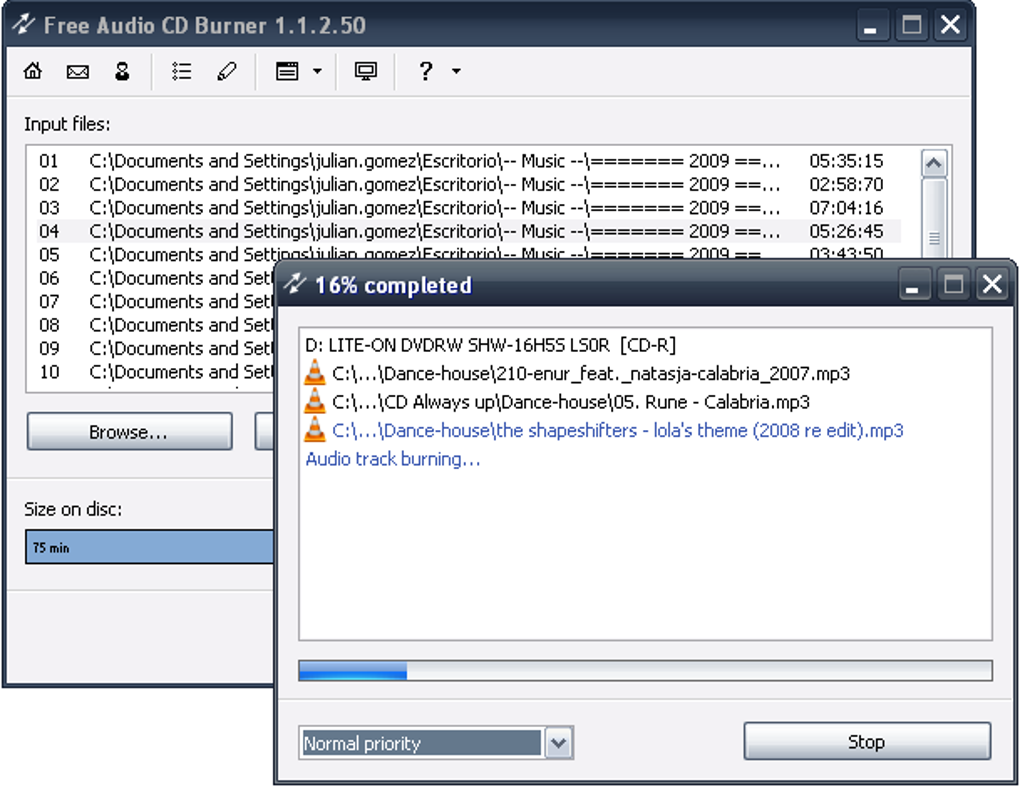
Free Audio CD Burner boasts a user-friendly interface, prioritizing simplicity and ease of use. The program’s layout is clean and intuitive, making it accessible even to users with limited experience in CD burning software. The main window presents a clear structure, allowing users to easily navigate through the process of selecting audio files, arranging track order, and initiating the burning process. The absence of cluttered menus and unnecessary options contributes to its overall efficiency. The core functionality revolves around the ability to add audio files (typically MP3, WAV, and WMA formats), arrange them in the desired order, and then burn them to a CD-R or CD-RW. The program provides clear visual cues, such as progress bars and status updates, keeping the user informed throughout the burning process. Options for adjusting burning speed are typically available, allowing users to balance speed and reliability based on their CD-writer’s capabilities and the quality of the media being used.
Performance and Reliability
Free Audio CD Burner has generally been reported as performing reliably in its primary function: burning audio CDs. Users often praise its speed and efficiency in converting and writing audio data to CD media. The program’s lightweight nature also contributes to its responsiveness and prevents it from hogging system resources, even on older or less powerful machines. However, like any burning software, the success of a burn operation is also dependent on factors outside the program’s control, such as the quality of the CD media itself, the condition of the CD-ROM drive, and the overall stability of the operating system. While issues can arise from these external factors, they do not directly reflect the program’s intrinsic reliability.
Supported Formats and Features
While Free Audio CD Burner’s primary focus is on burning audio CDs, the specific audio formats supported may vary slightly depending on the version. Commonly supported formats generally include MP3, WAV, and WMA files. Additional formats might be included, but this would need to be verified by checking the program’s specifications for the specific version being used. The program usually lacks advanced features found in more comprehensive burning suites. Features such as creating custom CD text, generating cue sheets, or directly supporting other media formats like ISO images are typically absent. This streamlined approach, however, makes the program exceptionally easy to use for its intended purpose. The focus is purely on burning audio CDs, with the design and implementation reflecting this targeted functionality.
Comparison with Other Burning Software
Free Audio CD Burner competes with a range of other CD burning software, both free and commercial. Free alternatives often include programs like CDBurnerXP, which offer a broader range of features, encompassing data burning and ISO image creation. However, these programs often come with a more complex interface and may require more technical expertise. Commercial options, such as Nero Burning ROM, offer comprehensive burning capabilities, along with additional multimedia features. These advanced suites, while powerful, are not free and often have a steeper learning curve. The choice between Free Audio CD Burner and other options ultimately depends on individual needs and preferences. For users primarily seeking a simple, reliable, and free solution for burning audio CDs, Free Audio CD Burner is a suitable choice. However, for those needing a broader range of features or are willing to pay for a more comprehensive suite, alternatives like CDBurnerXP or Nero Burning ROM might be more attractive.
System Requirements and Compatibility
Free Audio CD Burner is primarily designed for Windows operating systems. While it has historically supported older versions of Windows (including XP), compatibility with the most recent versions should be verified before installation. The program’s system requirements are generally modest, requiring only a minimal amount of RAM and disk space. It’s designed to be lightweight, minimizing its impact on system performance. This compatibility with older systems makes it a useful tool even for users with less powerful computers. However, always refer to the official program website or documentation for the most up-to-date system requirements and compatibility information. This is particularly important when considering whether the software will work effectively on older hardware and operating systems.
Installation and Usage
The installation process for Free Audio CD Burner is typically straightforward. Download the installer from a reputable source, such as the official program website or a trusted software repository. Follow the on-screen instructions during the installation, accepting the default settings unless you have specific preferences. After installation, launching the program reveals the main interface, presenting a clear and intuitive layout for adding audio files, arranging tracks, and initiating the burning process. The simplicity of the interface ensures that even users with limited experience in CD burning software can navigate and utilize the program effectively. Detailed instructions and a user manual (if available) can further assist in understanding and utilizing all features.
Security and Safety Concerns
As with any software downloaded from the internet, it is crucial to download Free Audio CD Burner from a trusted and verified source to minimize the risk of malware or unwanted bundled software. Downloading from the official website is recommended to ensure the integrity and safety of the installation file. Once downloaded, running a virus scan before installation is a prudent measure to further mitigate any potential security risks. It’s also prudent to be wary of any unusual prompts or behavior during the installation process. Any suspicious activity should lead the user to immediately abort the installation and investigate the source of the software. Remember that reputable sources provide detailed information about the software, including its licensing terms and any potential security considerations.
Conclusion
Free Audio CD Burner offers a straightforward and effective solution for users seeking a simple and free method for creating audio CDs. Its user-friendly interface and reliable performance make it an attractive choice for those who require a dedicated audio CD burning utility without the complexities and overhead of more comprehensive burning suites. While lacking the advanced features found in some competing software, its ease of use and focus on its core functionality are considerable strengths. The program’s lightweight design also contributes to its efficiency and compatibility with a broader range of systems, including older computers. Before downloading and installing, users should ensure they obtain the program from a reliable source and take appropriate security precautions to mitigate any potential risks. For users who prioritize simplicity and ease of use in their audio CD burning needs, Free Audio CD Burner provides a practical and efficient solution.
File Information
- License: “Free”
- Latest update: “July 11, 2023”
- Platform: “Windows”
- OS: “Windows 8”
- Language: “English”
- Downloads: “19.6K”
- Size: “28.02 MB”


