
Free Audiobook Converter is a versatile and user-friendly software application designed to simplify the process of converting audiobook files into various audio formats. Developed by ThunderSoft (now known as ThunderShare), a reputable software developer, this free tool empowers users to transform their audiobook collections for seamless playback across a wide range of devices. This comprehensive guide explores the features, functionalities, and advantages of using Free Audiobook Converter, offering insights into its capabilities and limitations.
Understanding the Need for Audiobook Conversion
Audiobooks, a popular medium for consuming literary content, often come in proprietary formats, restricting their playback to specific devices or applications. DRM (Digital Rights Management) is frequently employed to protect copyrighted material, limiting the user’s control over the digital asset. This means that an audiobook downloaded from Audible or iTunes might only play on their respective apps or compatible devices. This limitation can be frustrating for users who wish to listen to their audiobooks on different devices, such as MP3 players, smartwatches, or in their car’s audio system. Free Audiobook Converter offers a solution to this problem by converting these protected and unprotected audiobook files into widely compatible formats, unlocking greater flexibility and accessibility.
Key Features and Functionalities
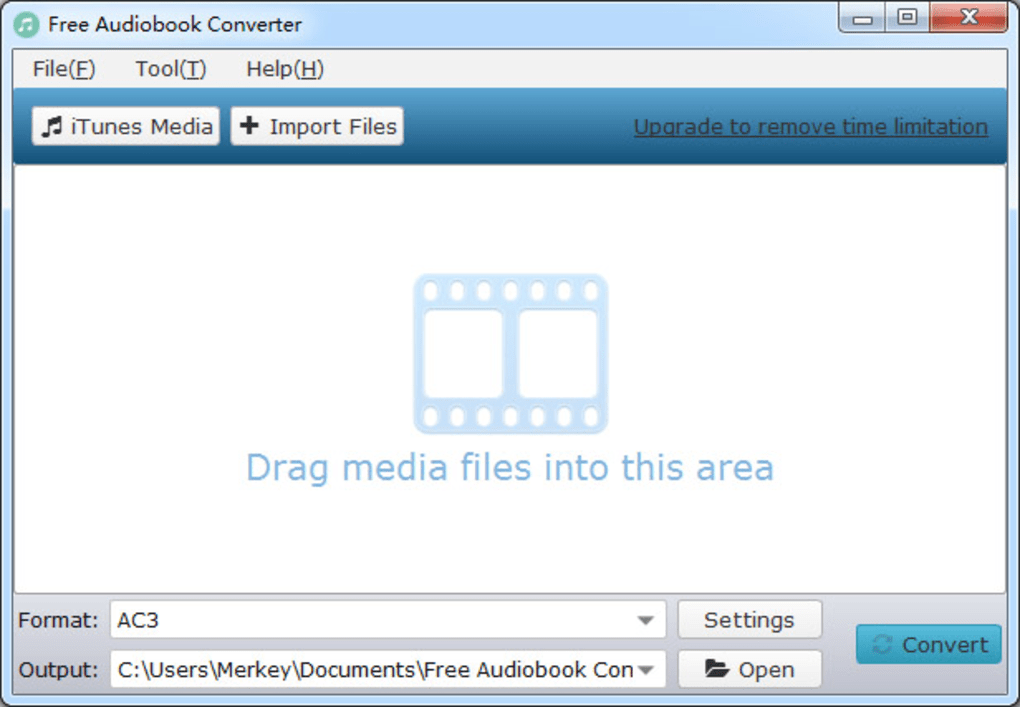
Free Audiobook Converter boasts a comprehensive suite of features designed to streamline the audiobook conversion process. Its capabilities extend beyond simple format changes, offering options for customization and preserving metadata.
-
Wide Format Support: The software supports a broad spectrum of input and output formats. Input formats include popular audiobook formats like M4B, M4A, AA, AAX, and MP4, encompassing both DRM-protected and DRM-free files from sources like iTunes and Audible. Output formats include commonly used audio formats such as MP3, AAC, WAV, and FLAC, ensuring compatibility with a vast array of audio players and devices. This versatility eliminates the limitations imposed by proprietary formats.
-
DRM Removal (Partial): While not explicitly advertised as a DRM removal tool, Free Audiobook Converter is capable of converting DRM-protected audiobooks into unprotected formats. This effectively bypasses the restrictions imposed by DRM, allowing users to play their audiobooks on any compatible device. It’s crucial to note that the legality of removing DRM from copyrighted material varies by jurisdiction, and users should always ensure they are complying with applicable copyright laws.
-
Batch Conversion: The software’s batch conversion functionality dramatically speeds up the conversion process, especially when dealing with large audiobook collections. Users can add multiple files to a queue and initiate the conversion of all selected files simultaneously, saving considerable time and effort. This is particularly beneficial for users with extensive audiobook libraries.
-
Preservation of Metadata: Free Audiobook Converter prioritizes the preservation of metadata, including crucial information like track titles, artist information, album art, and chapter markers. This ensures a seamless and organized listening experience, maintaining the integrity of the original audiobook file. However, it’s important to note that the preservation of chapter information is primarily guaranteed for M4A and MKA output formats.
-
Customization Options: For users with more advanced needs, Free Audiobook Converter offers customization options. While the default settings provide excellent results, users can fine-tune parameters such as bit rate, sample rate, and audio channels to optimize the output audio quality according to their preferences. This level of control allows for advanced users to tailor the conversion process to their specific needs.
-
User-Friendly Interface: The software stands out for its intuitive and user-friendly design. The interface is straightforward, even for users with limited technical expertise. The drag-and-drop functionality allows users to effortlessly import audiobook files for conversion. The simple layout eliminates the need for extensive training, making the software accessible to a broad audience.
Steps to Convert Audiobooks Using Free Audiobook Converter
The conversion process using Free Audiobook Converter is remarkably simple. Follow these steps:
-
Download and Install: Download the Free Audiobook Converter software from the official ThunderSoft website or a trusted software repository. Install the application following the on-screen instructions.
-
Import Audiobooks: Launch the software and import the audiobook files you wish to convert. You can either drag and drop the files directly into the main window or use the “Import Files” button to browse and select your files.
-
Choose Output Format: Select your desired output audio format from the available options (MP3, AAC, WAV, FLAC, etc.). The software automatically suggests a suitable format based on your selected input file.
-
Customize Settings (Optional): If desired, adjust the advanced settings such as bit rate, sample rate, and audio channels. These options allow you to fine-tune the audio quality of the converted files.
-
Start Conversion: Click the “Convert” button to initiate the conversion process. The software will process your files, displaying the progress as it works.
-
Access Converted Files: Once the conversion is complete, the software will notify you. You can then access the converted audiobook files from the specified output folder.
Advantages and Disadvantages of Free Audiobook Converter
Like any software, Free Audiobook Converter presents both advantages and disadvantages:
Advantages:
- Free of Charge: The software is available at no cost, making it an accessible option for users on a budget.
- Ease of Use: The user-friendly interface simplifies the conversion process for both novice and experienced users.
- Versatile Format Support: The wide range of supported input and output formats ensures compatibility with a broad range of devices.
- Batch Conversion Capability: Batch conversion significantly reduces the time required for converting multiple files.
- Metadata Preservation: The software diligently preserves essential metadata, maintaining a consistent listening experience.
Disadvantages:
- Limited Metadata Preservation (for some formats): While metadata is generally preserved, chapter information is only reliably kept for M4A and MKA output formats.
- Potential Legal Concerns (DRM Removal): Converting DRM-protected files may raise legal concerns depending on copyright laws and licensing agreements. Users should be mindful of copyright regulations in their region.
- No Guaranteed DRM Removal for all protected files: While it handles many DRM-protected files, success may vary depending on the specific DRM implementation.
Alternatives to Free Audiobook Converter
Several alternative audiobook conversion tools exist, each offering varying features and capabilities. Some popular alternatives include:
- Calibre: A powerful e-book management application that also includes audiobook conversion capabilities.
- Switch Audio Converter: A professional audio converter supporting a vast array of formats and offering advanced editing features.
- AudioBookConverter: A dedicated audiobook converter specializing in converting DRM-protected files.
Conclusion
Free Audiobook Converter presents a compelling solution for users seeking to overcome the limitations of proprietary audiobook formats. Its ease of use, wide format support, and batch conversion capabilities make it an attractive option for both casual and avid audiobook listeners. While some limitations exist concerning the preservation of chapter markers for all formats and the legal implications of DRM removal, the software’s strengths outweigh its weaknesses for many users. Remember to always respect copyright laws and utilize the software responsibly. Ultimately, the suitability of Free Audiobook Converter depends on individual needs and preferences, but its accessibility and functionality make it a valuable tool for managing and enjoying audiobook collections.
File Information
- License: “Free”
- Latest update: “July 11, 2023”
- Platform: “Windows”
- OS: “Windows 7”
- Language: “English”
- Downloads: “75.9K”
- Size: “45.97 MB”


