
The Free AVI MP4 WMV MPEG Video Joiner is a versatile tool designed to streamline the video conversion and merging process. This software offers a straightforward solution for users needing to convert older video formats like AVI, MPEG, and WMV to more modern formats such as MP4 and FLV, compatible with today’s media players and devices. Beyond simple conversion, its key strength lies in its ability to seamlessly join multiple video clips of differing formats in a single operation, significantly accelerating the initial stages of video editing. This guide provides a thorough examination of its features, benefits, limitations, and alternative options.
Streamlining Video Editing: The All-in-One Approach
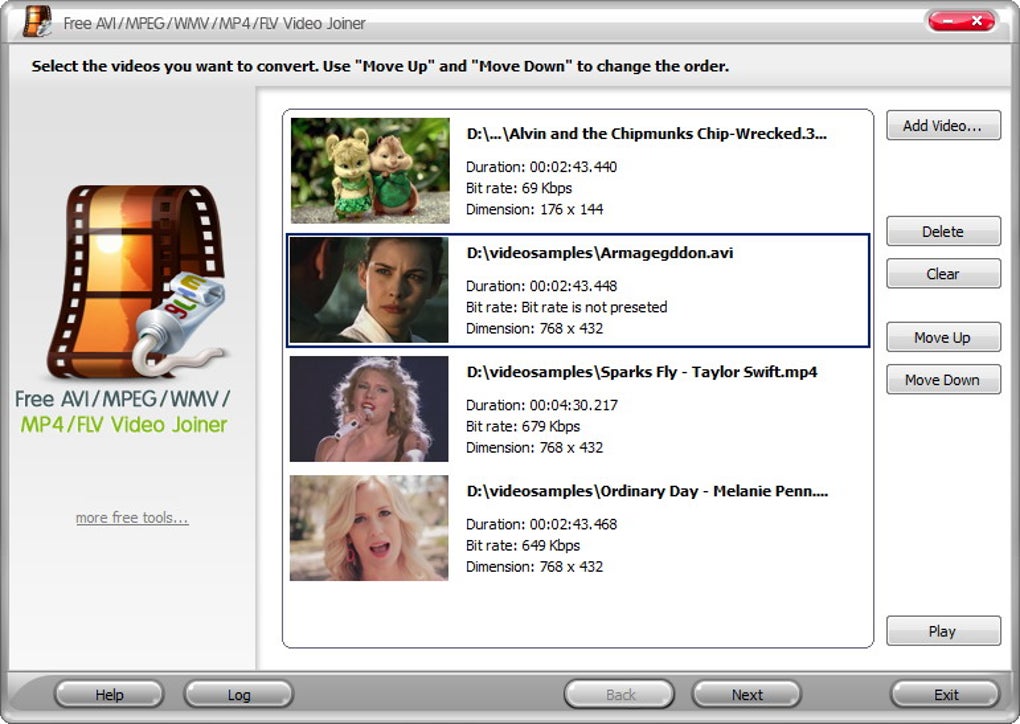
Traditional video editing often involves a multi-step process. First, individual video clips need to be converted into a compatible format. Then, these converted files are imported into a video editor for merging and further enhancements. The Free AVI MP4 WMV MPEG Video Joiner eliminates this cumbersome workflow by combining both conversion and joining into one efficient step. Users simply add their video files in the desired order, and the software handles the format conversion while simultaneously merging the clips into a single output file. This integrated approach drastically reduces processing time and simplifies the overall editing workflow. The resulting file maintains consistent bitrate and dimensions, ensuring a seamless transition between merged video segments, minimizing visible discontinuities.
This tool is not intended to replace a full-featured video editor. It serves as a powerful pre-processing tool, preparing your footage for advanced editing. By knitting together smaller video segments, it creates a single, unified file ready for import into professional-grade video editing software, where finer adjustments, transitions, and effects can be applied.
Supported Formats and Conversion Capabilities
The Free AVI MP4 WMV MPEG Video Joiner demonstrates remarkable versatility in handling a broad range of video formats. This includes:
- AVI: A widely used container format, often associated with older video files.
- MPEG: Another legacy format that may present compatibility issues with modern players.
- WMV: Microsoft’s proprietary video format, sometimes problematic with various media players.
- MP4: A contemporary, highly versatile and widely supported format ideal for diverse applications.
- FLV: A common video format frequently used for online streaming.
- 3GP: A format often used for mobile devices.
- MOV: Apple’s QuickTime movie format.
- SWF: A format commonly used for Flash animations.
- RM: RealMedia format, less common today.
This extensive format support allows users to consolidate video collections comprised of various older or less common formats, effortlessly converting them into modern, widely compatible formats. This significantly increases the usability and accessibility of your video archives.
User Experience and Interface
While the software effectively handles video conversion and merging, its user interface (UI) isn’t visually striking. It adopts a functional, no-frills design, prioritizing practicality over aesthetics. The simplicity of the UI, while potentially less visually appealing to some, contributes to its ease of use. Even novice users can quickly grasp the software’s functionality and navigate the process with minimal effort. The lack of sophisticated editing tools contributes to this simplicity, focusing the software’s purpose directly on conversion and joining. This targeted functionality minimizes the learning curve, making it accessible to a broad range of users, regardless of technical expertise.
Limitations and Considerations
Despite its strengths, the Free AVI MP4 WMV MPEG Video Joiner possesses certain limitations:
-
Absence of Advanced Editing Features: This is not a video editor. It lacks features like trimming, cutting, or adding transitions between segments. Its purpose is solely to convert and merge videos, preparing them for further editing in more sophisticated software.
-
Basic User Interface: While straightforward and easy to use, the UI is not visually appealing or feature-rich. It prioritizes functionality over visual design.
-
Potential Quality Variations: While the software strives for seamless merging, differences in the original video files’ quality may result in slight variations in the final output. This is especially true when combining older, lower-resolution files with newer, higher-resolution ones.
-
No File Cutting Functionality: The software does not allow users to trim or cut portions of their video files. Users need to pre-process their videos elsewhere to remove unwanted parts before using this joiner.
Alternatives and Comparisons
Several alternative video conversion and merging tools exist. Some offer more advanced features, while others focus on specific niches. When choosing an alternative, consider your specific needs and workflow:
-
VLC Media Player: A popular, versatile media player capable of handling a vast range of video formats. While not primarily a video joiner, its conversion and playback features might suffice for simple needs.
-
Format Factory: A powerful, multi-functional conversion tool supporting numerous audio and video formats. It offers broader format support and additional features than the Free AVI MP4 WMV MPEG Video Joiner, but it might have a steeper learning curve.
-
HandBrake: A free, open-source video transcoder known for its ability to produce high-quality output files. It provides fine-grained control over encoding settings but requires a more technical understanding.
-
FFmpeg: A command-line based tool offering unparalleled flexibility and control over video conversion and manipulation. Its steep learning curve makes it more suitable for experienced users.
The best alternative depends on the individual user’s requirements. If ease of use and streamlined conversion/merging are paramount, the Free AVI MP4 WMV MPEG Video Joiner remains a compelling choice. However, users seeking more advanced editing capabilities or a wider array of conversion options may find other tools more suitable.
Conclusion
The Free AVI MP4 WMV MPEG Video Joiner fulfills its core purpose effectively: providing a simple, efficient way to convert and merge video files. Its strength lies in its streamlined workflow, which expedites the pre-editing stage of video production. While it lacks advanced editing features and a visually stunning interface, its ease of use and efficient performance make it a valuable tool for users seeking a quick and straightforward solution for preparing video footage for more complex editing processes. The software’s support for a broad range of video formats adds to its practicality, allowing users to consolidate diverse video collections into a uniform and easily manageable format. Ultimately, this software finds its niche as a valuable preliminary step in many video editing workflows.
File Information
- License: “Free”
- Latest update: “January 24, 2023”
- Platform: “Windows”
- OS: “Windows 8”
- Language: “English”
- Downloads: “137.7K”
- Size: “5.28 MB”


