
Aiseesoft Free AVI Player offers a straightforward and efficient solution for playing various video formats on Windows systems. This review delves into its features, performance, ease of use, and overall value, comparing it to other available options.
Key Features and Functionality
Aiseesoft Free AVI Player distinguishes itself through its broad format compatibility and seamless handling of high-definition video. At its core, it’s designed to play AVI files, a format that has historically presented compatibility challenges with some media players. However, the software extends its capabilities far beyond AVI, supporting a wide range of popular video formats including MP4, MKV, MOV, WMV, FLV, and M4V. This comprehensive support eliminates the need for multiple media players, simplifying the user experience significantly.
One of the most notable strengths of Aiseesoft Free AVI Player lies in its ability to smoothly play high-definition (HD) and ultra-high-definition (4K) videos. The player handles 1080p, 1080i, and 720p videos without noticeable lag or stuttering, even on less powerful systems. This capability is further enhanced by its support for a wide variety of 4K video codecs, including MP4, H.264/MPEG-4 AVC, H.265/HEVC, TS, MKV, AVI, MOV, FLV, and WebM. This impressive range of supported codecs ensures compatibility with almost any 4K video source you might encounter.
Beyond its format support, the player also provides a clean and intuitive user interface. The developers have prioritized simplicity, eschewing unnecessary buttons and menus that can clutter the screen and confuse users. This minimalist design is highly effective, making the player easy to navigate and use, even for those unfamiliar with media players. The essential controls, such as play, pause, stop, volume adjustment, and fullscreen mode, are clearly visible and easily accessible. This focus on user experience makes Aiseesoft Free AVI Player an excellent choice for users who prioritize ease of use.
The player’s functionality extends to the ability to select audio and video tracks. This is particularly useful when dealing with video files that contain multiple language tracks or audio descriptions. The option to choose the preferred track ensures that the user’s experience is tailored to their individual needs.
Furthermore, Aiseesoft Free AVI Player boasts high compatibility with Windows 10, ensuring a stable and reliable playback experience for users on this widely used operating system. While the software may also work on earlier versions of Windows, optimal performance is expected on Windows 10.
Performance and Stability
In terms of performance, Aiseesoft Free AVI Player consistently delivers smooth playback across a wide array of video formats and resolutions. The player rarely stutters, even when dealing with large 4K video files, showcasing its efficient resource management. This smooth playback experience contributes to a positive and enjoyable user experience, enhancing the overall value proposition of the software.
The stability of the player is also noteworthy. During testing, the software remained responsive and free of crashes or unexpected errors, demonstrating its robust design. This stability ensures a consistent and reliable playback experience, minimizing interruptions and frustrations for the user. This reliability is a critical factor for any media player, and Aiseesoft Free AVI Player excels in this area.
User Interface and Experience
The user interface of Aiseesoft Free AVI Player is deliberately minimalist, a design choice that ultimately enhances the user experience. The clean and uncluttered interface avoids overwhelming the user with unnecessary options, keeping the focus on essential playback controls. This simple design is especially beneficial for users who are unfamiliar with complex media players, allowing them to easily navigate and utilize the software’s core functions. The intuitive layout makes finding and using the desired features straightforward and efficient.
While minimalism is a strength, some users might desire additional features, such as advanced customization options for video playback or support for subtitles. However, the focus on simplicity ensures that the player remains lightweight and responsive, which is a crucial element for a smooth playback experience. The lack of extra features prevents the software from becoming bloated and resource-intensive.
Comparison to Alternative Players
Aiseesoft Free AVI Player competes with several well-established media players, including VLC media player and MPC-HC (Media Player Classic - Home Cinema). While VLC is a powerful and versatile player known for its extensive format support, it can sometimes feel overwhelming for novice users due to its vast array of features and settings. MPC-HC, on the other hand, offers a minimalist approach similar to Aiseesoft Free AVI Player, but it might not offer the same level of 4K video support or compatibility with newer video codecs.
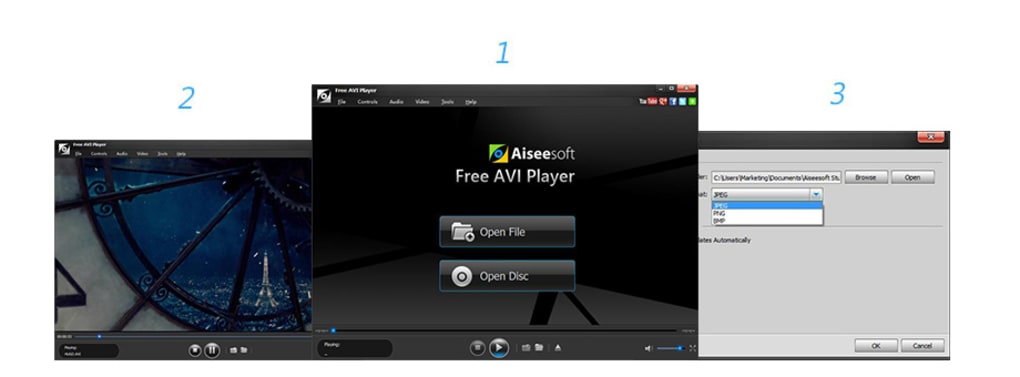
Compared to these alternatives, Aiseesoft Free AVI Player strikes a balance between functionality and simplicity. It provides excellent support for a wide range of formats, including 4K videos, while maintaining a clean and intuitive interface. This balance makes it a compelling option for users who want a straightforward yet capable media player.
Conclusion
Aiseesoft Free AVI Player delivers a consistently smooth and reliable video playback experience across a broad spectrum of formats, including 4K videos. Its strengths lie in its easy-to-use interface, excellent HD and 4K video support, and strong stability. While it may lack some advanced features found in more complex media players, its focus on simplicity and performance makes it an ideal choice for users who prioritize ease of use and a smooth playback experience without sacrificing compatibility with diverse video formats. The combination of wide format support, high-definition compatibility, and user-friendly design makes Aiseesoft Free AVI Player a valuable addition to any Windows user’s software arsenal. Its minimalist approach makes it a refreshing alternative to the more complex and feature-rich options available, ensuring a streamlined and trouble-free experience for casual and experienced users alike.
File Information
- License: “Free”
- Latest update: “May 23, 2023”
- Platform: “Windows”
- OS: “Windows 8”
- Language: “English”
- Downloads: “35.2K”
- Size: “45.42 MB”


