
The Free Bible Dictionary, a software application developed by Media Freeware, aims to provide users with a readily accessible resource for understanding biblical terminology. This review delves into its functionalities, strengths, weaknesses, and overall user experience, offering a balanced perspective on its utility and potential drawbacks.
Functionality and Features
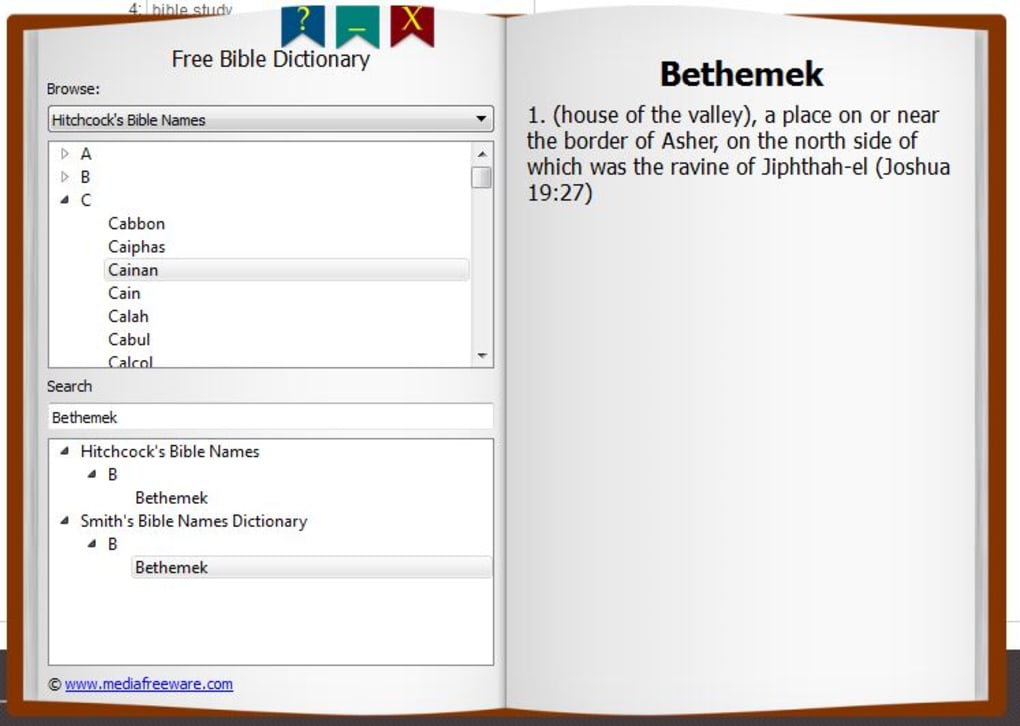
The Free Bible Dictionary functions as a digital lexicon, enabling users to quickly search for and find definitions of biblical terms. Its database draws from three prominent Bible versions: Hitchcock’s Bible, Easton’s Bible, and Smith’s Bible. This multi-version approach aims to cater to a wider range of users familiar with different translations. The software’s interface is designed to mimic the feel of a traditional printed dictionary, presenting entries in alphabetical order. This familiar format should ensure ease of use for individuals accustomed to conventional dictionaries.
Beyond basic term lookups, the Free Bible Dictionary offers additional search options. Users can search for specific individuals mentioned in the Bible, such as “All the Men of the Bible” or “All the Women of the Bible,” providing a convenient way to access information on key biblical figures. Furthermore, it allows searches based on broader biblical themes and topics, presenting relevant passages associated with the chosen theme. This thematic search functionality enhances the software’s capacity to facilitate deeper exploration of the Bible’s content.
The software’s lightweight design ensures minimal impact on system resources, making it suitable for users with less powerful computers. This is a significant advantage for users who might be concerned about the performance implications of installing larger, more resource-intensive applications. The small size also translates to faster download and installation times, a considerable benefit in today’s fast-paced digital environment.
User Interface and Experience
The Free Bible Dictionary boasts a user-friendly interface, aiming for simplicity and ease of navigation. The book-like design is intended to evoke a sense of familiarity, creating a comfortable and intuitive user experience. The alphabetical listing of entries ensures straightforward access to definitions. While the layout itself is clean and uncluttered, aiding in efficient navigation, the lack of visual aids or supplementary features might limit engagement for some users who prefer a richer, more visually stimulating interface. The simplicity, however, is a strength for those prioritizing functionality over visual appeal.
Strengths and Weaknesses
The Free Bible Dictionary possesses several strengths, including its ease of use, compact size, and multi-version database. The user-friendly interface and the inclusion of broader search options beyond simple term definitions significantly enhance its utility. The ability to search by individual biblical figures and thematic topics greatly enhances the user experience, offering a more comprehensive approach to studying the Bible. The software’s small size ensures that it doesn’t consume excessive system resources, making it a viable option for users with modest computing capabilities. The availability of definitions sourced from three different Bible versions also adds to its value for users accustomed to various translations and interpretations.
However, the software also faces some significant criticisms. A major drawback is the potential inclusion of unwanted software during installation. The installer utilizes OutBrowse Download Manager, which bundles additional adware, including potentially harmful programs such as Conduit Search Protect, Yontoo PlurPush, and SysTweak. This bundled adware poses a significant security risk, potentially exposing users’ systems to malware and intrusive advertisements. This unexpected and potentially harmful addition significantly detracts from the software’s overall value proposition. The presence of such adware has led many users to uninstall the program, highlighting a critical flaw in the installation process.
Another limitation is the relatively small number of Bible versions integrated into the dictionary. While three versions are included, many other valuable translations exist that are not represented. This limited scope might restrict the software’s usefulness for users who prefer specific translations or require access to a broader range of biblical interpretations. Furthermore, the limited number of search categories compared to other, more comprehensive Bible dictionaries could hinder users looking for a more detailed and in-depth study tool.
The absence of features such as cross-referencing or the ability to create personal annotations also limits the Free Bible Dictionary’s functionality. The software’s simple design, while beneficial in terms of ease of use for basic lookups, lacks the advanced features that many other Bible study tools offer. Such limitations could hinder its utility for individuals seeking a more sophisticated and comprehensive approach to Bible study. The lack of an extension or plugin compatibility further limits its integration with other software or browser environments.
Security Concerns
The most significant concern surrounding the Free Bible Dictionary is the adware bundled with the installer. The inclusion of potentially unwanted programs (PUPs) during installation is a serious issue. The fact that the software’s functionality is overshadowed by this potential security risk is a major detriment. Users should exercise extreme caution during the installation process and carefully monitor the steps to prevent the installation of unwanted adware. It is highly advisable to use a reputable antivirus program and a dedicated adware removal tool to scan and eliminate any potentially harmful software that might have been installed alongside the dictionary.
Alternatives
Several alternative Bible study tools exist that offer similar functionality without the security risks associated with the Free Bible Dictionary. These alternatives often provide a wider range of Bible versions, more advanced search options, and additional features like cross-referencing, note-taking, and integration with other Bible study resources. These alternative applications often have a more robust and transparent installation process, minimizing the risk of unwanted software bundles. Researching and choosing a reputable and well-reviewed alternative might offer a safer and more enriching Bible study experience.
Conclusion
The Free Bible Dictionary, while offering a simple and accessible interface for looking up biblical terms, suffers from a significant security vulnerability due to bundled adware during installation. While its basic functionality might be sufficient for users with simple needs, the potential risks associated with the installer severely compromise its overall value. Users seeking a safe and comprehensive Bible study tool should carefully consider the potential downsides and explore the many alternative applications available that offer enhanced features, security, and broader functionality. The simple design and limited scope, despite being advantageous in terms of lightweight performance, are overshadowed by the security risks presented. For users prioritizing safety and a more robust user experience, the Free Bible Dictionary falls short of expectations.
File Information
- License: “Free”
- Version: “1”
- Latest update: “July 23, 2019”
- Platform: “Windows”
- OS: “Windows Vista”
- Language: “English”
- Downloads: “26.9K”
- Size: “11.25 MB”


