
Blu-ray discs offer unparalleled multimedia quality, but their format’s inflexibility presents a significant hurdle. The need to have a compatible Blu-ray player limits access to these high-definition movies and restricts their use on various devices. This is where Blu-ray ripper software comes into play, offering a solution to convert Blu-ray discs into more versatile formats like MP4 or MKV, without sacrificing the original quality. This review focuses on one such software: the Free Blu-ray Ripper. We’ll delve into its features, performance, ease of use, and limitations, comparing it to other available options to determine its overall effectiveness and value.
Installation and User Interface
The installation process for Free Blu-ray Ripper is straightforward and user-friendly. The installer file is compact, leading to a swift installation without the need for additional downloads or complex configurations. This ease of installation is a significant advantage, particularly for users unfamiliar with software installation procedures. The installer avoids unnecessary bloatware and keeps the process streamlined.
Upon launching the software, users are greeted with a clean and intuitive interface. The color scheme, a calming grey with green accents, is visually appealing and non-distracting, allowing the user to focus on the task at hand. The layout is uncluttered, with minimal visual noise. The primary functionality is clearly presented: a prominent “Load Disc” button is centrally located at the top, guiding users through the initial steps. At the bottom of the interface, options for selecting the output format and destination folder are readily available. This simple and logical design makes the software accessible to both novice and experienced users.
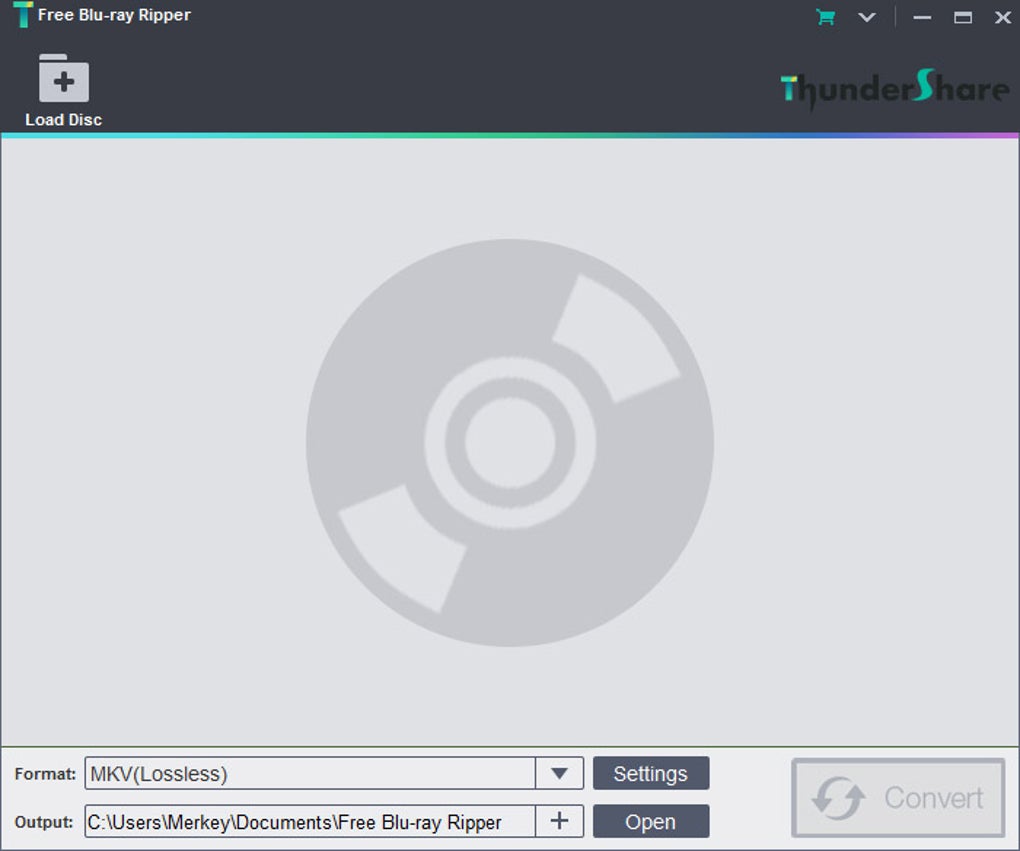
The minimalistic approach to the user interface enhances usability. There’s no unnecessary complexity or overwhelming number of options, reducing the learning curve and preventing confusion. The clear labeling of buttons and options contributes significantly to the intuitive user experience. The overall design emphasizes practicality and efficiency, reflecting a focus on core functionality rather than superfluous visual elements.
Performance and Functionality
The Free Blu-ray Ripper delivers on its core promise: converting Blu-ray discs into digital formats efficiently. The conversion speed is notably quick, allowing users to complete the process without extensive wait times. This speed is commendable, especially considering the relatively high data volume involved in processing Blu-ray content. The quick processing time significantly enhances the user experience, improving overall workflow efficiency.
Perhaps the most impressive aspect is the quality of the output. The software maintains 100% fidelity to the original source material. This lossless conversion ensures that users retain the high-definition quality of their Blu-ray movies, eliminating concerns about compression artifacts or degradation in visual or audio fidelity. This commitment to preserving original quality is a significant strength of the Free Blu-ray Ripper.
However, despite its performance advantages, the software does have some limitations. The most significant drawback is the restricted range of supported output formats. Currently, users are limited to converting their Blu-ray discs to MKV and MP4 formats. While these are popular and widely compatible formats, the lack of broader support could be a significant limitation for users who require other formats for compatibility with specific devices or editing software. The absence of options for adjusting bitrates or codecs within these formats further restricts user customization.
This limitation is a trade-off; the software’s strength lies in its speed and lossless conversion within the supported formats. However, the lack of format flexibility might deter users needing more diverse output options. This trade-off highlights the need for users to carefully consider their specific needs before selecting this software.
Ripping Blu-ray Discs with Ease
The Free Blu-ray Ripper significantly simplifies the often-daunting process of ripping Blu-ray discs. The streamlined interface and the quick conversion process make this task accessible to users with varying levels of technical expertise. The software removes the complexities frequently associated with this type of conversion, allowing users to focus on the outcome rather than the technical details. This ease of use is a significant advantage, democratizing access to digital copies of Blu-ray content for a wider audience.
Pros and Cons
Pros:
- Easy Installation: The software installs quickly and effortlessly, requiring no additional downloads or specialized knowledge.
- Simple User Interface: The clean and intuitive interface is easy to navigate, regardless of technical expertise.
- Exceptional Output Quality: The software ensures lossless conversion, preserving the high-definition quality of the original Blu-ray content.
- Quick Conversion Speed: The conversion process is significantly faster than many comparable programs, improving workflow efficiency.
Cons:
- Limited Output Formats: The software only supports conversion to MKV and MP4 formats, limiting flexibility for users requiring other formats.
- Lack of Customization Options: Users cannot modify bitrates, codecs, or other settings, restricting control over the output file characteristics.
- Potentially Not Entirely Free: Some reviews indicate limitations in functionality unless a registration fee is paid, which could be considered misleading given the name “Free Blu-ray Ripper.”
Comparison with Alternative Software
Several alternative Blu-ray ripper software packages are available, each with its strengths and weaknesses. Some offer a wider range of output formats, codec choices, and customization options, but often at the cost of speed or increased complexity. Others prioritize speed but may compromise output quality through lossy compression. The Free Blu-ray Ripper occupies a niche by prioritizing speed and lossless conversion within a limited format range. The choice between different software depends entirely on the user’s priorities. If speed and lossless quality are paramount, even within the constraints of limited format choice, the Free Blu-ray Ripper is a viable option. However, if a wider array of output formats and customization options are essential, other software may be a better fit.
Conclusion
The Free Blu-ray Ripper is a compelling option for users who value speed and lossless quality above all else. Its straightforward installation, intuitive interface, and fast conversion times make it a user-friendly tool. The preservation of original Blu-ray quality is a significant advantage. However, the limitation to only MKV and MP4 output formats, coupled with the potential for hidden costs, should be carefully considered. Users requiring diverse output formats or extensive customization should explore alternative software packages. The decision of whether to use the Free Blu-ray Ripper hinges on the user’s specific needs and priorities, weighing the advantages of speed and lossless conversion against the restrictions on output format options. A thorough evaluation of individual needs is essential before selecting a Blu-ray ripper, ensuring the chosen software aligns perfectly with the user’s requirements.
File Information
- License: “Free”
- Latest update: “October 4, 2024”
- Platform: “Windows”
- OS: “Windows XP”
- Language: “English”
- Downloads: “133.5K”
- Size: “45.36 MB”


